 ShizuStore
XGesture
1.36.0 · GitHub
More about this app
All-in-one gesture and one-hand navigation suite with edge panels, floating cursor, offline OCR ball, app freezer and freeform windows via Shizuku.

📱 XGesture — The Ultimate Android Gesture & One-Handed Productivity Suite
All-in-One Open-Source Alternative to Samsung One Hand Operation+ (OHO+), Quick Cursor & FooView
Edge Panels · Reachability Floating Cursor · Floating Ball OCR & Reverse Image Search · Shake & Back-Tap Gestures · Notification & OTP Manager · App Freezer · Freeform Window · Shizuku & LSPosed








XGesture is a universal system-level gesture and single-handed productivity suite designed for all Android 12+ devices across all OEMs. Built on Accessibility Services with flexible multi-privilege modes (Shizuku, Root / KernelSU / Magisk, and optional LSPosed integration), it brings desktop-grade control and effortless reachability to modern large-screen phones.
Easily trigger 50+ system actions via customizable multi-angle screen-edge swipes, reachability floating pointers, multi-functional floating ball, device shaking, desk-flipping, or back-tap gestures. Deeply integrates 100% offline on-device OCR, word segmentation (CppJieba), and reverse image search aggregation—delivering high-efficiency overlay launchers, app freezing, OTP verification code extraction, notification management, and OEM freeform windows on top of any app, completely free from ads and cloud trackers.
- Package Name:
com.slideindex.app - Current Version: 1.36.0 (versionCode 71)
- Requirements: Android 12+ (API 31+)
- License: AGPL-3.0 License
📥 Download & Installation


| Variant | Scenario | Description |
|---|---|---|
Full Package (xgesture-*-full.apk) |
Recommended for new users | Out-of-the-box experience with built-in offline OCR, Jieba segmentation, and offline translation native engines |
Lite Package (xgesture-*-lite.apk) |
Compact size / on-demand updates | Retains core gestures and fundamental features with smaller package size; download extension engines on demand |
Tip
Both packages share the same applicationId (com.slideindex.app), allowing direct overwriting installation without losing configurations.
🌟 Core Features
The app features four main navigation tabs: 🏠 Home · 📳 Motion · 🔔 Notification · 🧩 Extensions.
🏠 Home — Edge Gestures, Floating Ball & Customization
1. Edge Gestures
- Triggers & Aesthetics: Highly responsive left/right/top/bottom edge triggers, supporting bubble, capsule, wave animations, and haptic feedback.
- Custom Layout & Landscape Triggers: Freely adjust trigger position, height, thickness, angle, and segments; supports dedicated landscape trigger handles for gaming and media viewing.
- Smart Anti-Mistouch: Auto-hide in landscape/lock screen/home screen, with per-app exclusion lists and foreground switching blacklists.
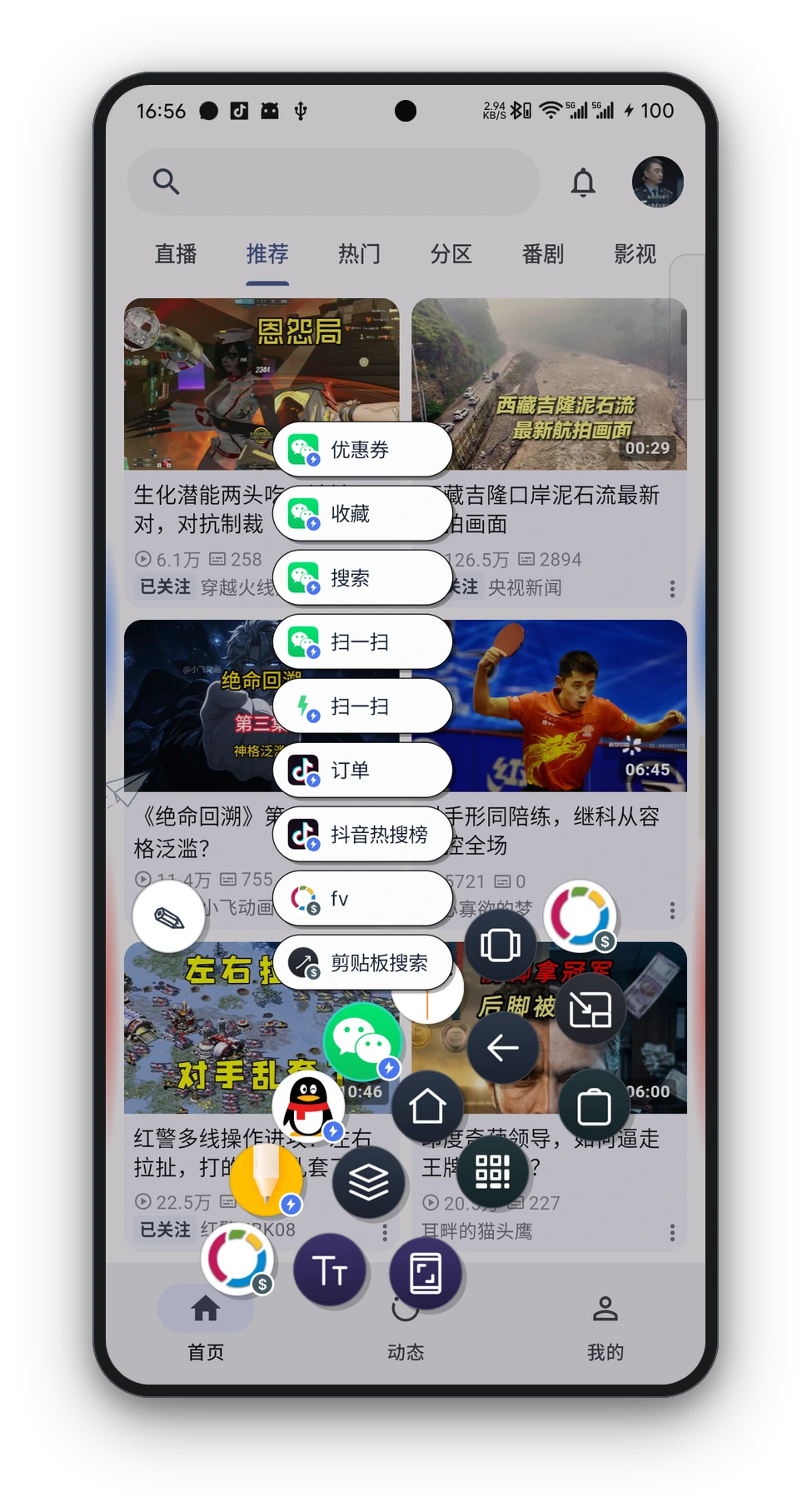
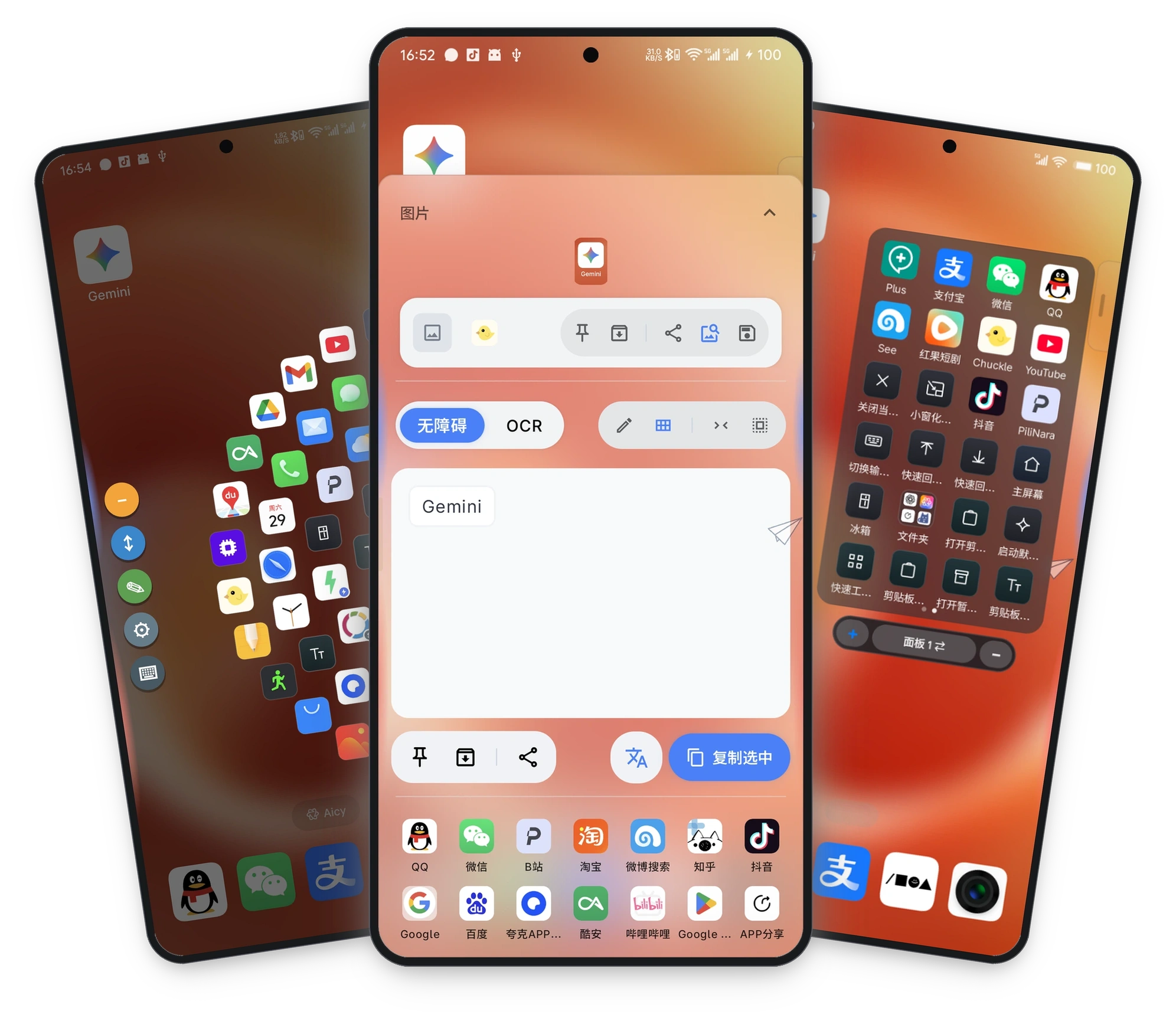
- Corner Radial Menu: Swipe from bottom-left or bottom-right corners to summon a radial menu with real-time Gaussian blur and action grouping.
- OEM Freeform Integration: Deeply adapts to native Android Freeform, Xiaomi MIUI/HyperOS Small Window, and Meizu Flyme Small Window.
2. 50+ Configurable Gesture Actions
| Category | Actions Supported |
|---|---|
| System Navigation | Back, Home, Recents, Previous App, Lock Screen, Power Menu, Split Screen |
| Screenshot & Visual | Fullscreen Screenshot, Region Screenshot, Screenshot OCR, Region OCR, Screen Recorder, Flashlight |
| OCR & Image Search | Floating Ball OCR, Reverse Image Search, Live Screen Translation, Universal Screen Copy, Pin Screenshot, QR Code Scanner |
| Panels & Launchers | Quick Launcher, App Index, Ring Launcher (FV Style), Honeycomb Launcher, Holographic Launcher, Task Switcher (OHO Style), App Freezer, Expand Panel (Volume/Brightness), Widget Overlay |
| Media & Controls | Previous/Next Track, Play/Pause, Volume Adjust, Brightness Adjust, Switch IME |
| Tools & History | Floating Pointer, Clipboard History Panel, Quick Tools Panel (OHO Style), Pause Overlay, Pause Gestures |
| Advanced & Extensions | Run Shell Commands (Shizuku / Root), Launch Activity / Shortcut, Direct App Launch, Alarm Reminder in N min, Re-freeze Apps |
3. 🔮 Floating Ball (OCR, Image Search & Gestures)
Operates independently from the Floating Pointer, combining joystick navigation with screen OCR pointers.
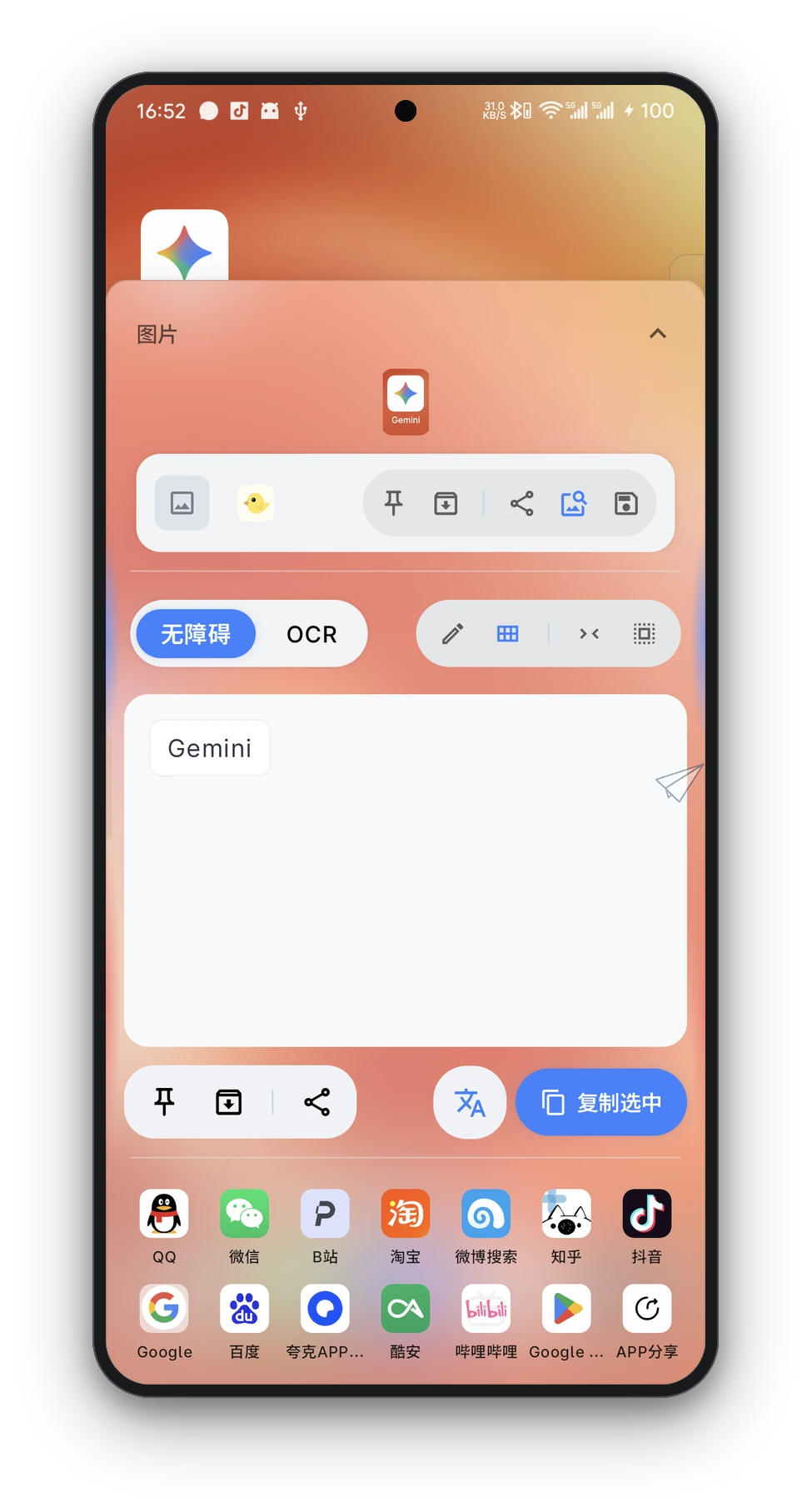
- Accessibility & Offline Multi-Engine OCR: Extracts text via accessibility nodes first, seamlessly falling back to local offline OCR (ML Kit / Tesseract / PaddleOCR ONNX).
- Text Selection Panel: One-click search, translate, segmentation (CppJieba), select all, remove spaces, and copy; supports region clipping and shared image OCR history.
- Search Aggregation: Customizable search engines, grid sorting, search history, prefix aliases, and deep links; supports importing from GestureEVO / SearchEVO.
- Reverse Image Search: Summon multi-engine reverse search (Google, Yandex, TinEye, SauceNAO, IQDB, 3D-IQDB, ASCII2D, trace.moe, AnimeTrace, Copyseeker) with built-in WebView preview.
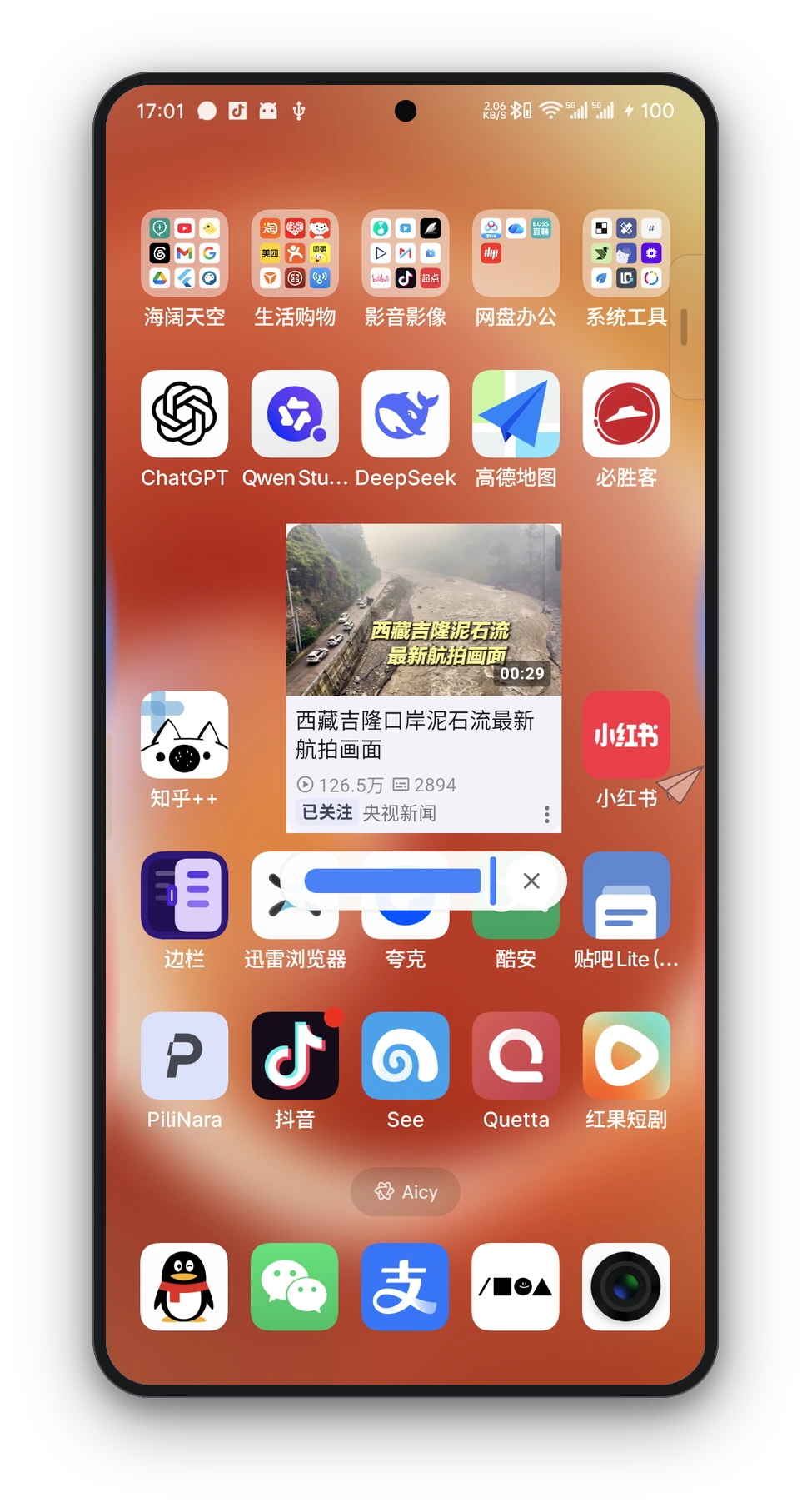
- Pin to Screen: Pin screenshots or text cards as top-level floating windows with pinch-to-zoom and drag support.
- Appearance & Tuning: Custom themes, images, GIFs, and slideshows; adjustable pointer sensitivity and OCR tolerance.
4. Theme & Appearance
- Miuix Design System: Comprehensive adoption of Miuix UI (HyperOS style) with collapsible TopAppBar, virtualized grouped cards, overscroll damping, and haptic feedback.
- Material You Dynamic Coloring: Automatically extracts wallpaper colors via MaterialKolor on Android 12+, generating 9 palette styles injected into MiuixTheme.
- Blur & Performance: Bottom navigation and floating overlays support Gaussian blur and progressive blur; can be disabled to completely eliminate scroll sampling overhead.
📳 Motion & Device Gestures — Shake, Flip & Back-Tap
- 6-Direction Shake Recognition: Distinguishes left/right flip, forward/backward flip, and quick side shakes; supports per-app custom actions and sensitivities.
- Desk-Flip Mute: Place face-down on a flat surface while screen is on to trigger lock screen and silent mode.
- Back-Tap Gestures (BackTap): Accelerometer-based back-cover double-tap recognition supporting 50+ actions, screen on/off/always trigger policies, sensitivity tuning, and charging guard.
- Scenario Rules: Screen on/locked activation policies, app blacklists/whitelists, independent sensitivity thresholds, and vibration feedback.
🔔 Notification — Reminders, History & OTP
- Multi-Style Reminders: Intercepts notifications with Dynamic Island cards, heads-up popups, side bubbles, or screen danmaku; supports "Open Latest Message on Unlock" (with whitelist and confirm policies).
- Notification History & Filtering: Categorizes active, history, and hidden notifications with multi-dimensional regex and keyword archiving.
- OTP Verification Center: Automatically detects verification codes in SMS and app notifications with regex extraction, clipboard auto-copy, and auto-fill; optional LSPosed module for system-level SMS injection.
🧩 Extensions — Utility Tools & Backup
| Module | Navigation Entry | Core Capabilities |
|---|---|---|
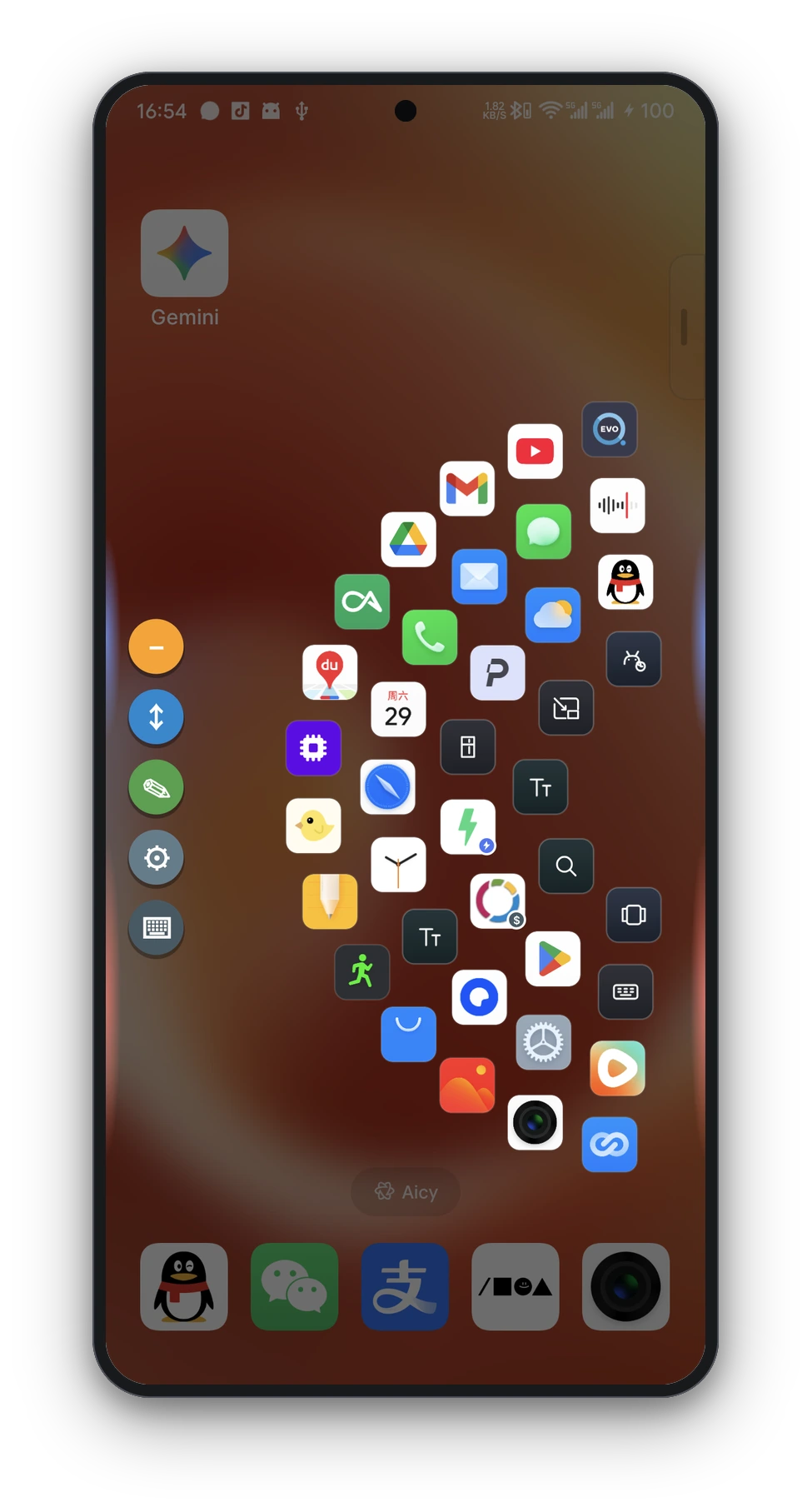
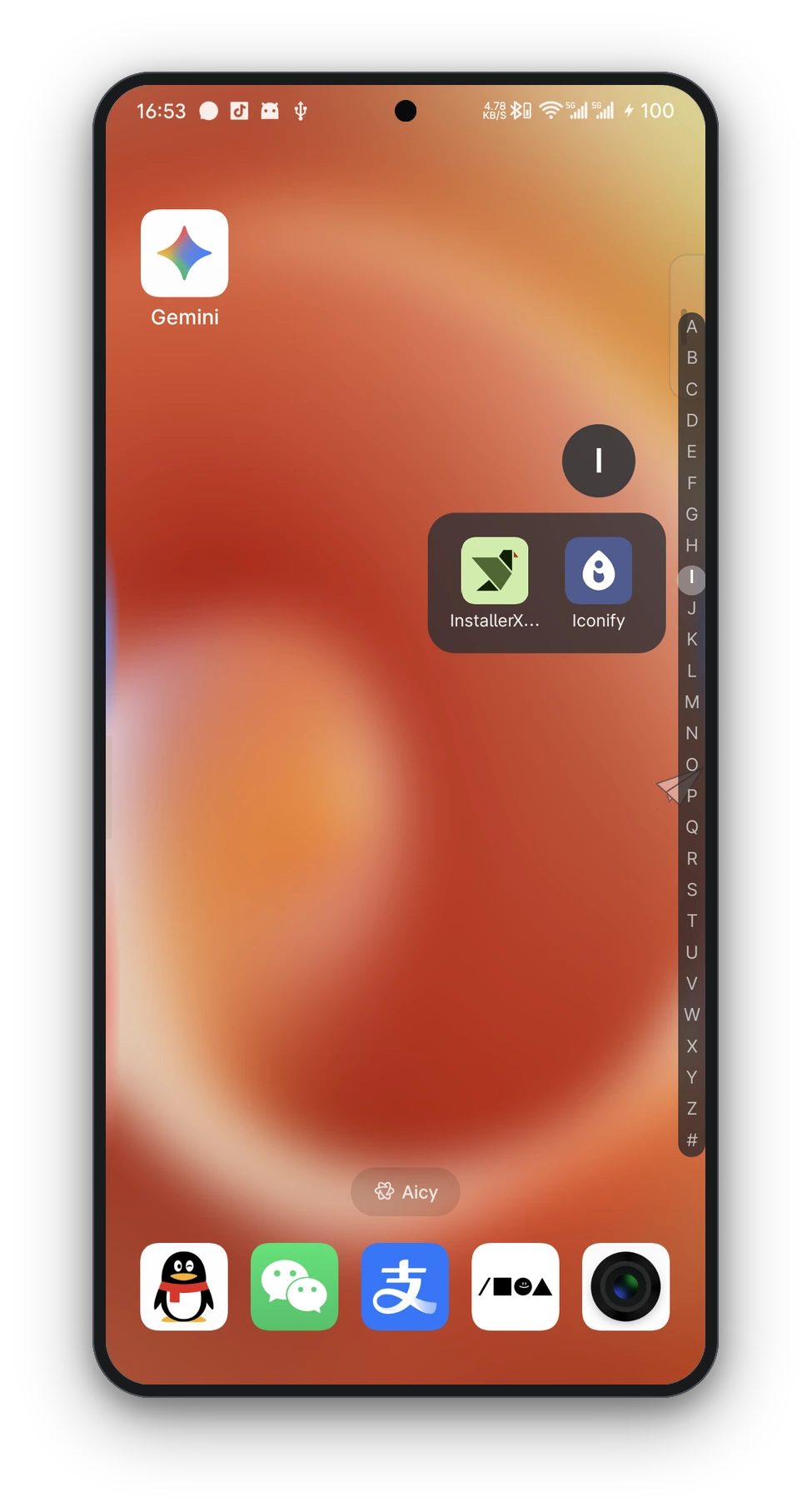
| App Index | Extensions → App Index | Alphabetical Pinyin rail app drawer with adjustable columns and transparency |
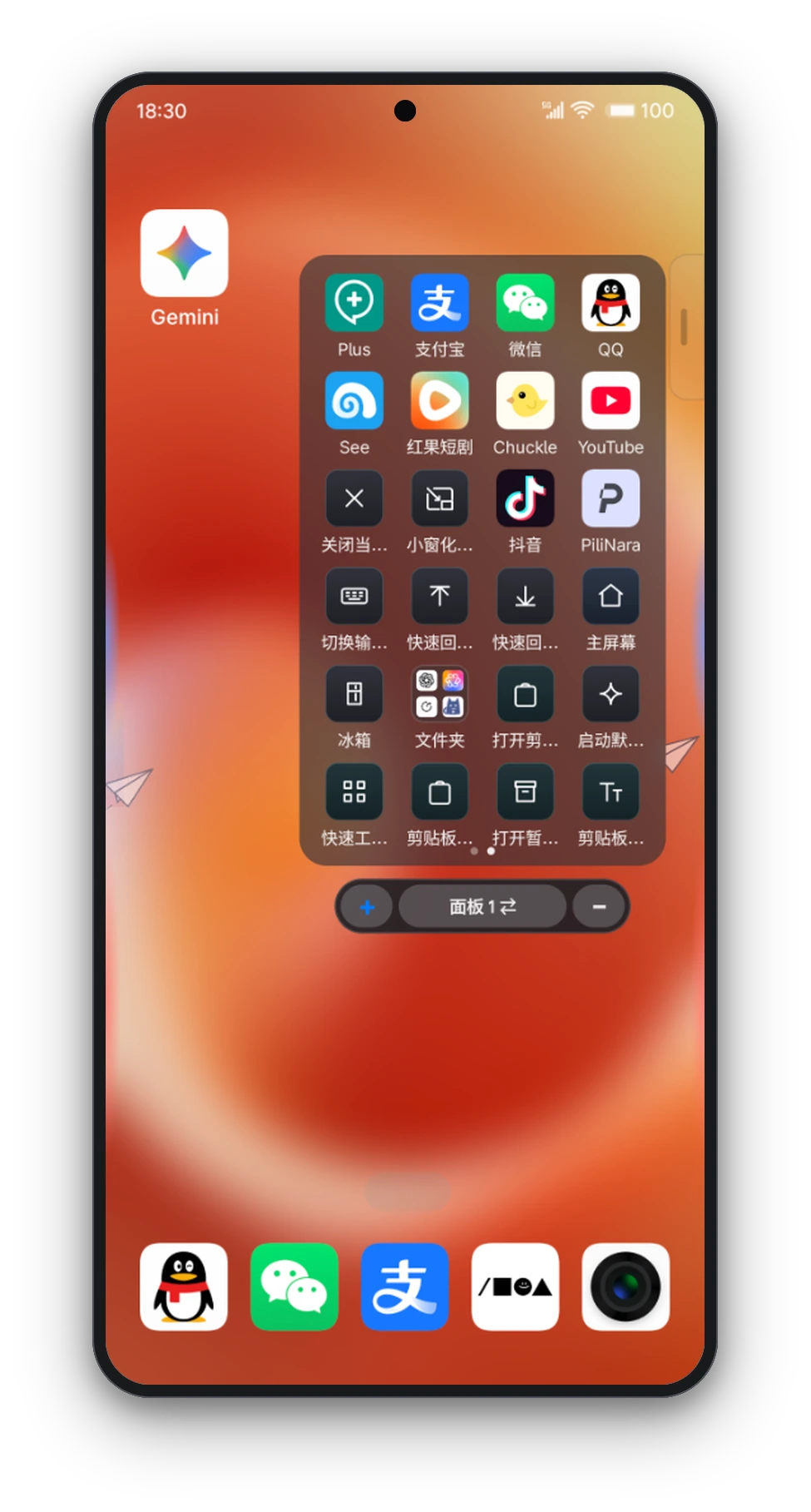
| Quick Launcher | Extensions → Quick Launcher | Grid launcher supporting multi-panel switching, pagination, folder grouping, and shortcut library |
| Ring Launcher | Gesture Action "Ring Launcher" | FV-style concentric ring layout with customizable tiers, spacing, shapes, and slots |
| Honeycomb Launcher | Extensions → Honeycomb Launcher | Hexagonal honeycomb grid layout with swipe-out direct launching |
| Holographic Launcher | Extensions → Holographic Launcher | Fullscreen 3D holographic sphere launcher; drag to rotate and click to open |
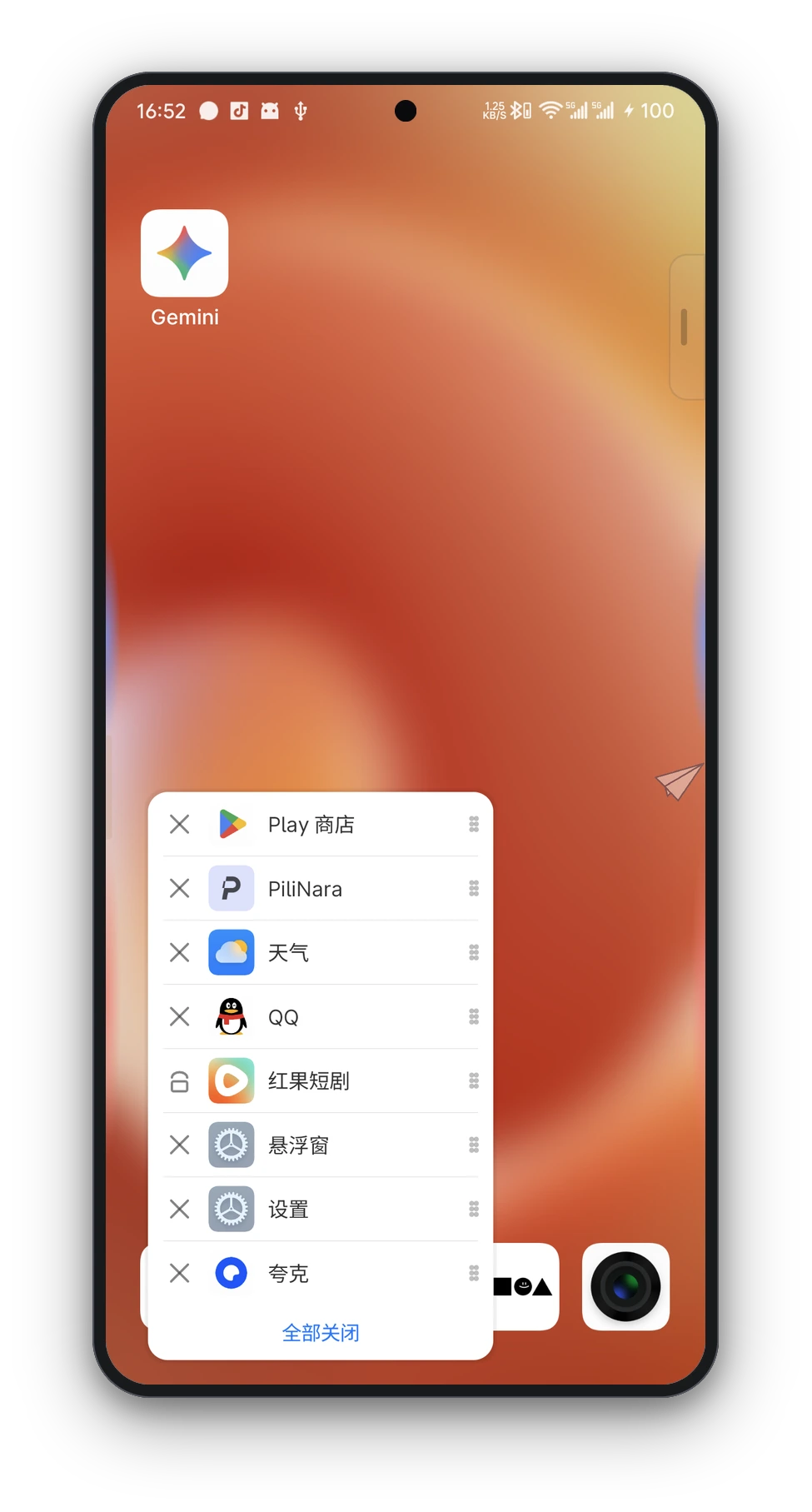
| Task Switcher | Gesture Action "Task Switcher" | OHO-style vertical running tasks panel with swipe-to-switch, kill, clear all, and freeform launch |
| Quick Tools Panel | Gesture Action "Quick Tools Panel" | OHO-style quick settings panel aggregating system toggles, actions, and shortcuts |
| App Freezer | Extensions → App Freezer | Batch freeze and unfreeze background apps via Shizuku / Root with quick re-freeze gesture |
| Search Panel | Extensions → Search Panel | Unified search for apps, contacts, files, system settings, web queries, and reverse image search |
| Activity Shortcuts | Extensions → Activity Shortcuts | Hidden system settings, non-exported activity launcher, App Shortcuts, and URI deep links |
| External Invocation | Extensions → External Invocation | xgesture:// deeplinks and intent actions for Tasker, MacroDroid, and other automations |
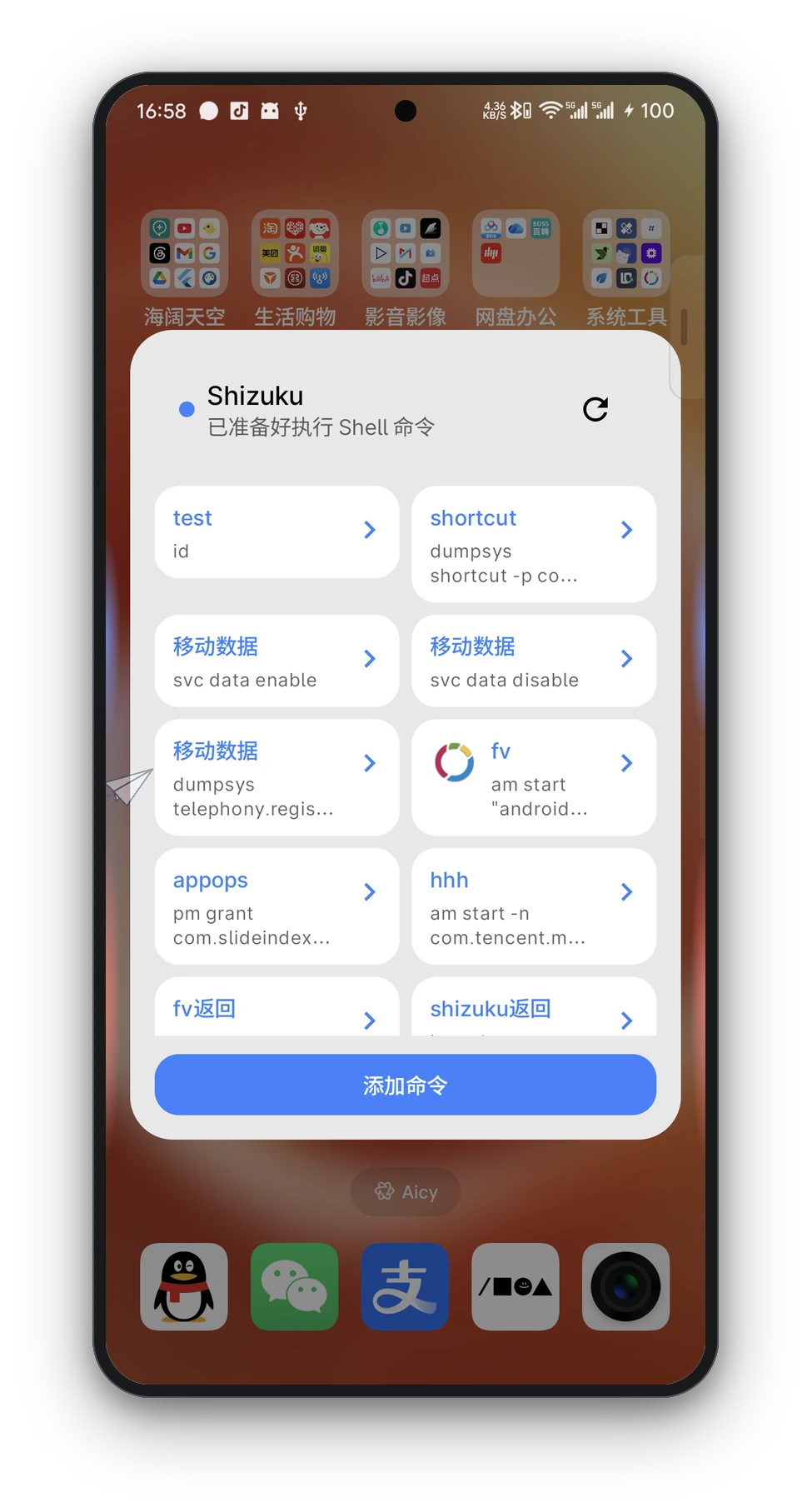
| Shell Commands | Extensions → Shell Commands | Command panels, template variable substitution, and custom icons via Shizuku / Root |
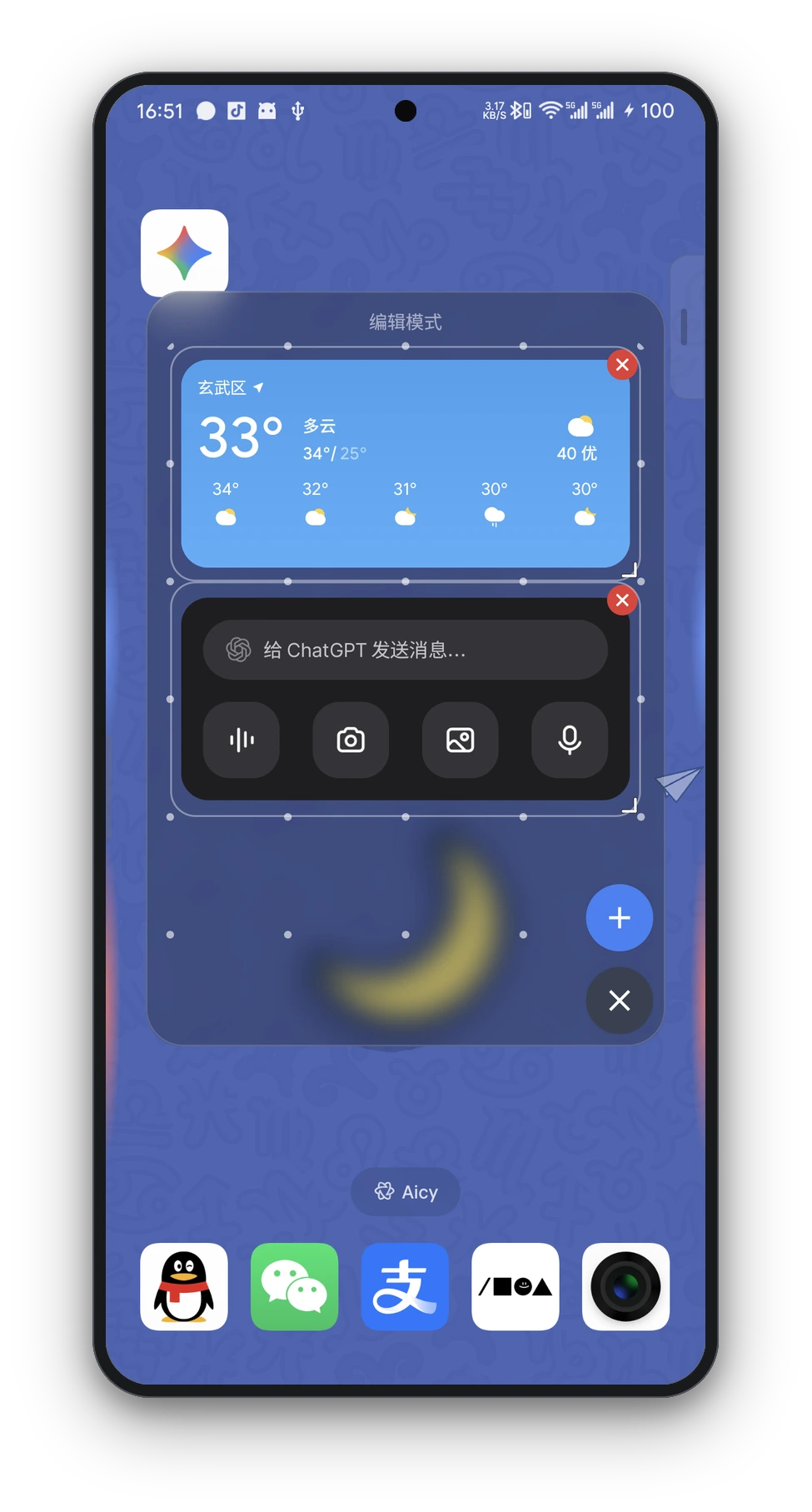
| Widget Panel | Extensions → Widget Panel | Floating desktop widget host with adjustable blur background and multi-selection |
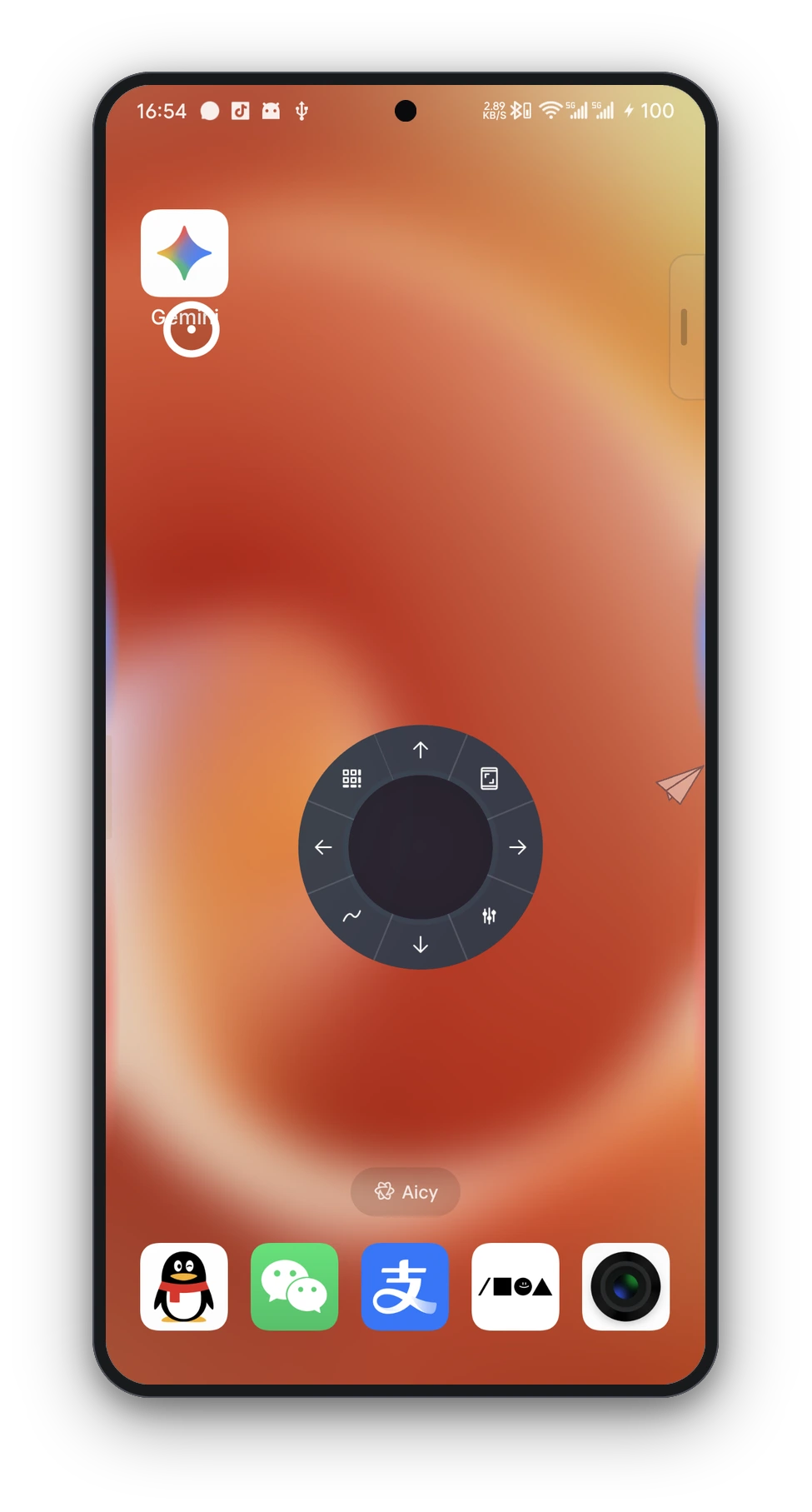
| Floating Pointer | Extensions → Floating Pointer | Virtual joystick-controlled ring pointer with hover selection, radial actions, and gesture macro replay |
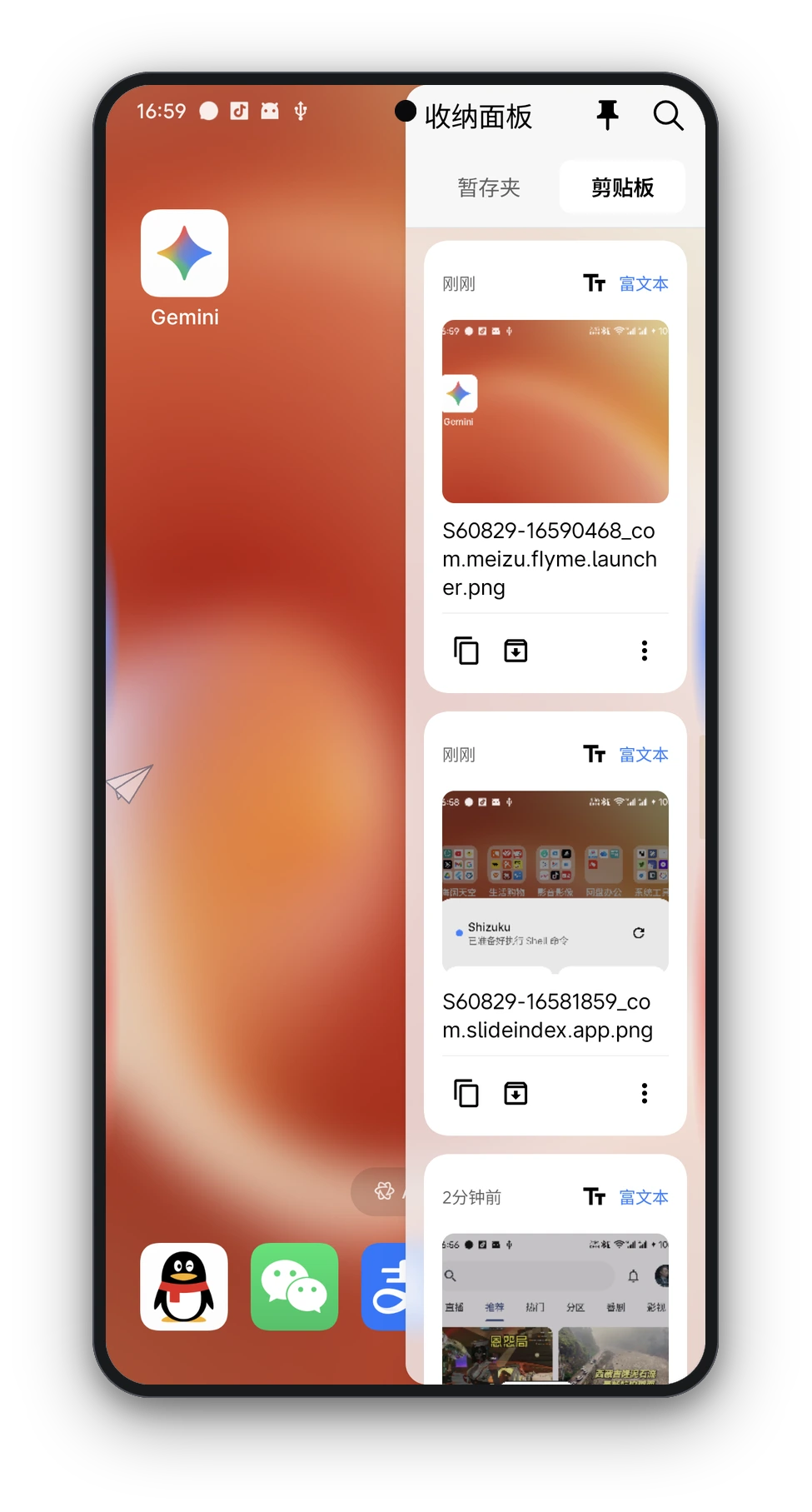
| Clipboard History | Gesture Action "Clipboard Panel" | Rich clipboard history with search, edge floating window, and Shizuku background listener |
| Settings Backup | Extensions → Settings Backup | Export and import all configurations and assets as encrypted ZIP files |
📸 Key Interfaces & Interaction Preview
| Corner Radial Menu | Ring Launcher (FV Style) | Quick Launcher (Grid) |
|---|---|---|
 |
 |
 |
| Floating Pointer (Joystick) | Shell Command Panel (Shizuku) | Clipboard History / Stash |
 |
 |
 |
| App Index (Pinyin Rail) | Widget Floating Panel | Pin Screenshot Window |
 |
 |
 |
🔗 External Invocation
Open XGesture panels from other apps, Tasker, MacroDroid, or adb. In-app reference: Extensions → Shortcuts & actions → External Invocation (tap to copy).
Prerequisites: Search panel, stash, and clipboard require the sidebar and accessibility service. Notification hub requires notification listener access.
Deeplinks (recommended)
Format: xgesture://open/<path>?q=<optional query>
| Feature | URI | Notes |
|---|---|---|
| Notification hub | xgesture://open/notification-history |
Open notification hub |
| Notification hub (prefill) | xgesture://open/notification-history?q=keyword |
Open with search prefill |
| Stash | xgesture://open/stash |
Open stash panel |
| Stash (prefill) | xgesture://open/stash?q=keyword |
Open with search prefill |
| Clipboard | xgesture://open/clipboard |
Open clipboard panel |
| Clipboard (prefill) | xgesture://open/clipboard?q=keyword |
Open with search prefill |
| Search panel | xgesture://open/search-panel |
Open search panel |
| Search panel (prefill) | xgesture://open/search-panel?q=keyword |
Open with query prefill |
Examples:
# Open search panel
adb shell am start -a android.intent.action.VIEW -d "xgesture://open/search-panel"

# Open search panel with prefill
adb shell am start -a android.intent.action.VIEW -d "xgesture://open/search-panel?q=weather"
Intent actions (advanced)
Use when there is no matching URI, or when you need an explicit component. Package name: com.slideindex.app.
| Feature | Action | Component | Optional extra |
|---|---|---|---|
| Notification hub | com.slideindex.app.action.OPEN_NOTIFICATION_HISTORY |
.MainActivity |
— (use deeplink for search prefill) |
| Stash | com.slideindex.app.action.OPEN_STASH_PANEL |
.service.StashClipboardTrampolineActivity |
q |
| Clipboard | com.slideindex.app.action.OPEN_CLIPBOARD_PANEL |
.service.StashClipboardTrampolineActivity |
q |
| Search panel | com.slideindex.app.action.OPEN_SEARCH_PANEL |
.service.SearchPanelTrampolineActivity |
q |
| Toggle gestures | com.slideindex.app.action.TOGGLE_GESTURE |
.service.ToggleGestureTrampolineActivity |
— |
| Shell panel | com.slideindex.app.action.OPEN_SHELL_PANEL |
.service.ShellCommandPanelTrampolineActivity |
— (not exported; app shortcuts only) |
Examples:
# Open search panel with prefill
adb shell am start -a com.slideindex.app.action.OPEN_SEARCH_PANEL \
  -n com.slideindex.app/.service.SearchPanelTrampolineActivity \
  --es q "weather"

# Toggle edge gesture master switch
adb shell am start -a com.slideindex.app.action.TOGGLE_GESTURE \
  -n com.slideindex.app/.service.ToggleGestureTrampolineActivity
💡 Design Philosophy & Comparisons
Standing on the Shoulders of Giants
Android has seen legendary tools that shaped mobile navigation and productivity:
- Samsung One Hand Operation+ (OHO+) perfected multi-angle edge triggers and smooth system gestures.
- Quick Cursor introduced thumb-friendly screen reachability via intuitive floating cursors.
- FooView (FV) pioneered floating-ball universal OCR, search aggregation, and floating window shortcuts.
Why XGesture?
While we deeply admire these pioneering tools, modern Android users frequently face fragmentation:
- Vendor Lock-in: OHO+ is one of the most beloved gesture tools ever created, but it remains exclusive to Samsung One UI. Non-Samsung users on Pixel, Xiaomi, Motorola, Sony, etc., have long sought a genuine alternative.
- Open Source & Privacy-First: Proprietary utilities often carry cloud-dependent OCR and closed ecosystems. XGesture is 100% AGPL-3.0 open-source, bundling offline on-device OCR (PaddleOCR ONNX / ML Kit) that respects user privacy.
- Unified Navigation: Rather than running multiple separate tools for edge gestures, single-handed pointers, and floating OCR, XGesture brings them together into a unified, coherent experience with fluid Miuix animations.
| Dimension | XGesture (This App) | Samsung OHO+ | Quick Cursor | FooView |
|---|---|---|---|---|
| Open Source & License | ✅ AGPL-3.0 (100% FOSS) | ❌ Proprietary (Closed) | ❌ Proprietary (Closed) | ❌ Proprietary (Closed) |
| Device Compatibility | ✅ Universal (Any Android 12+) | ⚠️ Samsung Galaxy only | ✅ Universal | ✅ Universal |
| Pricing & Monetization | ✅ 100% Free & No Ads forever | ✅ Free (with One UI) | ⚠️ Free basic + PRO in-app purchases | ✅ Free (Ad/sponsor supported) |
| Edge Navigation Gestures | ✅ Full OHO+ style (Multi-angle & Hold) | ✅ Native OHO+ gestures | ⚠️ Edge swipe for cursor only | ⚠️ Floating / Edge gestures |
| Single-Hand Reachability | ✅ Built-in reachability joystick pointer | ⚠️ Virtual Touchpad (floating box mode) | ✅ Native reachability cursor | ⚠️ Floating ball crosshair |
| Screen OCR & Reverse Search | ✅ Local offline models (ONNX / ML Kit) | ❌ No such feature | ❌ No such feature | ⚠️ Cloud & web-assisted OCR |
| Deep System Privileges | ✅ Shizuku + Root + LSPosed + A11y | ✅ Samsung system-signature privileges | ⚠️ Accessibility Service | ⚠️ Root + Accessibility Service |
| Visual Aesthetics & Haptics | ✅ Miuix & Real-time Gaussian Blur | ✅ One UI native design | ⚠️ Standard Material | ⚠️ Classic utility UI |
🛠️ Tech Stack
| Layer | Core Technologies / Components |
|---|---|
| Languages | Kotlin 2.4.0 + C++17 (NDK / CMake) |
| UI Framework | Miuix UI (KMP 0.9.4 / HyperOS style) + Jetpack Compose (BOM 2026.07.01) |
| Color & Visuals | MaterialKolor 5.0.0 (Dynamic Wallpaper Colors) + Haze 1.7.2 (Gaussian Blur) |
| Architecture & DI | MVVM + UDF (Unidirectional Data Flow) + Dagger Hilt 2.60.1 |
| Async & State | Kotlin Coroutines 1.11.0 + StateFlow / SharedFlow + DataStore Preferences 1.2.1 |
| OCR & AI | ML Kit Text Recognition 16.0.1 + Tesseract4Android 4.9.0 + PaddleOCR (ONNX Runtime 1.28.0 + OpenCV 4.12.0) |
| NLP & Tokenization | CppJieba (JNI Native Tokenizer) + ML Kit Translate / Language ID |
| Privileged Access | Shizuku API 13.1.5 + LibSuperuser 1.1.1 + HiddenApiBypass 6.1 + LibXposed API 102.0.0 |
| Network & Parsing | OkHttp 5.4.0 + ZXing Core 3.5.4 + kotlinx.serialization 1.11.0 + Markdown Renderer M3 |
📐 Architecture
The app adopts a Multi-Module layered architecture following MVVM + UDF patterns:
                              ┌─────────────────────────────┐
                              │          :app (Root)        │
                              └──────────────┬──────────────┘
                                             │
                      ┌──────────────────────┼──────────────────────┐
                      ▼                      ▼                      ▼
           ┌──────────────────────┐┌──────────────────────┐┌──────────────────────┐
           │   :feature:settings  ││     :feature:otp     ││   :feature:shake     │
           │   :feature:apps      ││ :feature:notification││   :feature:message   │
           └──────────┬───────────┘└──────────┬───────────┘└──────────┬───────────┘
                      │                       │                       │
                      └──────────────────────┼───────────────────────┘
                                             ▼
           ┌──────────────────────────────────────────────────────────────────────┐
           │ :core:gesture       :core:ocr          :core:translate  :core:autofill│
           │ :core:overlay-layout:core:native-engine:core:monitoring :core:common │
           └──────────────────────────────────┬───────────────────────────────────┘
                                             ▼
                                  ┌───────────────────────┐
                                  │   :vendor:ppocr-sdk   │
                                  └───────────────────────┘
- Service Coordination & Overlay Rendering:
SlideIndexAccessibilityServiceintercepts global gestures and dispatches system events, while overlays are managed byOverlayLayoutand independent WindowManagers. - Dynamic Engine Loading: OCR, translation, and segmentation engines support both Full and Lite packaging modes; native
.solibraries and models can be extracted at runtime. - Privileged Pipelines: Shizuku IPC (rootless privilege), Root fallback executor (LibSu), and LSPosed module collaborate to provide seamless background clipboard monitoring and process lifecycle control.
📂 Project Structure
.
├── app/                                 # Host Application: DI assembly, JNI C++ bridge, and main UI
│   └── src/main/
│       ├── cpp/                         # C++17 JNI Sources (CppJieba bridge)
│       └── java/com/slideindex/app/
│           ├── activity/                # Top-level Activities & transparent interaction layers
│           ├── backtap/                 # Back-tap gestures
│           ├── clipboard/               # Clipboard history & Shizuku background monitor
│           ├── gesture/                 # Core gesture service & overlay trigger bars
│           ├── overlay/                 # System overlay window managers
│           ├── search/                  # Text & reverse image search aggregator
│           ├── shell/                   # Shell command executor
│           ├── ui/                      # Compose UI, Miuix themes, and dynamic colors
│           └── xposed/                  # LSPosed module entry & hooks
├── core/                                # Core modules & engines
│   ├── autofill/                        # OTP autofill framework
│   ├── common/                          # Extensions, shared models, and utilities
│   ├── gesture/                         # Gesture recognition algorithms & event bus
│   ├── monitoring/                      # Performance tracing & memory monitoring
│   ├── native-engine/                   # Offline native engine distribution & asset extraction
│   ├── notification/                    # Notification interception & processing
│   ├── ocr/                             # Multi-engine OCR dispatcher (ML Kit / Tesseract / ONNX)
│   ├── overlay-layout/                  # Overlay layout rendering core
│   └── translate/                       # Multi-language translation & language detection
├── feature/                             # Business feature modules
│   ├── apps/                            # App scanner, icon caching, and launchers
│   ├── message/                         # Heads-up notification & danmaku rendering
│   ├── notification/                    # Notification history & archiving
│   ├── otp/                             # Verification code extraction & statistics
│   ├── settings/                        # Settings, preferences backup, and DataStore
│   └── shake/                           # Sensor shake & desk-flip algorithms
├── vendor/
│   └── ppocr-sdk/                       # PaddleOCR SDK binding & ONNX Runtime
├── gradle/libs.versions.toml             # Dependency catalog
└── RELEASE_NOTES.md                     # Release changelog
🚀 Building & Compilation
Requirements
- JDK 25
- Android Studio (Ladybug or newer recommended)
- Android SDK (API 37
compileSdk) & NDK 28+
Build Commands
# Clone the repository
git clone https://github.com/qpst4/XGesture.git
cd XGesture

# Build Full Debug APK (with built-in offline engines)
./gradlew assembleFullDebug

# Build Lite Release APK (compact version)
./gradlew assembleLiteRelease
🌍 Help Translate

Contribute in-app UI translations on Weblate — no Git required. See CONTRIBUTING.md.
💬 Community & Feedback
Welcome to join the community discussions and provide feedback or feature requests:




Telegram: chat group (XGesture · X手势) · QQ Group: 1042783385
💖 Sponsor & Support
If you find XGesture helpful in your daily workflow, consider buying the developer a cup of coffee ☕! Your generous support is the greatest motivation for ongoing development and OEM adaptations.

📜 License
This project is licensed under the GNU Affero General Public License v3.0 (AGPLv3).
🤝 Acknowledgements
Special thanks to the following open-source projects for their architecture, inspiration, and code references (see THIRD_PARTY_NOTICES.md for details):
- SideGesture — Edge gesture and overlay architecture reference
- EdgeGesture — Expand panel, alarm reminder, screen translation, universal copy, and back-tap gesture reference
- EdgeX & FanFreeform — Honeycomb launcher and App Freezer architecture reference
- ClipboardListener & ClipShare — Android 10+ background clipboard listening architecture
- Root Activity Launcher — Non-exported activity launching scheme
- Circle To Search — Multi-engine reverse image search strategy
- Nova Text — Floating ball OCR and word selection interaction
- XposedSmsCode — OTP SMS Hook and verification code extraction rules
- Miuix — Elegant Material & Miuix style Compose UI component library
📝 Changelog
For complete release history, see RELEASE_NOTES.md and CHANGELOG.md.
How Shizuku is used
Can freeze and pause apps, manage tasks and free windows, launch hidden activities, monitor clipboard and run shell commands via `Shizuku`.
This is an AI-assisted analysis of Shizuku-related usages in the app's public source code. It is best effort, so it may not catch every single usage.
How this app uses Shizuku
Shizuku is used for app freezing, task and window control, hidden activity launching, clipboard monitoring and custom shell commands.
- Freeze and pause apps: Users can freeze unused apps to disable them and pause apps to keep icons installed but greyed, with automatic stopping and restore on launch, applied with
pm disable,pm enable,pm suspendandpm unsuspendthrough Shizuku. - Manage recent tasks: Users can see recent tasks, jump to a task, close tasks and stop running packages, applied with
cmd activity task remove,am force-stopand system task queries through Shizuku. - Open floating windows: Users can move the current or a selected app into a resizable floating window with chosen size and position through Shizuku.
- Launch hidden activities: Users can open hard to reach system and app screens from the activity launcher, including assist based launches, through Shizuku.
- Run custom shell commands: Text the user types or saves as a gesture action is executed as a shell command through Shizuku.
- Watch clipboard in background: Users get continuous clipboard history even in the background by reading system logs or a helper process through Shizuku.
- View diagnostic logs: Users can stream filtered system logs for troubleshooting in the diagnostics screen with
logcatthrough Shizuku. - Launch shortcuts and assistant: Users can start published app shortcuts and open the voice assistant with
cmd shortcut start-shortcutandcmd voiceinteraction showthrough Shizuku.
Android APIs or commands used
IPackageManager.setApplicationEnabledSettingIPackageManager.getApplicationEnabledSettingIPackageManager.setPackagesSuspendedAsUserIPackageManager.grantRuntimePermissionIActivityManager.startActivityWithFeatureIInputManager.injectInputEventSearchManager.launchAssistActivityTaskManager.getTasksActivityManager.getRecentTasksActivityTaskManager.removeTaskActivityTaskManager.moveTaskToFrontActivityTaskManager.startActivityFromRecentsIShortcutService.getShortcutspm disablepm enablepm suspendpm unsuspendpm grantam force-stopam startam get-current-usercmd activity task removecmd shortcut start-shortcutcmd voiceinteraction showdumpsys shortcutlogcatapp_process
Changelog
What's new for version 1.36.0
[1.36.0] - 2026-10-06
Added
- New "volume up" and "volume down" gesture actions
- New floating-ball "inward then down" and "inward then up" two-stage gestures; the gesture settings page is grouped by direction
- New freezer "Pause": the app stays installed and its launcher icon stays in place but turns grey, and tapping it shows a system dialog with a one-tap resume; the freezer list, batch actions, manager filter and search-panel quick actions can all pause and resume
- New inverted condition for the notification advanced-match JSON, with stricter JSON validation
Changed
- The floating ball size limit is raised from 72dp to 96dp, with 1dp steps
- The first stage of the floating-ball two-stage gestures uses the short-swipe threshold
- The trigger gesture settings page is split into sections, with the slot list first
- Ring launcher settings and strings use the "ring launcher" naming; existing configuration migrates automatically on upgrade and gesture bindings are unaffected
- The ring launcher enters edit mode only when no slot is pinned and no app can fill in; otherwise it fills with recent apps
- The notification rule screen state becomes a three-way choice (any / screen on / screen off), and leaving all three charging states unchecked means no restriction
- "Floating window for the current app" first tries to move the window in place on Meizu devices and only relaunches when that fails
- In-app update notes follow the system language (Chinese or English)
- Freezer "Re-freeze" only affects apps in use and keeps paused apps paused; "Unfreeze all" no longer touches paused apps
- The freezer import also covers frozen and paused launcher apps
- Freezer pause and freeze both skip this app itself, system, SystemUI and the current launcher
Fixed
- Fixed the trigger being drawn higher and shorter than its touchable area in the trigger settings preview
- Fixed a gesture slot losing its launch mode after saving, which still launched fullscreen when the floating window was selected
- Fixed ring launcher slots being cleared after editing
- Fixed charging states being re-checked when reopening a notification rule that had only one phone state selected
- Fixed the app-condition dropdown label and value being misaligned in notification rules
- Fixed the notification-access entry not opening this app's detail page
- Fixed occasional crashes when clipboard monitoring starts
- Fixed the flashlight action still opening the app info page when the permission was already granted
- Fixed four mojibake strings in the English UI
[1.36.0] - 2026-10-06
Added
- 新增「音量增加」「音量减小」手势动作
- 新增悬浮球「向内再向下」「向内再向上」两段式手势,手势设置页按方向分组
- 新增冰箱「暂停」:应用保持安装,桌面图标留在原位但变灰,点击时弹出系统对话框并可一键取消暂停;冰箱列表、批量操作、管理页筛选与搜索面板快捷操作都能暂停与取消暂停
- 新增通知高级匹配 JSON 的取反条件,并对 JSON 做严格校验
Changed
- 悬浮球大小上限由 72dp 提升至 96dp,档位改为 1dp 步进
- 悬浮球两段式手势的首段统一按短滑门槛判定
- 触钮手势设置页按分区呈现,槽位列表前置
- 圆环启动器的设置项与文案统一为「圆环启动器」命名,升级后旧配置自动迁移,手势绑定不受影响
- 圆环启动器只在没有任何固定槽位且没有可填充应用时进入编辑模式,其余情况用最近应用填充
- 通知过滤规则的屏幕状态改为「不限 / 亮屏时 / 熄屏时」三选一,充电状态三项都不勾选表示不限制
- 小窗化当前应用在魅族模式下先尝试原地搬移,搬不动再重新启动
- 应用内更新说明按系统语言显示中文或英文
- 冰箱「重新冻结」只处理使用中的应用,已暂停的保持暂停;「全部解冻」不再影响已暂停的应用
- 冰箱导入同时覆盖已冻结与已暂停的桌面应用
- 冰箱的暂停与冻结都会跳过本应用自身、system、SystemUI 与当前桌面
Fixed
- 修复触钮设置页预览时触钮位置偏上、长度变短,与可触发区域不在同一处
- 修复手势槽位保存后丢失启动形态,选择小窗仍以全屏启动
- 修复圆环启动器槽位在编辑后被清空
- 修复通知过滤规则只选一项手机状态时,重新进入编辑页后充电状态三项被自动勾选
- 修复通知过滤规则应用条件下的下拉框标签与取值错位
- 修复通知读取权限入口未直达本应用详情页
- 修复打开剪贴板监听时偶发崩溃
- 修复手电筒动作已授权时仍跳转应用信息页
- 修复英文界面四处文案乱码
Permissions
31 permissions requested
More from this category
 Essentials
 Extendroid
 ShizuTools
 Smart Island
 Dragon Launcher
 Expressive Cutout
 Tap, Tap
 GAMA
GAMA
 SystemUI Tuner
 Ambient Music Mod
 ColorBlendr
 SetEdit+