 ShizuStore
Volume Manager
0.2 · GitHub
More about this app
Control each app's volume independently
Volume Manager

Work in progress
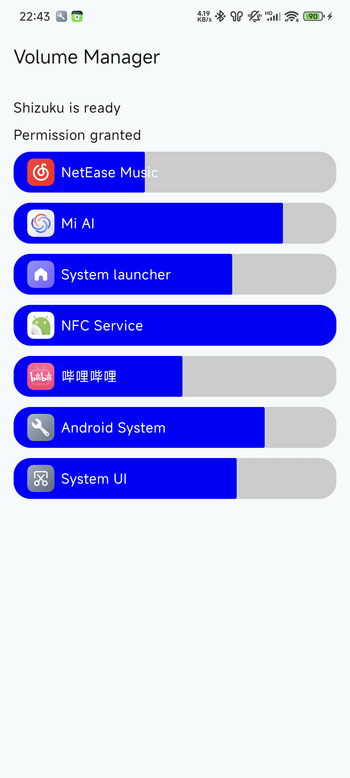
Control each app's volume independently. Shizuku is used to access privileged APIs.
Requires Android 13.
(Screenshot from beta version, download available from action artifacts)
Download
Latest development version can be downloaded from action artifacts.
Some hand-picked versions can also be downloaded from releases.
Usage
- Install and enable Shizuku
- Launch Volume Manager and request Shizuku permission
- It should automatically enable its accessibility service
- You can change volume either from
- The main interface
- Press any volume button and a popup should appear, completely replace the default volume popup
- Enable accessibility button and click the button
Compare to SoundMaster from ShizuTools
This app uses hidden API to directly change each audio stream's volume.
SoundMaster uses MediaProjection API to record audio from each app and apply post-effects.
| Feature | Volume Manager | SoundMaster |
|---|---|---|
| Minimal Android version | 13 | 10 |
| Control volume of each app | ✅ | ✅ |
| Set output device for each app | ❌ 1 | ✅ |
| Change left-right balance | ❌ 2 | ✅ |
| Equalizer (EQ) | ❌ | ✅ |
| Control protected apps | ✅ | ❌ 3 |
| Zero latency added | ✅ | ❌ |
1: There are APIs to do that, but not implemented in this app
2: There are other APIs to do that, but not implemented in this app
3: Can be worked around by patching the app
How does it work
Use
AudioManager#getActivePlaybackConfigurations()to get list ofAudioPlaybackConfiguration.Each
AudioPlaybackConfigurationrepresents a audio player, likeAudioTrackandMediaPlayerUse
ActivityManager#getRunningAppProcesses()andPackageManager#getApplicationInfo()to map and groupAudioPlaybackConfiguration#getClientPid()to appsUse
AudioPlaybackConfiguration#getPlayerProxy()andIPlayer.setVolume()to update the internal volume multiplierUse
AudioManager#registerAudioPlaybackCallback()to listen for newAudioPlaybackConfigurations and apply current volume to them.
Note
This app uses the same API as MIUI's "Adjust media sound in multiple apps". Because this API can only setting volume, not reading, the volume set by one app will not be reflected in the other one.
How Shizuku is used
Can control per-app volume and auto-enable its volume panel via `pm grant`, `IAudioService` and `IActivityManager` through Shizuku.
This is an AI-assisted analysis of Shizuku-related usages in the app's public source code. It is best effort, so it may not catch every single usage.
How this app uses Shizuku
Volume Manager uses Shizuku to observe playback per app, set individual app volumes, and enable its own system access.
- Adjust per-app volume: users can set a separate volume level for each app, applied through Shizuku access to the privileged system audio service.
- Detect playing apps: users see which apps are currently playing sound because the app maps live audio sessions to running apps through Shizuku access to privileged system services.
- Enable volume panel itself: users get the floating volume overlay without manual setup commands because the app grants itself a system settings permission with the
pm grantshell command through Shizuku and then writes secure settings to turn on its accessibility service.
Android APIs or commands used
pm grantandroid.content.pm.IPackageManagerandroid.media.IAudioServiceandroid.app.IActivityManager.getRunningAppProcessesandroid.media.AudioManager.getActivePlaybackConfigurationsandroid.media.AudioManager.registerAudioPlaybackCallbackandroid.media.AudioPlaybackConfiguration.getClientPidandroid.media.AudioPlaybackConfiguration.getPlayerProxyandroid.media.PlayerProxy.setVolumeandroid.provider.Settings$Secure.putIntandroid.provider.Settings$Secure.putStringandroid.provider.Settings$Secure.getString
Changelog
What's new for version 0.2
- Fix accessibility service can't be enabled automatically on some devices (#4, #9, #12)
APK built in https://github.com/yume-chan/VolumeManager/actions/runs/17017302629
Full Changelog: https://github.com/yume-chan/VolumeManager/compare/v0.1...v0.2
Permissions
4 permissions requested
More from this category
 allEQ
allEQ
 MicUp
MicUp
 Volume++
 Castix
 WEcho
WEcho
 Spotify Ad Skipper
 Voice Isolation
 Mixer (1)
 FineVolume
 centuryplay
 Call Recorder (Skvalex)
 PrecisEQ