 ShizuStore

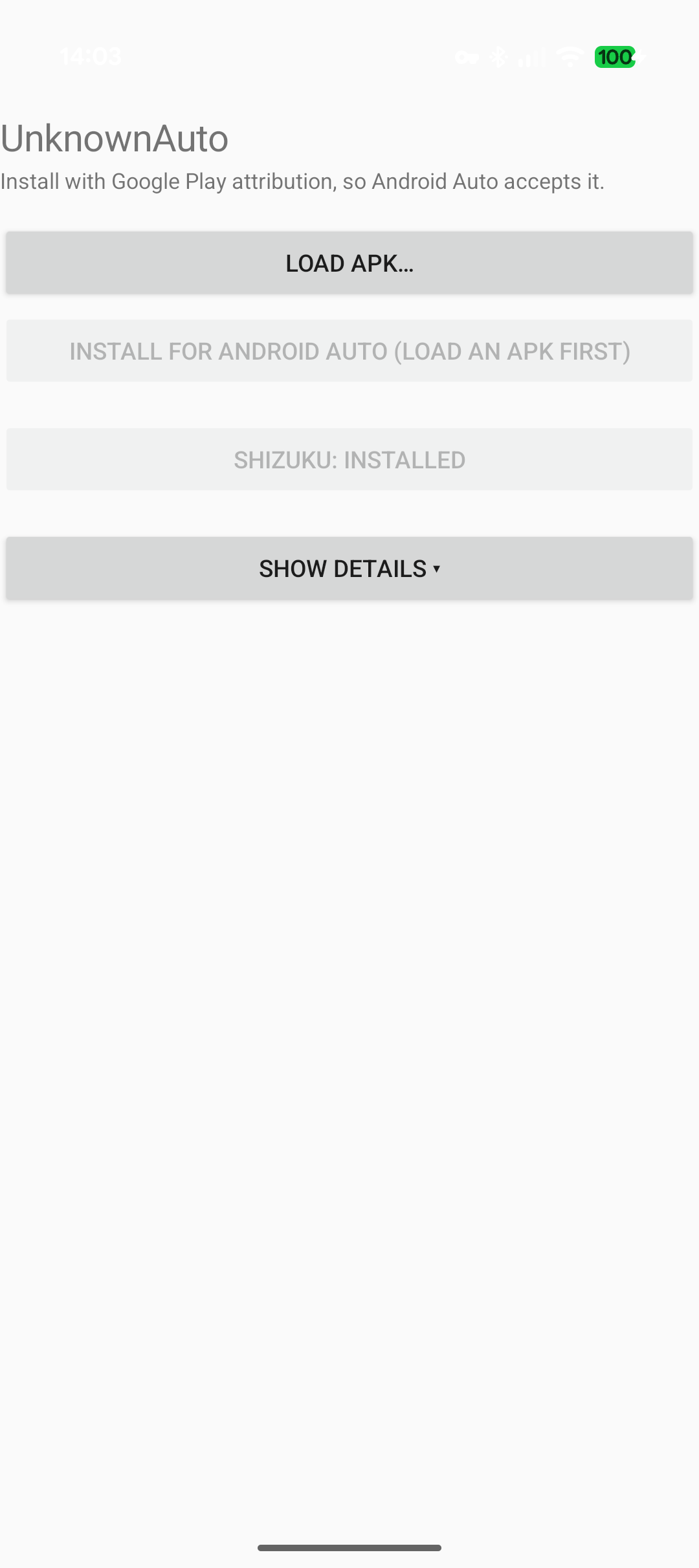
UnknownAuto
1.5 · GitHub
More about this app
Sideload and install Android Auto apps from unknown sources on-device, marking installs as Play-sourced via Shizuku
UnknownAuto


An open, offline tool that lets a self‑built or sideloaded Android Auto app actually run in the car. It installs an APK the way Android Auto requires — as if it came from Google Play — entirely on the phone, no computer (Android 11+). No internet, no account, no payment, no analytics. A free, open alternative to the proprietary AA Enabler.

Why it's needed
Android Auto won't run an app built with its Car App Library unless Android thinks the app
was installed from Google Play. The developer "Unknown sources" switch doesn't change
that. A normal sideload — adb install, a file manager, or Shizuku — is recorded as not
from Play, so Android Auto quietly refuses the app. UnknownAuto fixes that record so the
car accepts it.
How it works
Android remembers who installed each app, and that "installed from Google Play" mark can only be set when the app is installed — you can't change it afterwards, and a plain sideload can't set it at all.
UnknownAuto uses Shizuku — which runs with the phone's "shell" privileges, the same
ones a connected computer's adb has — to drive Android's own package installer and mark
the install as coming from Google Play. The car then treats it as a real Play install. It's
the same trick the proprietary AA Enabler uses, done openly and for free.
Some Android 17 builds do it the other way round: they keep the mark only when UnknownAuto starts the installer itself. When an install comes out without the mark, UnknownAuto tries once more the other way (one more tap on Update) and remembers which way works on that phone. Start Shizuku so both ways are available.
Android 14 and older also check the app that asked for the install, and refuse the shell itself. There Shizuku starts the installer on UnknownAuto's behalf, so UnknownAuto needs the install unknown apps permission for this too.
If the install doesn't go through at all, for example a newer version or one signed with another key is already installed, UnknownAuto says so, and Show details includes the installer's own log lines, which is the most useful thing to paste into an issue.
Install UnknownAuto
Grab the latest UnknownAuto APK from the latest release and open it on the phone — or build it yourself with plain Android SDK tools, no Gradle:
./build.sh            # build unknownauto.apk
./build.sh install    # build, then install and open it
On first use, allow it to install unknown apps (it opens that settings screen for you).
Set up Shizuku (once)
UnknownAuto needs Shizuku running. Shizuku gets the same access a computer gets through USB debugging, but on Android 11+ the phone gives it that access itself, over Wireless debugging. So when Shizuku asks you to pair, you pair the phone with itself: there is no computer or second device involved.
Wireless debugging only works while the phone is connected to Wi‑Fi (any network; it doesn't use the internet).
- Install Shizuku. Tap Install Shizuku in UnknownAuto (it downloads the official app), or get Shizuku from Google Play.
- Turn on Developer options. Settings → About phone → tap Build number seven times. (Samsung: About phone → Software information → Build number. Xiaomi: About phone → OS version or MIUI version.)
- Start pairing in Shizuku. Open Shizuku and, under Start via Wireless debugging, tap Pairing. Allow notifications if it asks: you'll type the pairing code into a Shizuku notification. The notification says Searching for pairing service.
- Get a pairing code. Open Developer options → Wireless debugging (usually Settings → System → Developer options; or search Settings for "Wireless debugging"). Turn on Use wireless debugging and allow it on this network, then tap Pair device with pairing code. A six‑digit code appears. Leave this dialog open.
- Type the code into the notification. Pull down the notifications: Shizuku's notification now says Pairing service found. Tap Enter pairing code, type the six digits and send. It changes to Pairing successful.
- Start Shizuku. Go back to Shizuku and tap Start (the button next to Pairing). A black screen with text opens for a moment and closes by itself; that's normal. Shizuku's main screen now says Shizuku is running.
The first time you tap Install in UnknownAuto, Shizuku asks whether to allow UnknownAuto: choose Allow all the time.
After a reboot Android turns Wireless debugging off and Shizuku stops. The pairing is kept: turn Wireless debugging on again and tap Start in Shizuku. No new code needed.
If Shizuku won't pair or start
- The notification stays on "Searching for pairing service". The pairing‑code dialog has to be open while you enter the code, and the phone has to be on Wi‑Fi. On Xiaomi and some other phones, also turn off battery optimization for Shizuku (Settings → Apps → Shizuku → Battery → No restrictions).
- No Shizuku notification, or nowhere to type. Allow notifications for Shizuku (Settings → Apps → Shizuku → Notifications). If the notification has no text field, drag it down to expand it.
- Shizuku stops on its own. Android can turn Wireless debugging off when the phone switches Wi‑Fi networks: turn it on and tap Start again. Turning on Developer options → Disable adb authorization timeout stops the pairing from expiring after a week without use.
- Android 10 or older has no Wireless debugging: Shizuku has to be started from a computer after each reboot (Shizuku → Start by connecting to a computer shows how). On a rooted phone, Shizuku can start with root instead.
Using it
For any app you want in the car:
- Load APK or XAPK… — pick the APK of the app you want in the car, e.g. one you built
or downloaded (or open that
.apkor.xapkwith UnknownAuto). It shows the app's name, package and version. It doesn't install yet. - Install — tap it, confirm the system install prompt once, and UnknownAuto shows a big ✔ / ✘ banner telling you whether Android Auto will accept the app. If Play Protect offers to scan the app, choose More details → Install without scanning.
The technical output is tucked behind a Show details toggle; the result banner is always visible.
XAPK files
An .xapk is a zip that holds an app's APKs and, for some games, extra data (OBB files).
UnknownAuto reads it like this:
- One APK inside: installed exactly like that APK, with the Google Play mark. The OBB
files are then copied to
Android/obb/<package>/. - Split into several APKs (
config.arm64_v8a,config.xxhdpi,config.en, …): installed together as one app. On a rooted phone UnknownAuto gets even a split the full Google Play mark (see below), so Android Auto accepts it. Without root it installs the splits through its own installer, which Android won't give the Play mark — Android Auto then shows the app only with Unknown sources on in its developer settings, and not at all if it's a Car App Library app. The banner says which case you got. Splits for CPU types the phone doesn't have are left out.
Rooted phones
A single APK gets the Play mark on any phone (installer screen launched as shell). A split
XAPK can't go through that screen — it takes only one APK — so Android normally can't mark a
split. On a rooted phone UnknownAuto gets around this: it creates the install session
under Google Play's own account (su <play-uid> pm install-create -i com.android.vending),
then writes the APKs and commits as root. Android records Play as both the initiating and
the installing package, so the result is a normal, Play‑marked install of a multi‑APK app,
OBB files placed, no taps. (Writing and committing run as root because a session's owner can't
stream an APK from a pipe, and the install source is fixed when the session is created, so
committing as root doesn't change it.)
The first install asks the root manager (Magisk etc.) to grant UnknownAuto root — choose
allow. A non‑rooted phone never sees a root prompt and falls back to the unmarked split
install. If Google Play isn't installed, it falls back to a root pm install -i com.android.vending, which sets the Play installer name but leaves the shell as the
initiator — enough for simpler "from Play" checks, not for Android Auto on Android 11+.
For your own Car App Library app you don't need root: build one APK rather than splits,
e.g. from an app bundle with bundletool build-apks --mode=universal. Only install XAPKs
from sources you trust.
Support
UnknownAuto is free and stays free. If it got your app into the car and you'd like to say thanks, you can buy me a coffee on Ko‑fi.
License
MIT — see LICENSE.
UnknownAuto builds against the Shizuku API (Apache‑2.0) and downloads the official Shizuku app. It is not affiliated with Google, Android Auto, Shizuku, or AA Enabler.
How Shizuku is used
Can install sideloaded apps with Play attribution, diagnose installs and copy OBBs via `Shizuku` shell service
This is an AI-assisted analysis of Shizuku-related usages in the app's public source code. It is best effort, so it may not catch every single usage.
How this app uses Shizuku
UnknownAuto uses Shizuku to install sideloaded APKs so Android Auto accepts them as Play installed, and to support those installs.
- Install apps for Auto: a staged APK is installed by launching the system package installer as the shell user through Shizuku, passing Play as the installer plus not unknown source and install reason flags so the result is recorded with Play attribution.
- Diagnose failed installs: the installer and package manager log output since the install started is read as the shell user through Shizuku and shown on screen, revealing why an install was cancelled, blocked or lost its Play mark.
- Copy expansion files: XAPK expansion (OBB) files the app cannot write itself are copied into shared storage under Android/obb through the Shizuku shell service.
Android APIs or commands used
android.app.ActivityTaskManager.getServiceandroid.app.ActivityManager.getServiceIActivityTaskManager.startActivityIActivityManager.startActivity/system/bin/am start/system/bin/shlogcat -dgrep -E
Notable details
Works without Shizuku via the normal system install screen, but on current Android only the Shizuku shell launch keeps the Play mark that Android Auto requires. If one launch method loses the mark, the app retries once with the other method.
Changelog
What's new for version 1.5
What's new in 1.5
XAPK support — load and install .xapk bundles, not just single APKs. Open an .xapk with UnknownAuto, or pick it with Load APK or XAPK….
- A single-APK XAPK installs like that APK, with the Google Play mark. Its OBB expansion files are copied to
Android/obb/<package>/. - A split (multi-APK) XAPK installs together as one app. On a rooted phone it gets the full Android Auto mark — the install session is created under Google Play's own account and committed as root, so Android records Play as the initiating and installing package. Without root it installs without the mark (Android's installer only marks a single APK), or with the Play installer name only.
Same as before: no internet, no accounts, no payment, no analytics.
Permissions
4 permissions requested
More from this category
 Flywheel
 AARE
 ScreenOnAuto