 ShizuStore

TinyKit
1.23.7 · GitHub
More about this app
39 KB toolbox of one-tap Shizuku tweaks: hide developer options, ad-blocking DNS, per-app camera/mic and background blocking, APK backup, cache cleaning, free hotspot and Shizuku start/stop.

TinyKit
Useful Android tweaks in one clean menu. No root, powered by Shizuku.





Download the latest APK · Fake permissions · Features · Documentation


TinyKit puts dozens of hidden Android settings, privacy controls and system tools in one place: fake permissions, deleted-file recovery, Quick Settings tiles and more. It uses Shizuku to get shell-level access without rooting your phone.
- No root. Everything runs through Shizuku with ADB-level permissions.
- Nothing in the background by default. No services, no wake-locks. TinyKit only works while it is open, or when you tap one of its tiles or its widget. One optional switch (off unless you turn it on) keeps a small service running so a newly installed app is blocked the moment it appears.
- No ads, no analytics, no tracking. It only goes online when you check for updates (GitHub, by tap or optionally when TinyKit opens) or open Network info (public IP lookup).
- Small. About 360 KB, with a single dependency (the Shizuku API).
- Reversible. Every change is a standard system setting or app-op, and you undo it from the same screen.
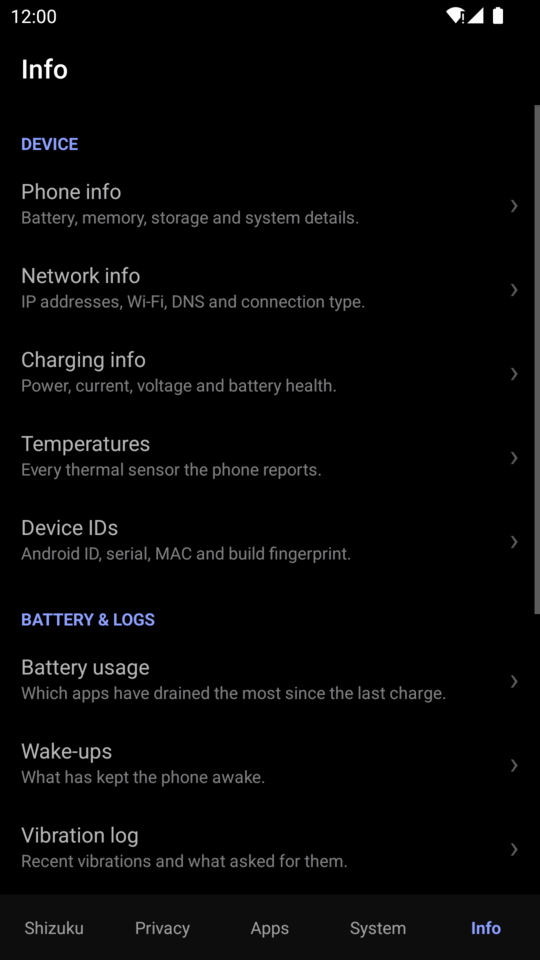
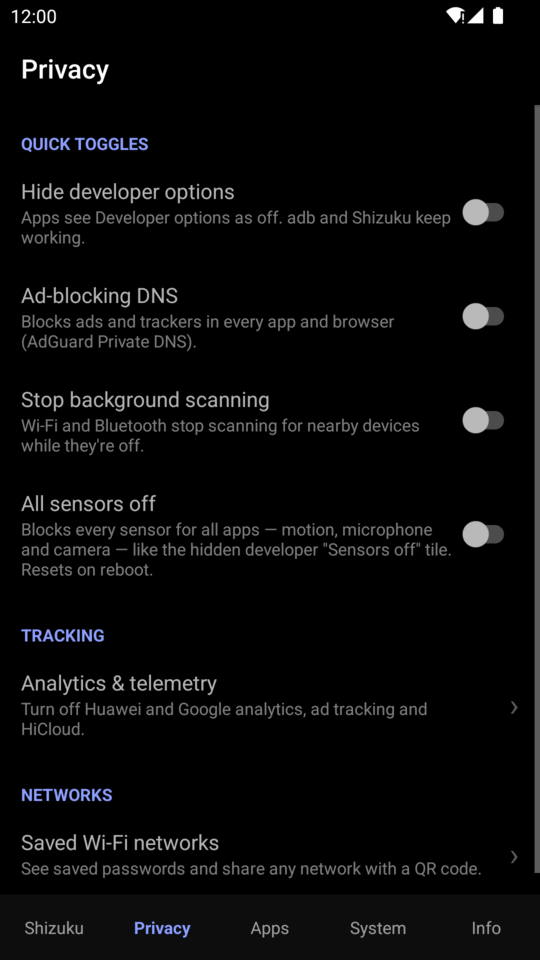
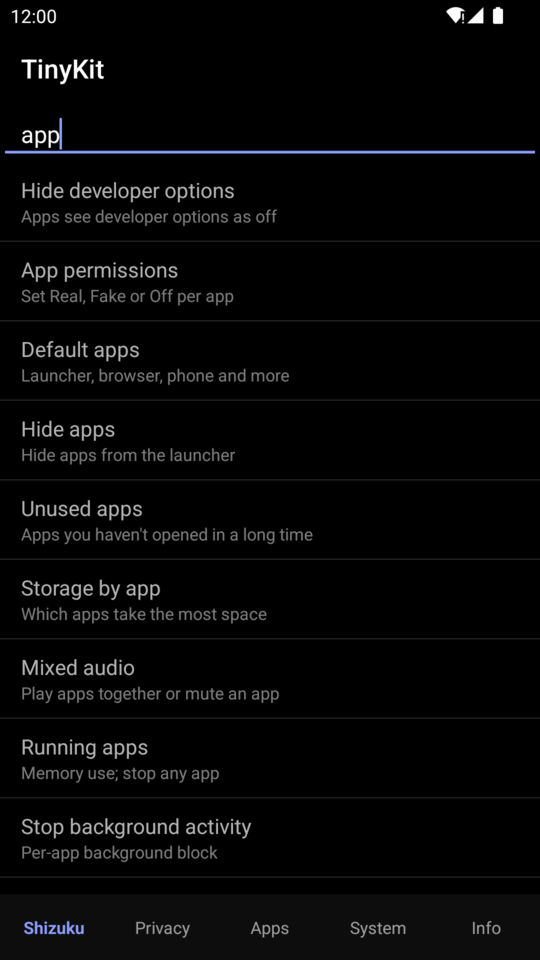
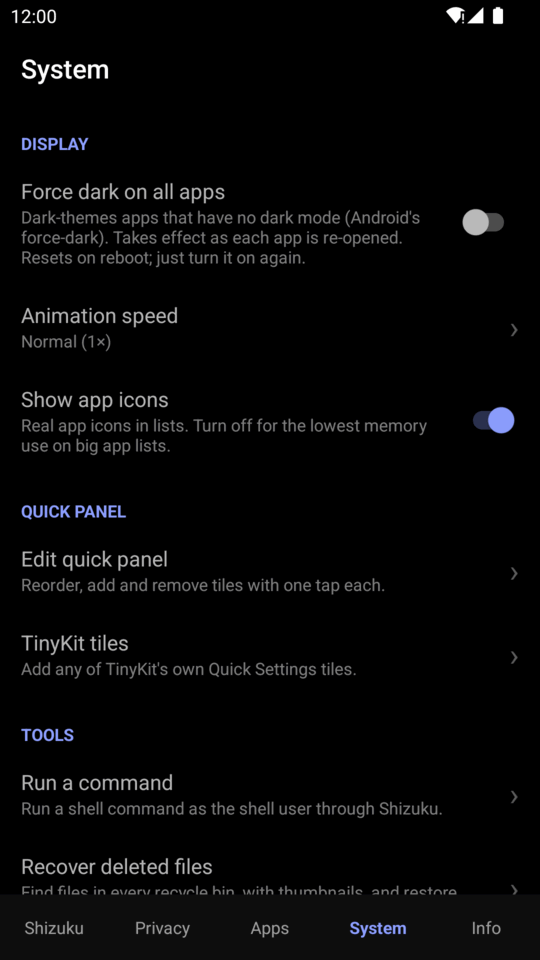
The interface uses a pure black (AMOLED) theme, or a high-contrast light one, and a bottom bar with five sections: Shizuku · Privacy · Apps · System · Info. A search bar on the home screen finds any tool. It is available in English, Spanish and Russian.
What's new
- Banking mode. One switch (and a Quick Settings tile) turns Developer options, USB debugging and Wireless debugging off and stops Shizuku, so banking apps that refuse to run with them on will start. Turn it off and everything comes back as it was.
- Deep sleep profiles that work on Android 16 / ColorOS. Each Doze timing is written on its own, so the ones a phone refuses no longer stop the rest.
- Extra dim safety. Its strength is capped, and unless you press Keep it turns itself off, so a black screen fixes itself.
- TinyFolder (Secure folder or plain work profile) only shows its launcher icon when there is a real work profile.
- Set a permission for every app in one tap. In Permissions by type, pick a permission and set Real, Fake or Off for all the apps listed, or only the ones a search shows.
- Start Shizuku over adb on the network now also tries port 50000.
- Send feedback from the Info tab opens a ready-made GitHub issue.
- Russian translation and a high-contrast Light theme.
Every release is listed, with its changes, on the releases page.
Contents
- 🎭 Fake permissions
- What's new
- Features
- Requirements
- Installation
- How it works
- Documentation
- Building from source
- Contributing
- License
🎭 Fake permissions
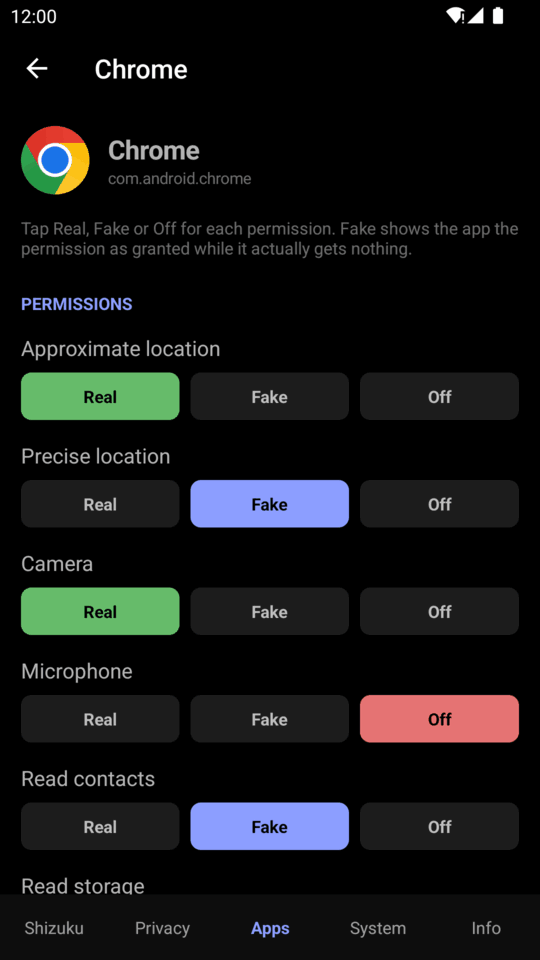
Give an app the permission it insists on, without giving it your data.
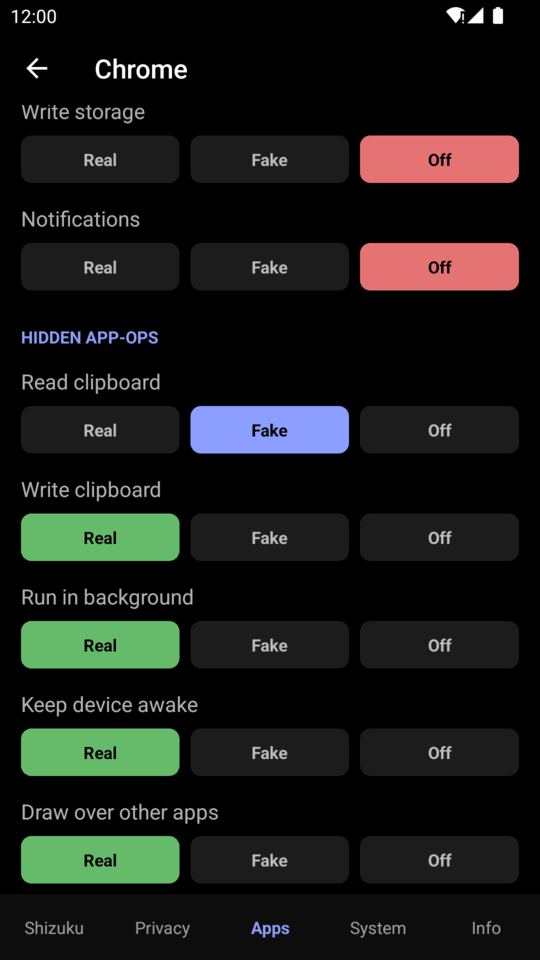
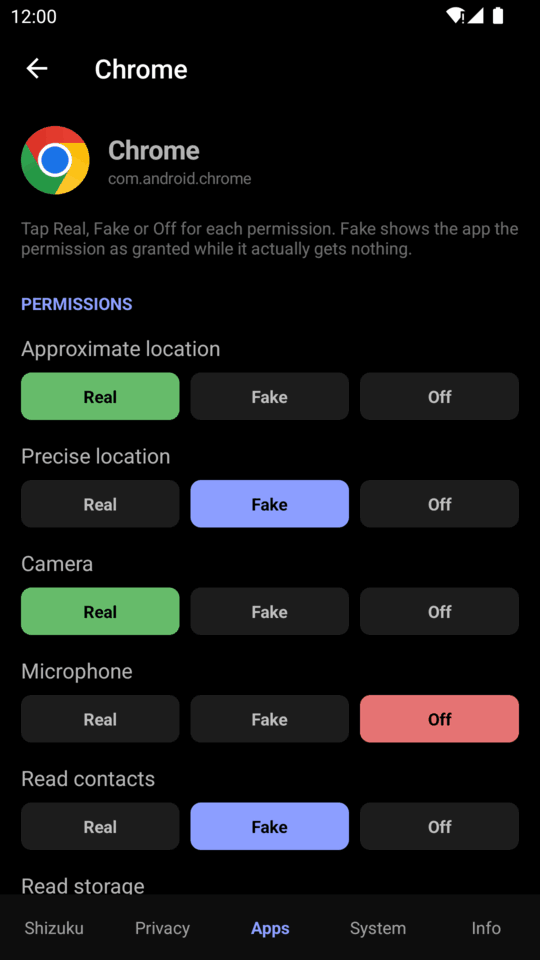
Some apps refuse to work until you grant a permission they don't need. Android only lets you allow (the app gets your data) or deny (the app knows, and complains). TinyKit adds a third choice:
How: Fake grants the runtime permission, then sets the matching
app-op to The app's permission check passes, but Android quietly returns empty results instead of throwing an error, so the app carries on as if you simply had no contacts.
|
Per-app permissions 
Hidden app-ops |
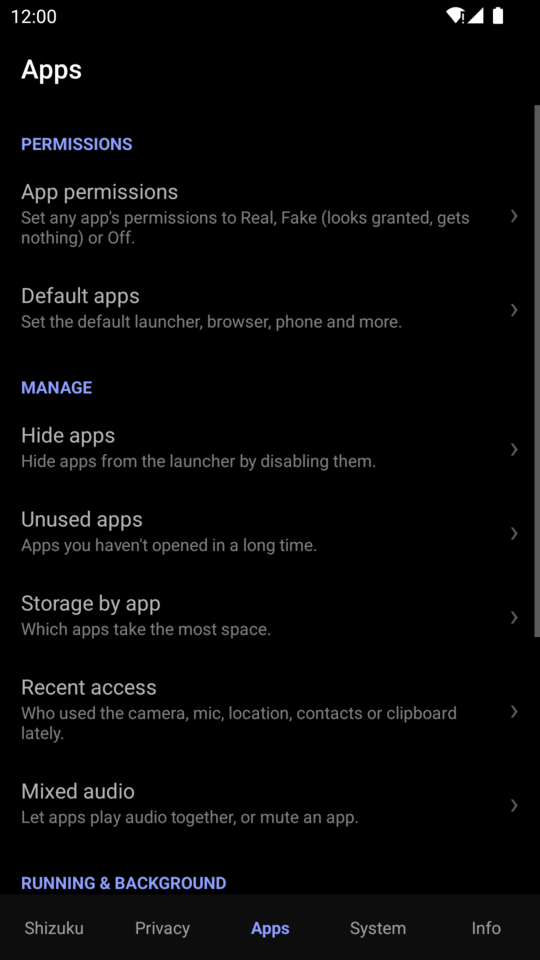
Find it under Apps → App permissions.
Features
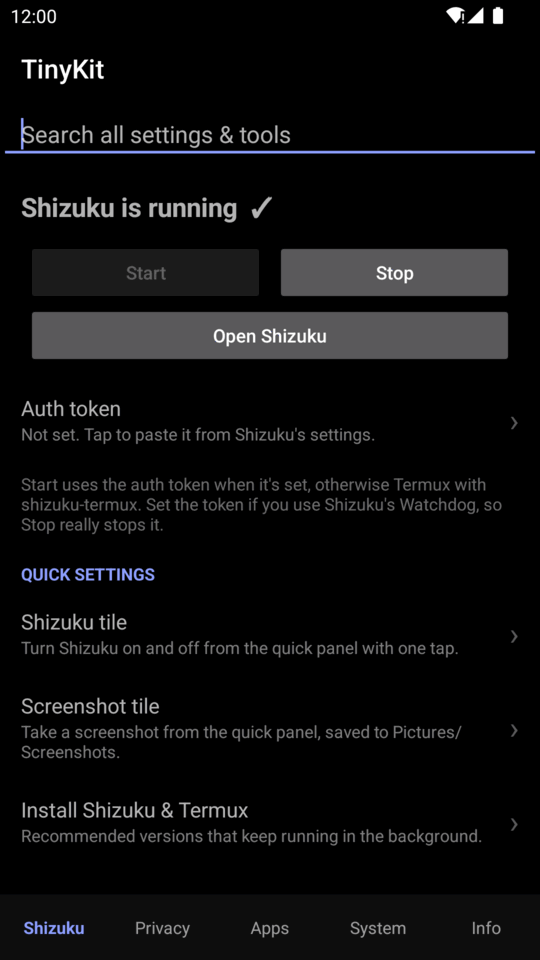
Shizuku
| Tool | What it does |
|---|---|
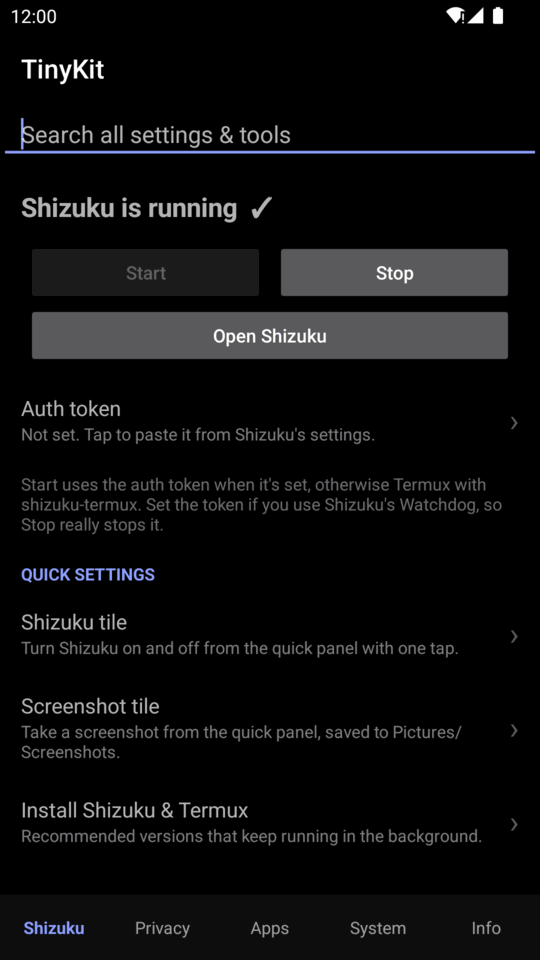
| Start / Stop Shizuku | Starts and stops Shizuku from inside TinyKit. If you have set Shizuku's auth token (in Shizuku's settings), TinyKit talks to Shizuku directly. Stop closes Shizuku fully, so a Watchdog can't start it straight back up. Without the token, Start goes through Termux if you have it (TinyKit copies one command for you to paste in Termux once, which sets everything up; after that the script runs in the background), and otherwise uses TinyKit's own adb client, the same three ways shizuku-termux does but with nothing else installed: root, adb over the network if it is on, or Wireless debugging (Android 11+), where it pairs once with a code you type into a notification and after that one tap starts Shizuku, switching Wireless debugging on by itself. Once it has worked, Start by itself (off until you switch it on) starts Shizuku again after a restart and when you open TinyKit, quietly. Without root, Android 10 and older need adb tcpip 5555 (or 50000, which TinyKit tries too) from a computer once per restart: Android allows nothing else, and TinyKit says so. Works with the standard Shizuku app and its forks. |
| Search | Find any TinyKit setting or tool from the top of the home screen. |
Quick Settings tiles
Add any of these from System → TinyKit tiles. On Android 13 and newer, adding one takes a single tap. Most of them keep working with Shizuku stopped. There are 23 tiles in all. All tiles →
 Shizuku on/off |
 Screenshot |
 Screen record |
 Caffeine |
 Developer options |
 USB debugging |
 Hide dev options |
 Sensors off |
 Grayscale |
 Extra dim |
 Ad-block DNS |
 Mic & camera off |
 Screen timeout |
 Clear caches |
 Free RAM |
 Close app |
 Banking mode |
 Internet block |
 HW overlays off |
 Force dark |
And Work profile, Deep sleep and Audio mixer.
Privacy
| Tool | What it does |
|---|---|
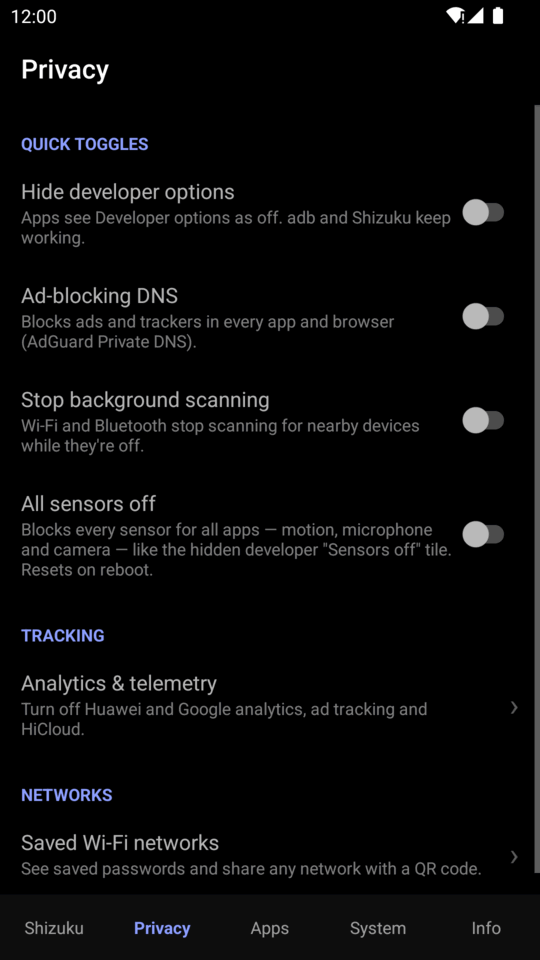
| Analytics & telemetry | Turns off Huawei's User Experience Programme, its background diagnostics apps and HiCloud, and limits Google ad personalisation. Your Huawei ID sign-in is never touched. |
| All sensors off | Blocks every sensor, including motion, microphone and camera, for all apps. It works like the hidden Sensors off developer tile. |
| Block internet per app | Cuts chosen apps off Wi-Fi and mobile data (Android 14+) with Android's own per-app firewall, or blocks everything except the apps you allow. Nothing runs in the background unless you turn on Run in the background: the system enforces it, and TinyKit puts it back after a restart as soon as Shizuku is running. |
| Shut Up | Pick apps (banking apps, games) that refuse to run with Developer options or USB or Wireless debugging on. While one is open they look off, and they come back when you leave it. Off by default; turning it on also turns on Run in the background, which it needs. |
| Clipboard guard | Stops chosen apps from reading what you copy, even while they're open. |
| Saved Wi-Fi networks | Lists saved networks with their passwords, with search. Share any network as a QR code, export them all to a file and import them on another phone. |
| Send feedback | Info tab > TinyKit. Write a feature request, bug report or question and it opens as a ready-made GitHub issue in your browser (you press Submit; TinyKit sends nothing itself). |
| Banking mode | One switch (and a Quick Settings tile) for banking apps that refuse to run with developer options or debugging on: turns Developer options, USB debugging and Wireless debugging off and stops Shizuku, so the apps start. Turn it off and everything comes back as it was, and Shizuku starts again. It needs Shizuku once, to give TinyKit access to those settings. |
| More | Hide developer options · Ad-blocking DNS · Stop background scanning |
Apps
| Tool | What it does |
|---|---|
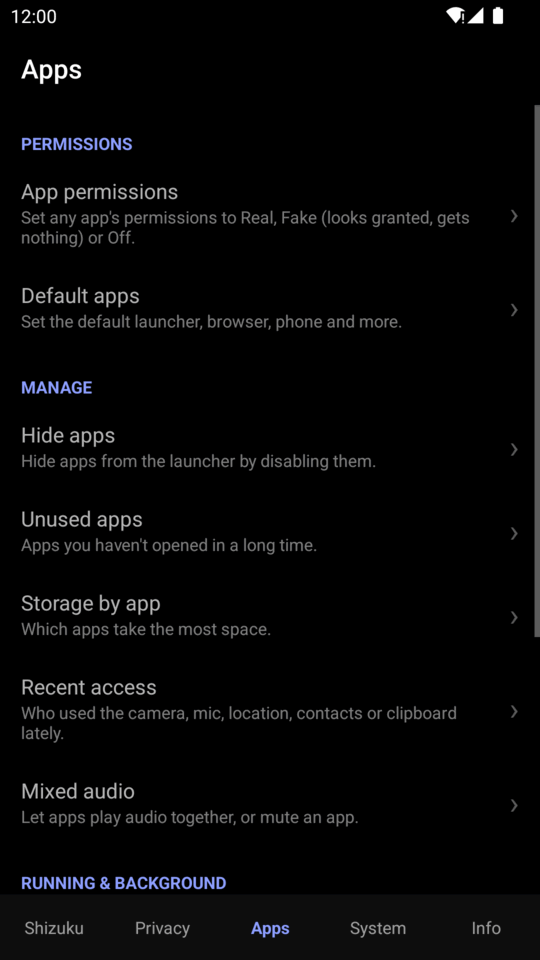
| App permissions | Set each permission and hidden app-op for each app to Real, Fake or Off, one at a time or all at once. Permissions by type shows which apps have a permission and sets Real, Fake or Off for every app in the list (or just the ones a search leaves) in one tap. See above. |
| Default apps | Choose the launcher, browser, phone, SMS and assistant apps, and see which app opens each file type. |
| Work profile | Makes a work profile in one tap (no setup screens, no extra app inside it) and manages it like Shelter, Island and Samsung's Secure Folder together: separate copies of apps, freeze one or all, auto-freeze chosen apps, a PIN of its own that locks it, auto-lock when the screen is off or after a restart, pause (switch or Quick Settings tile), launcher shortcuts that unfreeze and open an app, install APKs straight into it. |
| Deep sleep | Makes the phone doze sooner after the screen goes off and wake up less often, with Comatose's Light, Moderate, High and Extreme profiles. Writes where your Android version reads them, checks Android is really using it, and can doze right now. A Quick Settings tile cycles the profiles. Phones that refuse some of the timings (Android 16, ColorOS) still get the ones they accept, and TinyKit says which it couldn't set. |
| Running services | Lists every running service with its app and whether it is foreground, started or bound. Stop one, stop its app, or block it for good (and unblock it later). |
| Audio mixer | A volume slider for each app, so you can turn YouTube down and leave your music up, with the phone's media volume at the top. Shows the apps open now, and every app below with search, including apps in the work profile. Volumes stick for each new video or song. Has a Quick Settings tile. Real sliders on Android 8+: exact on Android 13+, audio effects before that. |
| TinyFolder | A front door to the work profile, in two looks: Secure folder (Samsung-style: its own launcher icon that opens the work apps behind your lock screen, hides them from the launcher when you want, and locks again when you leave) or the plain Work profile. The icon only appears when there is a real work profile. |
| Share menu pins | Pins the apps you share to most in the top row of Android's share menu, so there is no scrolling to find them (Android 10+). |
| Hide apps | Removes apps from the launcher, and they stop running until you restore them. |
| Unused apps | Lists apps by how long since you last used them. |
| Storage by app | Shows how much space each app uses. |
| Recent access | Shows which apps used the camera, microphone, location, contacts or clipboard, and when. |
| Mixed audio | Lets several apps play audio at once, or mutes a single app. Android's audio system enforces this, so TinyKit doesn't need to keep running. |
| Debloater | Removes apps your phone came with, for your user only, with a safety rating for each (Recommended, Advanced, Expert, Unsafe). Restore any of them later. |
| Special access | Install unknown apps, draw over apps, modify settings, all files and usage access, per app. |
| App language | Gives any app its own language (Android 13+). |
| Trackers in apps | Finds the ad and analytics libraries inside each app. Tap one to cut that app off the internet (Android 14+). |
| Notification channels | Block one kind of notification from an app (Messages, Promotions…) instead of all of them. Android 8+. |
| Install options | Allow downgrade, grant all permissions or allow test-only apps for the APK installer. |
| Installed with TinyKit | The apps the installer put on, with a remove button. Stores nothing: read from Android's own records. |
| Install APK files | Installs .apk, .apks, .xapk and .apkm files, including apps split into parts and game data. Streams the files, installs only the parts your phone needs. |
| More | Running apps (sort by memory or CPU, stop one or several) · Running services · Stop background activity (full Restricted mode) · Keep apps alive · Back up an app as an APK |
System
| Tool | What it does |
|---|---|
| Edit quick panel | Reorder, add and remove tiles in an editor laid out like the real panel. |
| Run a command | Runs any command as the shell user through Shizuku. |
| Recover deleted files | Searches every recycle bin and trash folder (Gallery's recycle bin, .File_Recycle, .fvTrash, Android's .trashed-* files, LOST.DIR and thumbnail caches). It shows thumbnails and copies files to Download/TinyKit/Recovered, leaving the originals in place. |
| Settings backup & restore | Saves all system settings to a file and restores them from it. |
| Force dark on all apps | Turns on Android's built-in force-dark for apps that have no dark mode. |
| Disable HW overlays | Composes everything with the GPU, like the developer option, and keeps it on after a restart. |
| Animation speed | Turns system animations off, or makes them faster or slower. |
| Advanced reboot | Reboots normally, or into recovery or the bootloader, or does a soft (userspace) reboot. |
| Speed-up widget | A home screen widget: one tap frees RAM and clears app caches without opening TinyKit, and shows how much it freed. |
| Speed up phone | One tap deletes every app's cache, closes cached apps, frees and compacts memory and trims storage. Apps you're using stay open. Works without Shizuku on Android 13 and older. |
| Clean & speed | Clear all app caches · Optimize apps · Trim storage |
| Network & battery | Free hotspot · Turn off mobile data while on Wi-Fi |
Info & logs
| Tool | What it does |
|---|---|
| Device info | Phone info · Charging info · Temperatures (every thermal sensor) · Device IDs |
| Network info | Shows IP addresses, Wi-Fi details, DNS and your public IP. Open router settings opens your default gateway's page. |
| Usage logs | Screen time · Battery usage · Wake-ups · Vibration log, as plain readable lists |
| Diagnostics | App log · Crash log · Report a problem · Send feedback · What's new · Check for updates (by tap, or optionally on start with a popup) · About |
The feature reference lists the exact command behind every tool.
Requirements
| Android | 7.0 (API 24) or newer |
| Shizuku | thedjchi's fork (recommended) or the original |
Installation
- Install and start Shizuku.
- Download
TinyKit-<version>.apkfrom the latest release and install it. - Open TinyKit and tap Allow when it asks for Shizuku access.
The getting started guide covers each way to start Shizuku.
Install with Obtainium

Or in Obtainium choose Add App and paste https://github.com/Order52/tinykit.
Releases are signed with the same key as the GitHub APK, so Obtainium updates it in place.
How it works
Shizuku runs a small process with ADB (shell user) privileges, and TinyKit sends commands to
it through the Shizuku API. Every tool is a standard Android mechanism, such as:
- System settings (
settings put global|secure|system …) - App-ops (
appops set …) - Package manager (
pm grant,pm revoke,pm disable-user, …) - System services (
cmd role,cmd sensor_privacy,cmd statusbar,dumpsys …,svc power …)
TinyKit doesn't patch the system or modify system files, so every change can be undone from
TinyKit or Android's own settings. The first time Shizuku is available, TinyKit grants itself
WRITE_SECURE_SETTINGS, so its settings tiles keep working when Shizuku is stopped.
Architecture →
Documentation
| Getting started | Setting up Shizuku and TinyKit |
| Fake permissions | The full guide, with commands and how to verify them |
| Feature reference | Every tool and the command it runs |
| Quick Settings tiles | All 23 tiles |
| Privacy & security | What TinyKit can access, stores and sends |
| Troubleshooting & FAQ | Common problems and Huawei notes |
| Architecture · Building · Contributing | For developers |
Building from source
Prerequisites: JDK 21 and the Android SDK (compile SDK 34).
git clone https://github.com/Order52/tinykit.git
cd tinykit
export JAVA_HOME=/path/to/jdk21
./gradlew assembleRelease
The APK is written to app/build/outputs/apk/release/app-release.apk. See
Building for signing and releases.
Contributing
Bug reports and feature requests are welcome. Please
open an issue and include your Android version,
your device or ROM, and your Shizuku version. Pull requests are welcome too. Please keep
TinyKit small: no background services, no new dependencies, and every change must be
reversible. See Contributing. Each push is checked by
CI (build, lint, unit tests and an emulator run on five
Android versions), and pushing a v* tag builds, signs and publishes the release.
Translations: TinyKit is available in English, Spanish (Latin America, still being checked by a native speaker) and Russian. A translation is one plain text file, so adding or fixing a language is easy. See Translating TinyKit.
License
TinyKit is released under the MIT License.
Made by Ali Alakbar.
How Shizuku is used
Can run typed shell commands and manage apps, privacy, network, settings and upkeep via `sh` shell through Shizuku.
This is an AI-assisted analysis of Shizuku-related usages in the app's public source code. It is best effort, so it may not catch every single usage.
How this app uses Shizuku
TinyKit uses Shizuku to run shell commands as the shell user for one tap tweaks, app control and device care.
- Run any command: type any shell command and see its output and exit code through Shizuku with the
shshell, with large output cut and long commands stopped automatically. - Install split apps: install picked APK and split packages with staged sessions using
pm install-create,pm install-writeandpm install-commit, and copy files into place withmkdirandcat. - Remove and restore apps: uninstall chosen apps with
pm uninstall, list packages withpm list packages, find install paths withpm path, and bring back disabled apps withpm enableandpm disable-user. - Stop and calm apps: force stop running apps with
am force-stop, check background activity withappops query-op, manage battery allowlists withdumpsys deviceidle whitelist, force Doze withdumpsys deviceidle force-idle, and run upkeep withcmd package bg-dexopt-job,pm trim-caches,sm fstrimandsm idle-maint run. - Control app privacy: set per app permissions with
pm grant,pm revokeandappops set, repair camera and microphone access, block clipboard access withREAD_CLIPBOARD, and toggle sensor privacy withcmd sensor_privacyanddumpsys sensor_privacy. - Change system settings: apply Private DNS with
private_dns_mode, hide developer options, set animation scale, per app language, hotspot and sleep choices withsettings put,settings get,settings deleteandgetprop, plus notification and locale changes withcmd localeandcmd role. - Inspect files and logs: preview files with
catand copy recovered files to Download withmkdir, read crash logs withlogcat, and review battery, vibration and service state withdumpsys batterystatsanddumpsys activity services.
Android APIs or commands used
pm install-createpm install-writepm install-commitpm install-abandonpm list packagespm uninstallpm pathpm enablepm disable-userpm grantpm revokepm trim-cachesam force-stopam set-standby-bucketam stopserviceappops setappops getappops query-opdumpsys sensor_privacydumpsys deviceidledumpsys deviceidle whitelistdumpsys deviceidle force-idledumpsys deviceidle unforcedumpsys batterystatsdumpsys vibratordumpsys activity servicessettings putsettings getsettings deletegetpropcmd sensor_privacycmd locale get-app-localescmd locale set-app-localescmd package bg-dexopt-jobcmd role get-role-holderscmd statusbarsm fstrimsm idle-maint runcatmkdirlogcat
Notable details
Run a command forwards whatever text is typed, so it can run arbitrary shell commands, with output capped and long commands stopped automatically.
Changelog
What's new for version 1.23.7
• Permissions by type: set Real, Fake or Off for every app in a permission's list in one tap (or only the apps a search leaves). It asks first, shows what it did, and skips, with the reason, anything it must not touch (camera app, system apps, shared permissions). Each app also shows its current choice.
Signed CN=Order52, SHA-256 87170bdd8488a3a7fd834d4f207962dfe8a4868ed736eae33494d31fd2822fe8
Permissions
14 permissions requested
More from this category
 GhostLock
 VineOS
 OptiDroid
 Screen Translator
 Phone Diagnostic
 Device Watch
 Screen Recorder
 abCheck Device & System
 FluxLinux
 Fern
 雨晴截屏
 CaptureCap