 ShizuStore
Thor’s Lightning
1.3.1 · GitHub
More about this app
Controller-driven dual-screen brightness control for the AYN Thor, with optional Shizuku-privileged input recording.
Thor's Lightning
An unofficial Android utility for controller-driven dual-screen brightness control on the AYN Thor. It has been tested on the February 2026 Android 13 firmware.
Unofficial project: Thor's Lightning is an independent community utility. It is not developed, sponsored, endorsed, or supported by Shenzhen AYN Technologies Co., Ltd. AYN and Thor are used only to identify the compatible device. All related trademarks belong to their respective owners.
What it does
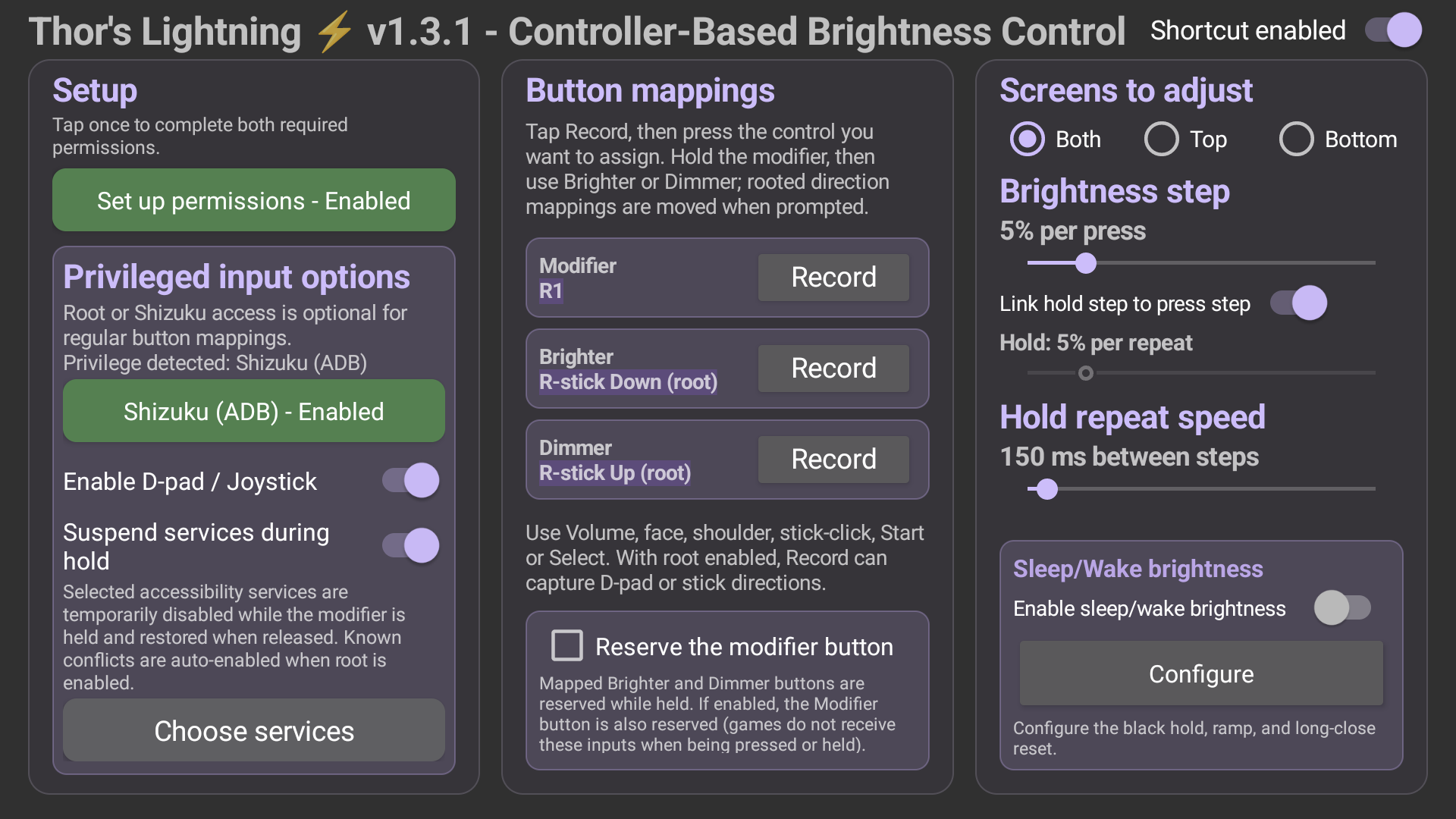
- Modifier-held brightness control: hold a configurable controller button and press mapped Bright or Dimmer controls to adjust brightness.
- Dual-screen targeting: adjust the top screen, bottom screen, or both screens together.
- Configurable mappings: choose the modifier, Bright, and Dimmer controls from standard Android controller buttons.
- Non-root volume support: volume up and volume down work without root and are reserved while mapped for brightness.
- Optional privileged input support: devices with Root or Shizuku can record any D-pad or analog-stick direction for Bright and Dimmer controls.
- Modifier reservation option: root users can optionally reserve the modifier itself while brightness controls are held.
- Service conflict handling: select multiple accessibility services to pause temporarily while the modifier is held, preventing other controller tools from reacting to the same buttons at the same time.
- Clear setup status: the in-app setup buttons show whether each required permission is needed or enabled.
- Boot persistence: Android can restart the accessibility service after reboot once the service has been enabled by the user.
- Sleep/Wake brightness: hold both screens dark briefly after wake, then ramp back to the brightness levels saved before closing or sleeping.
- Long-close reset: optionally use a chosen default brightness after a configurable period closed, from 0 minutes to 24 hours.
The non-root path is built around Android's accessibility key-event handling. Root input support is optional and exists for controls that Android does not deliver through the same route.
Brightness behavior
When Both is selected, Thor's Lightning adjusts the top and bottom screens relative to their current brightness. Each press applies the same step to each screen, so if the top screen is brighter than the bottom screen, it stays brighter while both move up or down together.
The screens only become equal when they already start at the same brightness, or when one screen reaches the minimum or maximum brightness limit and the other screen continues until it reaches the same limit. This keeps manual top/bottom brightness differences intact during normal adjustment.
Requirements
- AYN Thor running the compatible Android 13 firmware
- Accessibility service enabled for Thor's Lightning
- Android brightness write permission
- Root or Shizuku access only if using D-pad or analog-stick mappings
Root axis input has platform limits. D-pad and stick directions may still be visible to games, and analog sticks cannot physically send both directions on the same axis at the same time. Use volume or standard buttons when complete input reservation matters.
Installation
- Download the APK from the latest GitHub release and install it as a normal Android APK.
- Open Thor's Lightning and tap Set up permissions.
- Follow the on-screen guide to allow Modify system settings, then enable Thor's Lightning controls under Android Accessibility. Return to the app after each settings page; the guide will take you to the next step.
- Choose the modifier, Bright, Dimmer, and screen-target options. For root input, tap a Bright or Dimmer Record button and move the direction you want to assign; the app identifies the D-pad or stick automatically.
- Enable privileged input only if you want D-pad or analog-stick mappings, then approve Root or Shizuku access when prompted.
- If another accessibility app responds to the same controller buttons, turn on Suspend services during hold and select the services to pause while the modifier is held.
- To configure wake behavior, open Sleep/Wake brightness. Set the black hold, ramp duration, optional long-close reset, reset time, and reset level. The long-close reset is off by default.
Building
The project requires JDK 17 and Android SDK 35.
./gradlew :app:test :app:assembleRelease
The release build currently uses the Android debug signing key for direct installation and update testing.
Support scope
This app depends on AYN's dual-display Android behavior and Android's handling of controller, accessibility, and rooted input events. Future firmware may change those internals. Please include the device firmware version, root state, selected mappings, screen target, and whether the issue happens in non-root or root mode when reporting a problem.
Development disclosure
This project was created under human direction with assistance from OpenAI Codex. AI assistance was used for portions of the code, documentation, build automation, icon generation, and test workflow. The device-specific behavior and release APK were reviewed and tested by the project owner on real AYN Thor hardware.
AI-assisted output can contain mistakes. Review the source and understand the accessibility and optional root-input behavior before installing or modifying the project.
Changelog
v1.0
- Initial public release.
v1.1
The main focus of this update is handling conflicts with other controller-related apps. If another app responds to the same buttons, brightness and volume could change at the same time. Thor's Lightning can now temporarily suspend multiple selected accessibility services while the modifier is held, then restore them afterward.
Additional improvements:
- Improved first-time setup with a guided welcome and clearer permission steps.
- Clearer button-mapping layout with the assigned control highlighted below its function.
- Amber - Needed and green - Enabled setup indicators.
- Improved spacing, text wrapping, and button sizing to prevent clipped labels.
- Separate brightness steps for individual presses and repeated holds.
v1.2
- Improved root input detection so D-pad, L-stick, and R-stick directions are identified correctly when recording brightness controls.
- Enabling Enable D-pad / Joystick turns on exclusive root-axis mode: regular button and volume mappings are suppressed while D-pad or stick brightness input is selected, preventing both paths from changing brightness at the same time.
- Root directional mappings now work for Bright and Dimmer controls, while directional inputs are kept out of the modifier role.
- Added clearer recording safeguards when the required permissions are not yet enabled, plus clearer guidance around root-input and reservation limits.
- Improved duplicate mapping handling so assigning an already-used button swaps the existing mapping cleanly.
- Refined spacing, text wrapping, setup status, and root-options presentation for better readability on Thor's three-button navigation layout.
- Enabled Android immersive mode to keep the navigation bar from interfering with the app layout and avoid GUI rendering issues.
v1.3
- Added configurable Sleep/Wake brightness behavior with a short black hold and smooth ramp back to each screen's saved level.
- Added optional long-close reset behavior with a 0-minute to 24-hour timeout and configurable reset brightness.
- Improved independent top/bottom brightness capture during Thor lid and sleep transitions.
- Reworked Sleep/Wake settings into grouped, rounded sections with clearer explanations and safer enable/save behavior.
- Updated first-run conflict messaging to explain when root is required for suspending another accessibility service.
- Refined layout spacing, immersive popup behavior, default timing values, and setup text for the current Thor display and navigation layout.
v1.3.1
- Added Shizuku as an alternative to Root for D-pad/joystick input and temporarily suspending conflicting accessibility services.
- Added an in-app Shizuku authorization prompt with automatic status updates after approval or denial.
- Privileged controls now reset safely if Root/Shizuku access is later lost.
- Gated Sleep/Wake brightness and service selection until required permissions are configured, with clearer, shorter warnings.
License
Thor's Lightning's original source and icon are available under the MIT License. Third-party components retain their own licenses.
How Shizuku is used
Can record D-pad and stick directions and pause conflicting services via `getevent` and `settings` through Shizuku.
This is an AI-assisted analysis of Shizuku-related usages in the app's public source code. It is best effort, so it may not catch every single usage.
How this app uses Shizuku
Shizuku is used to enable controller based brightness extras that need elevated access.
- Record stick directions: you can record D-pad and left or right stick directions as the Brighter and Dimmer controls, captured by reading controller input with the
getevent -ltshell command through Shizuku. - Pause conflicting services: you can have selected accessibility services temporarily disabled while the brightness modifier is held and restored when it is released, applied with the
settings put secureandsettings get secureshell commands through Shizuku.
Android APIs or commands used
getevent -ltsettings get secure enabled_accessibility_servicessettings put secure enabled_accessibility_services
Notable details
Regular button mappings work without Shizuku. Shizuku is only needed for D-pad or joystick direction recording and for suspending selected services during a hold.
Changelog
What's new for version 1.3.1
Added Shizuku as an alternative to Root for D-pad and joystick input. Added Shizuku authorization handling with automatic status updates. Privileged controls reset safely if Root/Shizuku access is lost. Gated Sleep/Wake brightness and service selection until required permissions are configured. Updated privilege wording, setup guidance, and layout details. Install the attached APK, open Thor's Lightning, and tap Set up permissions.
Permissions
2 permissions requested
More from this category
 Calibrate SoC
 VR Launcher
 buttonoo
 Heimdall
 MindControl
 SidePad
 Glyph Barty
 ha-paneld
 BooxUltimatum
 DiAuto
 Thor Volume Link (ThorVolumeLink)
 flipx
flipx