 ShizuStore
Tern
0.3.0 · GitHub
More about this app
Obtainium-style updater that verifies package name, signing certificate and publisher checksums before installing via Shizuku, Dhizuku, root or the system installer on phones, tablets and TV.
Tern



Android apps from where their developers publish them, checked before they install.
Most open source Android apps put their releases on GitHub, GitLab, Codeberg or a repository of their own, days before any store carries them, if a store ever does. Obtainium showed that a phone can follow those release pages by itself. Tern does that job too, and then it looks hard at what it was handed: who signed the file, whether it is the app you asked for, and whether it matches the checksum the publisher gave. Only then does Android's installer see it.
It is a native app of about 7 MB, with no analytics and no account. It talks only to where your apps come from and to the places PRIVACY.md lists, such as an icon host or the places you search, and to nobody on its own behalf. Every request says it comes from Tern.
- Every signature is verified twice: by Tern's own verifier and by Android.
- Each app stays tied to the certificate of its first install. For 15 well-known apps Tern knows the certificate before that.
- It reads the forges, repositories and sites Obtainium reads, and eight third-party stores once you turn them on, and installs through Android, Shizuku, Dhizuku, root or another installer app.
- A widget, a Quick Settings tile and launcher shortcuts check and update from outside the app.
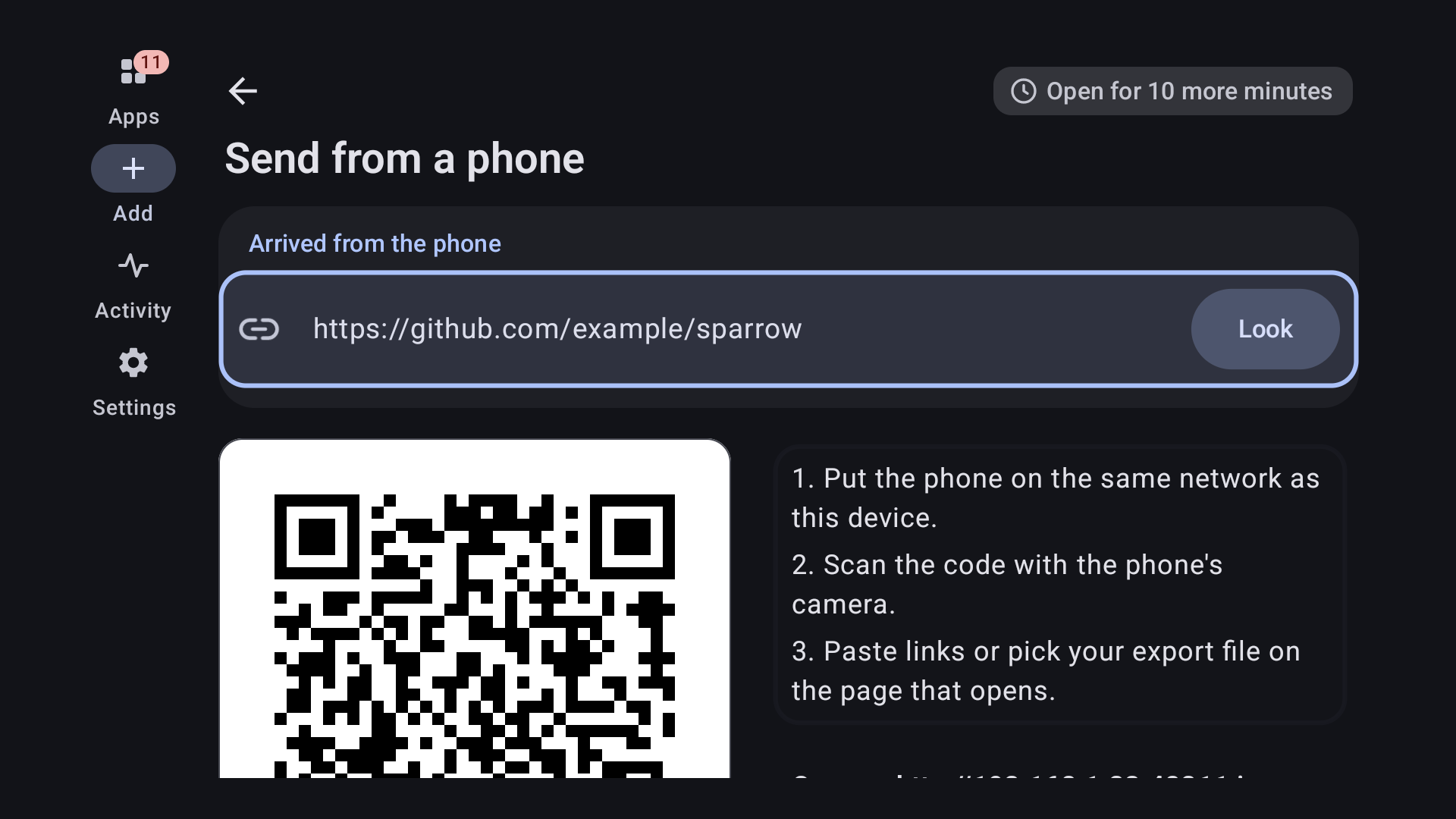
- Android TV works by remote, and a phone can send links to it sealed with a code the TV shows.
- With Orbot chosen, everything goes through Tor and nothing goes around it.
- An Obtainium export brings your list and your settings along, and Tern can write one for Obtainium too.

Or download tern.apk from the latest release.
It runs on Android 9 and later, on phones, tablets and TVs. Once it is
installed, the badge above adds Tern to itself, so it keeps itself up to date.


What it checks
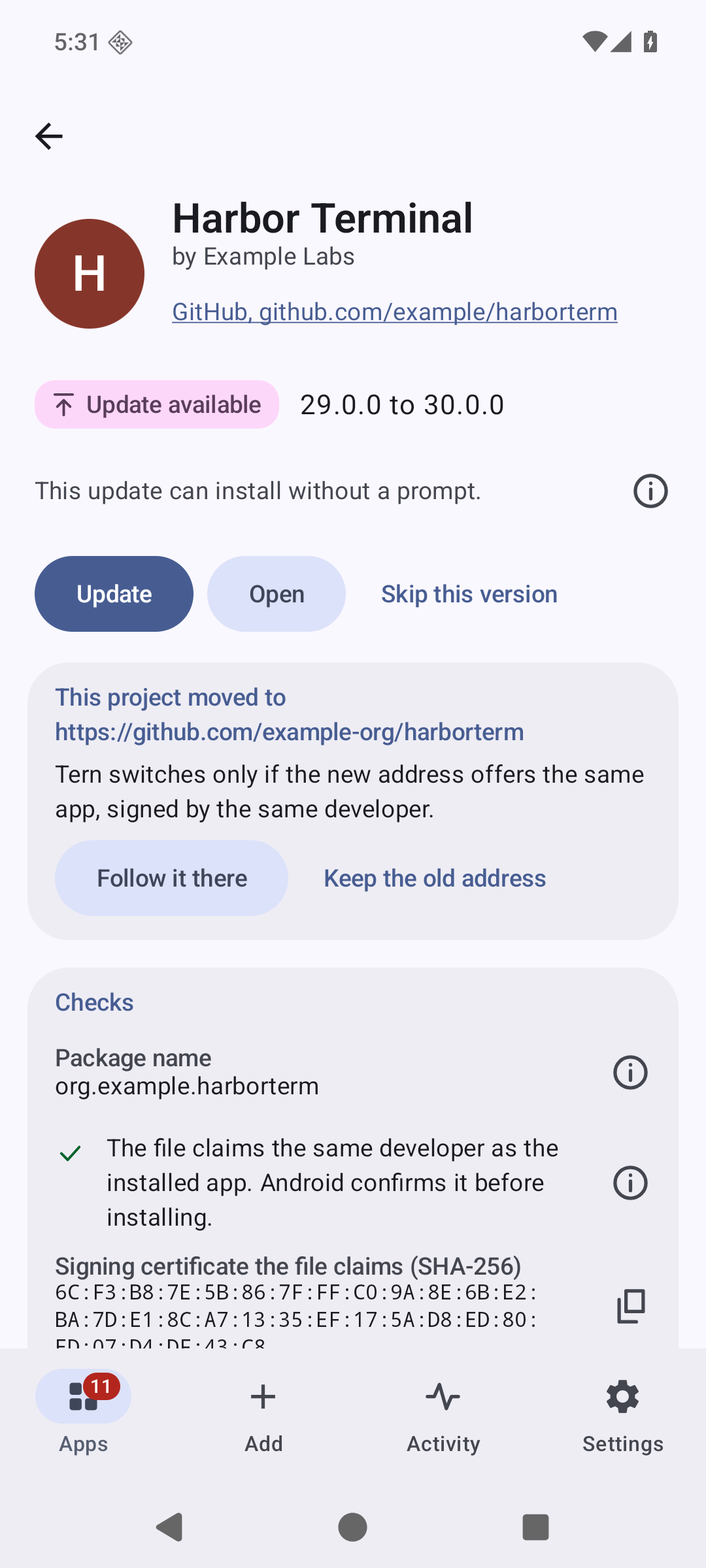
Before it downloads anything, Tern reads the file's own package name, version code and signing certificate off the server with a handful of range requests. For a 6 MB file that took 4 requests and 106 KiB. What it reads there is a claim, and the screen says "claims" until Android has confirmed it.
After the download:
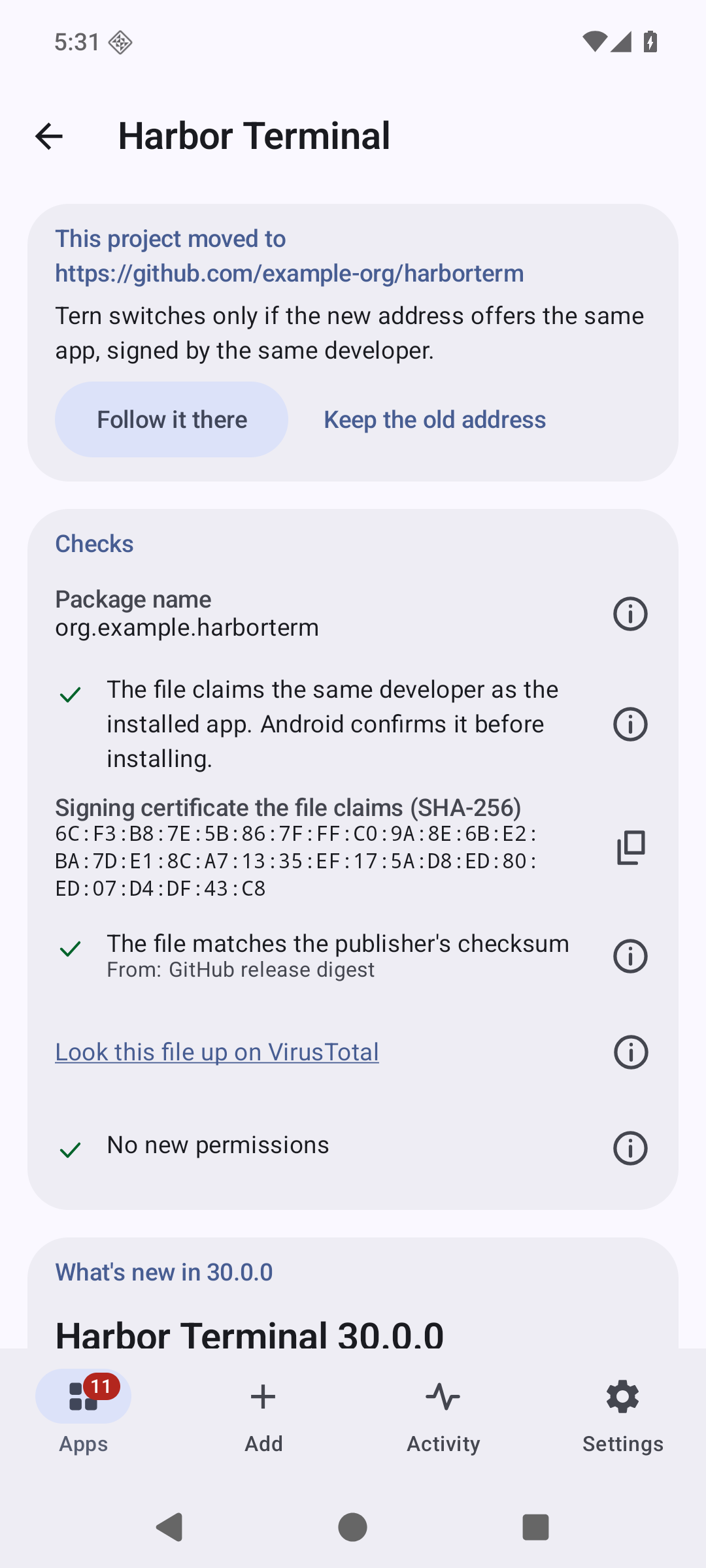
- The file's SHA-256 is compared with the publisher's checksum when there is one:
GitHub's release digest, a signed F-Droid index, a
.sha256file next to the download, aSHA256SUMSfile, or a hash in the release notes. - The signature is verified twice, by Tern's own verifier (APK Signature Scheme v1, v2, v3 and v3.1) and by Android. If the two disagree about who signed the file, it is refused. Android does not read every part of a split bundle on every version, and a part it skips has to pass Tern's check alone.
- The signer has to be the signer of the app you already have, and the one pinned for it. The pin is set from the first install and travels with your exports, so a reinstall on a new phone is held to the same certificate. For 15 well-known apps Tern carries the developer's certificate itself, each one confirmed by a second source, so even their first install is checked.
- A file for another package, an older version than the installed one, or a test-only build is refused.
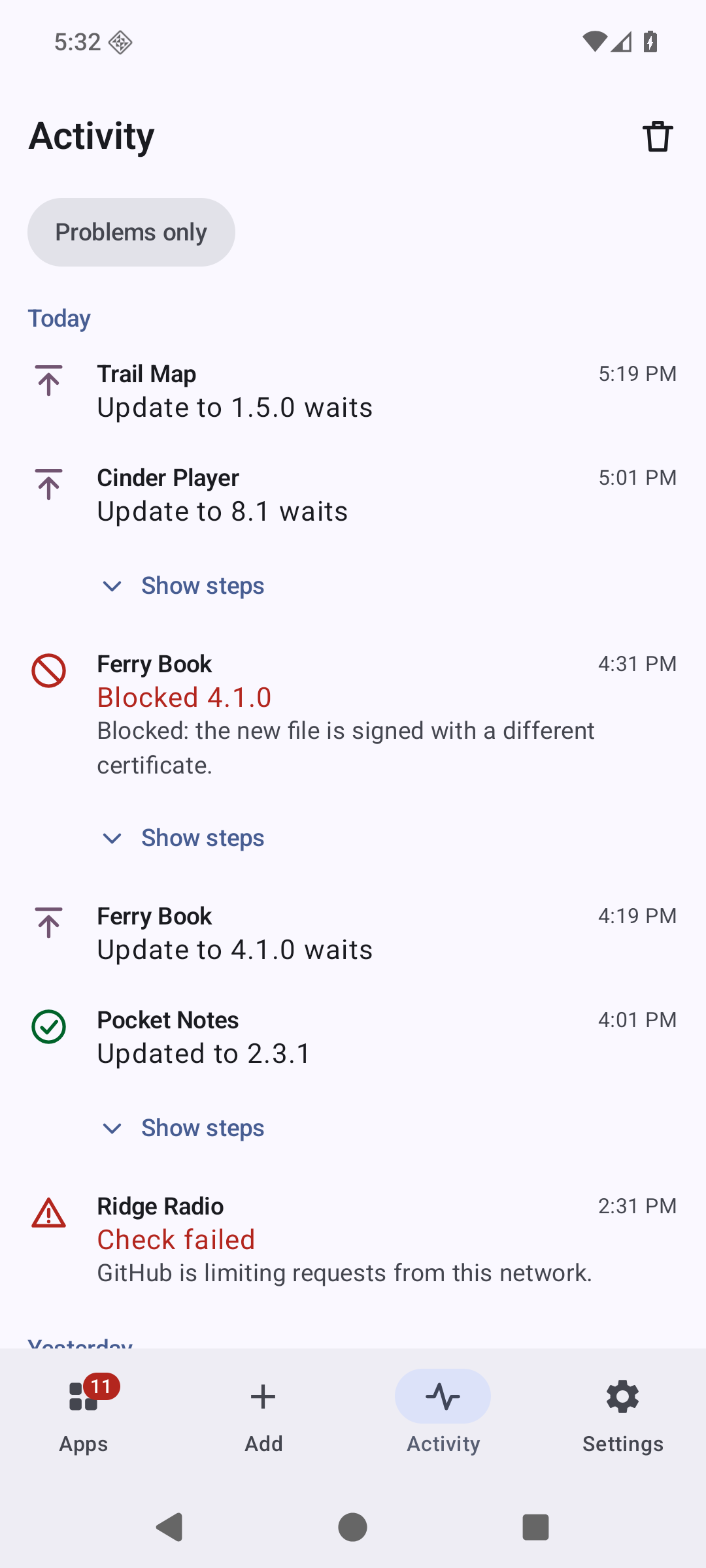
An install counts when Android says it succeeded and the package manager then shows the new version code. Until both are true the app's row says what is really on the phone. docs/SECURITY-MODEL.md says who is trusted with what, and where each check ends.
For a file whose SHA-256 is known, the same panel links to the file's page on VirusTotal. Your browser opens it. Tern uploads nothing and needs no key. When AppVerifier is installed, an app's page also offers a second check there, against AppVerifier's own list.
Where it looks
| Source | What is read |
|---|---|
| GitHub | The release feed first, the API only when the feed changed |
| GitHub Actions | Artifacts of the latest successful run of a workflow (needs a token) |
| GitLab | gitlab.com and self-hosted instances |
| Forgejo, Gitea | Codeberg and self-hosted instances |
| F-Droid, IzzyOnDroid | Their per-app listings |
| Any F-Droid format repository | The signed index, with the repository's key pinned |
| A web page | Links to installable files, with optional steps through other pages |
| A direct link | One file at a fixed address, whether or not the address ends in a file name |
| Jenkins, SourceHut, SourceForge | The last successful build, tags, the project's files or one folder of them |
| itch.io, Telegram, Neutron Code | The developer's own page and files |
| Huawei AppGallery, Samsung Galaxy Store, vivo | Third-party stores, off until you turn them on: each store's own app record |
| APKPure, Aptoide, APKCombo, APKMirror, Tencent | Third-party stores, off until you turn them on, that offer again what developers publish elsewhere (APKMirror for tracking only) |
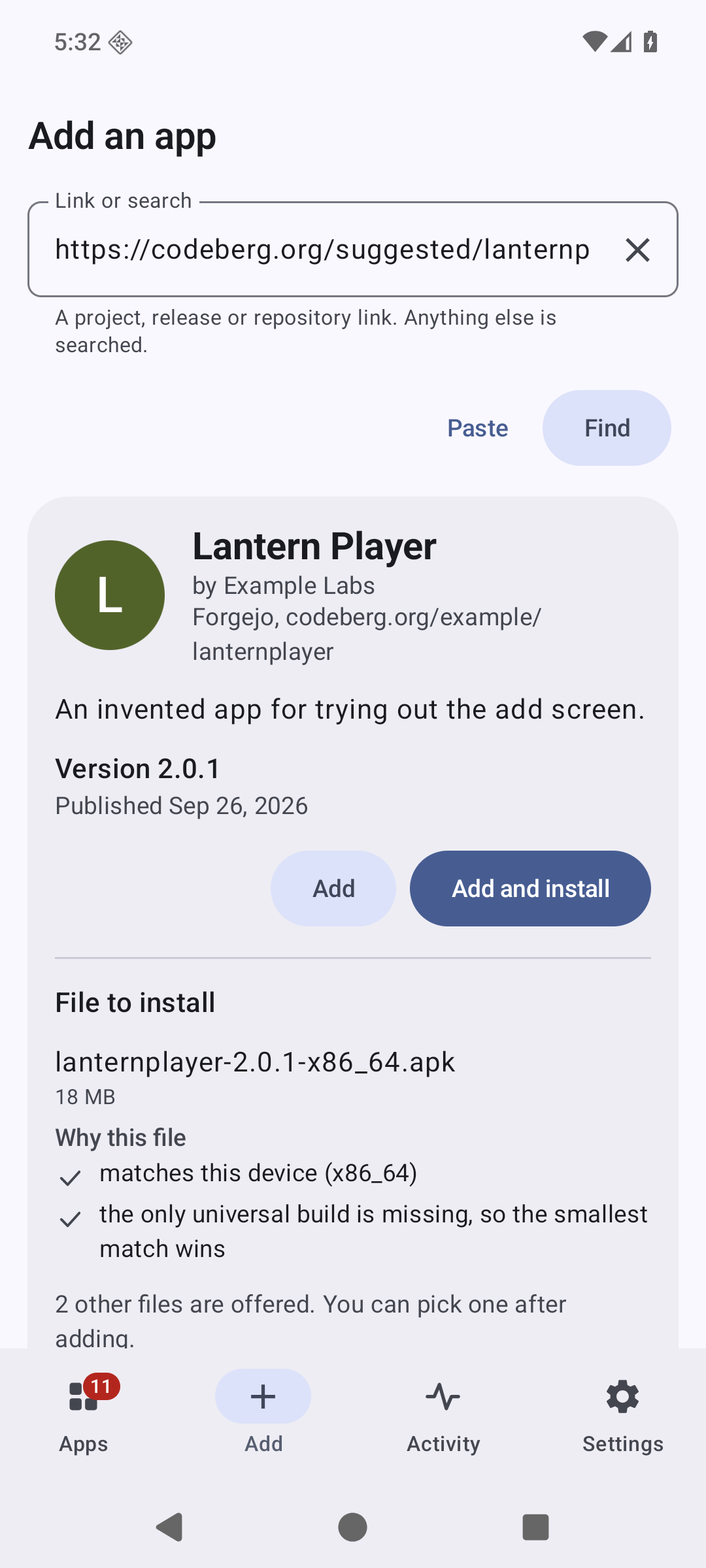
Paste a link, or share one from the browser, and Tern works out which of these it is. Searching by name looks in the forges and F-Droid, and in the stores you pick once they are on.
The stores sit behind one setting, Settings, Network, Third-party stores, which starts off. A store serves its own copies of apps, and Tern reads it through the interface the store made for its own app or site, as Tern and with nothing borrowed from that app. Pasting a store's address while the setting is off shows what that means and a button to turn it on. An app from a store says so on its page, and says what its first install decides: the certificate its updates must carry, unless the app is one whose developer's certificate Tern carries, or you pinned one. Whatever the source, a file is held to the certificate of the app you have, and to the pinned one.
Some places Obtainium reads are left out on purpose. docs/COMPARISON.md says which and why.
Updates without a prompt
Before the very first install, Android wants to hear from you that Tern may install apps. Tern asks before it starts, opens the right page of the system settings, and carries on with the install when you come back.
The first install of any app asks once, as Android requires. After that Tern asks Android for a silent update every time and does what the system answers. On Android 12 and newer, for an app Tern installed, that is normally a silent update; where Android wants a confirmation you get a notification instead of a surprise. Android refuses a second silent update of the same app within 30 seconds of the last one, and that is one of the cases where you are asked.
With Shizuku, Dhizuku or root chosen under Settings, Installing, first installs and updates install without a prompt. Shizuku 13.6 and Dhizuku 2.12 did that on an Android 13 emulator, for a first install and for an update. Root has not been tried yet: the su of Android's emulator images answers only adb, so Tern could not be given root there. With Dhizuku, Android names Dhizuku as the installer, and may show its own notice that an admin installed the app. You can also hand every checked file to another installer app; Tern then compares the signer of what it installed with the file it checked.
Checks run every six hours by default, and anywhere from every 15 minutes to every 30 days, through Android's own job scheduler. The schedule is put back after a reboot and after Tern itself is updated. You can limit them to unmetered networks or to charging, and hold updates that install by themselves for Wi-Fi or a charger on their own. You can check when Tern opens or when an app's page opens, and choose per app between being told, updating automatically, and never checking in the background. If you force stop Tern, Android drops the schedule until you open the app again.
Outside the app
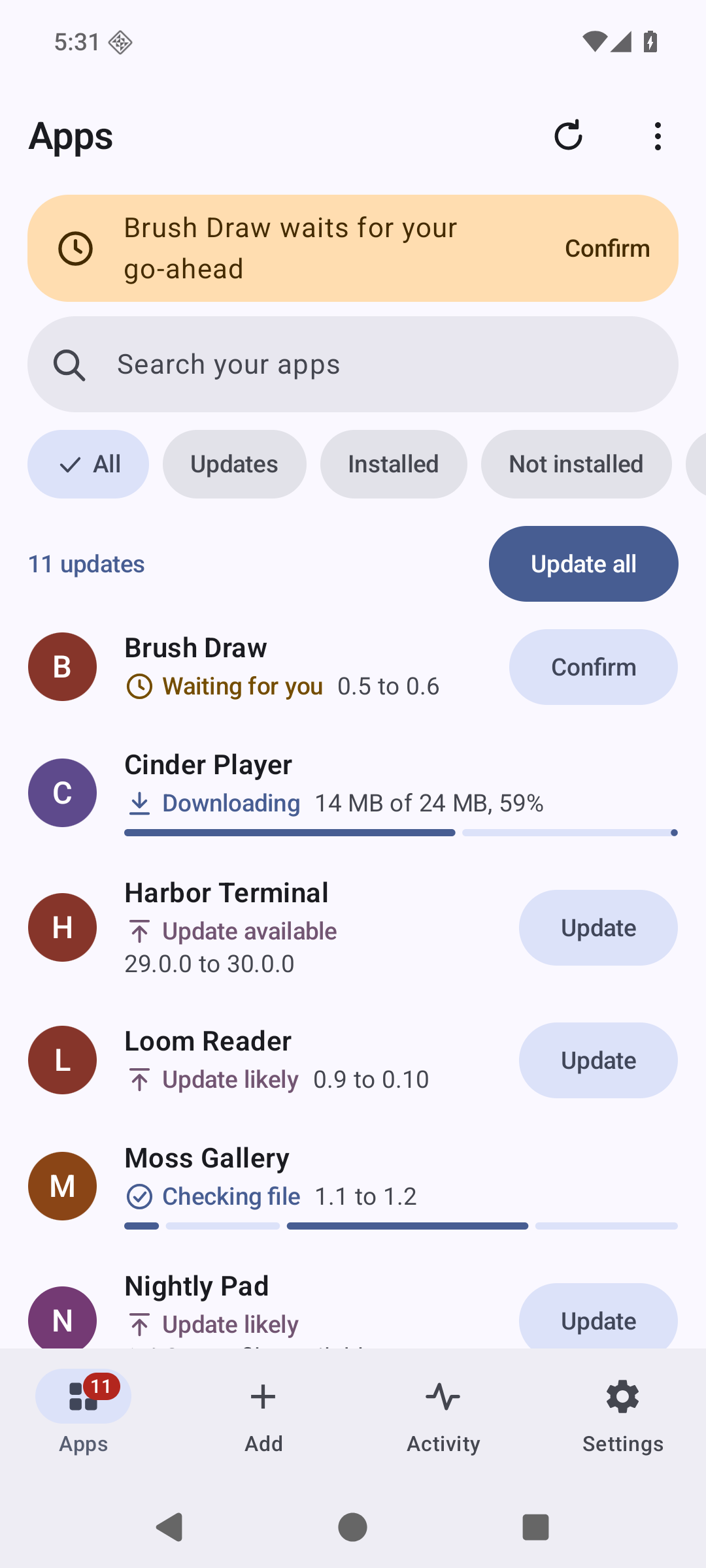
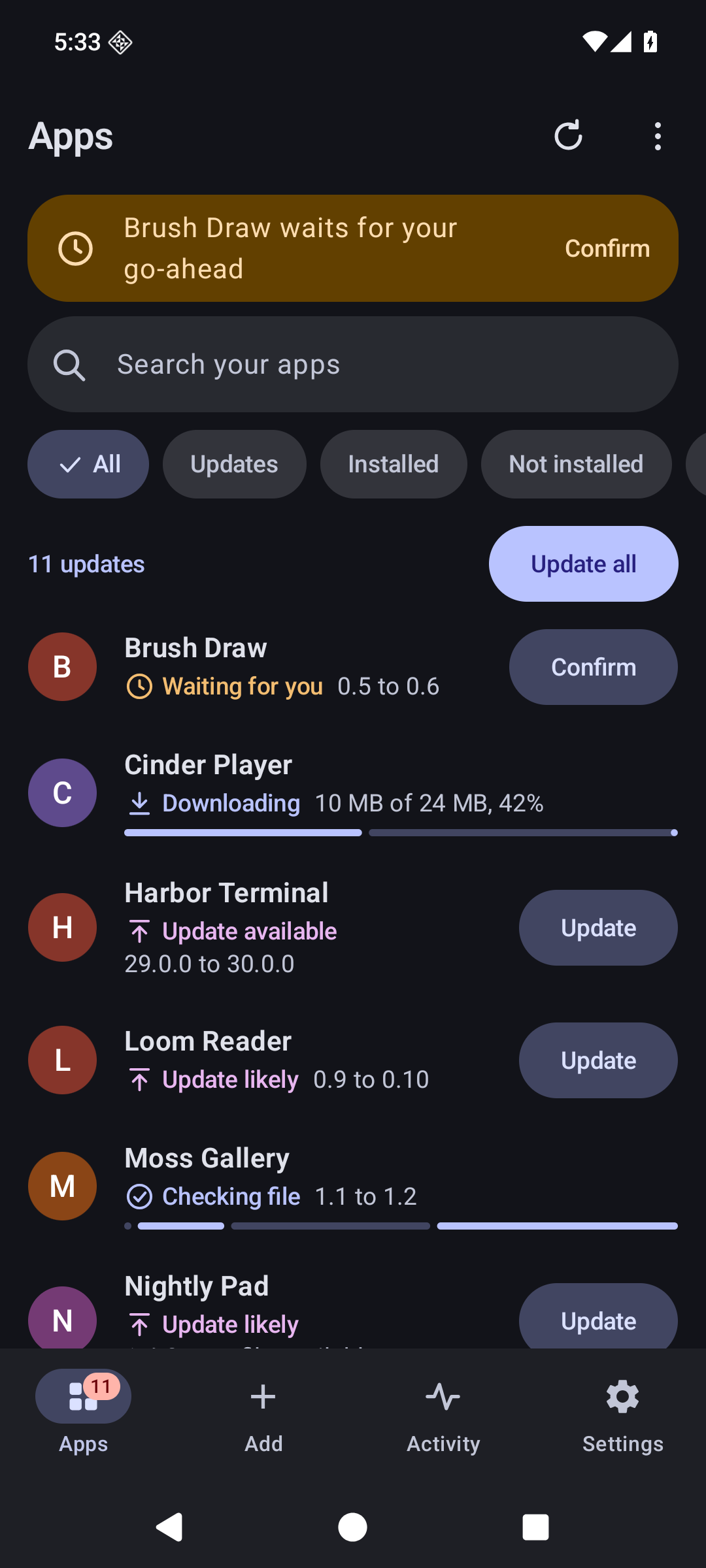
A widget on the home screen says how many updates there are, with a Check button and an Update all button. A Quick Settings tile checks and shows the count, and the launcher icon's shortcuts check, update everything or add an app. Notifications about updates carry an Update button of their own.
Through Tor
Choose Orbot under Settings, Network, and every request Tern makes goes through Orbot's proxy, names included. If the proxy is not there, the request fails and says so. Nothing goes round it, and tests on a device hold it to that for checks, downloads and icons. The same row shows whether Orbot is connected and opens it when it is not.
On a television
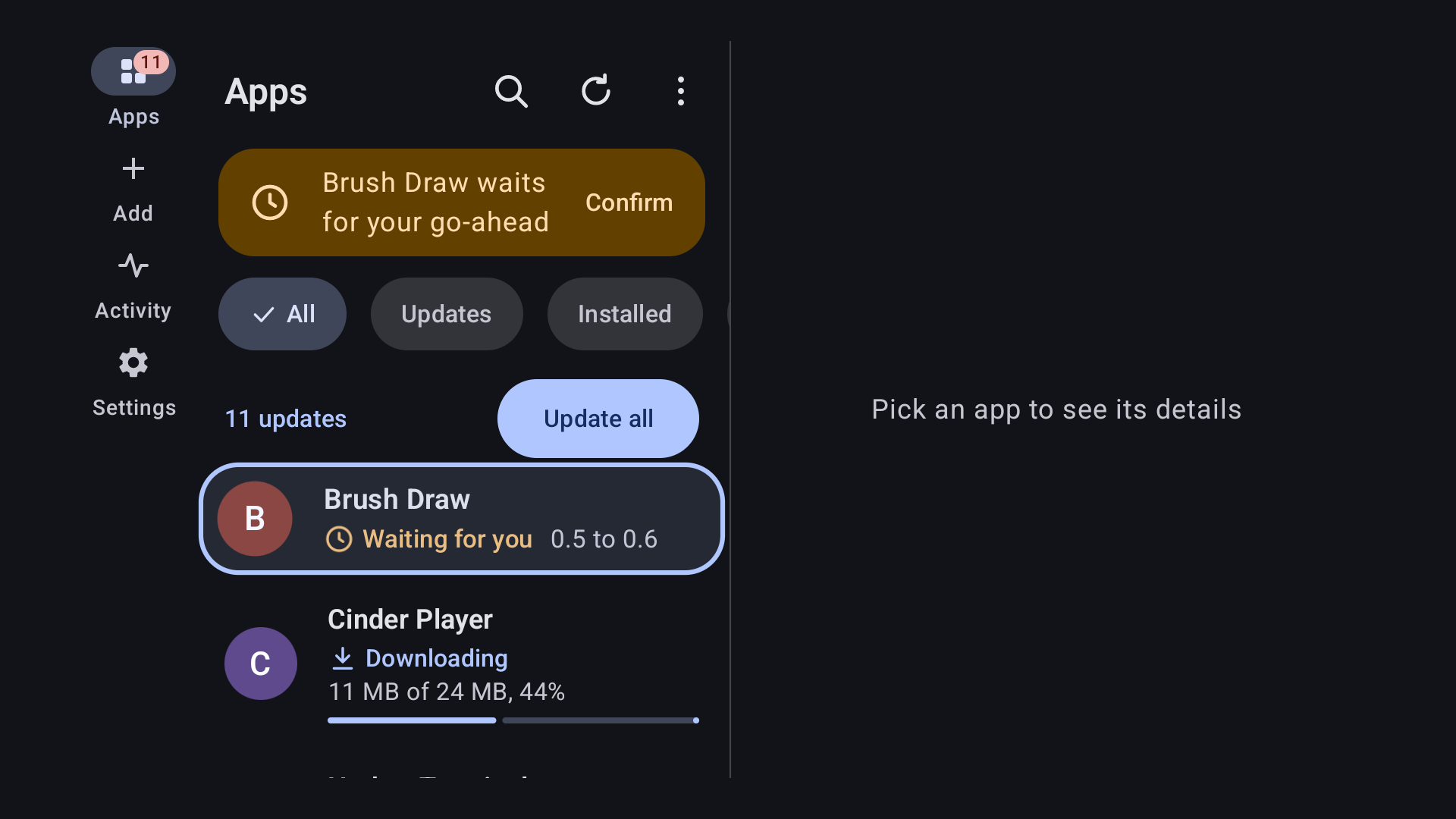
Every screen works with the remote alone. A TV has no file picker, so exports go
to Download/Tern and imports come from a list, an address or a phone. Choose
Send from a phone and the TV shows a QR code and a code of 20 characters. The
phone's browser seals the links or the export file with that code before they
leave the phone, and the TV opens only what was sealed with it. Nothing is added
until you look at it on the TV. docs/TELEVISION.md has the
details.

Coming from Obtainium
Import its export file under Settings. Apps come over with their filters, categories, notes and pinned certificates, and the settings in the file come along under Tern's names: the interval, the list's order and grouping, the theme and the colours of the categories. Tokens and the installer never travel in a file. Apps that arrive with a pinned certificate or a filter are named in the summary, because those are settings somebody else chose. Going the other way, Settings writes a file Obtainium imports.
You can also start from the repositories you starred on GitHub: give a user name, tick the ones that are apps, and Tern adds them one by one.
Tern can also open obtainium:// links, which is how the
crowdsourced configurations are shared.
That is off until you turn it on in Settings, and a link only ever fills in the
Add screen: nothing is stored or installed until you press the button.
A badge for your own app
If you publish an Android app on GitHub or anywhere else Tern reads, a badge in your README lets people add it to Tern with one tap:
[<img src="https://tern.munzzyy.dev/badge.png" alt="Get it with Tern" height="80">](https://tern.munzzyy.dev/add/#url=https%3A%2F%2Fgithub.com%2FYOU%2FYOUR-APP)
The site writes this line for you from your address. The link opens a small page that hands the address to Tern, which shows the app first and adds nothing until the person presses Add. Without Tern the page offers the download.
Languages and screens
Tern comes in English and 28 other languages, right-to-left ones included. The translations were made by a machine and checked by a second one; no native speaker has reviewed them yet, and corrections are welcome. Pick the language under Settings, Appearance, on any Android version; from Android 13 on, Android's own app language setting shows the same choice.
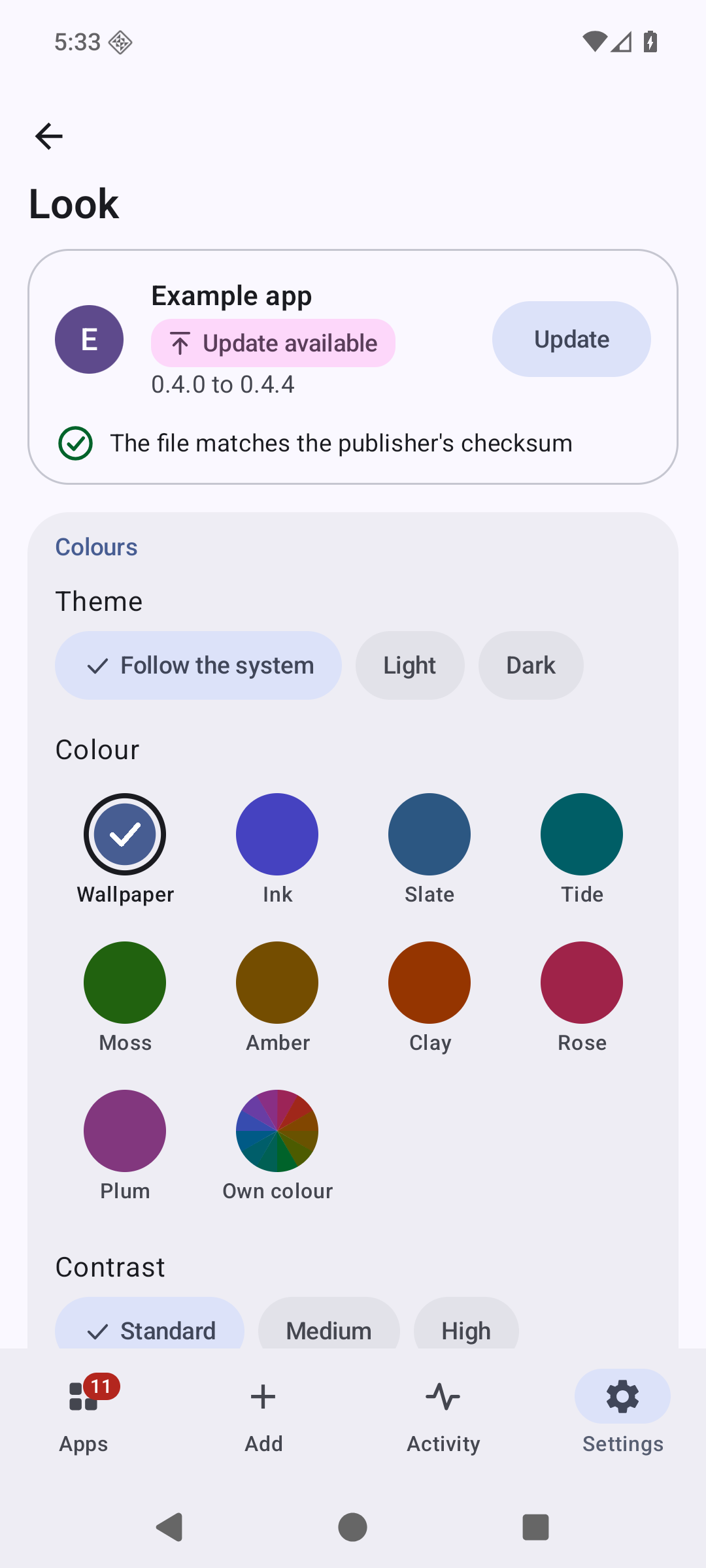
Text at twice the normal size keeps each screen's main action on screen, on a phone and on a TV. From one and a half times the size, a TV shows the list and an app's page one at a time, as a phone does. The look is yours to change under Settings, Look: the theme, colours from the wallpaper, a palette or a colour of your own, contrast, density, corners and the shape of app icons.
How it compares
docs/COMPARISON.md goes through it point by point, with the file and line in Obtainium's source or the issue number for each claim about it, and the test or measurement for each claim about Tern. It also lists what Obtainium does that Tern does not.
What it does not do
- Without Shizuku, Dhizuku or root, a first install always asks, and silent updates need Android 12, as Android decides.
- An archive compressed with zstd is not opened; zip, tar, and tar compressed with gzip, bzip2 or xz are.
- The translations are machine-made. Details of an error that come from a server or a parser stay in English, and an entry in the activity log stays in the language it was written in.
- This version has run on emulators: phones with Android 9, 10, 13 and 16, and televisions with Android TV 9, 12 and 14. It has not yet run on a shelf of real devices. On Android 9, a kept export or a file saved from an app's page goes through a file picker instead of straight to Download/Tern, since Android only added that folder in 10; Android itself offers no certificate transparency check there either. Everything else, install and update included, works the same. On Android 9 and 16 emulators the background check was still scheduled after a reboot and after Tern updated itself, and it ran in a Doze maintenance window. Doze was only forced and stepped through there, not left to run for hours, and vendor installers are untested. On the television image Play Protect stopped the first install of an app it had not seen and offered "Install anyway"; that answer is yours to give.
- F-Droid and IzzyOnDroid are read through their per-app listings, which are protected by TLS and not by the index signature. Add either as a repository by its address if you want the signature checked; the first contact then downloads the whole index, 19 MB for F-Droid, and later changes cost a diff.
- A filter pattern that takes too long to match is stopped after half a second and reported, but the thread it ran on keeps spinning until Android ends the app's process.
- It is not in any store yet; see the roadmap below.
Build it
export ANDROID_HOME=~/Android/Sdk
./gradlew :app:assembleRelease
bash tools/check-apk.sh app/build/outputs/apk/release/app-release-unsigned.apk
You need JDK 21 and the Android SDK with platform 37. The result is unsigned; docs/RELEASING.md covers signing.
Check the claims
./gradlew :core:test runs the parsers, the sources and the update decision on
the JVM, against fixtures built by Google's own tools, so the oracle for an APK's
package, version and certificate is aapt2 and apksigner and not Tern.
./gradlew :core:test -Dtern.live=true --tests '*LiveSmokeTest*' runs the
same code against GitHub, F-Droid, Codeberg and GitLab. It reads public data and
sends no credentials.
bash tools/device-suite.sh <serial> -e live true -e class io.github.munzzyy.tern.enginetest.LiveSourcesTest
does the same on a device, through the real engine, with one real app from each
of GitHub, GitLab, Codeberg, F-Droid, IzzyOnDroid, a web page, SourceForge,
itch.io, Telegram, Neutron Code and the eight stores. It leaves out GitHub
Actions, which needs a token, Jenkins, SourceHut, direct links and other F-Droid
format repositories. Every request has to carry Tern's User-Agent, and a refused
site, or a store while the stores are off, must not be asked anything. On an
Android 16 phone emulator and an Android TV 14 emulator every source gave a
listing. Where a store offers only ARM files that the emulator cannot run, Tern
says there is no file for that device.
bash tools/device-suite.sh <serial> runs the device tests on an emulator or a
phone, after ./gradlew :app:assembleDebug :app:assembleDebugAndroidTest. They
install a test app through Tern, publish a new version, and check that the
update arrives without a prompt; then they offer the same update signed by
another key and check that the installer is never called. They also cut
downloads mid-way, redirect a request with a token to another host, hand the
gate bundles that were altered after signing, and send checks through a proxy
that is not there. Gradle's own connected task is not used, because it drops a
permission that old Android versions only take from the host.
bash tools/check-schedule.sh <serial> sets the debug build to check every 15
minutes and makes sure the job is still there after a reboot and after Tern
replaces itself. Then it forces Doze and steps through its maintenance windows
until the check runs in one, without ever starting the job by hand.
bash tools/check-handoff-page.sh runs the handoff page's own ChaCha20, SHA-256
and HMAC against the RFC test vectors in node, then sends links and files from a
real Chromium to a live handoff and checks that the page broke no rule of its
Content-Security-Policy.
bash tools/check-network-doors.sh fails if any code other than the one HTTP
client opens a connection or resolves a name on the device, or uses anything
else that fetches by itself. bash tools/tests/network-doors/run.sh proves it
catches each of those ways.
bash tools/check-reproducible.sh <folder> builds the release twice from two
clones in different places and compares the files byte for byte.
tools/check-apk.sh reads the built APK and fails if its permissions differ from
the list in the script, if cleartext traffic is allowed anywhere, if it is
debuggable, if it is over 7 MiB, or if test code reached it.
python3 tools/strings.py check app/src/main/res compares every translation
with the English: the same placeholders, the plural forms the language needs,
nothing that exists in one and not the other.
Roadmap
What is left needs people, devices or decisions from outside this repository.
- F-Droid. The recipe was merged on 2026-10-01, and F-Droid's build server has not published it yet. Its build has to reproduce the APK here to carry the same signature, and then the two can replace each other without a reinstall. The README and the site will link the listing once it is up.
- Real devices. Every test so far ran on emulators, as What it does not do says. A phone with its maker's own Android, a television box, root through Magisk or KernelSU, Doze through a whole night, and sending to a television from a real phone's browser over Wi-Fi are still to be tried.
- Native speakers for the 28 translations, which Languages and screens says machines made.
- An independent security review of the verifier, the install gate and the handoff. Tern has had none, and docs/SECURITY-MODEL.md writes down what such a review would hold it to.
Taking part
Bugs and ideas go to the issue tracker, and CONTRIBUTING.md has the setup and the house rules. A security problem goes to me privately first, as SECURITY.md describes.
Licence
GPL-3.0-or-later. See LICENSE.
Tern contains no code from Obtainium. It reads Obtainium's export format so that people can move, and it owes the idea to Imran Remtulla's app.
How Shizuku is used
Can install verified apps and updates silently via `pm install-create`, `pm install-write` and `pm install-commit` through Shizuku.
This is an AI-assisted analysis of Shizuku-related usages in the app's public source code. It is best effort, so it may not catch every single usage.
How this app uses Shizuku
Tern uses Shizuku to install downloaded app files silently after they pass package, signature and checksum checks.
- Install apps silently: verified APKs are installed without a system prompt using
pm install-create,pm install-writeandpm install-commitrun through Shizuku, including first installs and updates on phones, tablets and TV. - Manage install sessions: interrupted or superseded installs are cleaned up with
pm install-abandonthrough Shizuku so stale sessions do not block later updates. - Place expansion files: game data files that arrive with an update are written to the shared OBB folder with privileged file commands through Shizuku, then verified by size before the install is finished.
Android APIs or commands used
pm install-createpm install-writepm install-commitpm install-abandonmkdirddstat
Notable details
When Shizuku is not available the same verified files can still be installed through the system installer with user confirmation.
Changelog
What's new for version 0.3.0
A stricter check of files signed by more than one key.
- A file signed with more than one key passes only when every one of those keys is pinned. An update passes only when the installed app has exactly the same keys. One matching key used to be enough. So a key added to a download could tie a first install to it, and then no later update from the developer would go in until the app was uninstalled.
- On Android 12 and 12L the question that asks to allow installs no longer says that Android will close Tern when the switch is turned on. Android 11 does that and is still told so. On Android 12 Tern stays open.
Tern can now turn down a file it used to take: one whose keys are not all pinned, or an update whose keys are not the installed app's. That is why this is 0.3.0 and not 0.2.3. A pin that lists more than one certificate still takes a file signed with any one of them, and a rotated key still passes. docs/SECURITY-MODEL.md has the whole rule.
Install tern-0.3.0.apk on Android 9 or later. It installs over earlier versions. Its SHA-256 is:
44969060c192a2a91c0d6d51d51f76007d8cbca3fef489fe7d5e3891a1273ae5
The SHA-256 of the signing certificate is:
a894d9999c8e93a102a1d7afe86028980c25d76e7436dc3b143c5664c95b7003
The device suite passed on the Android TV 9, 11, 12 and 14 emulators. On the phone emulators for Android 9, 10, 13 and 16 a few screen tests failed. Each of them fails the same way with 0.2.2. On Android 13 the new version went in over 0.2.2, kept the list and updated an app.
Permissions
14 permissions requested
More from this category
 ShizuStore
 Droid-ify
 InstallerX Revived
 Universal Installer
 Komi Store
 Vyxel Apps
 APKUpdater
 Neo Store
 Orion Store
 ObtainX
 ShizuCoreFetch
 Aurora Store