 ShizuStore
Smart Dock
1.15.0 · F-Droid
More about this app
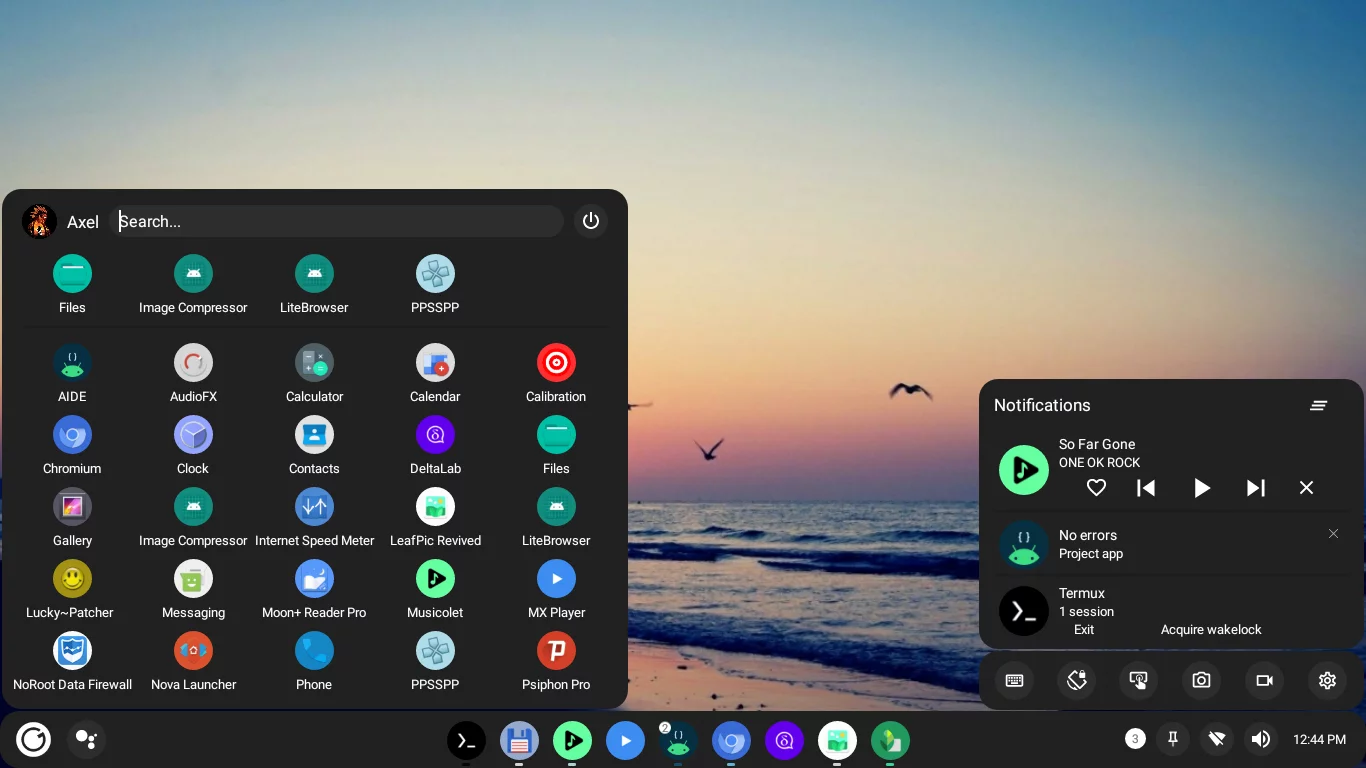
Transform your phone into a desktop environment with taskbar, recent apps, and start menu
Smart Dock
A user-friendly desktop mode launcher that offers a modern and customizable user interface
Main features
- Very customizable, icons, colors, shapes, sounds
- Multi window support
- Keyboard shortcuts
- Support for both desktop and tablet layouts
- Compatible with Android 10 and above, no root required
Install

You can grab the latest release from F-Droid
Note: The application should be installed as a system app in order to obtain the right permissions. Alternatively you can use Shizuku.
Usage
Grant restricted permissions:
On some devices Accessibility and Notification permissions might not be available. To solve this go to: System Settings > Apps > Smartdock > 3 Dot menu (Top right corner) > Allow restricted permissions
Secure settings
To grant secure settings permissions run the following command on an adb or root shell:
pm grant cu.axel.smartdock android.permission.WRITE_SECURE_SETTINGS
Hide navigation bar
You might also want to hide the Android navigation bar. See hiding navigation bar
Get help and ask questions
Telegram support group: https://t.me/smartdock358
Support the project
If you find this project useful or it has helped you in any way, consider showing your appreciation and supporting its ongoing development.
Bitcoin Address:
bc1qzc0jnpzk4g838t56jshvt4j5a2a5dgfx5w9k5a
Thank you for your support!
Contributors
How Shizuku is used
Can list live tasks, resize and close windows, and toggle WiFi and Bluetooth via Shizuku with `IActivityManager`, `IWifiManager` and `IBluetoothManager`.
This is an AI-assisted analysis of Shizuku-related usages in the app's public source code. It is best effort, so it may not catch every single usage.
How this app uses Shizuku
Smart Dock uses Shizuku to power its desktop style taskbar, window controls and quick settings toggles.
- Show running apps: the dock lists current open windows with icons and state retrieved through the privileged activity service instead of only usage history.
- Resize and snap windows: a running app chosen in the dock menu is resized to standard, maximized, portrait, fullscreen or tiled layouts through the privileged activity service.
- Close windows: a running app chosen in the dock menu is dismissed through the privileged activity service.
- Toggle WiFi: the WiFi button in quick settings turns WiFi on or off through the privileged WiFi service, and shows the current network name from the privileged connection info.
- Toggle Bluetooth: the Bluetooth button in quick settings turns Bluetooth on or off through the privileged Bluetooth service on newer Android versions.
Android APIs or commands used
IActivityManager.getTasksIActivityManager.resizeTaskIActivityManager.removeTaskIWifiManager.setWifiEnabledIWifiManager.getConnectionInfoIBluetoothManager.enableIBluetoothManager.disable
Notable details
Without Shizuku the task list falls back to usage history, WiFi control falls back to opening the system WiFi panel, and Bluetooth control falls back to opening Bluetooth settings. Window resize and close actions in the dock menu require the privileged grant to appear.
Changelog
What's new for version 1.15.0
What's Changed
- Fix Bluetooth related crashes
- Fix some features not working until their respective settings page was open
- Port to Material 3
- Better power menu positioning
- Partially fix icon pack support
- Hyperlinks added and a wrong word replaced. by @ilhan-athn7 in https://github.com/axel358/smartdock/pull/2
- Update README.md by @KSMaan45 in https://github.com/axel358/smartdock/pull/3
- Punjabi (ਪੰਜਾਬੀ) Translation by @KSMaan45 in https://github.com/axel358/smartdock/pull/4
- smartdock: Adding Hindi Language Support by @Fire7ly in https://github.com/axel358/smartdock/pull/5
- Addition of workflows, updated the project structure and done some minor fixes on code by @jr20xx in https://github.com/axel358/smartdock/pull/7
- Smartdock: Hindi_Support: Add more statement for support hindi by @Fire7ly in https://github.com/axel358/smartdock/pull/8
- Update LSPosed.md by @ilhan-athn7 in https://github.com/axel358/smartdock/pull/10
- DeviceUtils: Fix for kernelSU by @Xtr126 in https://github.com/axel358/smartdock/pull/11
- Highlight text when performing search by @Xtr126 in https://github.com/axel358/smartdock/pull/12
- Punjabi (ਪੰਜਾਬੀ) Translation Update by @KSMaan45 in https://github.com/axel358/smartdock/pull/15
- Update Contributors.md by @KSMaan45 in https://github.com/axel358/smartdock/pull/19
- Target Android 12 by @axel358 in https://github.com/axel358/smartdock/pull/23
- fix: Use correct pref for icon packs by @axel358 in https://github.com/axel358/smartdock/pull/24
New Contributors
- @ilhan-athn7 made their first contribution in https://github.com/axel358/smartdock/pull/2
- @KSMaan45 made their first contribution in https://github.com/axel358/smartdock/pull/3
- @Fire7ly made their first contribution in https://github.com/axel358/smartdock/pull/5
- @jr20xx made their first contribution in https://github.com/axel358/smartdock/pull/7
- @Xtr126 made their first contribution in https://github.com/axel358/smartdock/pull/11
- @axel358 made their first contribution in https://github.com/axel358/smartdock/pull/23
Full Changelog: https://github.com/axel358/smartdock/commits/1.9.8
Permissions
16 permissions requested
Sources
4 sources
Sources
4 sources
More from this category
 Essentials
 Extendroid
 ShizuTools
 Dragon Launcher
 Smart Island
 GAMA
GAMA
 Tap, Tap
 Expressive Cutout
 SystemUI Tuner
 Ambient Music Mod
 ColorBlendr
 SetEdit+