 ShizuStore
SilentAlarm
2.0 · GitHub
More about this app
Earphone-first alarm clock that keeps alarms alive on aggressive OEM ROMs with a Shizuku or root watchdog that restarts the app.
SilentAlarm — Private Earphone Alarm
中文 | English
SilentAlarm plays alarms through earphones (wired / BT / USB), with vibrate-only or speaker fallback. Kotlin + Jetpack Compose.
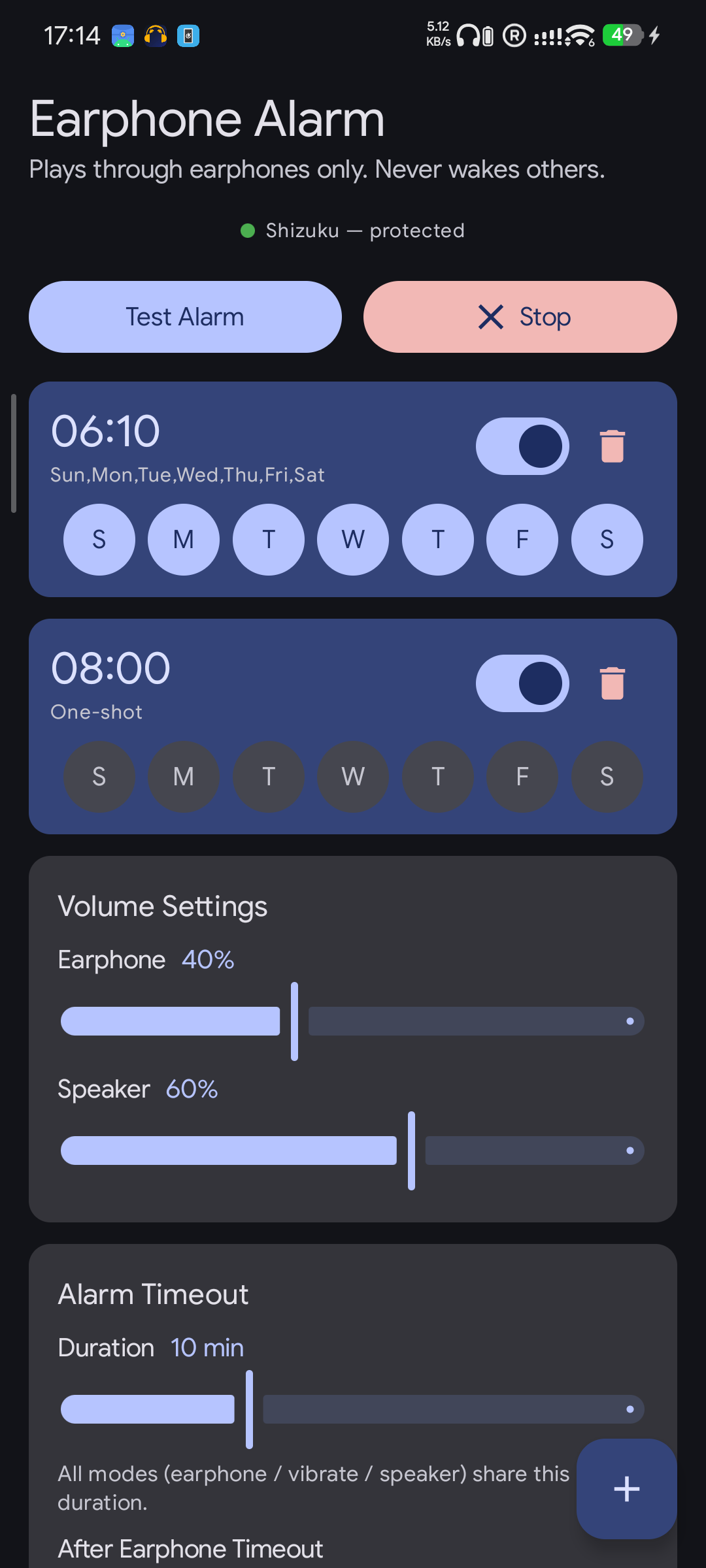
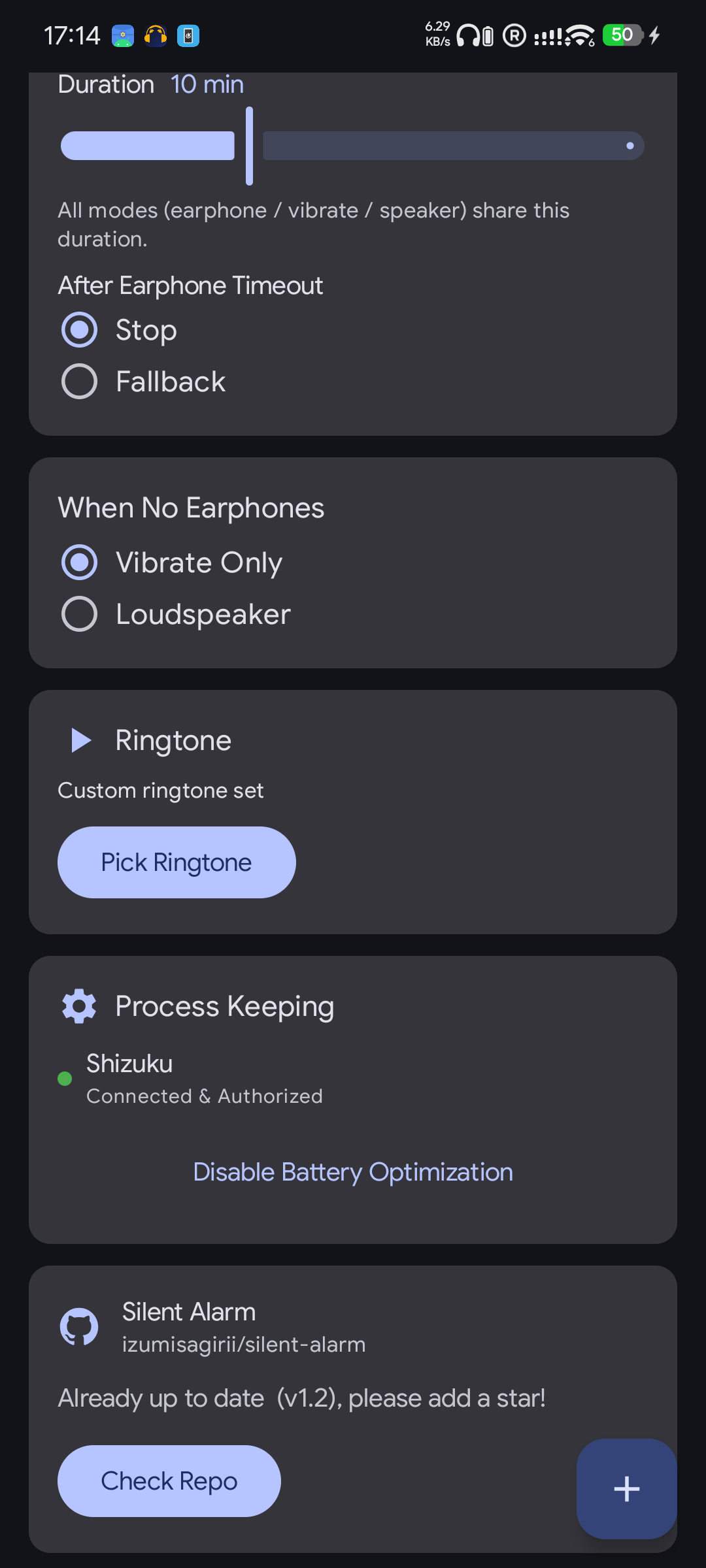
Screenshot


Features
- Multi-alarm — one-shot or recurring
- Earphone-first routing (wired / BT / USB), 500 ms silent BT wake-up
- No-earphone fallback — vibrate-only or speaker
- Ring timeout + fallback, 5-min snooze
- Separate earphone / speaker volume, custom ringtone
- Per-alarm timezone, search, Quick Settings Tile, 30+ languages
Keeping the alarm alive
Chinese OEM ROMs (MIUI, EMUI, ColorOS, …) aggressively kill background apps. Three layers keep the alarm reliable:
- Exact alarm (on by default) — scheduled via
setAlarmClock; fires even if the process is killed. No setup needed. - Notification keep-alive (optional) — a persistent notification plus a 2-hour auto-recovery alarm.
- Shizuku / root watchdog (optional, strongest) — battery-bucket whitelist plus a daemon that restarts the app within ~20 s.
Enable: turn on Notification keep-alive in the app; install Shizuku (or have root) and turn on the Shizuku toggle for the strongest protection.
Build
- minSdk 29 / targetSdk 36 · Kotlin 2.2.10 · Compose BOM 2026.02 · AGP 9.3
SilentAlarm — 隐私耳机闹钟
耳机优先响铃的 Android 闹钟,无耳机时可选仅振动或外放。Kotlin + Jetpack Compose。
功能
- 多闹钟 — 单次或每周重复
- 耳机优先响铃(有线 / 蓝牙 / USB),500 ms 静音唤醒
- 无耳机回退 — 仅振动或扬声器
- 响铃超时 + 回退、5 分钟贪睡
- 耳机 / 扬声器音量分开调节、自定义铃声
- 单闹钟时区、搜索、快捷磁贴、30+ 语言
保活
国产 ROM(MIUI、EMUI、ColorOS 等)会激进杀后台。三层保活确保闹钟可靠:
- 精确闹钟(默认开启)— 用
setAlarmClock调度,进程被杀也会响,无需配置。 - 通知保活(可选)— 常驻通知 + 2 小时自动恢复。
- Shizuku / root 看门狗(可选,最强)— 电池桶白名单 + 进程死亡约 20 秒内自动拉起。
启用方式: 应用内开启「通知保活」;安装 Shizuku(或有 root)后开启「Shizuku」开关,获得最强保护。
构建
- minSdk 29 / targetSdk 36 · Kotlin 2.2.10 · Compose BOM 2026.02 · AGP 9.3
How Shizuku is used
Can keep alarms alive via Shizuku with `cmd deviceidle whitelist`, `am set-standby-bucket` and a watchdog using `am start-foreground-service`.
This is an AI-assisted analysis of Shizuku-related usages in the app's public source code. It is best effort, so it may not catch every single usage.
How this app uses Shizuku
Shizuku is used to keep alarms reliable on aggressive ROMs by running battery exemption and watchdog commands with elevated privilege.
- Exempt app from battery limits: when the privileged keep alive option is enabled, the app is added to the Doze whitelist and set to the active standby bucket with the
cmd deviceidle whitelistandam set-standby-bucketshell commands through Shizuku, reapplied after reboot. - Restart alarm service after kills: when the privileged option is on and alarms are enabled, a background shell loop checks whether the app is running with
pidofand restarts the alarm audio service with theam start-foreground-serviceshell command through Shizuku, and it is stopped withpkillwhen disabled or no alarms remain.
Android APIs or commands used
cmd deviceidle whitelist +am set-standby-bucket activeam start-foreground-servicepidofpkill -fnohup sh -csh -c
Notable details
The privileged watchdog is optional. Alarms are scheduled normally without Shizuku; Shizuku only adds the battery exemption and automatic restart layer.
Changelog
What's new for version 2.0
SilentAlarm v2.0
- 大幅提升UI流畅性
- 增添时区选择,默认当前时区,v1.x升级需要重新设置闹钟,切换时区不会修改预设的时区和时间
- 优化保活tier设置,默认权限即可满足正常使用,在会杀后台的oem上可选启用通知保活和权限保活,不同的选项相互独立
- 其他提升稳定性的重构
- Significantly improved UI smoothness.
- Added time zone selection (defaults to the current time zone); alarms must be reconfigured after upgrading from v1.x, while switching time zones will not alter the preset time zone or time.
- Optimized process keeping settings; default settings are sufficient for normal use, with optional "notification-based" and "permission-based" modes available for OEMs that aggressively kill background processes (these options operate independently).
- Refactoring for improved stability.
PGP: [email protected]
Permissions
13 permissions requested
More from this category
 VineOS
 Phone Diagnostic
 OptiDroid
 Screen Recorder
 Screen Translator
 KeiOS
KeiOS
 雨晴截屏
雨晴截屏
 CaptureCap
 Kiosk Satellite
 Iris长截图
 Fern
Fern
 GhostLock