 ShizuStore
ShizuTools
1.4.6 · GitHub
More about this app
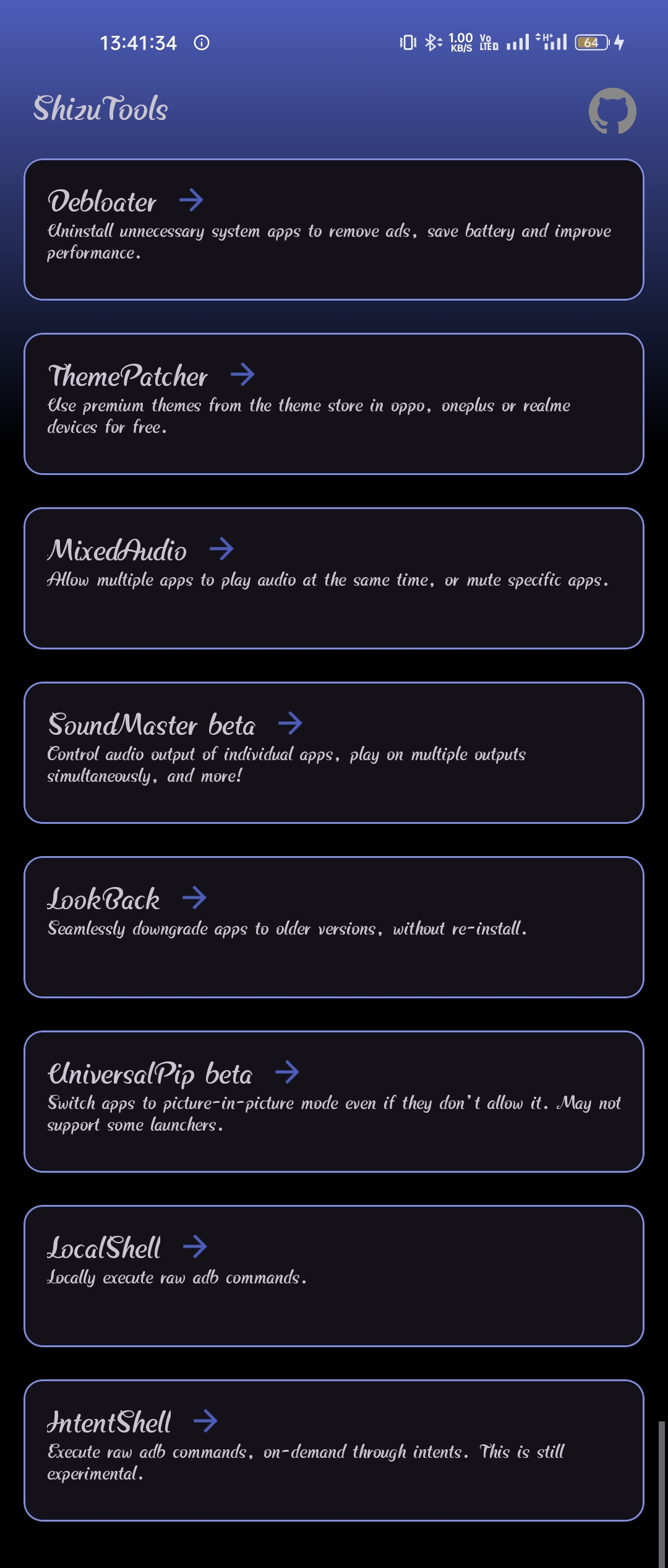
Contains some easy-to-use tools to go beyond the level of control allowed by Android System
ShizuTools
Contains some easy-to-use tools to go beyond the level of control allowed by Android System.
Tools -
- Debloater - Uninstall system apps and bloatware, with app information from UAD.
- ThemePatcher - Unlocks premium content for free, from the Oppo/Realme/Oneplus theme store.
- MixedAudio - Allows multiple media apps to play at the same time, or mute audio of specific apps.
- SoundMaster - Independent volume control for every app, play on multiple audio outputs simultaneously, and more! How to use
- LookBack - Allows downgrade of apps, without uninstallation. Does not work on all devices.
- UniversalPip - Enforces Picture-in-Picture mode for all apps, even if they don't allow it. How to use.
- LocalShell - Manually execute other raw ADB commands.
- IntentShell - Allows other apps (Tasker,MacroDroid,etc) to run ADB commands via intent requests. How to use
Better Alternative to UniversalPip - Extendroid
This app is still being developed. Feel free to suggest new features, report bugs or contribute to the project. But do not expect swift responses as I am usually quite busy.
Installation
Install the Latest Release Build from here.
Install the Latest Dev Build from here
License
This project is licensed under GNU General Public License v3.0.
Note - You must not distribute this software, whether original or modified, to any platform without its source code or the reference to its original source code. Also, publishing to any app stores without permission is forbidden.
How Shizuku is used
Can run shell commands, debloat apps, install APKs, tune audio and force PiP via `sh -c` through Shizuku.
This is an AI-assisted analysis of Shizuku-related usages in the app's public source code. It is best effort, so it may not catch every single usage.
How this app uses Shizuku
ShizuTools uses Shizuku to run privileged shell commands for system tweaks, app management and audio control.
- Run custom commands: type any shell command in the local shell box and see its output, executed with
sh -cthrough Shizuku. Other apps can also send a command by broadcast when the intent shell switch is on, with the result returned by broadcast. - Disable and remove apps: list installed and disabled apps, then disable or re-enable selected apps and uninstall them for the current user with
cmd package disable,cmd package enable,cmd package uninstallandpm list packages. Uninstalled system apps can be found and restored withcmd package list packagesandcmd package install-existing. - Install APK files: pick an APK file from storage and install it with
catpiped topm install. - Mute and mix audio: see which apps can play sound or take audio focus, then mute or unmute them and allow, ignore or deny mixed audio focus with
appops query-opandappops setforPLAY_AUDIOandTAKE_AUDIO_FOCUS. - Route app sound: capture selected apps and play them on chosen outputs with per app volume, using
appops set PLAY_AUDIOto mute the original stream plus media capture and playback. Starting capture is prepared withpm grant RECORD_AUDIOandappops set PROJECT_MEDIA. - Force picture in picture: create a virtual display, launch apps on it and send media keys and taps to it with
settings getandsettings put global overlay_display_devices,am start --display,dumpsys display,dumpsys window displays,input keyeventandinput tap. - Patch trial themes: detect trial theme values and reset them to permanent values in the system and secure settings tables with
settings put system,settings put secureandam force-stopon the theme store.
Android APIs or commands used
sh -cpm grantpm list packagespm installcmd package enablecmd package disablecmd package uninstallcmd package install-existingcmd package list packagesappops query-opappops setsettings getsettings putam startam force-stopdumpsys displaydumpsys window displaysinput keyeventinput tap
Notable details
The broadcast shell only runs when the intent shell switch is enabled and the sender supplies the matching access key shown in the app, and a wrong key temporarily locks execution. The local shell passes typed text directly to the privileged shell, so any command the shell user can run is available.
Changelog
What's new for version 1.4.6
Permissions
12 permissions requested
More apps from this developer
 Extendroid
More from this category
 Essentials
Extendroid
Essentials
Extendroid
 Dragon Launcher
 Smart Island
 GAMA
GAMA
 Tap, Tap
 Expressive Cutout
 SystemUI Tuner
 Ambient Music Mod
 ColorBlendr
 SetEdit+
 XGesture