 ShizuStore
Shizuku Shortcuts
0.5.0 · GitHub
More about this app
Create launcher shortcuts for shell commands
Shizuku Shortcuts





Tiny launcher shortcuts, home-screen widgets, and custom shell actions for Android through Shizuku.
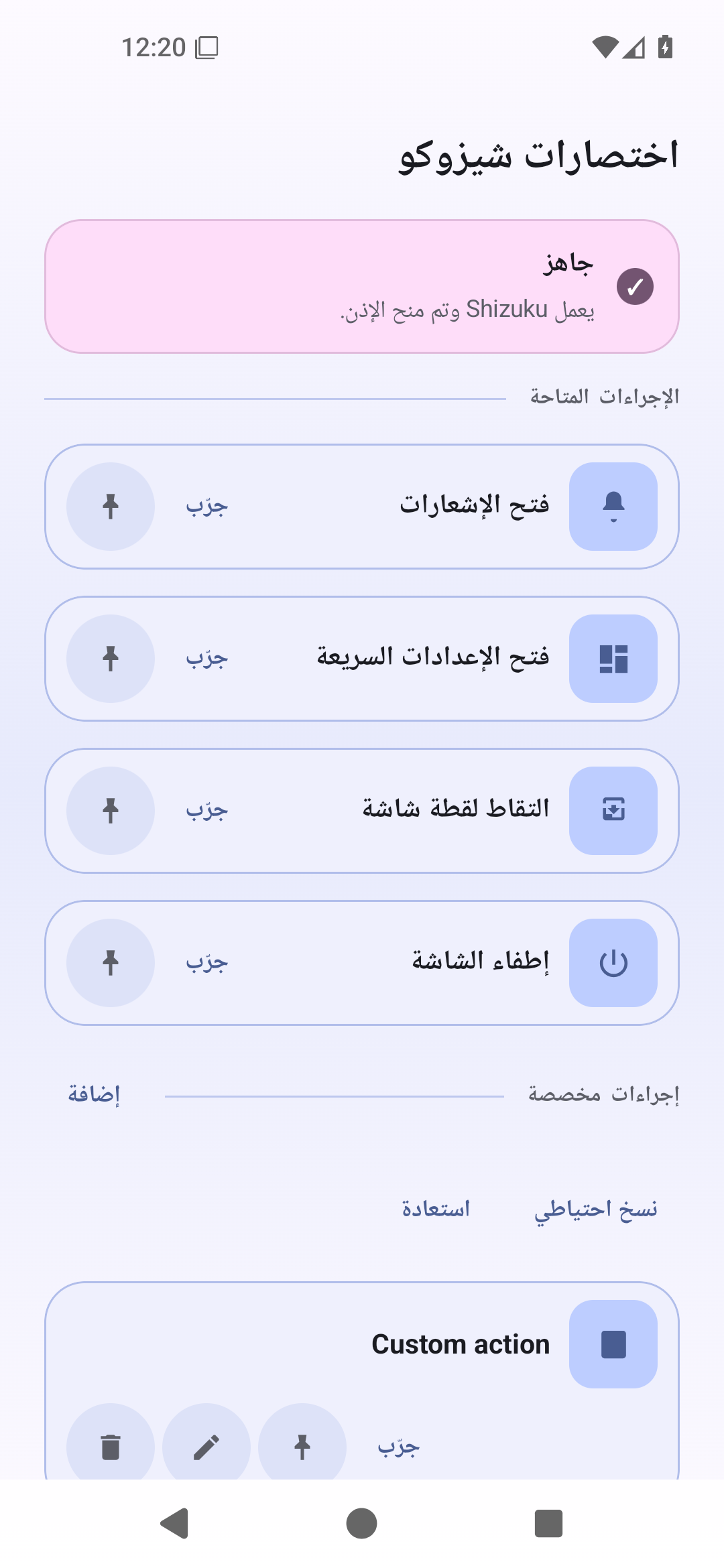
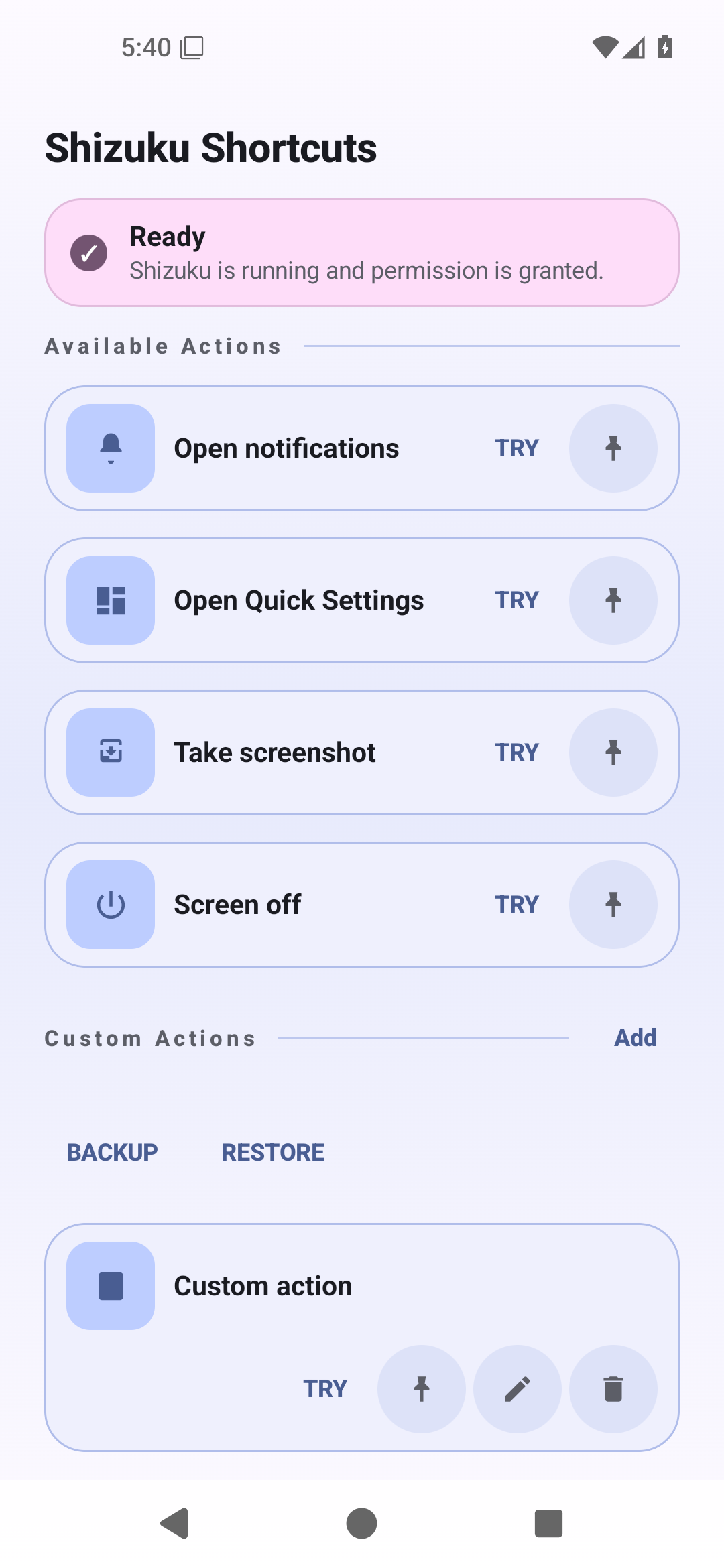
The app ships with four built-in actions:
- open notifications
- open Quick Settings
- take screenshot
- screen off
It can run them directly from the compact home screen with Try, pin them as launcher shortcuts with Pin, place them as home-screen widgets, and add local custom shell actions such as cmd statusbar expand-notifications without the adb shell prefix.
Caution
This project was developed with heavy use of AI assistance, including OpenAI Codex.
Screenshots
| English | Arabic (RTL) |
|---|---|
|
Home (actions + status)

|
Home (الصفحة الرئيسية)

|
What This App Does
- Opens the notification shade with
cmd statusbar expand-notifications - Opens Quick Settings with
cmd statusbar expand-settings - Falls back to
service call statusbar 1for notifications on older ROMs when needed - Lets you add local custom shell actions that run through the same Shizuku user-service path
- Keeps built-in static launcher shortcuts and publishes custom dynamic shortcuts to the launcher long-press menu
- Supports pinned launcher shortcuts for both built-ins and custom actions
- Supports a unified home-screen widget: each widget instance can be configured to one built-in or custom action
- Routes widget taps through the disposable trampoline into an internal dispatch service and shows a rebind prompt if a linked custom action is removed
- Shows one clear Shizuku readiness status with the next required action
- Lets you
Try,Edit,Pin, orDeletecustom actions from the home screen - Shows the active action and rejects concurrent dispatch instead of queueing duplicate commands
- Supports manual backup/restore for custom actions via Android file picker (replace-all restore)
- Exports backup files as JSON with timestamped default names like
shizuku-custom-actions-backup-20260404-153045.json - Supports Android dynamic colors on Android 12+ with a fixed fallback palette on older versions
- Supports English and Arabic with RTL
- Uses Android app language settings, not an in-app language picker
Requirements
- Android
minSdk 26 - Shizuku installed and running
- Shizuku permission granted to this app
Architecture
Core pieces:
MainActivity: launcher orchestration, backup/restore contracts, and action callbacksMainScreen: condensed Compose UI with one readiness status, inline guidance, action rows, and dialogsShortcutDispatchActivity: disposable launcher-shortcut trampolineShortcutDispatchService: internal lifecycle-independent shortcut/widget executionAppShizukuManager: binder state, permission flow, and user-service bindingPrivilegedStatusBarService: Shizuku user service binderAppCustomActionsRepository: local custom-action persistence in one SharedPreferences JSON payloadCustomActionsBackup: backup file naming, JSON serialization/parsing, and SAF read/write helpersActionCatalogandDynamicShortcutSync: merged lookup plus custom dynamic shortcut publishingActionPerformer: shell command execution and fallback logicActionWidgetProvider,ActionWidgetConfigureActivity,ActionWidgetRenderer, andWidgetBindingsRepository: widget lifecycle, selection UI, rendering, and per-widget action binding
Runtime flow:
- User taps
Tryin the app, launches a static/dynamic/pinned shortcut, or taps a configured widget - The app checks Shizuku availability and permission
- The app binds the Shizuku user service
- The user service runs either the built-in argv command or
sh -cfor a custom shell action - The app returns silently or shows a short toast on failure
Calling From Other Apps
Notifications and Quick Settings can also be triggered by other apps such as Tasker because ShortcutDispatchActivity is exported. Sensitive and custom actions require a private token embedded in shortcuts and widgets created by the app.
Use an explicit intent to:
- package:
com.yshalsager.shizukushortcuts - class:
com.yshalsager.shizukushortcuts.ShortcutDispatchActivity
Built-in actions support either the intent action or the extra_action_id extra.
Open notifications:
adb shell am start \
  -n com.yshalsager.shizukushortcuts/.ShortcutDispatchActivity \
  -a com.yshalsager.shizukushortcuts.action.EXPAND_NOTIFICATIONS
Open Quick Settings:
adb shell am start \
  -n com.yshalsager.shizukushortcuts/.ShortcutDispatchActivity \
  -a com.yshalsager.shizukushortcuts.action.EXPAND_QUICK_SETTINGS
You can also use the shared extra instead:
adb shell am start \
  -n com.yshalsager.shizukushortcuts/.ShortcutDispatchActivity \
  --es extra_action_id expand_notifications
Current built-in ids:
expand_notificationsexpand_quick_settings
Notes:
- Shizuku still needs to be running and permission must already be granted
- screenshot, screen-off, and custom actions are not exposed through the public intent API
Implementation details live in docs/implementation-walkthrough.md.
Build
This project uses mise for tool management.
# Build debug APK
./gradlew :app:assembleDebug

# Run unit tests
./gradlew :app:testDebugUnitTest

# Run lint
./gradlew :app:lintDebug

# Build Android test APK
./gradlew :app:assembleDebugAndroidTest

# Run regular instrumentation tests on a connected device
./gradlew :app:connectedDebugAndroidTest \
  -Pandroid.testInstrumentationRunnerArguments.notPackage=com.yshalsager.shizukushortcuts.screenshots
Fastlane And Metadata
This repo includes:
fastlane/metadata/android/en-USfastlane/metadata/android/ar- screenshot assets under
fastlane/metadata/android/*/images/phoneScreenshots - fastlane lanes for metadata validation, screenshot capture, and Play upload
Useful commands:
# Install fastlane
bundle install

# Validate fastlane metadata
bundle exec fastlane android validate_metadata

# Capture screenshots
bundle exec fastlane android capture_screenshots
CI
GitHub Actions included in this repo:
ci.yml: unit tests, lint, debug/release builds, API 34 instrumentation tests, metadata validationscreenshots.yml: emulator-based fastlane screenshot capturerelease.yml: build release APK and attach it to GitHub releases
License
GPL-3.0-only. See LICENSE.
How Shizuku is used
Can open notification shade and Quick Settings, take screenshots, turn screen off and run custom shell commands via `Shizuku shell commands`.
This is an AI-assisted analysis of Shizuku-related usages in the app's public source code. It is best effort, so it may not catch every single usage.
How this app uses Shizuku
Shizuku is used to run privileged shell commands from launcher shortcuts, widgets and in-app try buttons.
- Open notification shade: lets the user expand notifications from a shortcut using the
cmd statusbar expand-notificationsshell command through Shizuku, withservice call statusbar 1as a fallback. - Open Quick Settings: lets the user expand Quick Settings from a shortcut using the
cmd statusbar expand-settingsshell command through Shizuku. - Take screenshot: triggers a screenshot from a shortcut by simulating the screenshot key with the
input keyevent 120shell command through Shizuku. - Turn screen off: turns the screen off from a shortcut by simulating the sleep key with the
input keyevent 223shell command through Shizuku. - Run custom commands: runs a shell command the user types and saves as a custom action using
sh -cthrough Shizuku, launched from its shortcut.
Android APIs or commands used
cmd statusbar expand-notificationsservice call statusbar 1cmd statusbar expand-settingsinput keyevent 120input keyevent 223sh -ctimeout -k .25 5
Notable details
Custom commands time out after about five seconds and their captured output is bounded, so long running commands are reported as timed out.
Changelog
What's new for version 0.5.0
Shizuku Shortcuts v0.5.0
This release focuses on safer external dispatch, more reliable privileged actions, resilient custom-action storage, and accessible controls.
Highlights
- Protects screenshots, screen-off, and custom shell actions with a per-install authorization token while keeping notification and Quick Settings actions available to Tasker and similar apps.
- Moves accepted actions into an internal service so shortcut launches can finish immediately without interrupting bounded execution.
- Adds timeouts and output limits for shell commands and Shizuku service calls, clearer failure diagnostics, and protection against concurrent execution.
- Hardens cold-start dispatch, malformed persistence, backup/restore limits, durable replacement, dynamic shortcut reconciliation, and package-upgrade migration.
- Uses the non-toggle
KEYCODE_SLEEPpath for screen-off actions. - Adds custom-action delete undo, safer shell-command editing, and clearer restore impact summaries.
- Improves TalkBack semantics, readiness status, touch targets, large-text behavior, RTL presentation, widget contrast, and widget resizing.
- Compiles against Android 37 and updates the Android/Kotlin/Compose dependency stack.
External integrations
The following public actions remain available without a token:
com.yshalsager.shizukushortcuts.action.EXPAND_NOTIFICATIONScom.yshalsager.shizukushortcuts.action.EXPAND_QUICK_SETTINGS
Sensitive built-in and custom actions now require authorization generated by this installation. Backups intentionally do not transfer that authorization.
Full changelog: https://github.com/yshalsager/ShizukuShortcuts/compare/v0.4.0...v0.5.0
Permissions
2 permissions requested
Sources
2 sources
Sources
2 sources
More apps from this developer
 Mafza
Mafza
More from this category
 Essentials
 Extendroid
 ShizuTools
 Dragon Launcher
 Smart Island
 GAMA
GAMA
 Tap, Tap
 Expressive Cutout
 SystemUI Tuner
 Ambient Music Mod
 ColorBlendr
 SetEdit+