 ShizuStore

Shizuku-Next
14.0.36-next · GitHub
More about this app
Maintained continuation of thedjchi's fork: automated pairing without typing, start method selection, watchdog, in-app shell terminal, app-ops/firewall manager and a Material 3 UI

Shizuku-Next
An enhanced fork of Shizuku that lets apps use system APIs through ADB or root.








About
Shizuku-Next continues development of thedjchi's Shizuku fork, based on the original RikkaApps/Shizuku.
It keeps Shizuku's package name and API, so compatible apps continue to work.
Important: This fork uses a different signing key. Uninstall the official Shizuku or thedjchi's fork before installing Shizuku-Next. A server started by the previous app may remain active until stopped or the device is rebooted.
If you want the original app, visit RikkaApps/Shizuku.
Download
Get the latest build from Releases.
Features
Starting and reliability
- Start through wireless debugging, USB debugging, root, or the Samsung FOTA-agent system UID path where supported.
- Automatically handles wireless-debugging pairing, including reading the pairing code on supported devices.
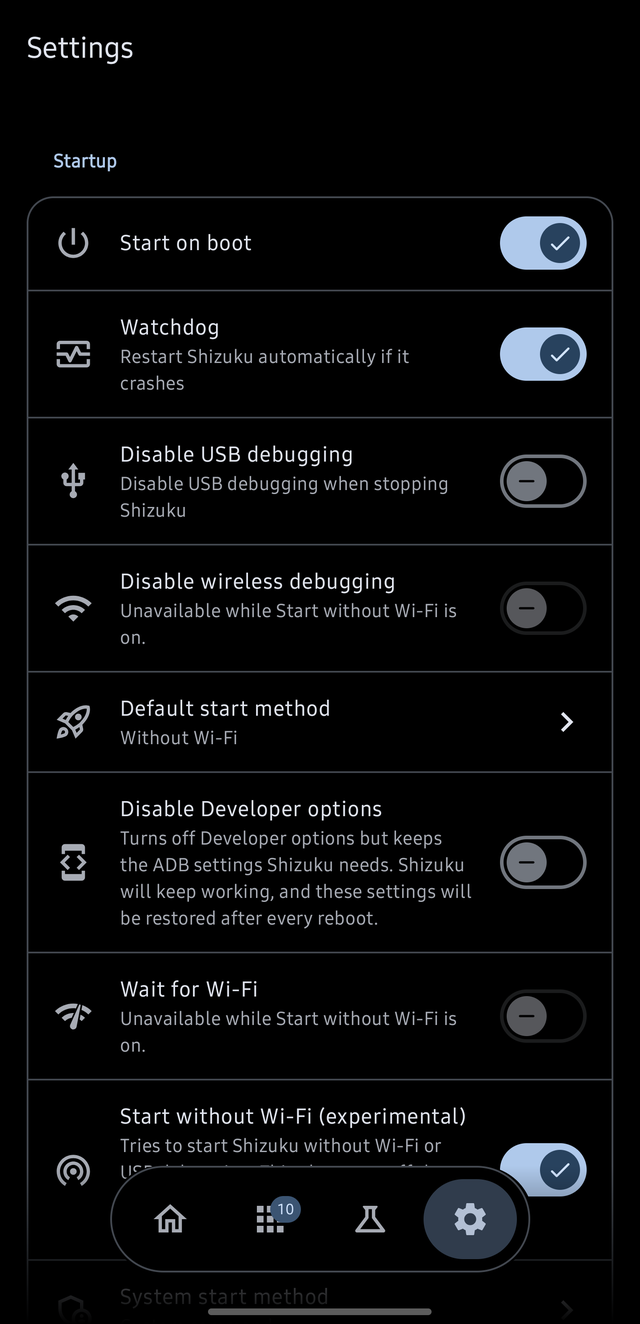
- Optional start on boot, watchdog restarts, automatic recovery, and configurable restart timing.
- TCP mode, USB-port recovery, and experimental startup without Wi-Fi on Android 11 to 16.
- Optional mode to hide Developer options and ADB settings.
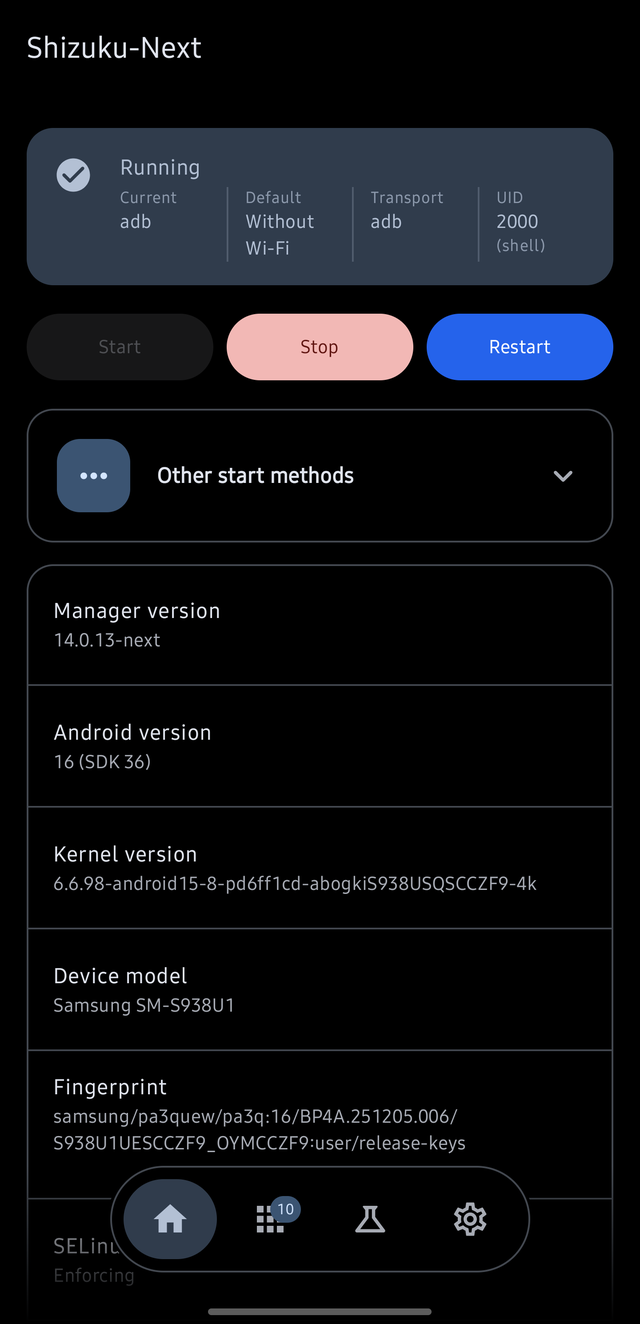
- Clearer startup status, diagnostics, and failure logs.
Manager tools
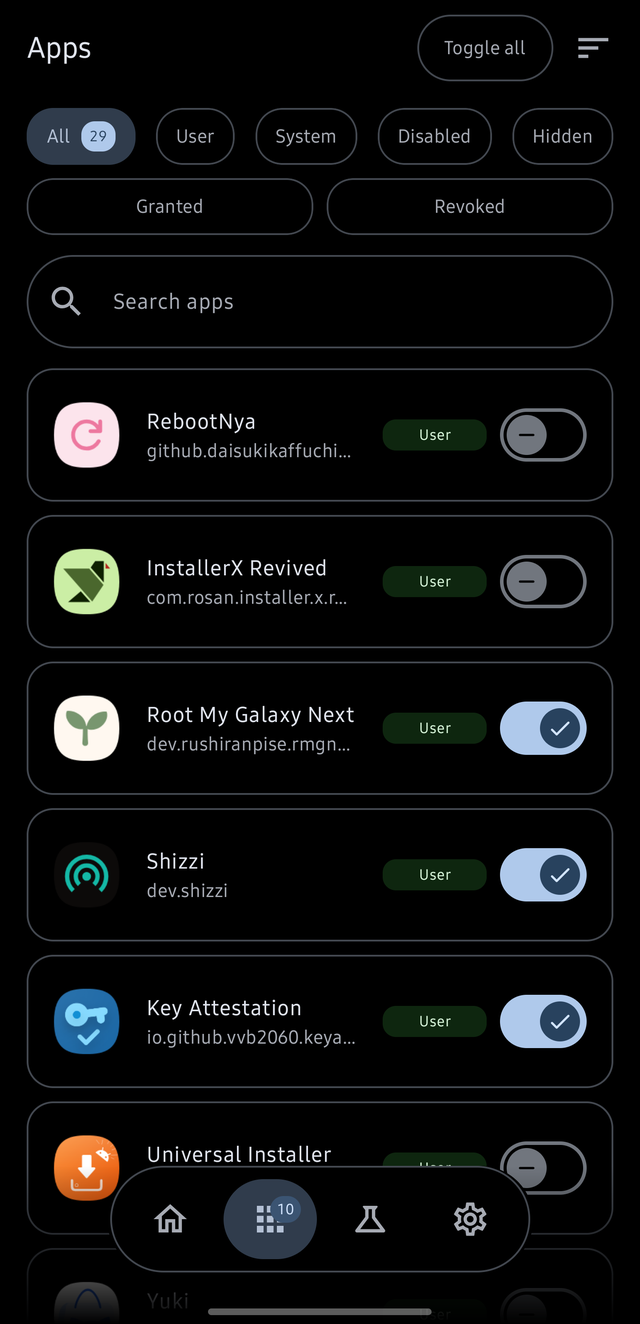
- Material 3 interface with Home, Apps, Modules, Labs, and Settings.
- Manage Shizuku access, app permissions, app ops, battery settings, and app network access, with a fallback to the platform's own firewall API on ROMs whose connectivity command is missing.
- Inspect app details and launch activities.
- Built-in shell, log viewer, file browser, and app installer.
- Manage saved Wi-Fi networks and export/import their credentials.
- Force dark mode and hide selected device settings for chosen apps.
- Batch permission changes, searchable app lists, and device information.
- Tasker and other automation support through intents and status broadcasts.
Firewall
The firewall uses Android's OEM deny chain 3. It can exist from Android 11, but some Android 11 and 12 ROMs do not expose it. The Firewall row appears only after the device answers that the chain is available. Open Labs > Firewall, turn the switch at the top on, then switch on the apps whose network access should be blocked. Work profile and cloned apps appear as their own rows, keyed by user. On Android 13 and newer, the cellular icon beside a blocked app blocks it only on mobile data instead of on every network.
Modules and compatibility
- Experimental ADB module support, including module actions, services, and WebUI. Writing a module covers the format:
module.prop, the environment a script runs in, the WebUI bridge, trust, and how a module gets found. - Stealth mode and in-app updates.
- Android TV and VR-friendly UI support.
- MediaTek compatibility fixes and improvements for some devices.
Some features are experimental or device-dependent. Root, Samsung FOTA-agent system-UID, and no-Wi-Fi startup methods are not available on every device. Only install modules and scripts you trust.
Requirements
- Android 7.0 or newer
- Wireless debugging: Android 11 or newer; supported Android TVs are also compatible.
- USB/PC start: A computer with ADB.
- Root start: A rooted device with working root access.
- System UID start: Samsung devices that ship the FOTA agent (
com.sdet.fotaagent). For SMTShell on older One UI, use the Custom command system start. - Start on boot: Supported start methods only.
See the wiki for setup and troubleshooting guidance.
Privacy
- No tracking or analytics.
- No telemetry or proprietary libraries.
- No Google Play Services dependency.
- Open-source code and reproducible builds.
- Internet access is used for wireless-debugging connections, for checking and downloading GitHub updates, and for the module lists, which are read from GitHub.
The app requests permissions for features such as notifications, background services, wireless debugging, and boot startup. See the app's permission page and source code for details.
Translations
Help translate Shizuku-Next on Crowdin. See docs/translations.md for translation details.
Support the project
Shizuku-Next is free and contains no ads. If you'd like to support development, you can buy me a coffee.
Please also consider supporting the upstream projects: thedjchi and RikkaApps/Shizuku.
Developer guide
API
The API documentation and demo project are available in the Shizuku-API repository.
Shizuku may run with different privileges depending on the start method. Check the server UID and permissions before assuming root access. Prefer ShizukuBinderWrapper over calling transactRemote directly when possible.
Build
git clone --recurse-submodules https://github.com/rushiranpise/Shizuku-Next.git
cd Shizuku-Next
./gradlew :manager:assembleDebug
For a release build, run:
./gradlew :manager:assembleRelease
The debug task builds a debuggable server. In Android Studio, enable Always install with package manager in the Run/Debug configuration when debugging shizuku_server.
Contributing
- Fork the repository.
- Create a feature branch.
- Make and test your changes.
- Commit and push your branch.
- Open a pull request.
Credits
- RikkaW / RikkaApps - original Shizuku, server, and API.
- thedjchi - upstream fork and many inherited features.
- kerneldroid - Nightzuku, where the ADB modules feature comes from: the module format itself, actions and services, and the
window.ShizukuWebUI bridge. - Shevery - the published module API and guide this app's module support is written against, and the module catalogue it searches.
- ShizuWall (AhmetCanArslan) - the firewall's fallback to the system API where a ROM has no connectivity command for it to use, and the technique behind it: the interface reached as Shizuku with a wrapped binder, by reflection.
- Xhizuku - the other implementation of that format, whose documentation this one is checked against.
- KernelSU-Next - the card, chip and tab layout the modules list and the Material 3 interface follow.
- MMRL - the label component whose default accent colour the module cards' size chip follows.
- All upstream contributors and Crowdin translators.
License
Licensed under Apache License 2.0.
Star History
How Shizuku is used
Can run typed shell commands, browse restricted files, install apps and manage permissions, network, WiFi, display and power via `sh -c` and system services
This is an AI-assisted analysis of Shizuku-related usages in the app's public source code. It is best effort, so it may not catch every single usage.
How this app uses Shizuku
This manager app uses Shizuku to act as the shell user, running commands and reaching system services the app itself cannot reach.
- Run shell commands: type any command in the in app terminal and it runs as shell with working directory and saved variables kept between commands.
- Browse restricted files: open folders the app cannot see itself, such as shared
Android/dataandAndroid/obb, with listing, reading, copying, moving, renaming, deleting, zipping and unzipping done through privileged file access and shell commands. - Install packages: install APK and split package files with chosen flags for replace, downgrade and grant all, applied with the
pm installshell command through the privileged file service. - Manage app permissions: view and change runtime and development permissions through the permission service, verified with shell commands.
- Control app operations: view and change background run, notifications, clipboard, camera, microphone and similar switches with
cmd appopsshell commands. - Manage battery behavior: view and change standby bucket with
amcommands, and check battery exemption withdumpsys deviceidleandcmd deviceidlecommands. - Filter app network: check and change whether an app is blocked with
cmd connectivityshell commands and the connectivity interface reached as shell. - Manage app state: force stop, clear data, suspend, disable, uninstall and restore apps with
amandpmshell commands. - Manage WiFi networks: view saved networks, show saved passwords, connect, forget and re add networks with the WiFi service reached as shell and
cmd wifishell commands. - Change display settings: apply a chosen resolution, density and refresh rate with the
wm size,wm density,settingsandcmd uimodeshell commands. - Control power options: reboot, reboot to recovery or bootloader, shut down and turn the screen off with
svc powerand key event shell commands. - Inspect device status: show battery, usage history, CPU, display and kernel status with
dumpsys battery,dumpsys batterystats,dumpsys cpuinfo,dumpsys displayandcat /proc/versionshell commands. - Launch activities: send broadcasts, start activities and press the assistant key through
am broadcast,am startandinput keyeventshell commands.
Android APIs or commands used
ParcelFileDescriptor.openjava.io.File.listFilesjava.io.File.mkdirsjava.io.File.renameTojava.io.File.deleteandroid.content.pm.IPackageManager.getInstalledPackagesandroid.content.pm.IPackageManager.getPackageInfoandroid.permission.IPermissionManager.grantRuntimePermissionandroid.permission.IPermissionManager.revokeRuntimePermissionandroid.permission.IPermissionManager.checkPermissionandroid.os.IUserManager.getUsersandroid.net.IConnectivityManager.getFirewallChainEnabledandroid.net.IConnectivityManager.setFirewallChainEnabledandroid.net.IConnectivityManager.getUidFirewallRuleandroid.net.IConnectivityManager.setUidFirewallRuleandroid.net.IConnectivityManager.updateMeteredNetworkDenyListandroid.net.wifi.IWifiManager.getPrivilegedConfiguredNetworkssh -cpm installpm grantpm revokepm uninstallpm install-existingpm clearpm list packagescmd appops setcmd appops getcmd appops query-opam get-standby-bucketam set-standby-bucketam force-stopam broadcastam startdumpsys batterydumpsys batterystatsdumpsys cpuinfodumpsys displaydumpsys deviceidle whitelistcmd deviceidle whitelistcmd connectivity get-chain3-enabledcmd connectivity set-chain3-enabledcmd connectivity get-package-networking-enabledcmd connectivity set-package-networking-enabledcmd wifi list-networkscmd wifi statuscmd wifi connect-networkcmd wifi forget-networkcmd wifi add-networkcmd uimode nightwm sizewm densitysvc power rebootsvc power shutdowninput keyeventsettings getsettings putunzip -vcat /proc/versionlogcat -d
Notable details
Some installs can use the normal package installer without Shizuku. Private app data under data/data stays unreachable even as shell, so the file browser reports the platform refusal.
Changelog
What's new for version 14.0.36-next
Features
- settings: add palette style selection
- settings: add custom hex accent color
- settings: add amoled background, accent and contrast options
Fixes
- i18n: drop empty translation files before merging
- home: center debugging button icon and label together
- start: run intent starts expedited and replace stale attempts
- home: center debugging button labels
- apps: revoke temporary access with permanent grants
- apps: show one-time grants in app list
- settings: include shell bookmarks in backups
- shell: avoid stale selection crash
- shell: avoid crash when copying long output
- start: handle redacted wireless debugging on Android 17
docs, CI and chores (4 changes)
Documentation
- readme: clarify Samsung system UID start
CI
- add fixed-name latest APK asset
- scan release APK with VirusTotal
Chores
- i18n: new translations from Crowdin
Full Changelog: https://github.com/rushiranpise/Shizuku-Next/compare/v14.0.35-next...v14.0.36-next
VirusTotal
0 malicious, 0 suspicious, 65 undetected
Permissions
23 permissions requested
More from this category
 Shizuku+
 Shevery
 Porter
 Stellar
 Shizako
 Xhizuku