 ShizuStore
Quintz
2.0.0 · GitHub
More about this app
Rootless Wi-Fi band locker and BSSID steering tool that pins Android to 5/6 GHz via Shizuku, with AP telemetry and an RF direction finder.
Quintz ⚡
Tactical Wi-Fi Band Locker, BSSID Steering & RF Direction Finder for Android.
-3DDC84?style=flat-square&logo=android)


-00C853?style=flat-square)

Overview
Quintz is a high-performance, rootless Wi-Fi utility designed to solve one of Android's most notorious wireless connectivity issues: sticky 2.4 GHz roaming on dual-band and mesh networks.
Modern routers broadcast both 2.4 GHz and 5 GHz (or 6 GHz) under a unified SSID. While 5 GHz delivers gigabit speeds and ultra-low latency, Android’s default roaming logic is notoriously conservative. Once your device steps down to 2.4 GHz, it will stubbornly remain connected to the slower, congested band—even when you walk right back next to the router.
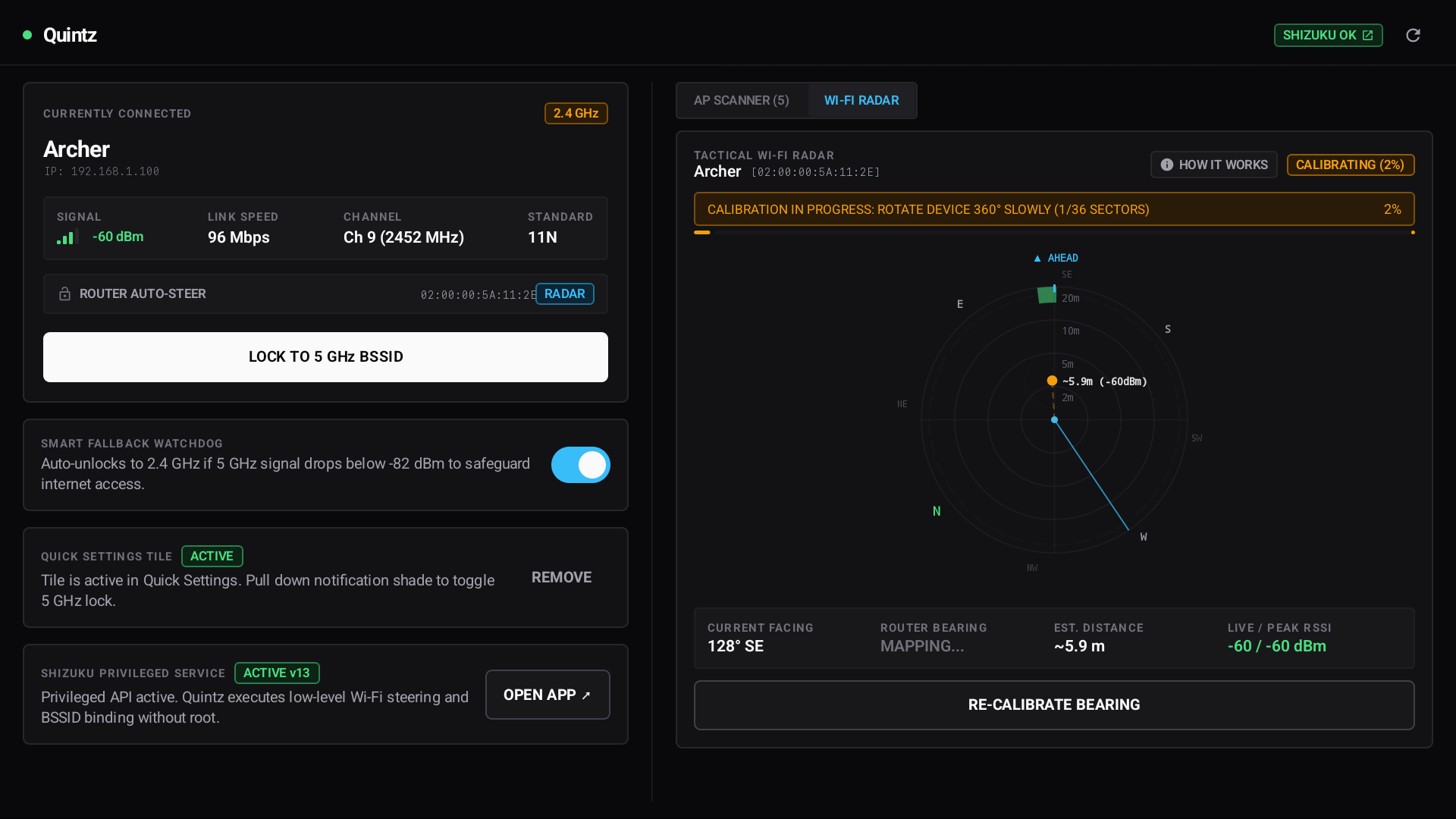
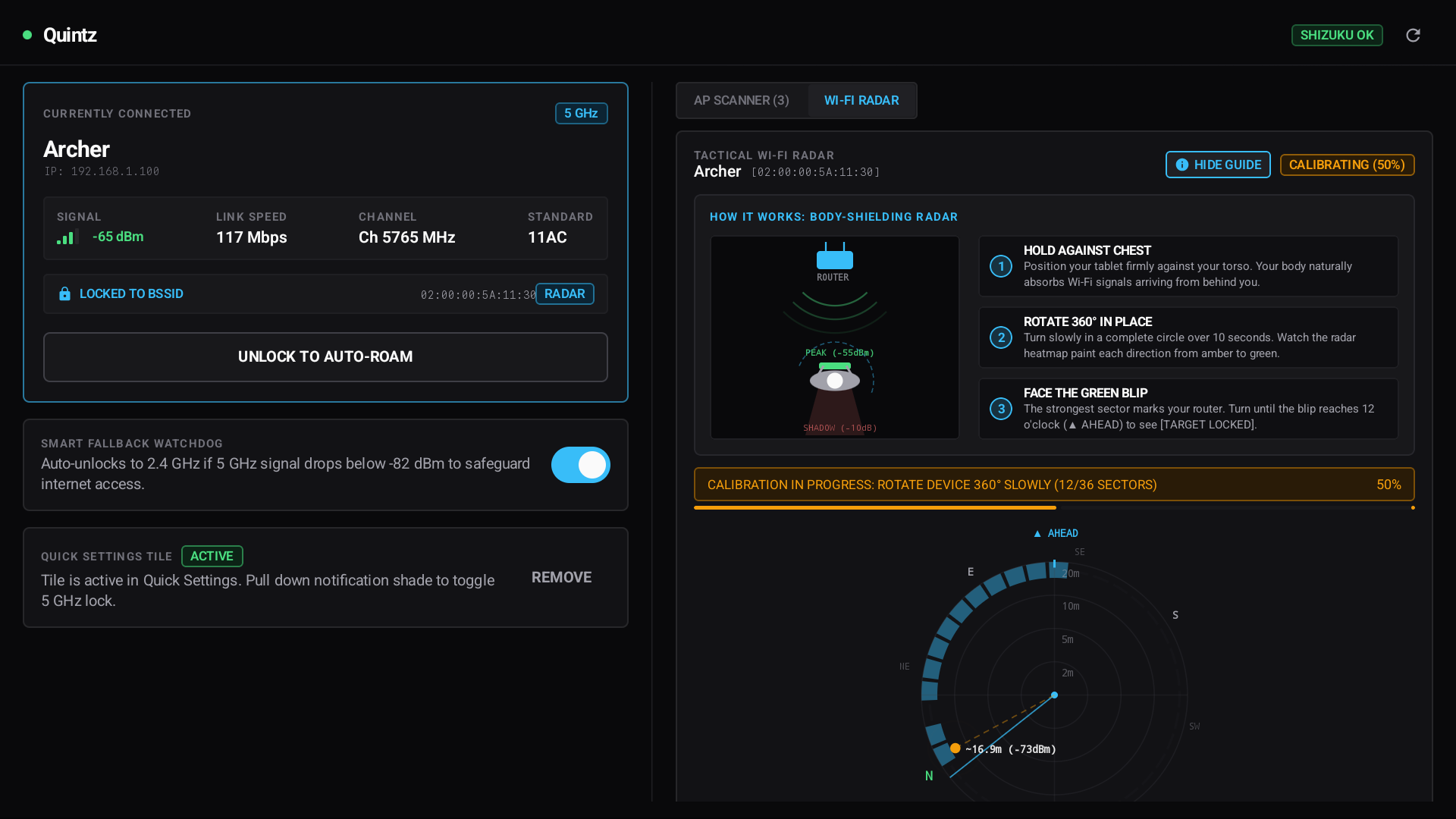
Quintz leverages the Shizuku privileged API bridge to lock Android directly to the 5 GHz / 6 GHz radio of your network without needing root access, while providing real-time AP telemetry, automated fallback protection, and a real-time roaming & RF telemetry monitor.
Key Features
🔒 1-Tap 5 GHz Preference (No Root Required)
- Selects a strong 5 GHz / 6 GHz BSSID on your network, then keeps the saved profile available for roaming.
- The preferred-band action is not a permanent BSSID pin: Android and the Wi-Fi firmware can still roam to another BSSID or band when conditions require it.
- Use a specific BSSID lock when you need to keep the profile pinned to one access point.
- Quintz stores Auto, Prefer 5 GHz, or Pin BSSID intent per SSID, so changing one network does not change the watchdog target for another.
- Supports WPA2-Personal, WPA3-SAE, Enhanced Open (OWE), and open networks.
- Uses Shizuku to interface safely with Android's system Wi-Fi service.
🛡️ Smart Fallback Watchdog
- Runs as a foreground service and checks the connected band while the watchdog is enabled and Shizuku is available.
- The 5 GHz preference leaves the saved profile unpinned so Android or device firmware can roam to 2.4 GHz when needed. The watchdog does not trigger an unlock at a particular 5 GHz RSSI value.
- When the device is connected to the target SSID on 2.4 GHz, the watchdog scans for a same-SSID 5 GHz / 6 GHz BSSID. The default recovery threshold is
-72 dBm. - A successful
start-scancommand only means Android accepted the request. Quintz waits up to 12 seconds for evidence that the target network's 5/6 GHz scan result refreshed, and excludes those candidates if it did not. - Recovery requires the same eligible BSSID in two fresh observations at least 10 seconds apart. If confirmed, Quintz requests a BSSID-specific transition, verifies that the target BSSID became active, then unpins the saved profile again so roaming remains allowed.
- For a pinned network, the watchdog monitors and restores that exact BSSID (on either band), then verifies the hard profile pin. Auto mode does not trigger band or BSSID recovery.
- The recovery scan interval starts at about 12 seconds and backs off to 30 seconds when no eligible candidate is found or a recovery attempt fails. Failed switch attempts also receive a retry cooldown that increases from 60 seconds up to 5 minutes.
- Recovery for secured networks requires Quintz to have the network password saved. A missing password, unavailable Shizuku service, stale scan results, or Android/OEM behavior can prevent or delay a switch; recovery is not guaranteed to be seamless.
⚙️ How BSSID Pinning Works & Technical Realities
- The Mechanism: Quintz configures Android's saved network profile using
cmd wifi connect-network <SSID> <sec> [pass] -b <BSSID> -r <none|persistent>via Shizuku. This tells Android'sWifiConfigManagerto restrict candidate selection to the designated hardware BSSID. - Per-Network MAC Policy: Supports Device MAC (
-r none) for router DHCP static reservations or Randomized MAC (-r persistent) for privacy. - OEM & Firmware Realities:
- In Android, Qualcomm Wi-Fi driver firmware (
wlan_driver) and OEM layers (e.g., Samsung's Intelligent Wi-Fi /SemWifi) retain autonomous driver-level roaming authority. - If RF signal degrades severely or the router issues IEEE 802.11k/v BSS transition management frames, the underlying Wi-Fi chip may autonomously reassociate to 2.4 GHz.
- Why the Watchdog Helps: Because no user-space application can completely override kernel/firmware roaming decisions, Quintz's Watchdog detects when the active connection is on 2.4 GHz and attempts a verified transition to a strong same-network 5 GHz / 6 GHz BSSID when RF conditions permit. It then restores the unpinned profile so normal roaming can continue.
- In Android, Qualcomm Wi-Fi driver firmware (
📊 Real-Time Roaming & RF Telemetry Monitor
- Rolling graphs for active connection RSSI and PHY link speed over the last minute.
- Multi-AP Roaming Crossover Detection: Plots recent same-network candidate scan readings as discrete points, and marks readings too old for a live comparison as stale.
- Color-Coded RF Quality Bands: Visual thresholds for Optimal (
> -65 dBm), Evaluation (-65 to -75 dBm), and Roam / Weak (< -75 dBm) zones. - Automated Handoff Event Tracking: Drops timestamped event pins whenever band or BSSID transitions take place.
- Interactive AP Legend: Instant 1-tap BSSID locking directly from the telemetry monitor.
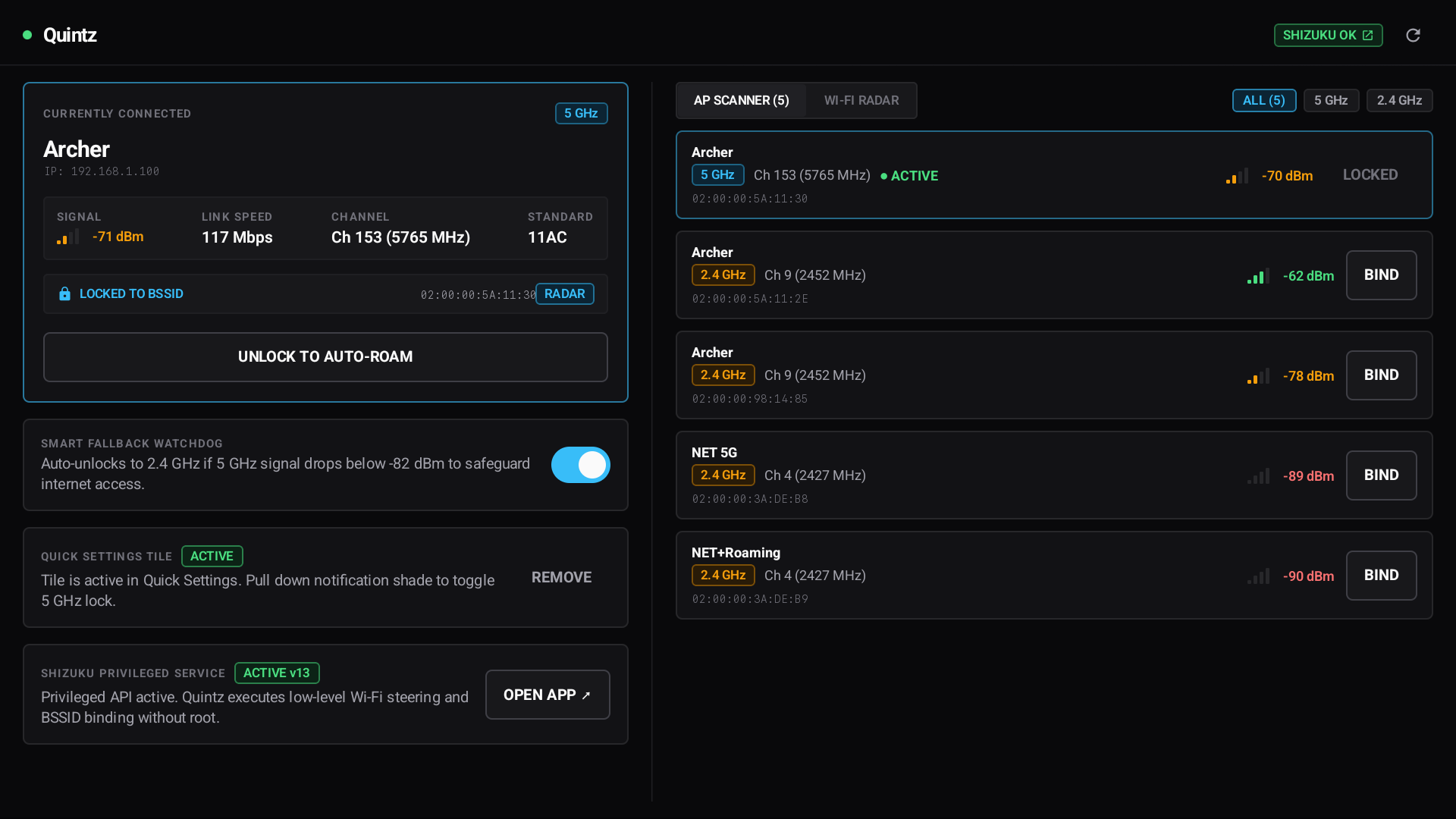
📊 AP Scanner & Channel Analyzer
- Scans and lists all nearby access points, frequencies, channel numbers, and MACs.
- Clear indicators for Wi-Fi standards (11n, 11ac, 11ax, Wi-Fi 7).
- 1-tap
BINDbutton to pin connection to any specific radio or access point; the connected AP stays actionable until it is actually pinned. Rows distinguish CONNECTED from PINNED.
⚡ Quick Settings Tile
- 1-tap lock and unlock directly from the Android Quick Settings shade without launching the full application.
- Real-time subtitle status shows the active locked channel and band.
🔋 Battery & Resource Optimized
- Zero background shell execution when the app is idle or minimized.
- Network callbacks are foreground-gated and strictly throttled.
- Canvas graphics allocations are pre-cached, eliminating garbage collection pauses during 60/120 FPS animations.
Prerequisites
- Android 10 (API 29) through Android 15 / 16 (API 35+).
- Shizuku (v13+ recommended).
Why Shizuku?
Since Android 10, Google restricted third-party applications from programmatically managing Wi-Fi networks and BSSID associations. Shizuku runs a privileged system service that lets user apps execute authorized system shell commands without modifying Android system files or rooting your device.
Setting up Shizuku takes ~1 minute on your device:
- Install Shizuku from Google Play or GitHub.
- Open Shizuku and follow the on-screen steps to start it via Wireless Debugging (no computer required).
- Open Quintz and tap GRANT when prompted.
Building from Source
Requirements
- JDK 21
- Android SDK (API 35, Build Tools 35.0.0+)
- Git
Steps
Clone the repository:
git clone https://github.com/corgilittlelegs/Quintz.git
cd Quintz
Build the release APK:
./gradlew assembleReleaseInstall to your connected device via ADB:
adb install -r app/build/outputs/apk/release/app-release.apk
Architecture & Tech Stack
- Architecture: MVVM with unidirectional data flow (UDF) via Kotlin Coroutines and
StateFlow. - UI Framework: 100% Jetpack Compose with Material 3 and custom industrial cyber-tactical CLI design tokens.
- Sensors: Hardware sensor fusion (
Sensor.TYPE_ROTATION_VECTOR) with orientation coordinate remapping across portrait and landscape layouts (SensorManager.remapCoordinateSystem). - Security: Local network credentials encrypted using AndroidX
EncryptedSharedPreferences. - System Integration: Shizuku IPC binder bridge to
cmd wifianddumpsys wifisystem services.
Privacy & Security Guarantee
- 100% Offline: Quintz contains no tracking, no analytics, no ads, and makes no internet network requests.
- Local Credentials: Any Wi-Fi passwords entered are saved exclusively on your local device within hardware-backed encrypted storage (
EncryptedSharedPreferences). - Open Source: Full source code is available for audit and verification.
Third-Party Open Source Credits & Acknowledgments
Quintz relies on and thanks the following open source projects:
Shizuku by Rikka Apps / RikkaW
Licensed under the Apache License 2.0
Enables rootless privileged API execution on Android devices.Android Jetpack & Jetpack Compose by Google / AOSP
Licensed under the Apache License 2.0
Modern UI toolkit, AndroidX lifecycle, architecture components, and crypto security.Kotlin & Kotlinx Coroutines by JetBrains
Licensed under the Apache License 2.0
Asynchronous stream processing and state management.JetBrains Mono by JetBrains
Licensed under the SIL Open Font License 1.1
Monospace typography used across telemetry readouts.
License
This project is licensed under the MIT License — see the LICENSE file for details.
How Shizuku is used
Can pin Wi-Fi to a chosen 5 or 6 GHz radio, prefer fast bands, restore auto roaming and manage its Quick tile via `cmd wifi`, `dumpsys wifi`, `settings get` and `cmd statusbar` through Shizuku.
This is an AI-assisted analysis of Shizuku-related usages in the app's public source code. It is best effort, so it may not catch every single usage.
How this app uses Shizuku
Quintz uses Shizuku to run privileged Wi-Fi and system commands that normal apps cannot use.
- Lock to specific radio: pin the current network to a 5 GHz or 6 GHz access point the user picks, using
cmd wifi add-networkandcmd wifi connect-networkwith a specific access point address pluscmd wifi list-networksandcmd wifi forget-networkwhen a same network handoff needs forcing. - Prefer fast band: automatically pick the strongest eligible 5 GHz or 6 GHz radio and steer to it while leaving roaming allowed, using the same add and connect network commands followed by an unpinned profile update.
- Restore auto roaming: remove the access point pin and return to normal automatic selection with
cmd wifi add-networkandcmd wifi connect-networkwithout an access point address. - Show live connection: read current network name, access point address, frequency, band, signal, speed and lock state with
cmd wifi statusplusdumpsys wifilookups, combined with normal Android connection info. - Scan nearby radios: trigger a fresh scan and list nearby access points with
cmd wifi start-scanandcmd wifi list-scan-resultsto show per radio signal, band, channel and security for steering choices, telemetry graphs and direction finding. - Maintain lock automatically: background monitoring reuses the same status, scan, lock and unlock operations to fall back to auto roaming on weak signal or disconnection and to steer back when a strong 5 or 6 GHz radio returns.
- Control Quick tile: toggle between auto roaming and preferred 5 GHz directly from the Quick Settings tile using the same status, lock and unlock operations.
- Check Quick tile: read whether the app Quick Settings tile is installed with
settings get secure sysui_qs_tiles. - Remove Quick tile: remove the app Quick Settings tile with
cmd statusbar remove-tile, verified with a follow up tile list read. - Apply MAC mode: apply the per network MAC randomization choice selected in the app as part of the same add and connect network operations.
Android APIs or commands used
cmd wifi statuscmd wifi start-scancmd wifi list-scan-resultscmd wifi add-networkcmd wifi connect-networkcmd wifi list-networkscmd wifi forget-networkdumpsys wifisettings get secure sysui_qs_tilescmd statusbar remove-tile
Notable details
Without Shizuku the app falls back to read only Android connection info and cannot scan, lock or unlock; tile status then uses a direct secure settings read or cached value. All privileged commands use fixed templates, with user supplied network name, access point address, password and MAC choice only filled in as arguments.
Changelog
What's new for version 2.0.0
Quintz v2.0.0
Changes since v1.3.1
🚀 New Features
- feat: animate newest graph interval reveal using curve tail transition (f6a9b1c)
- feat: add connected telemetry policy and quick tile spec with updated RadioRow UI (4a7673a)
- feat: add preferred band preparation state, custom dialog styling, and compact button sizing across UI components (caab01c)
- feat: add dark mode support and enhance telemetry candidate tracking with policy validation (ced4b60)
- feat: automate watchdog lifecycle based on active per-network steering targets (5544863)
- feat: add UI components and improve Wi-Fi scanning queue and state management (458ddde)
- feat: add bounded FlightJournal for diagnostic event logging with tests and service integration (c2420a0)
⚡ Improvements & Refactoring
- refactor: improve tablet layout detection, add horizontal scroll to scanner controls, and restrict activity config changes (0b9b407)
🛠️ Maintenance & CI
- ci: add manual debug APK artifact workflow (b034fda)
📦 Installation & Verification
- Download
Quintz-v2.0.0.apkbelow. - Install it on Android 10 or later.
- Launch Shizuku and grant Quintz permission when prompted.
SHA-256 Checksum:
91560bee7284f4f04621e7f21b6f0fb0bd20c9a751977d482dcc7afc10ede971
(The matching .sha256 checksum file is also attached below)
Permissions
11 permissions requested
Sources
2 sources
Sources
2 sources
More from this category
 ADNS
ADNS
 ShizuWall
 Dolphy
 Traffic Light
 NetManager
 De1984
 Shizzi
 Hikari AdBlock
 sing-box
 Bluetooth Bouncer
 NetSwitcher
 NetToggle