 ShizuStore
Privacy Flip
2.2.3 · GitHub
More about this app
Manage your device privacy based on lock/unlock state
PrivacyFlip
Automatic lock/unlock privacy control for Android devices 🔐📱✨
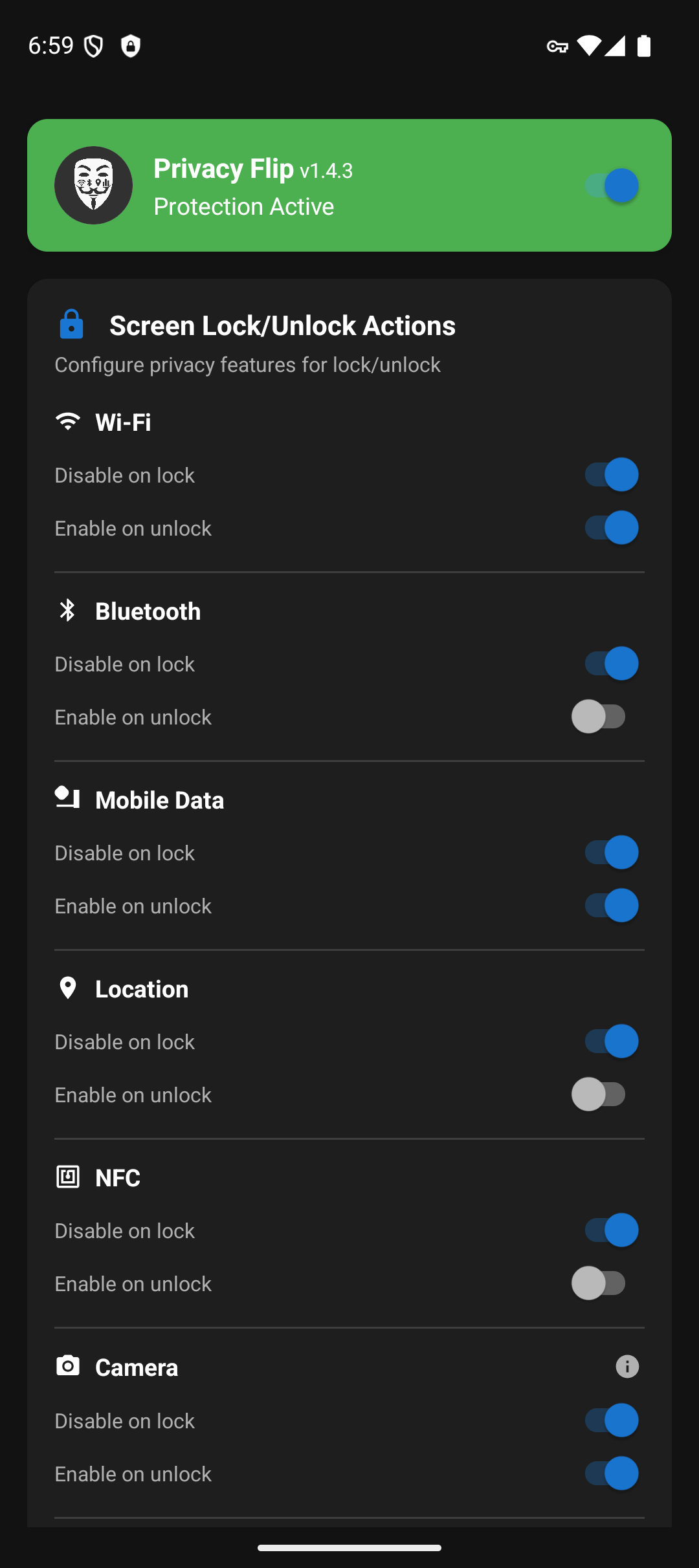
PrivacyFlip automatically manages your Android device's privacy features based on lock/unlock state. When you lock your device, it can disable Wi-Fi, Bluetooth, mobile data, location services, NFC, and even camera/microphone sensors. When you unlock, it intelligently restores the features you want back on.
Works with Shizuku or Root - Choose your preferred privilege method!


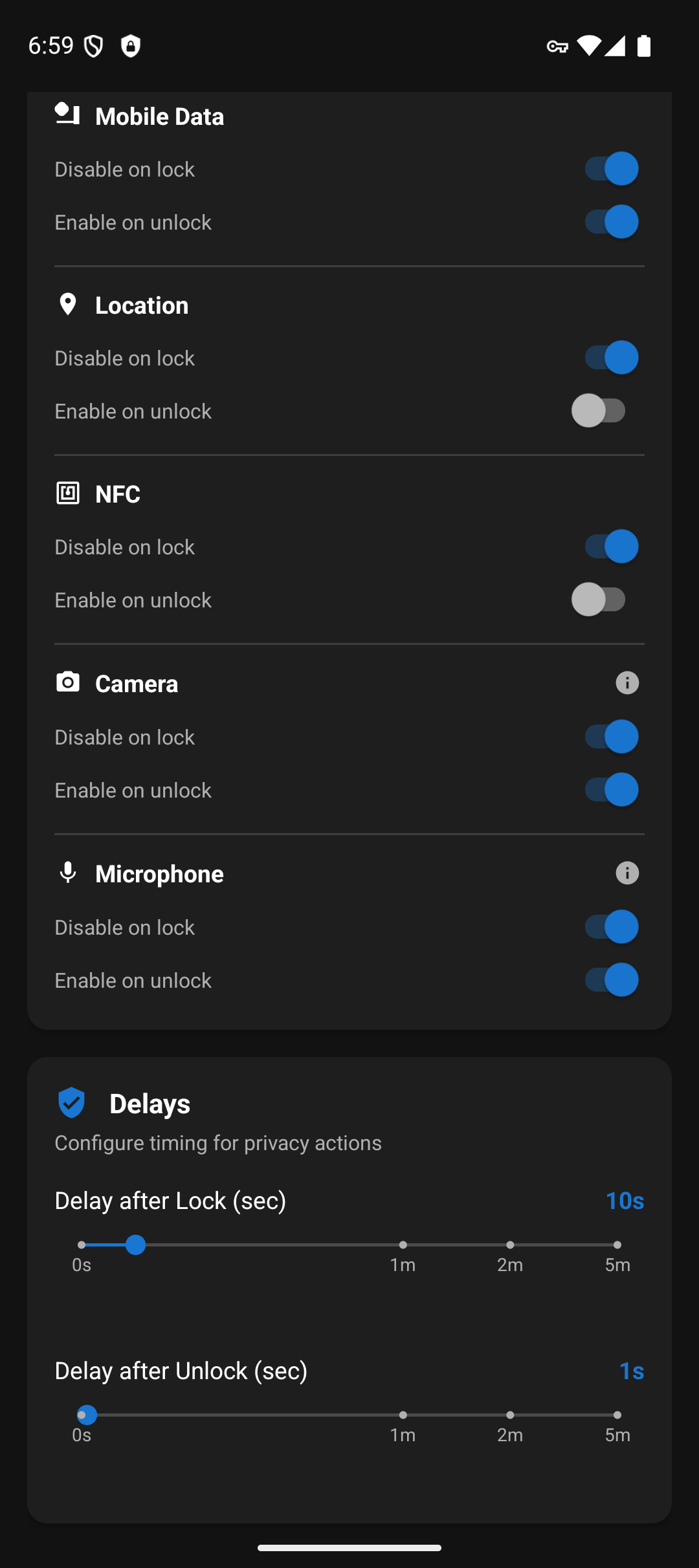
📸 Screenshots


🔒 Features
Automatic Privacy Control
- Lock Detection: Instantly disables privacy features when screen locks
- Unlock Detection: Waits for proper authentication (not just screen-on)
- Smart Restoration: Configurable feature re-enabling on unlock
Privacy Features Controlled
- 📶 Wi-Fi - Disable/enable wireless connectivity
- 📱 Bluetooth - Control Bluetooth radio
- 📡 Mobile data - Manage cellular data connection
- 📍 Location services - Control GPS and location tracking
- 📳 NFC - Control Near Field Communication sensor
- 📷 Camera - Disable/enable camera sensor privacy (Android 12+)
- 🎤 Microphone - Disable/enable microphone sensor privacy (Android 12+)
- ✈️ Airplane Mode - Enable airplane mode on lock (opt-in, disables all radios)
- 🔋 Battery Saver - Enable battery saver mode on lock (opt-in)
Advanced Features
Smart Disable Options:
- "Only if unused/not connected" - Don't disable WiFi, Bluetooth, or Location if actively in use, or Mobile Data while media is playing
- "Only if not already enabled" - Prevent connection resets by not re-enabling features that are already on
- "Only if not manually set" - Respect manually enabled protection modes on unlock
App Exemptions - Exclude specific apps from privacy actions when in foreground
NFC Auto-Retry - Opt-in: if a payment or wallet app turns NFC back on right after Privacy Flip turns it off, retry disabling it
Accessibility Service - Experimental support for side/power button instant-lock (opt-in, requires Accessibility permission; the instant-lock benefit applies to camera/microphone, which needs Android 12+)
Advanced Detection - Multi-tier Bluetooth connection detection prevents unwanted headphone disconnects
Customizable Timing
- Lock Delay: 0-60 seconds (granular), 2 minutes, or 5 minutes before privacy actions trigger
- Unlock Delay: 0-60 seconds (granular), 2 minutes, or 5 minutes before features are restored
- Instant Mode: Set delays to 0 for immediate action
- Note: Camera and microphone ignore custom delays and trigger immediately, due to Android limitations
📱 Requirements
Minimum: Android 7.0+ (API level 24) Camera/Microphone Features: Android 12+ (API level 31)
Choose your privilege method:
Option 1: Shizuku (No root required!)
- Shizuku app installed and running
- ADB privileges via USB debugging or wireless ADB
- No root required - works with ADB-level permissions
Option 2: Root Access (Recommended for rooted devices)
- Root access via Magisk, SuperSU, or similar
- Best performance with UID 0 privileges
Option 3: Dhizuku (Device Owner method, 5 of 9 features)
- Device Owner status. Android refuses to set a Device Owner on a device that already has a second user, such as a work profile
- No root required, no ADB needed after initial setup
- Persistent privileges - survives reboots
- Works for, and each needs its own Android version: Camera and Microphone (Android 12+), Bluetooth (Android 9+), Location (Android 11+), NFC (Android 15+). Below Android 9 a Dhizuku setup can switch nothing at all.
- Cannot do: WiFi, Mobile Data, Airplane Mode, Battery Saver. Dhizuku shares Device Owner rights, and Android gives a Device Owner no way to switch those. Use Root or Shizuku for them.
Option 4: Sui (Best of both worlds)
- Rooted device with Magisk installed
- Sui Magisk module installed
- Best user experience - no permission prompts, automatic startup
Privilege Detection Priority
- Sui - Magisk module providing Shizuku API with root (best UX)
- Root - Traditional root access via Magisk/SuperSU
- Dhizuku - Device Owner method (no root or ADB needed after setup)
- Shizuku - ADB privileges via Shizuku app
🤝 Contributing
Help make this app better. No contribution is too small!
How to Contribute
- Fork the repository
- Create a feature branch (
git checkout -b feature/amazing-feature) - Make your changes
- Commit your changes (
git commit -m 'Add some amazing feature') - Push to the branch (
git push origin feature/amazing-feature) - Open a Pull Request
All contributions are valued and appreciated!
📄 License
This project is licensed under the MIT License - see the LICENSE file for details.
💖 Support Development
PrivacyFlip protects your privacy. You can protect its future!
Late nights for brighter days
Created by Doru Moraru
How Shizuku is used
Can toggle WiFi, Bluetooth, data, NFC, location, camera, mic, airplane mode and battery saver via `Shizuku shell commands`.
This is an AI-assisted analysis of Shizuku-related usages in the app's public source code. It is best effort, so it may not catch every single usage.
How this app uses Shizuku
Shizuku is used to run privileged shell commands that turn privacy sensitive features off and on around screen lock and unlock and read back their state.
- Switch wireless radios: turn WiFi, Bluetooth, mobile data and NFC off on lock and back on on unlock with the
svc wifi,svc bluetooth,svc data,svc nfcandcmd nfcshell commands through Shizuku, with state checked withdumpsys wifi,dumpsys bluetooth_manager,dumpsys telephony.registryanddumpsys nfc. - Control location services: turn location providers off and on with the
settings put secureshell commands through Shizuku, with state checked withsettings get secureanddumpsys location. - Block camera and microphone: block and unblock camera and microphone access with the
cmd sensor_privacyshell command through Shizuku, with state checked withdumpsys sensor_privacy. - Toggle airplane mode: turn airplane mode on and off with the
cmd connectivity airplane-modeshell command through Shizuku, with state checked withsettings get global airplane_mode_on. - Toggle battery saver: turn battery saver on and off with the
cmd power set-modeandsettings put global low_powershell commands through Shizuku, with state checked withdumpsys power. - Skip features in use: optionally leave WiFi, hotspot and location alone when they look actively used, checked with the
dumpsys connectivity,dumpsys tetheringanddumpsys appopsshell commands through Shizuku.
Android APIs or commands used
svc wifi enablesvc wifi disablesvc bluetooth enablesvc bluetooth disablesvc data enablesvc data disablesvc nfc enablesvc nfc disablecmd nfc enablecmd nfc disablecmd nfc enable-nfccmd nfc disable-nfc '[persist]'cmd sensor_privacy enable 0 cameracmd sensor_privacy disable 0 cameracmd sensor_privacy enable 0 microphonecmd sensor_privacy disable 0 microphonecmd connectivity airplane-mode enablecmd connectivity airplane-mode disablecmd power set-modesettings put secure location_modesettings put secure location_providers_allowedsettings get secure location_modesettings get secure location_providers_allowedsettings put global airplane_mode_onsettings get global airplane_mode_onsettings put global low_powersettings get global low_powersettings get global wifi_onsettings get global bluetooth_onsettings get global mobile_dataam broadcast -a android.intent.action.AIRPLANE_MODEdumpsys wifidumpsys bluetooth_managerdumpsys telephony.registrydumpsys locationdumpsys nfcdumpsys sensor_privacydumpsys powerdumpsys connectivitydumpsys tetheringdumpsys appops
Notable details
Camera and microphone blocking uses the system sensor privacy switch and is only available on Android 12 and later, so those two options do nothing on older versions.
Changelog
What's new for version 2.2.3
- Bluetooth "Only if not connected" now also counts LE Audio earbuds and speakers, so a lock no longer turns Bluetooth off while they play
Permissions
17 permissions requested
Sources
2 sources
Sources
2 sources
More apps from this developer
 De1984
More from this category
 AppOpsNext
 AvarionX
 App Lock
 Amarok
 Privacify
 Anubis
 Shelter
 Monica