 ShizuStore
ObtainX
2.20.0 · GitHub
More about this app
Obtainium fork with Material 3 UI redesign
ObtainX

ObtainX is a modern and supercharged fork of Obtainium. Re-engineered with a stunning Material 3 Expressive UI, it delivers an ultra-smooth interface packed with power-user utilities that make managing your Android apps effortless.
Tip
Curious how ObtainX stacks up against Obtainium? Check out my side-by-side ObtainX vs Obtainium comparison featuring full interface screenshots.




Featured by HowToMen: Best Android Apps - May 2026! 🎊

📦 Installation


🔄 Seamlessly bring your data from Obtainium
If you want to try out ObtainX without losing your current setup, you can bring your existing app list over in seconds:
- In Obtainium: Open Settings and find the Obtainium export section, tap Export, and save the resulting .json file. (Older Obtainium versions kept this on a dedicated Import/Export tab.)
- In ObtainX: Go to the
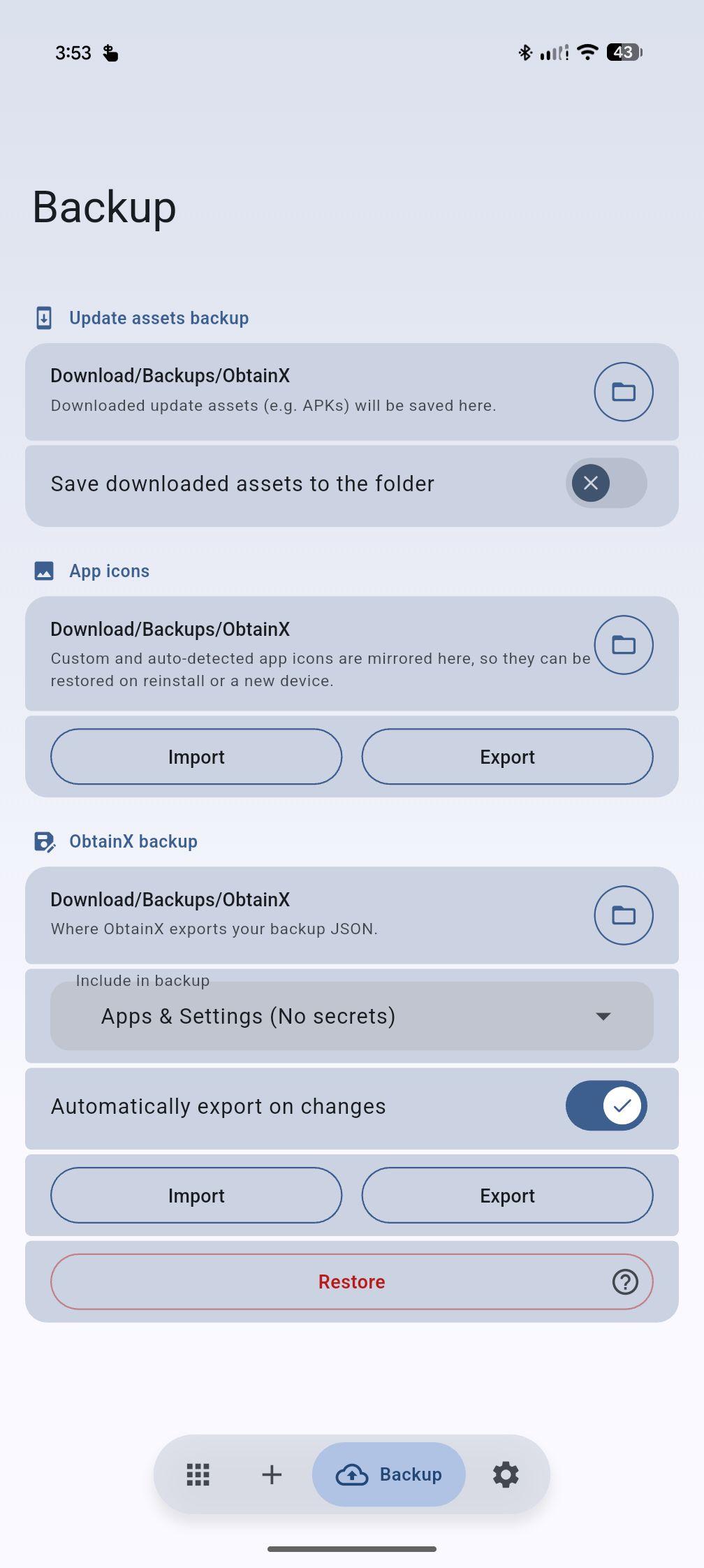
Backuptab, select Import (or Restore), and choose that exact .json file. - Continue where you left off: All your tracked apps and settings will be instantly populated.
✨ Exclusive features in ObtainX
These are built from the ground up and are exclusive in ObtainX.
🏪 One app, many sources
The same apps can be tracked from multiple stores — independently, simultaneously, and interchangeably.
🔄 Swap tracked source — Tracking an app on GitHub, but want to switch to F-Droid or APKPure? Change sources in-place in two taps. The app keeps its folders, categories, and history — only where the updates come from changes.
📚 Track multiple stores at once — Track the same app across different stores simultaneously. Follow GitHub for nightlies, F-Droid for reproducible builds, and APKPure as a fallback — all simultaneously. Each listing with its own independent version tracking and settings.
🛡️ Security & Integrity
🛡️ Build verification checks — Runs automated cryptographic checks (F-Droid/Izzy reproducible builds, GitHub Release Attestations) on apps you add to flag tampered binaries before install. For total integrity, ObtainX's own updates are reproducible (F-Droid) and attested (GitHub). Learn more in the Build Verification Guide.
🦠 VirusTotal APK scanning — Optionally scan downloaded APKs with VirusTotal before installation. Flagged or failed scans ask you what to do (including Retry). You can turn scanning off for individual apps while leaving it on globally.
🗂️ Smart Organization
- 📥 Bulk import from fevice — Select any apps already on your phone and ObtainX automatically finds their sources on stores you choose. No URL hunting one by one.
- ✅ Selective import or restore — Insteadd of blindly importing entire backup (all or nothing), pick which apps and settings to import (add to existing content), or Restore (reset ObtainX, then add from backup).
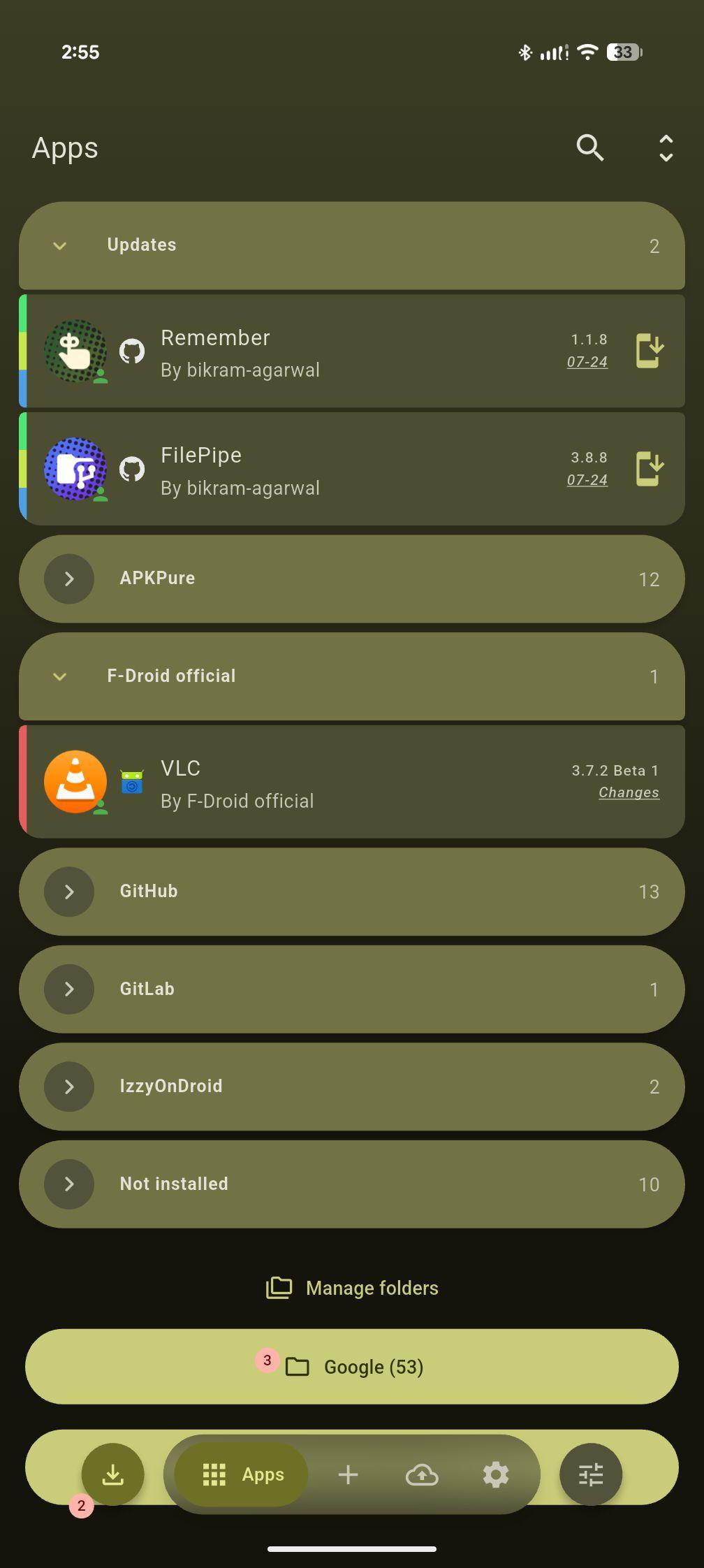
- 🗂️ Dynamic folders — Group apps into folders manually or via automatic routing rules (by name, author, category, source etc.). Each folder retains its own layouts.
- 🕐 On-Demand Only mode — Mark rarely updated apps so they're hidden from the main list and aren't checked during global update scans. Query them only on-demand.
- 👆 Configurable two-way swipe gestures — Left and right swipe actions are independently configurable per row. Choose from Update, Install, Pin, Edit, Delete, Open, App Info, or None.
- ↩️ Undo after delete — Revert accidental app removals instantly via a 5-second toast notification.
- 🖼️ Custom app icons — If the app source publishes no icon, ObtainX smartly finds one: it pulls it from a downloaded APK, or from another store listing (APKMirror, F-Droid, APKPure, Play Store). Or you can set your own icon from the gallery or the web.
- 🖼️ Backup app icons — Backup those custom and auto-detected app icons into a folder you pick, so they can be restored after a reinstall or a move to a new device.
- 🔍 Verified "also available on" store links — Each app detail page shows other stores where the app is available. Long-press a store icon to swap tracking there, add it as a second listing, jump to an existing listing, or copy the link.
🚀 Advanced Update Controls
- 🧩 Advanced filter / RegEx assist — A built-in helper walks you through building regex filters on any field that supports them. No regex knowledge required. Full details in the Additional options guide.
- ⏭️ Skip version — Skip a specific release you don't want without marking the app as "updated." The next release will still show up normally.
- 💾 Save assets — Option to automatically save update assets (e.g. APKs) to your chosen folder, during update process itself.
🎨 Interface & Experience
- 🌈 Per-app color theming — Each app's detail page derives its color scheme from the app's own icon. Deep, accurate, and dark-mode safe. Toggle Match app page to icon colors in Settings.
- 🪄 Hero icon transition — Tapping an app row animates its icon smoothly into the detail page. Swipe back and it returns the same way.
- 🎫 Rich, customizable app rows - See app type, tracking source, author, version, and category tags at a glance. Choose between full text badges or minimal stacked color strips to keep your list clean and uncluttered. Direct / HTML sources show the site they came from.
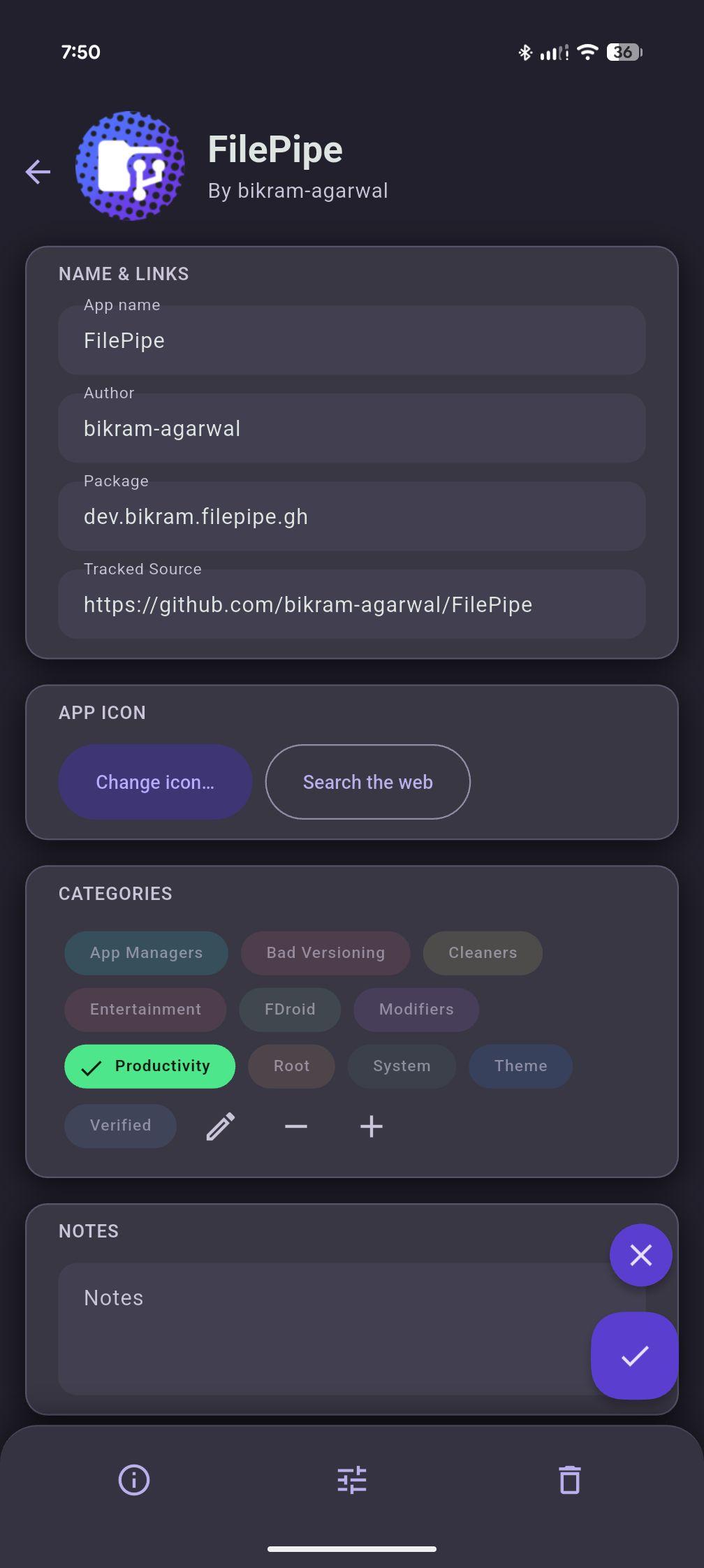
- ✏️ Inline edit on detail page — Edit any app's metadata directly from its detail page. An unsaved-changes guard prevents accidental data loss.
- ⚙️ View options on Apps tab — Grouping, sort order, and other organization controls live on the Apps tab itself (instead of separate settings page) so you can tune the list and see the result immediately.
🧭 Pioneered by ObtainX — now in Obtainium too
These features were also built from ground up and first released in ObtainX; and are now available in Obtainium too.
- 📦 Third-Party Installer Support — Hand off updates to third-party installers like InstallerX or App Manager to review APK metadata (trackers, permissions, target SDK etc.) before installing (data hidden by stock installers). Essential for devices running under Google Advanced Protection.
- ⚖️ Know the update size beforehand — See the exact download size for every update - across supported stores - before you even hit the update button.
- 🛑 Stop download — You can stop any ongoing download from the app, the notification, or the update queue.
- 🏷️ Category customization — Pick an exact color (hex or hue slider) and rename a category so every app carrying it updates automatically.
- Feature still exclusive to ObtainX: automatic black/white label text for readability at any color, and bulk edits that merge (add/remove) instead of overwriting each app's existing categories.
- 📐 Adaptive tablet, foldable & landscape layout — On large screens the app list sits side-by-side with the app's detail page, so tapping or editing a row opens it in place rather than pushing a full screen. Obtainium adopted this two-pane app list later — but that one screen is as far as its tablet support goes.
- Feature still exclusive to ObtainX: a genuinely complete tablet UI. A navigation rail pinned on the left lets you jump between tabs from anywhere, and the Settings, add-app and bulk-import screens all reshape into proper two-panel big-screen layouts too. In Obtainium, every screen except the apps list currently retain their single-pane phone layout.
- 💫 Material 3 Expressive throughout — Full M3 Expressive treatment across every screen: cards, fluid animations, expressive sliders, FAB and controls that feel like one product.
- 🔎 Live search bar — An on-page search bar with the list filtering live as you type (Obtainium originally offered only the filter sheet).
- Feature still exclusive to ObtainX: Obtainium's search bar scrolls away with the apps list, so after scrolling down you must scroll to the top to reach it. ObtainX keeps a small search button pinned at the top (without wasting space), so you can jump into search from anywhere.
- 🗃️ Settings and form options in cards — Settings are visibly grouped into labeled cards instead of one long wall of options.
- Feature still exclusive to ObtainX: each section card is collapsible - independently or collapse-all. And the per-app Additional options screen is sorted into categorized section cards, where Obtainium still shows one long, undifferentiated list.
🔧 Enhanced Features
Optimizations made to legacy Obtainium features.
🏪 APKMirror updates — In Obtainium, APKMirror apps are track-only, so the update button has nowhere to take you — you can only mark a version as installed. ObtainX keeps tracking accurate but makes the update action functional, opening the specific release page for the new version. (Bulk Import is also supported.)
🧠 Smarter version status — ObtainX handles harmless version label differences more intelligently, so you're only notified when there's genuinely something new. Six distinct states instead of a binary "update / up to date" pair: up to date, update available, device is ahead, same version shown differently, genuinely unclear and Not installed.
🎯 Add App — three paths, one screen — URL, Search, and From Device are all on one screen under a segmented control. Search results load inline alongside store chips — no floating sheets, no separate screens. New searches can be started without needing to go back-n-forth.
🔭 Track-only source improvements — Shows installed version from the device when the package ID is known. The Update button opens the concrete release page, not just the app listing. In Obtainium, if the wrong package ID is fetched (or none at all), the app shows as "not installed" forever and update notifications never work right — with no way to fix it. ObtainX surfaces this clearly and lets you edit the package ID directly from the app page, instantly restoring correct install detection and update tracking.
🔖 Powerful, live filtering — ObtainX rebuilds Obtainium's basic filter into a powerful tool. Filters like up-to-date, installed and track-only become three-state (include / exclude / off) instead of simple on/off toggles, and categories can be included or excluded and matched by Any or All — where Obtainium only lets you include categories, matched as "any." The apps list updates live as you change options, with no apply step required. Active filters also appear as dismissible chips at the top: tap one to clear just that filter.
🎛️ Total theme customization — You control the theme (system, light, dark, AMOLED), color (Material You, presets or any HEX), palette, color shading intensity, gradient, progressive blur, roundness of UI corners, UI scale, and more. It's not just an afterthought - it's a full blown theme engine. Make it yours.
🗄️ Richer app list grouping — Group by source (Obtainium adopted in July 2026), app type (user/system/privileged), or update status (update available, newer on device, same version, not installed etc.) A separate level of intelligent grouping for "Updates", "non-installed" and "track-only" apps.
🖼️ Screenshots
 |
 |
 |
 |
 |
 |
 |
 |
 |
 |
 |
 |
 |
🎥 Screenrecords
Original Obtainium
ObtainX is a fork of Obtainium, licensed under GPL-v3.
Read the original Obtainium README here.
➕ More Apps
 Remember
Notes, tasks, and reminders that keep coming back until they are done. |
 FilePipe
Your files, your rules. Automatically sort and move media with smart rules. |
Made with ❤️ by Bikram Agarwal
How Shizuku is used
Can silently install tracked apps and split packages via `Shizuku`
This is an AI-assisted analysis of Shizuku-related usages in the app's public source code. It is best effort, so it may not catch every single usage.
How this app uses Shizuku
- Install updates silently: tracked apps and new versions install in the background without a confirmation prompt through Shizuku.
- Install split packages: multi file split packages install together in one operation through Shizuku.
- Attribute Play store source: installs can appear to come from Google Play when the related setting is enabled through Shizuku.
Android APIs or commands used
android.content.pm.PackageInstaller
Notable details
The standard system install method remains available in settings and installs with the normal Android confirmation when Shizuku mode is not selected.
Changelog
What's new for version 2.20.0
✨ New Features
- 📚 Track the same app across different stores — Follow GitHub for nightlies, F-Droid for reproducible builds, and APKPure as a fallback — all simultaneously. Each listing with its own independent version tracking and settings.
- 🔄 Swap tracked source — Tracking an app on GitHub, but want to switch to F-Droid or APKPure? Change sources in-place in two taps. The app keeps its folders, categories, and history — only where the updates come from changes.
- Group the apps list by update status (update available, needs review, newer on device, same version, not installed, and so on).
- HTML sources can pick up zip artifacts from CI/nightly pages, with stable version labels for partial downloads.
- Better diagnostic: record about 60 seconds of on-device performance data from the logs screen, then include it when you share logs.
|
Track same app in multiple stores |
Hot-swap tracked store, or create new store entry |
🛠 Improved Features
- Update checks, downloads, and store lookups are faster and more resilient (timeouts, shared connections, less work on the UI thread, skipping background checks when nothing is due).
- Version comparison is much more reliable: Play Store and device-style labels, prereleases, build hashes, FOSS vs store variants, and the exact APK you selected are all taken into account.
- Auto mode no longer silently switches to a fake "same version" when it is unsure.
- F-Droid, F-Droid repositories, APKPure, and APKMirror feed richer version information into that comparison.
- GitHub app builds that share a version label but differ by commit can be automatically ordered using GitHub's compare history.
- Apps added from GitHub, GitLab, Codeberg, and SourceHut are matched to the right build more often. Some projects publish separate builds for each store, and ObtainX now recognizes the one that belongs to the site you are tracking, so the app no longer shows as "not installed" when it is actually there.
- Installing through third-party installer (or Shizuku/Dhizuku) waits for the system to confirm the package actually updated, instead of marking the update done as soon as the installer goes away. You can dismiss the temporary "Installing" indicator if you already finished elsewhere.
- "Reduce visual effects" now also turns off gradients, icon-tinted pages, and extra shadows.
- Back from Settings/Add/Backup returns to Apps in one press.
- When using "source webpage in app view", it now has proper back history, and file links open in default browser when ObtainX cannot download them itself.
- Better diagnostic: Shared logs now include display/font & scale info.
- Long version names on the About screen shrinks to fit.
🐛 Bug Fixes
- Apps no longer show "Update available" just because version strings look different (including several Play Store, FOSS, and GitHub hash cases).
- Track-only "mark as latest" actually sticks, including from bulk update.
- Bulk updates no longer stall when Shizuku permission and install calls overlap.
- Deleting a category removes it from every assigned app, including ones that were not loaded in memory.
- Settings labels that stayed in the old language after a locale change are fixed.
🗣️Translations
- Add missing Simplified and Traditional Chinese translations by @You236929 in https://github.com/bikram-agarwal/ObtainX/pull/279
- Complete and improve Turkish translation by @MrRaita in https://github.com/bikram-agarwal/ObtainX/pull/282
- French translation by @LeDimigit in https://github.com/bikram-agarwal/ObtainX/pull/285
🧾 Documentation
- README, Difference_with_Obtainium.md updated.
📰 News
- FilePipe got featured by Sam Beckman in Best Android Apps of 2026! 🎊




Permissions
21 permissions requested
Sources
5 sources
Sources
5 sources
More from this category
 ShizuStore
 Droid-ify
 InstallerX Revived
 Universal Installer
 Komi Store
 Vyxel Apps
 APKUpdater
 Neo Store
 Orion Store
 ShizuCoreFetch
 Aurora Store
 MultiStore