 ShizuStore
Network Switch
1.1.0 · GitHub
More about this app
Android app for 4G/5G network mode switching

Network Switch
Modern Android app for network mode switching





A modern Android application that enables users to toggle between network modes, supporting 34 different network configurations including 2G, 3G, 4G, and 5G combinations. Features dual control methods: Root access for rooted devices and Shizuku for non-rooted devices. Built using Jetpack Compose and Material Design 3.
Purpose
Network Switch provides control over your device's network modes, supporting 34 different configurations from basic 2G-only to advanced 5G combinations. This includes:
- Basic Modes: GSM (2G), WCDMA (3G), LTE (4G), NR (5G) only
- Combined Modes: Various 2G/3G/4G/5G combinations
- Regional Modes: CDMA support for US carriers, TD-SCDMA for Chinese networks
- Global Modes: Network support for international usage
Use Cases
- Quick network switching through customizable Quick Settings tile
- Battery optimization by selecting power-efficient modes
- Speed optimization by forcing high-performance modes
- Coverage optimization in areas with poor signal quality
- Data usage management with specific network restrictions
- Testing network compatibility and performance
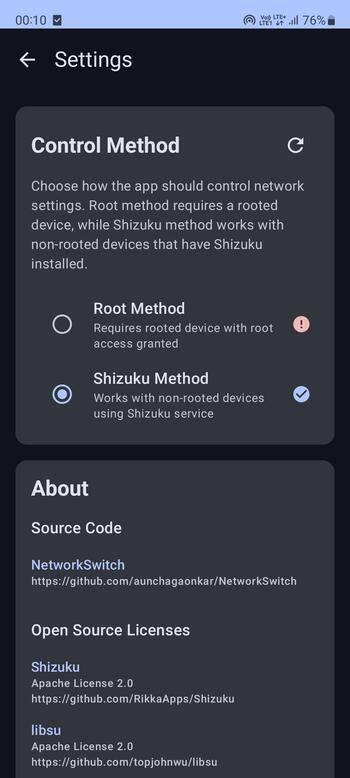
The app provides two methods of operation:
- Root Method: Direct system access for rooted devices
- Shizuku Method: System access through Shizuku service for non-rooted devices
Features
- Network Control: 34 different network modes including pure and combined configurations
- Privacy-Focused: No internet permissions, all operations are local
- Configurable Toggle Modes: Choose any two network modes for quick switching
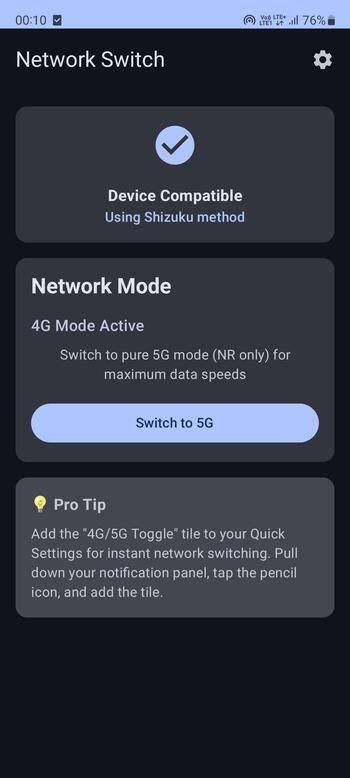
- Quick Settings Tile: Shows current and next modes with customizable configuration
- Dual Control Methods: Root and Shizuku support for compatibility
- Modern Material Design 3 Interface: Clean, intuitive UI with extensive configuration options
Configuration
Network Mode Selection
The app supports 34 different network modes:
Basic Modes:
- GSM Only (2G)
- WCDMA Only (3G)
- LTE Only (4G)
- NR Only (5G)
Combined Modes:
- 2G/3G combinations with preference settings
- 3G/4G combinations (LTE/WCDMA)
- 4G/5G combinations (NR/LTE)
- Multi-generation support (2G/3G/4G/5G)
Regional Modes:
- CDMA support for US carriers (Verizon)
- TD-SCDMA support for Chinese networks
- Global modes for international roaming
Toggle Configuration
- Open the app and tap the configuration icon
- Select Mode A and Mode B from the dropdown menus
- Preview your configuration
- Save the configuration
- Use the main toggle or Quick Settings tile to switch between modes
Screenshots


Requirements
Root Method
- Rooted Android device (Android 10+)
- Root permissions granted to the app
Shizuku Method
- Non-rooted Android device (Android 10+)
- Shizuku app installed and running
- ADB or Wireless ADB access to start Shizuku
Installation




- Download the latest APK from the Releases page
- Install on your Android device
- Choose your preferred control method:
- Root: Grant root permissions when prompted
- Shizuku: Install Shizuku app and grant permission
- Configure your preferred network modes in the app
- Add the "Network Switch" tile to Quick Settings for instant access
Project Structure
app/
├── src/main/java/com/supernova/networkswitch/
│   ├── presentation/          # UI Layer
│   │   ├── ui/
│   │   │   ├── activity/     # Activities
│   │   │   ├── composable/   # Reusable Compose components
│   │   │   └── components/   # Shared UI components
│   │   ├── viewmodel/        # ViewModels with state management
│   │   └── theme/            # Material Design 3 theme
│   ├── domain/               # Business Logic Layer
│   │   ├── model/            # Domain models
│   │   ├── repository/       # Repository interfaces
│   │   └── usecase/          # Business use cases
│   ├── data/                 # Data Layer
│   │   ├── repository/       # Repository implementations
│   │   └── source/           # Data sources
│   ├── service/              # System Services
│   │   ├── NetworkTileService # Smart Quick Settings tile
│   │   ├── RootNetworkControllerService # Root-based network control
│   │   └── ShizukuControllerService     # Shizuku-based network control
│   └── di/                   # Hilt dependency injection modules
├── src/main/aidl/            # AIDL interfaces for IPC
├── build.gradle.kts          # App build configuration
└── proguard-rules.pro        # ProGuard rules

hiddenapi/                    # Android Hidden API access module
├── src/main/aidl/            # AIDL interfaces
└── build.gradle.kts          # Hidden API build config

.github/workflows/            # CI/CD pipelines
├── ci.yml                    # Continuous Integration
└── build-release.yml         # Release workflow

gradle/
├── libs.versions.toml        # Version catalog
└── wrapper/                  # Gradle wrapper

build.gradle.kts              # Root build configuration
settings.gradle.kts           # Project settings
Building from Source
# Clone the repository
git clone https://github.com/aunchagaonkar/NetworkSwitch.git
cd NetworkSwitch

# Build debug APK
./gradlew assembleDebug

# Build release APK
./gradlew assembleRelease
TODO
- Add unit tests for all core components
- Add customizable network mode support (34 modes)
- Implement adaptive app icon, with icon-pack launcher compatibility
- Implement scheduled/automatic network switching
- Add network speed monitoring and performance metrics
- Add multi-language support
- Add network performance benchmarking tools
Contributing
Contributions are welcome! Please follow these guidelines:
Getting Started
- Fork the repository
- Create a feature branch (
git checkout -b feature/feature-name) - Make your changes following the project's code style
- Test your changes thoroughly
- Commit your changes (
git commit -m 'Add feature-name') - Push to the branch (
git push origin feature/feature-name) - Open a Pull Request
Code Style
- Follow Kotlin coding conventions
- Use meaningful variable and function names
- Add documentation for public APIs
- Maintain clean architecture principles
- Follow Material Design guidelines for UI changes
Testing
This project includes a suite of unit tests to ensure code quality and stability.
To run the unit tests, execute the following command from the root of the project:
./gradlew test
Testing Guidelines:
- Add unit tests for new functionality
- Test on both rooted and non-rooted devices
- Verify compatibility across different Android versions (10+)
- Test network mode switching with various configurations
- Validate AIDL interface implementations
- Test Quick Settings tile functionality
- Verify configuration persistence and restoration
Reporting Issues
- Use the GitHub issue tracker
- Provide detailed reproduction steps
- Include device information and Android version
- Attach relevant logs when possible
LICENSE
This project is licensed under the GNU General Public License v3.0. See the LICENSE file for details.
Dependencies and Credits
Core Dependencies
- Shizuku: Root-less system API access
- libsu: Root access management
- Hilt: Dependency injection
- DataStore: Modern preferences storage
- Jetpack Compose: Modern UI framework
- Material Design 3: UI components and theming
- Kotlin Coroutines: Asynchronous operations
Special thanks to the Android development community and the maintainers of the open-source libraries used in this project.
How Shizuku is used
Can switch and view 2G/3G/4G/5G network modes through Shizuku using `ITelephony` privileged calls.
This is an AI-assisted analysis of Shizuku-related usages in the app's public source code. It is best effort, so it may not catch every single usage.
How this app uses Shizuku
Shizuku is used to read and change the preferred mobile network type for 4G and 5G switching.
- Switch network modes: the user can switch the SIM between modes such as 2G only, 4G only, 5G only and combined auto modes from the app, its toggle button or the Quick Settings tile, applied through Shizuku with privileged telephony control.
- Show current mode: the user can see the currently active network mode in the app and tile, read through Shizuku with privileged telephony control.
- Verify device support: the app tests whether reading and writing the network type works on the device through Shizuku to show if switching is supported.
Android APIs or commands used
ITelephony.setAllowedNetworkTypesForReasonITelephony.getAllowedNetworkTypesForReasonITelephony.setPreferredNetworkTypeITelephony.getPreferredNetworkTypeServiceManager.getService
Changelog
What's new for version 1.1.0
Features 🎉
- Users can now switch between any 2 network modes of their preference, supporting 34 modes!
- Adaptive icons supporting various types of launchers and android's material design
What's Changed
- feat:Refactor CI/CD workflows and enhance testing coverage by @aunchagaonkar in https://github.com/aunchagaonkar/NetworkSwitch/pull/1
- initial fastlane structures from IzzyOnDroid by @IzzySoft in https://github.com/aunchagaonkar/NetworkSwitch/pull/2
- feat: Support network mode switching as per the user preferences by @aunchagaonkar in https://github.com/aunchagaonkar/NetworkSwitch/pull/10
- feat: Update launcher icons for adaptive theme support by @aunchagaonkar in https://github.com/aunchagaonkar/NetworkSwitch/pull/12
- Mark adaptive app icon implementation as complete by @S4tyendra in https://github.com/aunchagaonkar/NetworkSwitch/pull/13
New Contributors
- @IzzySoft made their first contribution in https://github.com/aunchagaonkar/NetworkSwitch/pull/2
- @S4tyendra made their first contribution in https://github.com/aunchagaonkar/NetworkSwitch/pull/13
Full Changelog: https://github.com/aunchagaonkar/NetworkSwitch/compare/v1.0.0...v1.1.0
Permissions
2 permissions requested
More from this category
 ADNS
ADNS
 ShizuWall
 Quintz
 Dolphy
 Traffic Light
 NetManager
 De1984
 Shizzi
 Hikari AdBlock
 sing-box
 Bluetooth Bouncer
 NetSwitcher