 ShizuStore
MaaMeow
0.22.0 · GitHub
More about this app
Run MAA natively on Android for one-click Arknights daily tasks with foreground and background modes

MAA Meow 🐱
Run MAA natively on Android
One-click automation for all daily tasks, powered by image recognition




Download · FAQ · Issues · QQ Group
English | 中文
No root required. Run Arknights in the background! Still in development — expect instability. Feedback is welcome!


Features
| Feature | Description | |
|---|---|---|
| 🧠 | Native MAA Core | Run automation logic directly on Android — no PC or emulator needed |
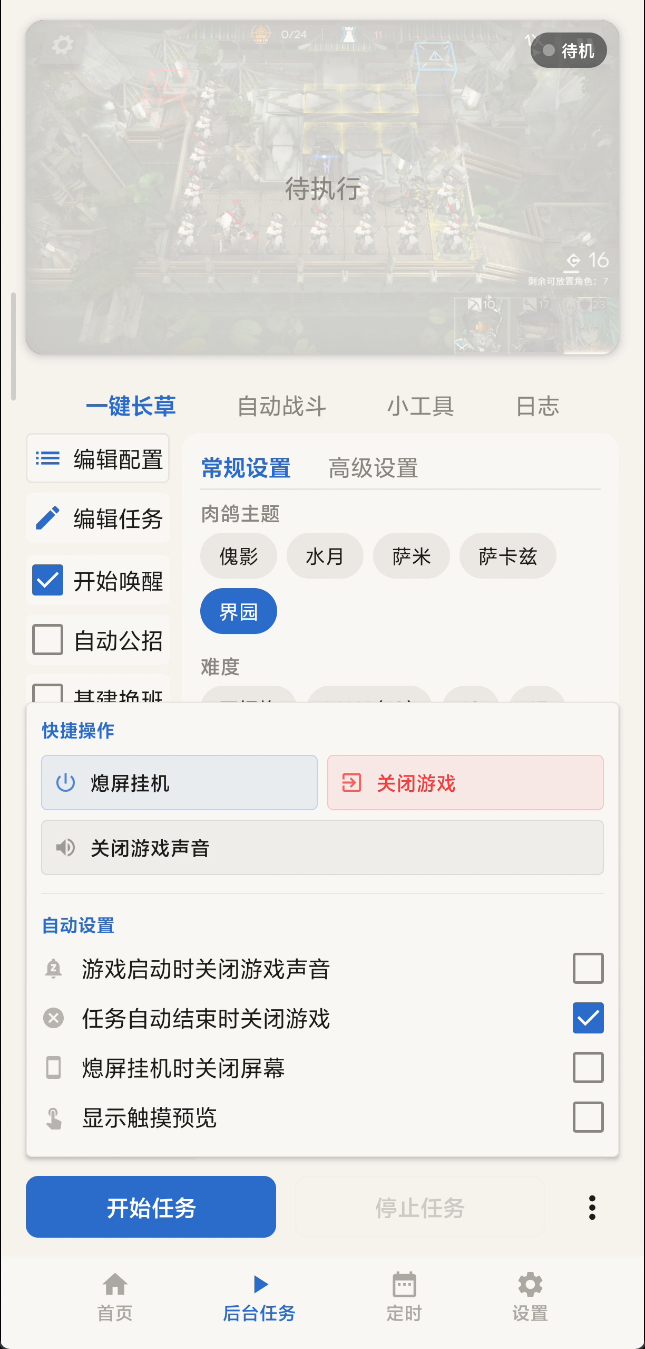
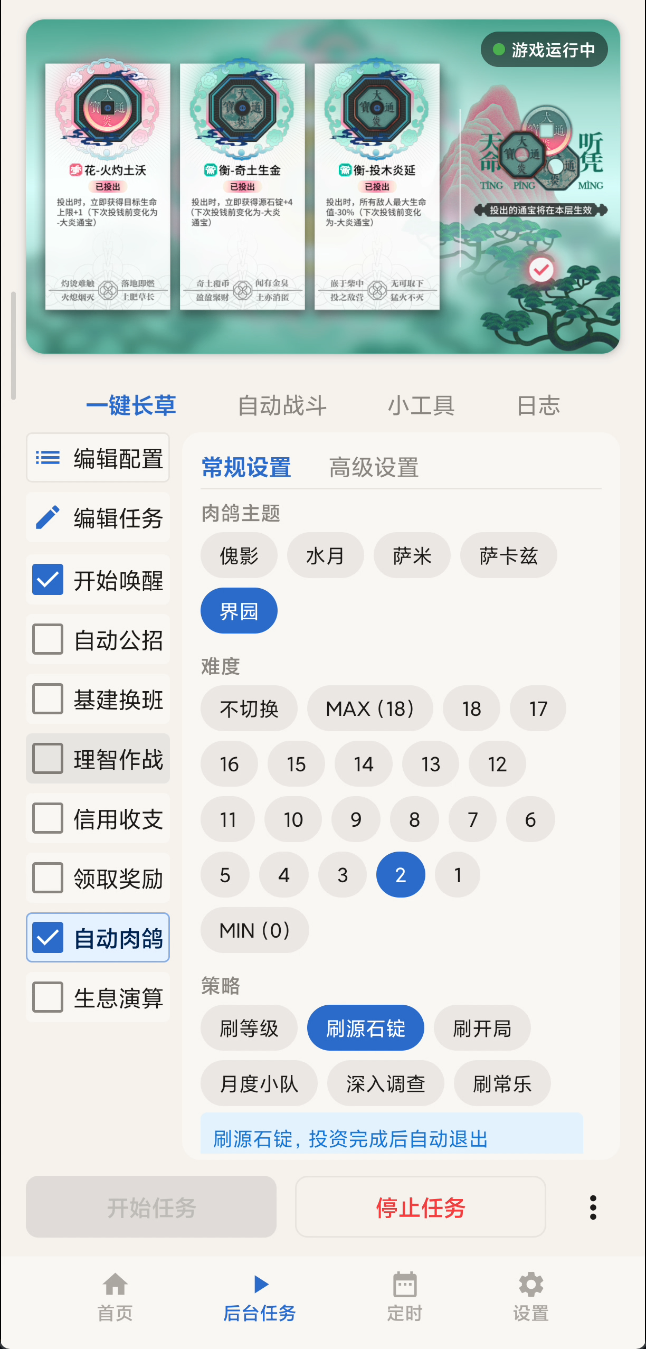
| 🪟 | Dual Mode | Foreground floating panel / Background virtual display (headless) |
| 📦 | Full Task Support | Sanity battles, recruitment, infrastructure, copilot, roguelike, and more |
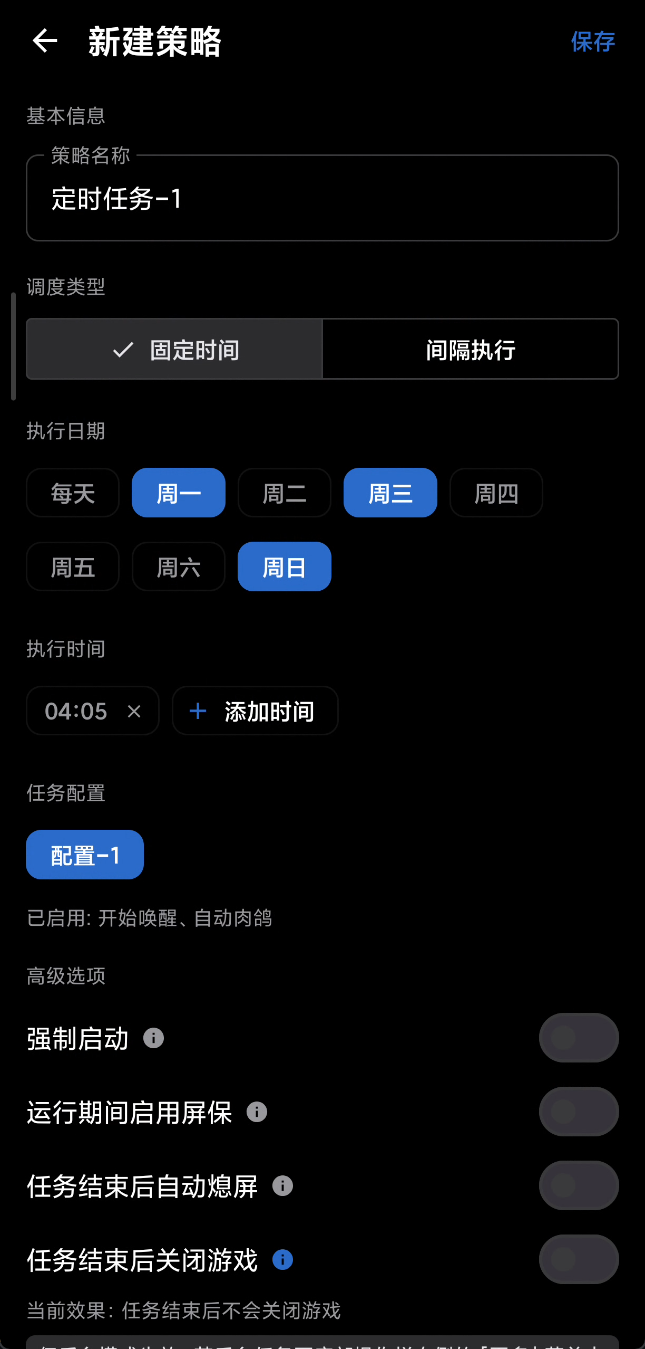
| ⏱️ | Scheduled Tasks | Auto-start tasks at preset times — perfect for daily routines |
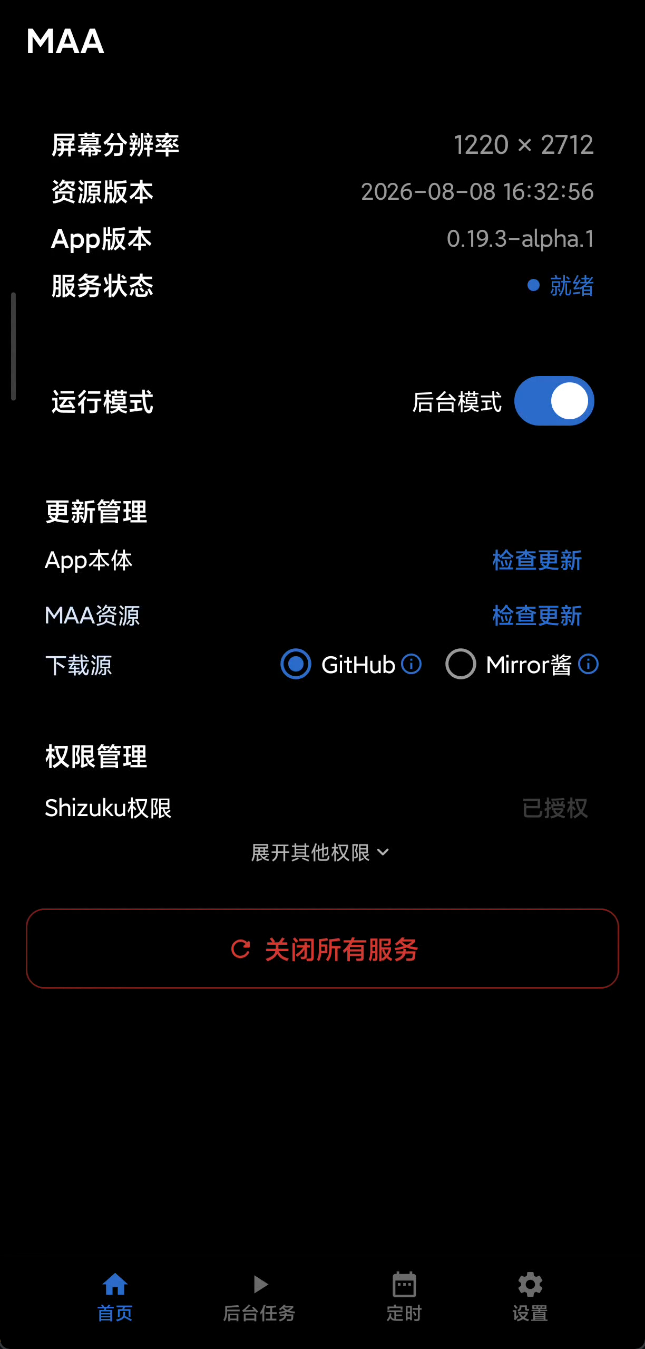
| 🔄 | Auto Update | Automatically check and download app & resource updates on launch |
Requirements
| Item | Requirement |
|---|---|
| OS | Android 9+ (API 28) |
| Permissions | Shizuku running & authorized, or rooted device |
| Architecture | arm64-v8a or x86_64 |
Documentation
| Document | Description |
|---|---|
| Build Guide | Build APK from source |
| External Automation | Launch profiles via Intent / am with MacroDroid or Tasker |
| Roadmap | Feature plans & progress |
| PR Guidelines | Pull request title, description, verification, and review conventions |
| Third-Party Notices | Open-source components & licenses |
Contributing
Pull requests are welcome! Whether it's a bug fix, UX improvement, or a new feature — we appreciate every contribution.
- Fork this repository
- Create your branch (
git checkout -b feat/your-feature) - Commit your changes (
git commit -m 'feat: add some feature') - Push to remote (
git push origin feat/your-feature) - Open a Pull Request
Please follow the Conventional Commits specification (
feat:,fix:,docs:, etc.). See the Build Guide for first-time setup. Read the PR Guidelines before opening a pull request.
If you find this project useful, consider giving it a Star ⭐ to help others discover it!
Acknowledgements
- MaaAssistantArknights — Arknights assistant based on image recognition
- Genymobile/scrcpy — Display and control your Android device.
- Shizuku — Using system APIs directly with adb/root privileges from normal apps through a Java process started with app_process.
License
This project is licensed under AGPL-3.0. Third-party code retains its original license — see Third-Party Notices.
How Shizuku is used
Can run Arknights daily tasks in foreground and background via `Shizuku newProcess` privileged service
This is an AI-assisted analysis of Shizuku-related usages in the app's public source code. It is best effort, so it may not catch every single usage.
How this app uses Shizuku
MaaMeow uses Shizuku to launch a privileged helper process that runs game automation outside normal app limits.
- Run automated game tasks: daily Arknights tasks are created, started and stopped through the privileged automation engine that taps and screenshots the game for the user.
- Play in background mode: a virtual display is created for the game so automation continues while the phone is used for other things or with the screen off.
- Play in foreground mode: the game is kept on the main display with touch input and screenshots supplied by the privileged process.
- Adjust display size: the game display size is forced and restored for automation, including a 16:9 mode and fixes for landscape devices.
- Turn screen off: the physical screen power is switched off and restored while background tasks keep running.
- Launch and keep game visible: the game is launched on the chosen display, checked on the correct display, and moved back if the system shifts it.
- Grant helper permissions: accessibility, floating window, notification, battery exemption, storage, background unrestricted and foreground service permissions are granted to the app through the privileged process.
- Mute game audio: game sound is muted and restored by changing its audio operation while tasks run.
- Wake and unlock device: the device is woken, unlocked with PIN or gesture, tested, and put back to sleep for scheduled tasks.
- Check game status: running game processes, installed packages, display placement and live frame rate are queried for automation control.
- Collect diagnostic logs: per-process log output and core debug files are captured by the privileged process for bug report export.
Android APIs or commands used
android.hardware.display.DisplayManager.createVirtualDisplayandroid.view.IWindowManager.setForcedDisplaySizeandroid.view.IWindowManager.clearForcedDisplaySizeandroid.view.IWindowManager.freezeRotationandroid.view.SurfaceControl.setDisplayPowerModeandroid.view.SurfaceControl.getBuiltInDisplayandroid.view.SurfaceControl.getPhysicalDisplayIdsandroid.hardware.display.DisplayControl.getPhysicalDisplayIdsandroid.os.IPowerManager.userActivityandroid.app.IActivityManager.startActivityandroid.app.IActivityManager.forceStopPackageandroid.app.ActivityManager.getRunningTasksandroid.app.IActivityTaskManager.moveRootTaskToDisplayandroid.app.IActivityTaskManager.moveStackToDisplayandroid.content.pm.IPackageManager.grantRuntimePermissioncom.android.internal.app.IAppOpsService.setModeandroid.os.IDeviceIdleController.addPowerSaveWhitelistAppandroid.provider.Settings.Secure.getStringandroid.provider.Settings.Secure.putStringandroid.provider.Settings.Secure.putIntandroid.net.IConnectivityManager.setUidFirewallRuleandroid.os.INetworkManagementService.setFirewallUidRuleam set-standby-bucketam set-inactiveam set-bg-restriction-levelappops setappops resetdevice_config put activity_manager max_phantom_processessettings put globalcmd connectivity set-package-networking-enabledcmd connectivity get-package-networking-enablediptablespidoflogcat
Changelog
What's new for version 0.22.0
0.22.0 - 2026-09-24
Highlights
适配 MAA v6.18.0
内置 MaaCore 升级至 v6.18.0,上游新功能同步可用:基建新增「副手换人」,黑流树海零件箱超载时自动丢弃零件,领取奖励支持限时签到活动,公招新增「3 星保留招聘许可」,肉鸽开局可分别指定三名干员并各自选择是否使用助战。上游的识别与流程修复也随之生效,详见 MAA v6.18.0 更新日志。
牛杂新增多项实用工具
牛杂新增「自动提升潜能」「缺口材料合成」「刷傀影维多利亚皇冠」;列表按「常驻功能」「常驻活动」「当前活动」分组展示。
一图流练度数据读取
设置新增「三方服务」栏。填写一图流 OpenAPI Token 并开启「干员识别从一图流获取」后,干员识别直接拉取一图流保存的练度数据,不再进游戏截图识别(数据来自森空岛导入,仅国服可用)。干员卡片同时展示技能等级、专精与模组。
自定义背景全面升级
自定义背景铺满主界面与所有子页面,支持「从壁纸取色」生成整套主题配色,切换 Tab 时背景带视差;背景相关设置移入独立的二级页面。
定时与后台运行更可控
定时任务的所有触发(定点、间隔、失败重试)统一改走系统闹钟通道,Doze 下也能准时触发,代价是有定时任务时状态栏会显示闹钟图标;定时任务被拦截或应用初始化失败时,触发日志会写明具体原因。后台任务页「自动设置」新增「限制单次运行时长」,到达上限后自动停止任务链。
从 beta.3 更新的用户请注意
v0.22.0-beta.3 曾跟随上游短暂移除基建设置中的「训练完成后继续尝试专精当前技能」,现已随上游恢复;升级 beta.3 后原开关状态已被重置,需要继续专精的请重新开启。
以下是详细内容(v0.21.4 → v0.22.0,含 beta.1 ~ beta.3):
✨ 新增 | Features
- 适配 MAA v6.18.0:内置 MaaCore 升级至 v6.18.0,基建设施新增「副手换人」,黑流树海零件箱超载清理记入日志,未知终止时引导前往「设置 → 关于 → 问题反馈」 @Aliothmoon
- 牛杂新增「自动提升潜能」(中坚信物不足时可选用普通信物)与「缺口材料合成」,列表按常驻功能 / 常驻活动 / 当前活动分组 @Aliothmoon
- 牛杂新增「刷傀影维多利亚皇冠」:从傀影肉鸽主菜单启动,未刷到维多利亚王冠时放弃重开并等待冷却,刷到后自动停止 @Aliothmoon
- 设置新增「三方服务」栏,干员识别支持从一图流 OpenAPI 获取练度数据 @Aliothmoon
- 干员识别卡片展示技能等级、专精与模组,导出补充技能等级列 @Aliothmoon
- 自定义背景铺满全部页面,支持从壁纸莫奈取色与切 Tab 视差,背景设置独立为二级页面 (#247) @WhiteMoon319 @Aliothmoon
- 后台任务新增「限制单次运行时长」,到达上限后自动停止任务链;抄作业、小工具、牛杂不受限制 @Aliothmoon
- 肉鸽开局可分别指定三名干员,每名可独立选择是否使用助战 @Aliothmoon
- 肉鸽各主题补充推荐开局配置提示 (#240) @youzibigg
- 开局干员推荐列表改为输入框内箭头展开,推荐提示自动换行 (#241) @youzibigg @Aliothmoon
- 领取奖励支持限时签到活动(仅常见横向版型) @Aliothmoon
- 公招新增「3 星保留招聘许可」:剩余许可不高于保留值或数量识别失败时跳过 3 星招募 @Aliothmoon
- 信用收支的借助战与访问好友新增「一日只执行一次」,借助战默认开启、访问好友默认关闭,按服务器日期换日 (#255) @youzibigg @Aliothmoon
- 关卡小提示显示芯片与技能书库存 (#253) @youzibigg
- 「无限吃 N 天内过期的理智药」改为手动输入天数,上限放宽到 30 天 @Aliothmoon
- 完成汇报附出错任务清单,有任务出错时标题改为「任务已全部完成,但出现错误!」 @Aliothmoon
- 检测护眼 / 夜光模式:开启时启动前提示可能影响色彩识别,并记入运行日志 @Aliothmoon
- 作业支持模组 β;动作同时填写干员与坐标、或像素区域与坐标时,按上游优先级校正并提示 @Aliothmoon
- 内置「252 一天 3 换」基建排班表 @Aliothmoon
- 时间选择器支持 12 / 24 小时制切换,滚轮首尾循环 @Aliothmoon
- 导出日志附带应用设置快照 @Aliothmoon
- 自动战斗类型选择默认折叠 @Aliothmoon
- 资源初始化进度条加入平滑过渡与扫光动画,准备阶段显示不定进度 @Aliothmoon
- 完善「牛牛喝酒」彩蛋,醉酒时点击屏幕会冒出醉话 @Aliothmoon
🐛 修复 | Bug Fixes
- 开始唤醒遇到掉线重连弹窗时不再停止整条任务链 @Aliothmoon
- 前台服务权限被系统拒绝时开始任务不再闪退,改为记入日志并给出排查命令 @Aliothmoon
- 授予「后台运行」权限时使用了错误的 AppOps 编号,导致授权不生效 @Aliothmoon
- 定时闹钟统一改用系统闹钟通道,Doze 下准时触发 @Aliothmoon
- 定时任务被拦截时日志写明具体原因,应用初始化失败也会记入定时触发日志 @Aliothmoon
- 信用收支优先购买列表拖动排序不生效 (#250) @Aliothmoon
- 干员识别统一升变阿米娅的形态,兼容旧配置中带职业后缀的写法 @Aliothmoon
- Telegram 通知内容超长时截断发送,不再整条失败 @Aliothmoon
- 冷启动日志与崩溃处理提前挂载,启动早期的问题也能留下日志 @Aliothmoon
- 日志导出遇到不可读文件时跳过,不再整体失败 @Aliothmoon
- 公告须停留倒计时结束后才能确认关闭或勾选不再显示 @Aliothmoon
- 炫彩字导致滚动容器回弹后点击失效 @Aliothmoon
- 补充遗漏的「已赠送线索」文案 (#239) @youzibigg
- 自动战斗步骤日志中的动作名未本地化 @Aliothmoon
- 修正「中坚信物」错别字 @Aliothmoon
🔧 杂项 | Miscellaneous
- CI 显式指定 setup-android @Aliothmoon
Full Changelog: v0.21.4 -> v0.22.0
下载哪个包
| 包 | 适用 |
|---|---|
universal |
通用,不确定选这个 |
arm64-v8a |
ARM 64 位真机 |
x64 |
x86_64 模拟器(Windows 上的蓝叠 / MuMu / 雷电等) |
z-arm64-v8a-emu-compat |
兼容包,arm64 模拟器(Mac 上的蓝叠 Air、MuMu Pro Mac 等)启动任务即闪退时改用 |
兼容包功能与 arm64-v8a 一致,只是关掉了 OpenCV 的 SVE2 指令分派。装了 universal 闪退的模拟器用户请直接换这个包,不要再试 universal
Permissions
20 permissions requested
Sources
3 sources
Sources
3 sources
More from this category
 SwiftSense
 AimBuddy
 LAC Tool
 BDroid X
 Cinderbox Companion
 神原
神原
 NBT Editor
 PF Tool
 Stalker
Ascent
Stalker
Ascent
 Okkei Patcher
 CloudSync