 ShizuStore
Auto Brightness Offset
1.4.1 · GitHub
More about this app
Samsung Galaxy adaptive-brightness offset for screens that feel too dark or too bright, including under privacy films: applies a fixed correction to the auto-brightness curve via Shizuku.
Auto Brightness Offset | 자동 밝기 보정

한국어 · English · 한국어 상세 설명서 · English guide · Download v1.4.1


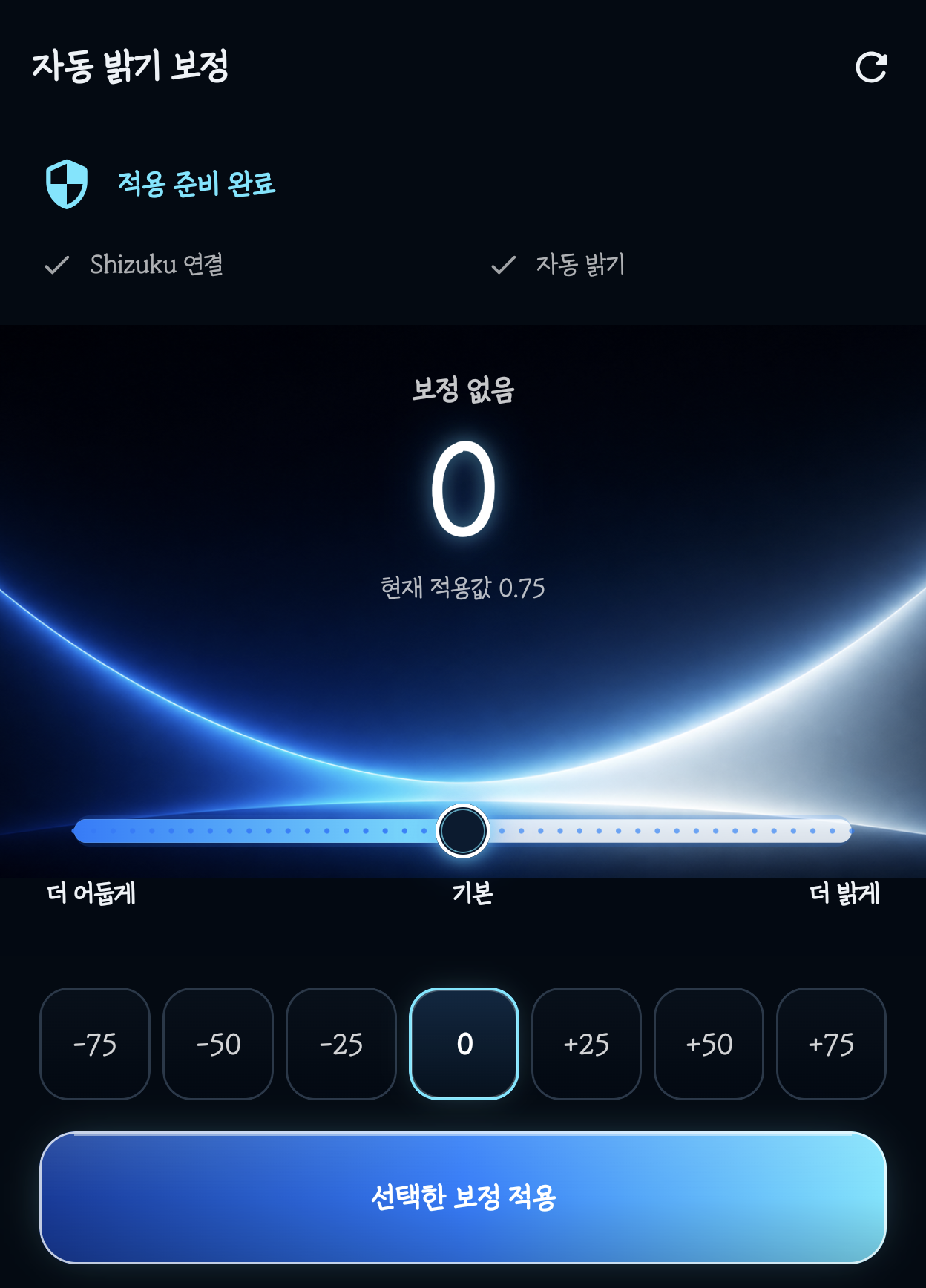
실제 Galaxy Z Fold8의 v1.4.1 화면입니다. 시스템 상태·내비게이션 영역을 제외하고, 설명에 필요한 앱 영역만 원본 픽셀 그대로 잘랐습니다. 글꼴은 시험 단말의 시스템 글꼴입니다.
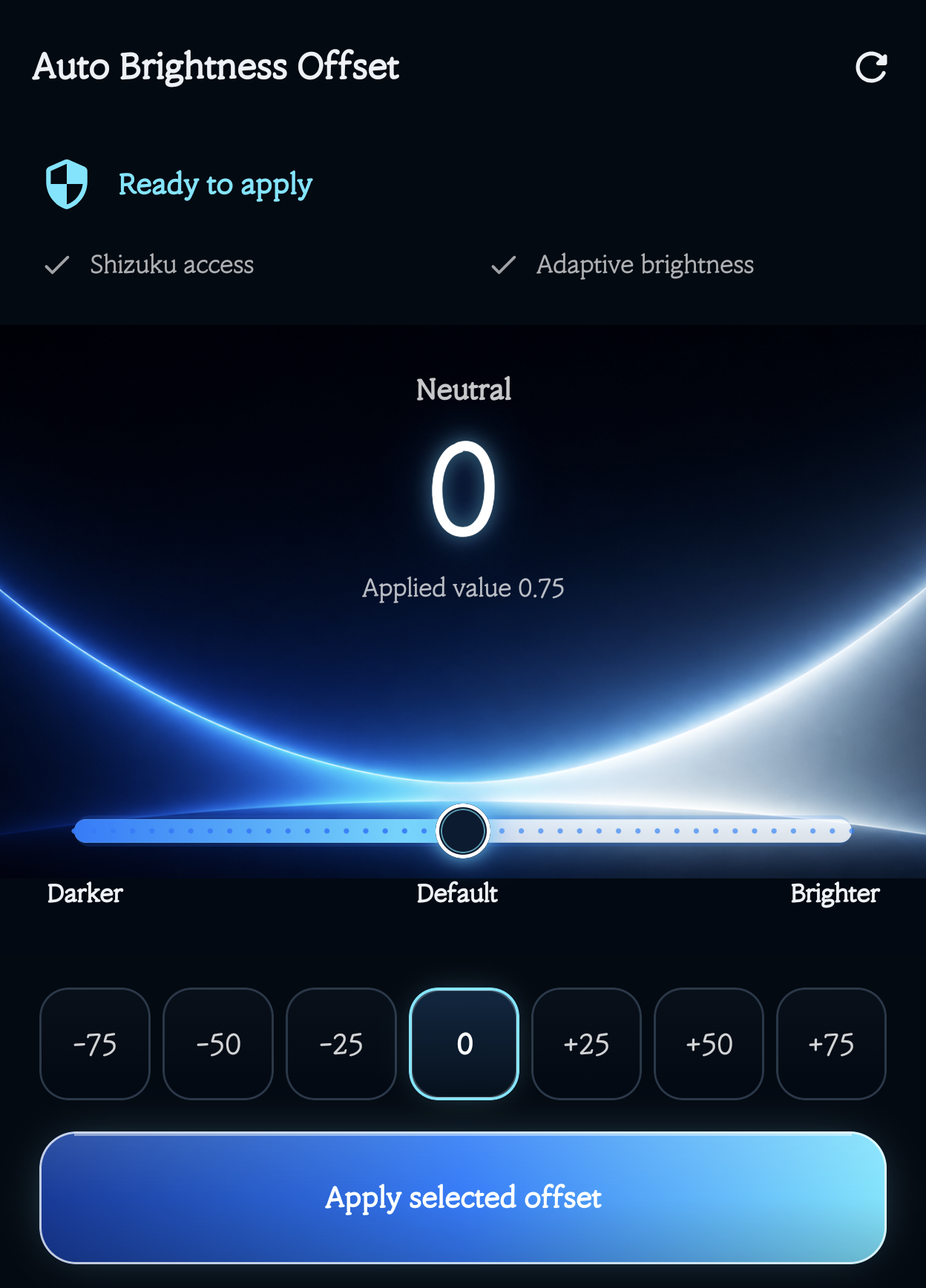
Real v1.4.1 captures from a Galaxy Z Fold8. Crops exclude system bars and focus on the relevant app area without altering pixels. The screenshots use the test phone's system font.
한국어
삼성 갤럭시의 자동 밝기를 계속 사용하면서, 시스템이 주변 조도에 따라 정한 밝기를 일정한 성향으로 더 밝거나 어둡게 보정하는 로컬 Android 앱입니다.
이런 경우에 적합합니다
- 자동 밝기는 계속 사용하고 싶지만 화면이 항상 조금 어둡게 느껴지는 경우
- 자동 밝기가 필요 이상으로 밝아 눈이 피로하거나 배터리 소모가 신경 쓰이는 경우
- 사생활 보호필름(프라이버시 필름), 저반사 필름 또는 강화유리를 붙인 뒤 화면이 더 어둡게 느껴지는 경우
- 갤럭시 Z 폴드·삼성 갤럭시에서 주변 밝기가 바뀔 때마다 밝기 슬라이더를 직접 조절하고 싶지 않은 경우
- 시스템 자동 밝기의 변화 방식은 유지하면서 항상 일정한 밝기 성향만 더하거나 빼고 싶은 경우
이 앱은 보호필름 자체의 투과율이나 시야각을 바꾸지 않습니다. 자동 밝기의 결과를 보정해 체감상 어둡거나 밝은 화면을 조절합니다.
다운로드
- APK: AutoBrightnessOffset-v1.4.1-release.apk
- 크기:
3,474,839 bytes - SHA-256:
91B5700052DECF3BCCBC67B17684CF90DF4B7C2955FCBD9A1AD1799DA472BBD0 - 빌드·서명: R8 최적화 Release, Android Debug 인증서, APK Signature Scheme v2·v3
이 APK는 개인 테스트·사이드로드용 디버그 서명 빌드입니다. Google Play 배포용 서명 빌드는 아닙니다.
필수 준비
- 삼성 갤럭시에서
설정 → 디스플레이 → 자동 밝기를 켭니다. - 공식 Shizuku 다운로드 페이지에서 Shizuku를 설치합니다.
- 공식 Shizuku 시작 안내에 따라 서비스를 시작합니다.
- 이 앱을 열고 Shizuku 권한을 허용합니다.
- 처음에는
+10부터 시험합니다.
처음 설치하는 사람은 이미지가 포함된 한국어 상세 설명서를 순서대로 따라가면 됩니다.
주요 기능
- 보정 범위
-100~+100, 5단계 간격 - 프리셋
-75,-50,-25,0,+25,+50,+75 - 주변 조도 변화에 따른 자동 재계산
- 화면 OFF 시 임시 밝기 해제, 화면 ON 시 재적용
- Shizuku 중지 시 조도 추적 일시 중지와 명확한 상태 표시
- Shizuku 재시작 후 앱을 열면 저장한 보정값 자동 재적용
- 연결이 끊긴 상태의 복원 요청을 예약하고 다음 연결 때 자동 완료
- 앱에서
원래 값 복원및 알림에서보정 해제 - Android 13 이상에서 첫 실행 시 관리 알림 권한 한 번 요청
- 시스템 언어에 따른 한국어·영어 UI
- 진단 정보 복사와 선택형 재부팅 후 재적용
- 인터넷·계정·광고·분석·개인정보 수집 없음
숫자는 화면 밝기 퍼센트가 아니라 자동 밝기 곡선의 보정 강도입니다. 0을 적용하거나 원래 값 복원을 누르면 앱의 임시 보정이 해제되고 시스템 자동 밝기로 돌아갑니다.
현재 UI와 버튼 상태
v1.4.0에서 적용한 디자인을 v1.4.1에서도 사용하며, v1.4.1에는 연결 중단·복원 대기 표시가 추가됐습니다.
- 숫자 이중 후광, 손잡이 후광, 손잡이 아래에서도 끊기지 않는 슬라이더
- 숫자 뒤 중첩 사각형을 제거한 7단계 프리셋과 선택 테두리
- 선택값을 바꿨을 때 밝게 표시되는 다층 그라데이션 적용 버튼
- 선택값이 적용값과 같으면
현재 +75 적용 중처럼 표시하며 중복 적용을 막는 낮은 강조 상태 보정 일시 중지·원래 값 복원 대기는 정상 적용과 다른 문구·색으로 구분
아래는 0을 선택만 한 상태입니다. 작은 현재 적용값 0.75가 실제 유지 중인 보정이고, 큰 0은 적용 대기 중인 선택값입니다. 밝은 버튼을 누르기 전까지 보정은 바뀌지 않습니다.


Wi-Fi 없는 야외 사용
집에서 USB ADB로 Shizuku를 시작한 뒤에는 USB 케이블을 빼고 Wi-Fi와 무선 디버깅을 꺼도 Fold8에서 보정이 동작했습니다. 먼저 Shizuku와 이 앱을 모두 배터리 → 제한 없음 및 삼성의 절전 상태로 전환하지 않을 앱에 추가해야 합니다. 절전 예외 적용 뒤 Wi-Fi OFF 상태에서 화면을 켠 백그라운드 3분과 화면 잠금·재점등 시험을 통과했습니다.
즉, 야외에서 Wi-Fi에 계속 연결할 필요는 없습니다. 연결 표시가 풀리면 Wi-Fi를 켤 필요 없이 Shizuku 앱 열기 → 자동 밝기 보정 앱 열기 순서로 Binder를 다시 받을 수 있습니다. 다만 재부팅하거나 Shizuku 서버가 실제 종료되면 PC, USB ADB 브리지 또는 루트 방식 없이 야외에서 다시 시작할 수 없습니다. 자세한 순서는 한국어 상세 설명서의 USB 시작 절차를 참고하십시오.
작동 방식
- 휴대폰 조도 센서에서 현재 lux를 읽습니다.
- Shizuku 사용자 서비스로 삼성 자동 밝기 곡선의 현재 목표값을 조회합니다.
- Android 계열의 감마 방식으로 선택한 보정 강도를 계산합니다.
- 설정 DB나 자동 밝기 학습값을 바꾸지 않고 임시 디스플레이 밝기 API를 적용합니다.
- 조도가 기준 범위를 벗어나면 다시 계산합니다.
Fold8 실제 검증
| 시험 | 결과 |
|---|---|
| JVM 단위시험 | PASS, 17/17 |
| Android Lint | PASS |
| Debug APK 빌드 | PASS |
| R8·리소스 축소 Release 빌드 | PASS, unsigned |
| Fold8 커버 화면 UI | PASS, 1248 × 1972, 420 dpi |
0 복원 |
PASS, 실제 자동 밝기 약 0.3340 |
+75 적용 |
PASS, 기본 0.3294 → 실제 0.6144 |
+50 복귀 |
PASS, 실제 0.5267 |
| 아이콘 축소판 설치·표시 | PASS |
| Shizuku 중지 시 일시 중지·반복 오류 차단 | PASS |
| 연결 끊김 중 복원 예약 → Shizuku 재시작·앱 열기 → 자동 복원 | PASS |
| 두 앱 절전 예외 후 Wi-Fi·무선 디버깅 OFF 운용 | PASS, 백그라운드 3분 및 화면 잠금·재점등 범위 |
| Android 알림 권한 요청과 관리 알림 표시 | PASS |
설치 APK와 기기 base.apk 해시 |
PASS, 일치 |
삼성의 야외 고휘도, 발열 감광, 절전 모드, HDR 및 앱별 제한은 계속 우선합니다. One UI 업데이트나 다른 제조사에서는 삼성 전용 명령/API가 달라 동작하지 않을 수 있습니다.
English
Auto Brightness Offset keeps Samsung adaptive brightness enabled while shifting its result consistently brighter or darker. It is a local Android utility built for Samsung Galaxy devices and physically tested on a Galaxy Z Fold8.
Who this is for
- Samsung adaptive brightness always feels a little too dark, but you still want it enabled
- Auto brightness often feels too bright, causing eye strain or unnecessary battery use
- A privacy screen protector, privacy filter, anti-glare film, or tempered glass makes the display feel dimmer
- You use a Galaxy Z Fold or Samsung Galaxy and do not want to move the brightness slider whenever ambient light changes
- You want to preserve the system's adaptive behavior while adding a consistent brighter or darker bias
The app does not change a screen protector's light transmission or viewing angle. It compensates the adaptive-brightness result when the display feels consistently too dim or too bright.
Download
- APK: AutoBrightnessOffset-v1.4.1-release.apk
- Size:
3,474,839 bytes - SHA-256:
91B5700052DECF3BCCBC67B17684CF90DF4B7C2955FCBD9A1AD1799DA472BBD0 - Build/signature: R8-optimized Release, Android Debug certificate, APK Signature Scheme v2 and v3
This is a debug-signed sideload build for personal testing, not a Google Play production-signed package.
Requirements and quick start
- Enable
Settings → Display → Adaptive brightnesson the Samsung device. - Install Shizuku from the official Shizuku download page.
- Start its service using the official Shizuku setup guide.
- Open Auto Brightness Offset and grant its Shizuku permission.
- Start with
+10, then adjust gradually.
See the illustrated English setup and user guide for every step.
Features
-100to+100compensation in 5-point steps- Quick presets:
-75,-50,-25,0,+25,+50,+75 - Automatic recalculation when ambient light changes
- Temporary override cleared while the screen is off and reapplied when it turns on
- Clear paused state when Shizuku stops, without repeated failed sensor queries
- Automatic saved-offset resume after Shizuku restarts and the app is opened
- Queued restore while disconnected, completed on the next Shizuku connection
- Restore from the app or clear the offset from the management notification
- One-time Android notification-permission request on Android 13 and later
- Korean UI on Korean systems and English UI on other locales
- Copyable diagnostics and optional reapply-after-reboot workflow
- No Internet permission, account, ads, analytics, or personal-data collection
The number is a curve-offset strength, not a brightness percentage. Applying 0 or choosing Restore original clears the app's temporary override and returns control to system adaptive brightness.
Current UI and button states
Version 1.4.1 retains the visual design introduced in 1.4.0 and adds explicit disconnected and pending-restore states.
- Dual number glow, a glowing thumb, and a continuous slider track
- Seven presets without the former overlapping rectangle behind each number
- A brighter, layered-gradient Apply button when the selected value differs from the active offset
- A subdued Offset +75 active button when no new value needs applying; this is a state indicator, not a missing visual effect
- Distinct wording and colors for Offset paused and Restore pending
In the selection screenshots above, the large 0 is a draft while Applied value 0.75 remains active. Selecting a preset alone does not change the offset. See how to read the screen and the current UI verification record.
Outdoor use without Wi-Fi
On the tested Fold8, Shizuku and the offset remained active after starting Shizuku through USB ADB, exempting both Shizuku and this app from battery restrictions, unplugging USB, and turning both Wi-Fi and Wireless debugging off. The phone passed a three-minute screen-on background run plus a screen-lock and wake reapply test.
You do not need a continuous Wi-Fi connection outdoors. If access drops while the server is still alive, open Shizuku and then Auto Brightness Offset to refresh the Binder without enabling Wi-Fi. A reboot or terminated Shizuku server still requires a computer, USB ADB bridge, or root method to start Shizuku again. See the USB start procedure.
How it works
The app reads ambient lux, queries Samsung's current adaptive-brightness target through a Shizuku user service, applies a gamma-style correction, and sends a temporary display-brightness override. It does not write the adaptive-brightness learning value.
Samsung outdoor boost, thermal dimming, power saving, HDR, and app-specific limits remain in control. Samsung's command output and private temporary-brightness API can change with One UI updates and may not work on other brands.
검색어 / Search keywords
- 한국어: 갤럭시 자동 밝기 어두움, 삼성 자동 밝기 보정, 자동 밝기 항상 어두움, 자동 밝기 항상 밝음, 사생활 보호필름 화면 어두움, 프라이버시 필름 밝기, 갤럭시 폴드 화면 밝기
- English: Samsung adaptive brightness too dark, Samsung auto brightness too bright, privacy screen protector dim display, Galaxy brightness offset, Galaxy Z Fold adaptive brightness, Shizuku brightness controller, One UI brightness adjustment
Documents
- 한국어 상세 설명서
- English detailed guide
- Document index / 문서 색인
- Privacy and permissions / 개인정보 및 권한
- v1.4.1 release notes
- Fold8 device test plan
- Debug and regression ledger
- Project history
- Handover
Build
.\scripts\verify.ps1 -IncludeRelease
The script runs clean, JVM tests, Android Lint, Debug APK assembly, and an R8/resource-shrunk unsigned Release build. The public APK is that optimized Release output signed with the Android Debug certificate and then installed on the physical Fold8.
License status
The repository is publicly viewable, but no open-source license has been selected. Public visibility alone does not grant reuse, redistribution, or modification rights beyond applicable law. Shizuku and other dependencies retain their own licenses.
How Shizuku is used
Can apply and clear an auto-brightness offset via `DisplayManager` temporary brightness APIs through Shizuku.
This is an AI-assisted analysis of Shizuku-related usages in the app's public source code. It is best effort, so it may not catch every single usage.
How this app uses Shizuku
The app uses Shizuku to apply a temporary, non-persistent correction on top of adaptive brightness while leaving automatic mode active.
- Apply brightness offset: the offset chosen by the user is combined with the current adaptive brightness level and applied to the active display through Shizuku using hidden display brightness controls.
- Follow ambient light: as the light sensor reports new ambient levels, the app reads the system automatic brightness curve for that light level through Shizuku and updates the corrected brightness.
- Restore original brightness: turning the offset off or choosing restore clears the temporary brightness and adjustment through Shizuku, returning the display to the normal adaptive curve.
Android APIs or commands used
DisplayManager.setTemporaryBrightnessDisplayManager.setTemporaryAutoBrightnessAdjustmentcmd display get-ambient-brightness-info
Notable details
The correction is temporary and not written as a permanent system setting, it is reapplied as ambient light changes and cleared when the feature is turned off, on restore, or when the management service stops.
Changelog
What's new for version 1.4.1
Auto Brightness Offset v1.4.1
Shizuku 연결이 끊겼을 때의 상태·복원 흐름과 Android 관리 알림 권한을 보강한 안정화 릴리스입니다.
한국어
현재 UI · 2026-08-27 문서 보완
숫자·손잡이 후광, 연속 슬라이더, 7단계 프리셋, 숫자 뒤 중첩 사각형 제거, 다층 적용 버튼과 축소 래스터 아이콘은 v1.4.0에서 반영되어 이 APK에도 포함돼 있습니다. v1.4.1은 여기에 보정 일시 중지·원래 값 복원 대기 상태 표시를 더했습니다.
밝은 선택한 보정 적용은 아직 적용하지 않은 선택값이 있을 때, 낮은 강조의 현재 +75 적용 중은 선택값과 적용값이 같을 때 표시됩니다. 한국어 화면 설명과 UI 검증 기록을 보강했습니다. APK·태그·기능은 변경하지 않았습니다.
주요 변경
- Shizuku 서버가 중지되면 조도 센서 추적을 멈추고
보정 일시 중지로 표시 - 연결이 끊긴 동안 반복되던
NOT_RUNNING오류와 불필요한 센서 재시도 제거 - 마지막 보정값과 현재 적용값을 구분해 중지 상태를 오해하지 않도록 개선
- Shizuku 재시작 후 앱을 열면 저장한 보정값을 자동 재적용
- 연결이 끊긴 상태의
원래 값 복원을 예약하고 다음 연결 때 자동 완료 - 진단 정보에
복원 대기상태 추가 - Android 13 이상에서 관리 알림 권한을 첫 실행에 한 번 요청
- USB ADB 시작 후 Wi-Fi 없이 사용하는 야외 운용 절차, 두 앱의 배터리 제한 해제 조건과 수동 연결 복구를 한영 설명서에 추가
Galaxy Z Fold8 실제 검증
| 시험 | 결과 |
|---|---|
| JVM Unit Test | PASS, 17/17 |
| Android Lint | PASS, 이슈 0건 |
| Debug APK | PASS |
| R8·리소스 축소 Release APK | PASS |
| Shizuku 중지 감지와 센서 추적 중지 | PASS |
중지 뒤 6초간 반복 NOT_RUNNING 오류 |
PASS, 0건 |
| 끊김 상태에서 복원 예약 | PASS, pending_restore=true |
| Shizuku USB 재시작 후 앱 열기 | PASS, 예약 복원 완료 |
| 복원 후 임시 밝기 | PASS, NaN |
저장한 +75 재적용 |
PASS, 기본 약 0.3451 → 실제 약 0.6270 |
| Android 알림 권한 창과 관리 알림 | PASS |
| 두 앱 절전 예외 후 Wi-Fi·무선 디버깅 OFF | PASS, 백그라운드 3분과 화면 잠금·재점등 뒤 Shizuku·서비스·+75 유지 |
최종 Release 설치와 기기 base.apk 해시 |
PASS, 일치 |
Samsung Freecess가 Shizuku 또는 앱을 동결하면 서버 PID가 살아 있어도 Binder 접근이 일시적으로 풀릴 수 있습니다. 두 앱을 배터리 제한 없음과 절전 상태로 전환하지 않을 앱에 추가하십시오. 접근이 풀리면 Wi-Fi를 켤 필요 없이 Shizuku 열기 → Auto Brightness Offset 열기로 복구할 수 있습니다. 재부팅하거나 서버가 실제 종료되면 PC, USB ADB 브리지 또는 루트 방식으로 Shizuku를 다시 시작해야 합니다.
설치 파일
- 파일:
AutoBrightnessOffset-v1.4.1-release.apk - 크기:
3,474,839 bytes - SHA-256:
91B5700052DECF3BCCBC67B17684CF90DF4B7C2955FCBD9A1AD1799DA472BBD0 - 버전:
1.4.1(versionCode=12,targetSdk=36) - 서명: Android Debug 인증서, APK Signature Scheme v2·v3 PASS
- Debug 전용 ADB 시험 Receiver: Release에서 미포함 확인
이 APK는 개인 테스트·사이드로드용 디버그 서명 릴리스입니다. Google Play 배포용 서명 패키지가 아닙니다.
English
Current UI · documentation supplement, 2026-08-27
This APK already includes the 1.4.0 design: number and thumb glows, a continuous slider, seven presets without overlapping number rectangles, a layered Apply button, and the scaled-down raster icon. Version 1.4.1 adds explicit paused and pending-restore states.
A bright Apply selected offset button indicates an unapplied draft; a subdued Offset +75 active button indicates that the selected value is already active. The English screen guide and screenshot evidence were refreshed. This is a documentation update, not a new APK, tag, or feature release.
Changes
- Pauses ambient-light tracking and shows Offset paused when the Shizuku server stops
- Removes repeated
NOT_RUNNINGfailures and unnecessary sensor retries while disconnected - Distinguishes the saved offset from a currently applied value
- Reapplies the saved offset after Shizuku restarts and the app is opened
- Queues Restore original while disconnected and completes it on the next connection
- Adds the pending-restore state to Diagnostics
- Requests Android management-notification permission once on Android 13 and later
- Adds bilingual USB-start and Wi-Fi-free outdoor instructions, battery-exemption requirements, and manual Binder recovery
Physical Fold8 verification
- Unit tests: PASS, 17/17
- Android Lint: PASS, zero issues
- Debug and R8/resource-shrunk Release builds: PASS
- Shizuku stop detection, paused UI, and sensor stop: PASS
- Repeated
NOT_RUNNINGlog lines during a six-second paused window: 0 - Disconnected restore queue: PASS
- USB Shizuku restart, app reopen, and automatic restore: PASS
- Temporary brightness after restore:
NaN - Saved
+75reapplied: Samsung base about0.3451to actual about0.6270 - One-time notification permission prompt and active management notification: PASS
- With both apps battery-exempt, Wi-Fi and Wireless debugging off: Shizuku, service, and
+75survived a three-minute background run plus screen lock and wake - Installed final Release and local APK SHA-256: identical
Samsung Freecess can temporarily interrupt Binder access even while the Shizuku server PID remains alive. Set both apps to Unrestricted and add both to Never auto sleeping apps. If access drops, keep Wi-Fi off and use open Shizuku → open Auto Brightness Offset. A reboot or terminated server still needs a computer, USB ADB bridge, or root method to restart Shizuku.
APK
- File:
AutoBrightnessOffset-v1.4.1-release.apk - Size:
3,474,839 bytes - SHA-256:
91B5700052DECF3BCCBC67B17684CF90DF4B7C2955FCBD9A1AD1799DA472BBD0 - Version:
1.4.1(versionCode=12,targetSdk=36) - Signature: Android Debug certificate, APK Signature Scheme v2 and v3 verified
This is a debug-signed sideload package for personal testing, not a Google Play production-signed build.
Permissions
6 permissions requested
More from this category
 Battery Health
 Root My Galaxy
 Scamsung Fonts
 Fonts
Fonts
 Samsung Region Override
 S Battery Tweaker
 Pearity
 SMT Shell
 4Zones
 ZFold Multi DPI
 ShutterMute
 Duo Fold Live