 ShizuStore
FlowPilot
1.1.0 · GitHub
More about this app
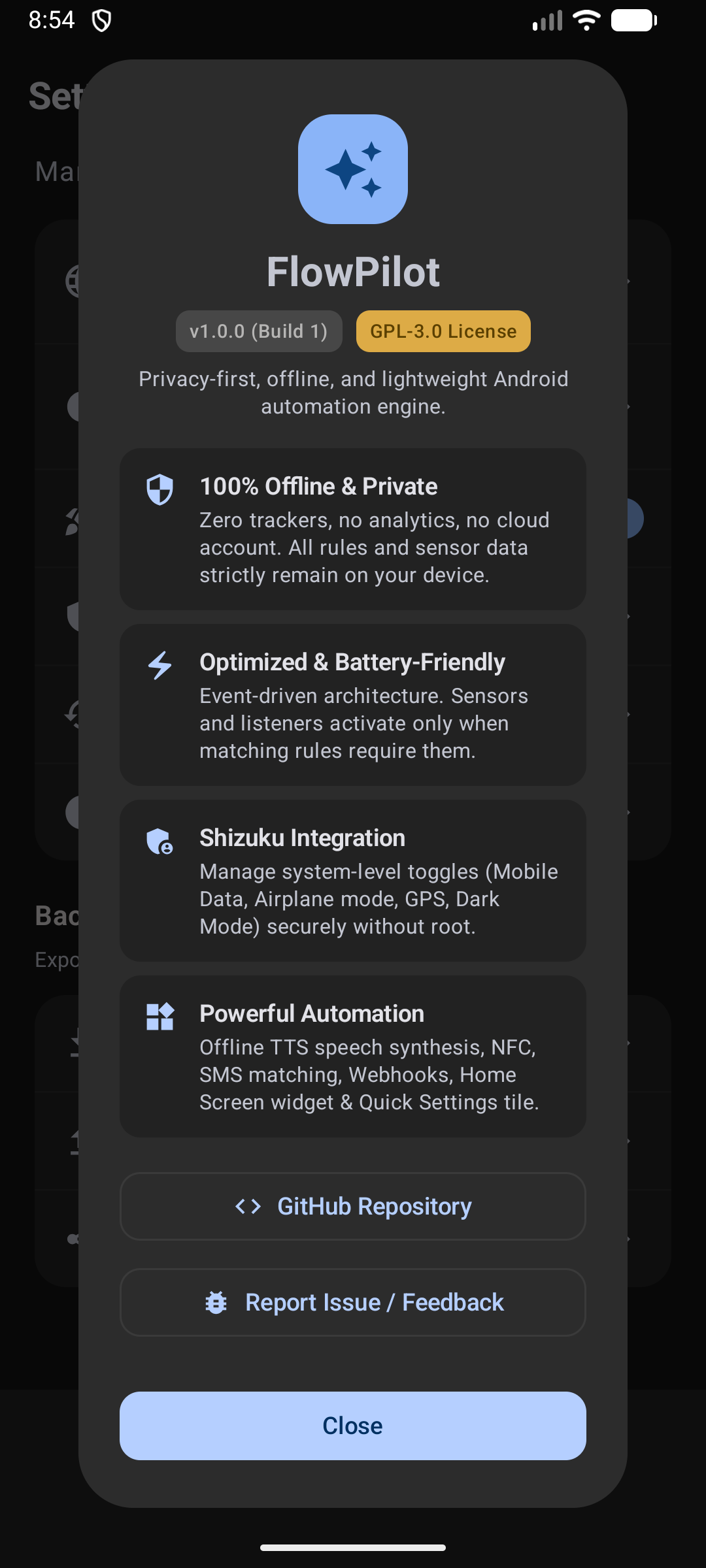
Privacy-first offline automation engine running privileged system actions such as mobile data, airplane mode and dark theme through Shizuku.
⚡ FlowPilot
The private, battery-first Android automation engine — without root.
Automate your device with event-driven triggers, privileged system actions via Shizuku, and a fluid Material 3 interface. No telemetry or cloud accounts, with battery-efficient demand-driven listeners.

-34A853?logo=android&logoColor=white)









Note
📱 Device Compatibility & Community Testing Notice FlowPilot is an independent open-source project, actively developed and primary-tested on Xiaomi HyperOS (Xiaomi 15T Pro). Strict adherence to standard Android Jetpack and system APIs is maintained throughout the codebase, and CI verifies runtime contracts against an API 35 Android Emulator.
Because OEM skins (Samsung One UI, Google Pixel, Motorola, OxygenOS, etc.) implement background process limits differently, your test reports, feedback, and pull requests are warmly welcomed!
🌟 Why FlowPilot?
Most Android automation tools force you to choose between steep complexity, heavy battery drain, or intrusive cloud logins. FlowPilot was built to fix this.
🔋 Battery-First & Event-DrivenNo constant CPU wake-locks or polling loops. Hardware sensors (accelerometer, proximity, light) and broadcast receivers register only when an active rule needs them and unregister instantly when idle. |
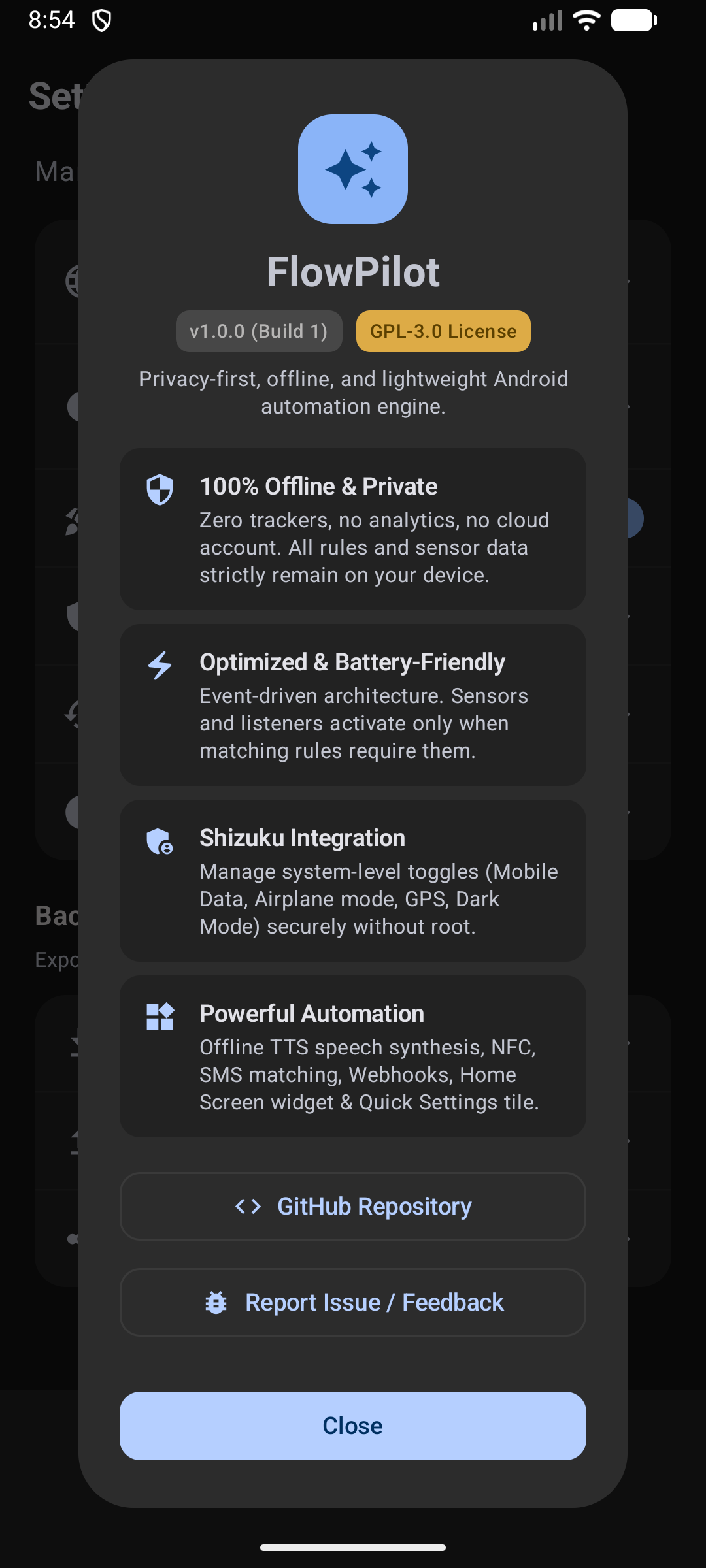
🔒 100% Offline & PrivateNo analytics, no telemetry, no remote servers, and no accounts. Everything happens on your device. Webhooks and SMS actions send only the data you explicitly configure. |
🛡️ Rootless System SuperpowersHarness the power of Shizuku to toggle Mobile Data, Airplane Mode, GPS, Dark Mode, and Force Stop apps using elevated ADB permissions—without rooting or voiding warranties. |
🎨 Modern Material 3 & ComposeCrafted completely in native Jetpack Compose. Experience fluid 60/120 FPS transitions, dynamic Material You theming, haptic feedback, and glanceable Home Screen widgets. |
🔊 Offline Text-to-Speech (TTS)Let your phone talk to you with on-device synthesized voice caching. Create custom spoken alerts for battery events, bedtime reminders, or location changes—zero internet required. |
🔐 Safe Sharing & Encrypted BackupsExport portable sanitized JSON rules to share with friends, or secure your entire library with AES-256-GCM password encryption (PBKDF2 with 100,000 iterations). |
📸 Screenshots
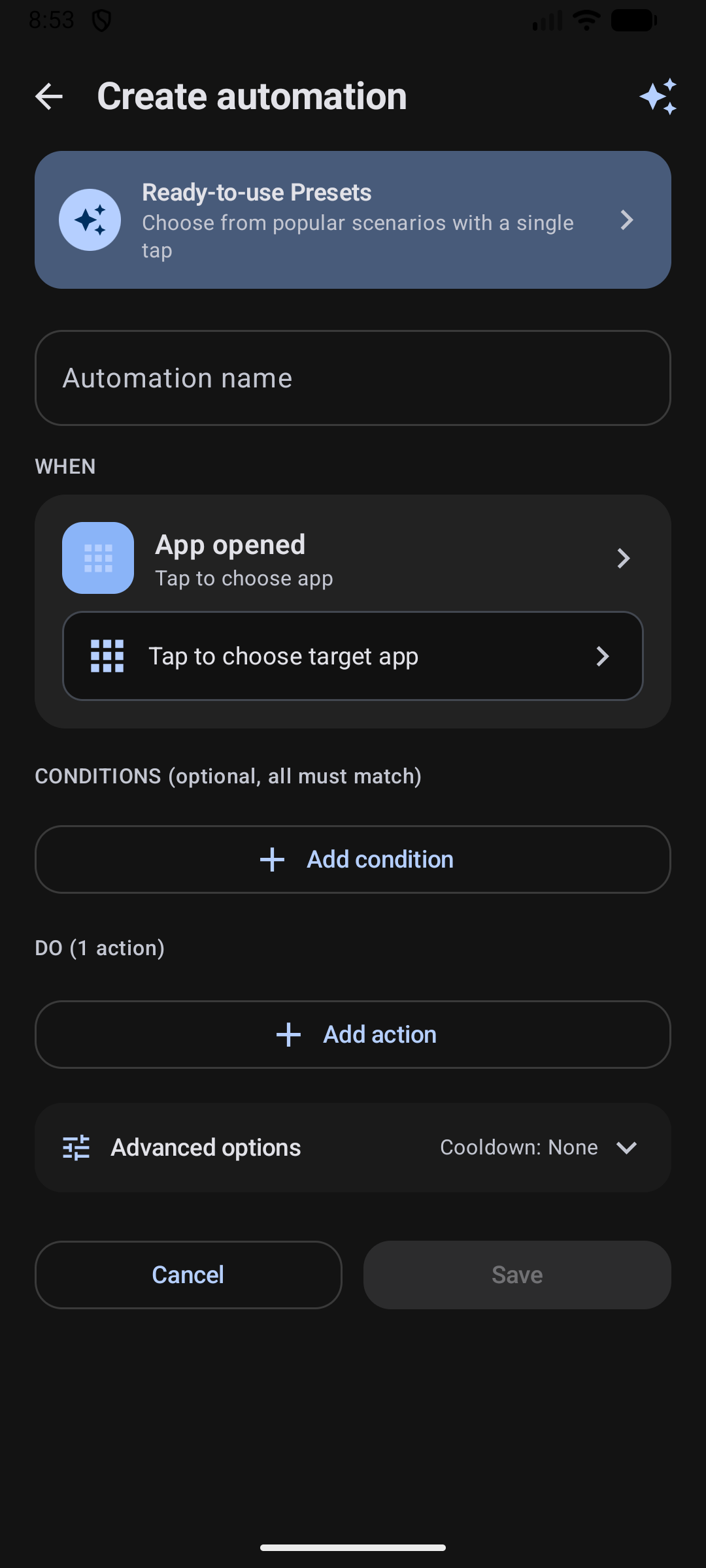
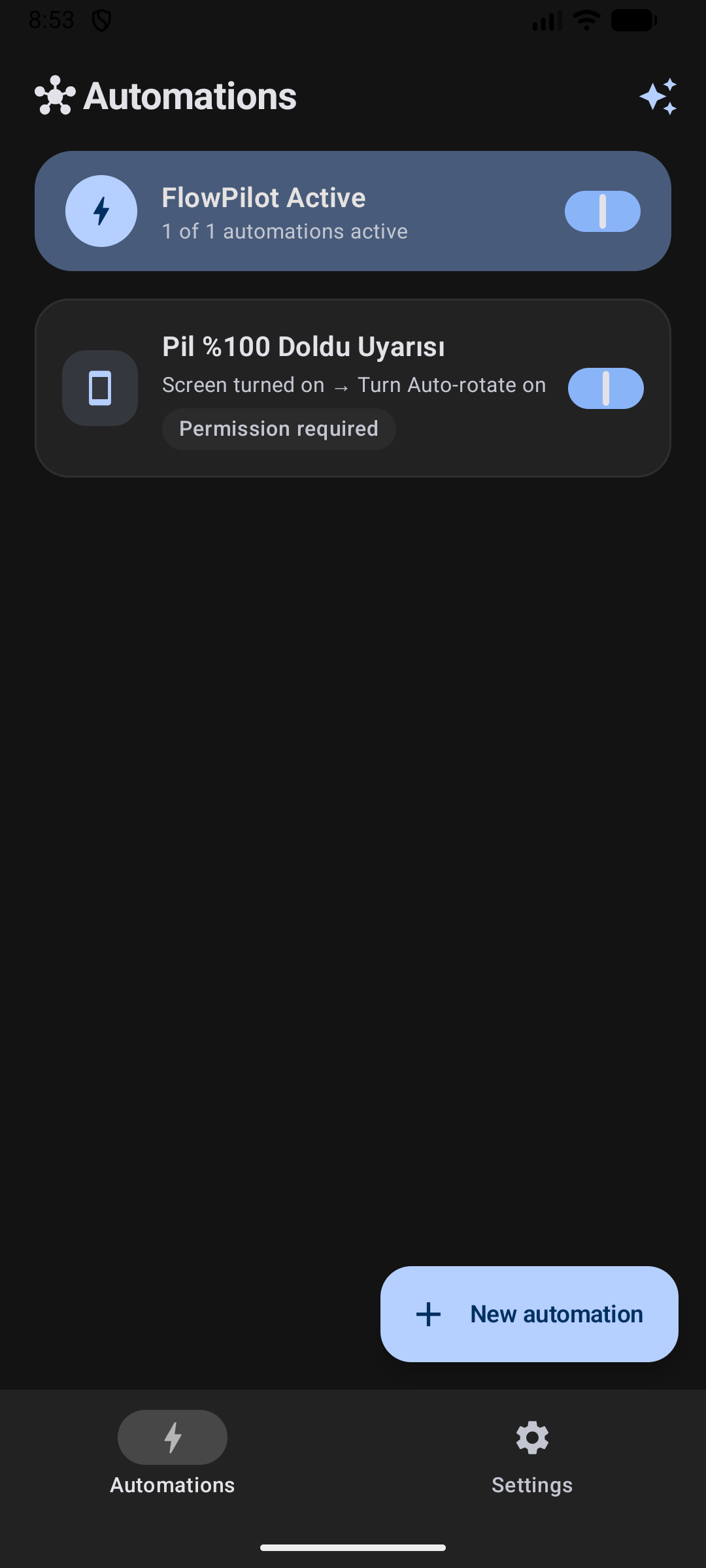
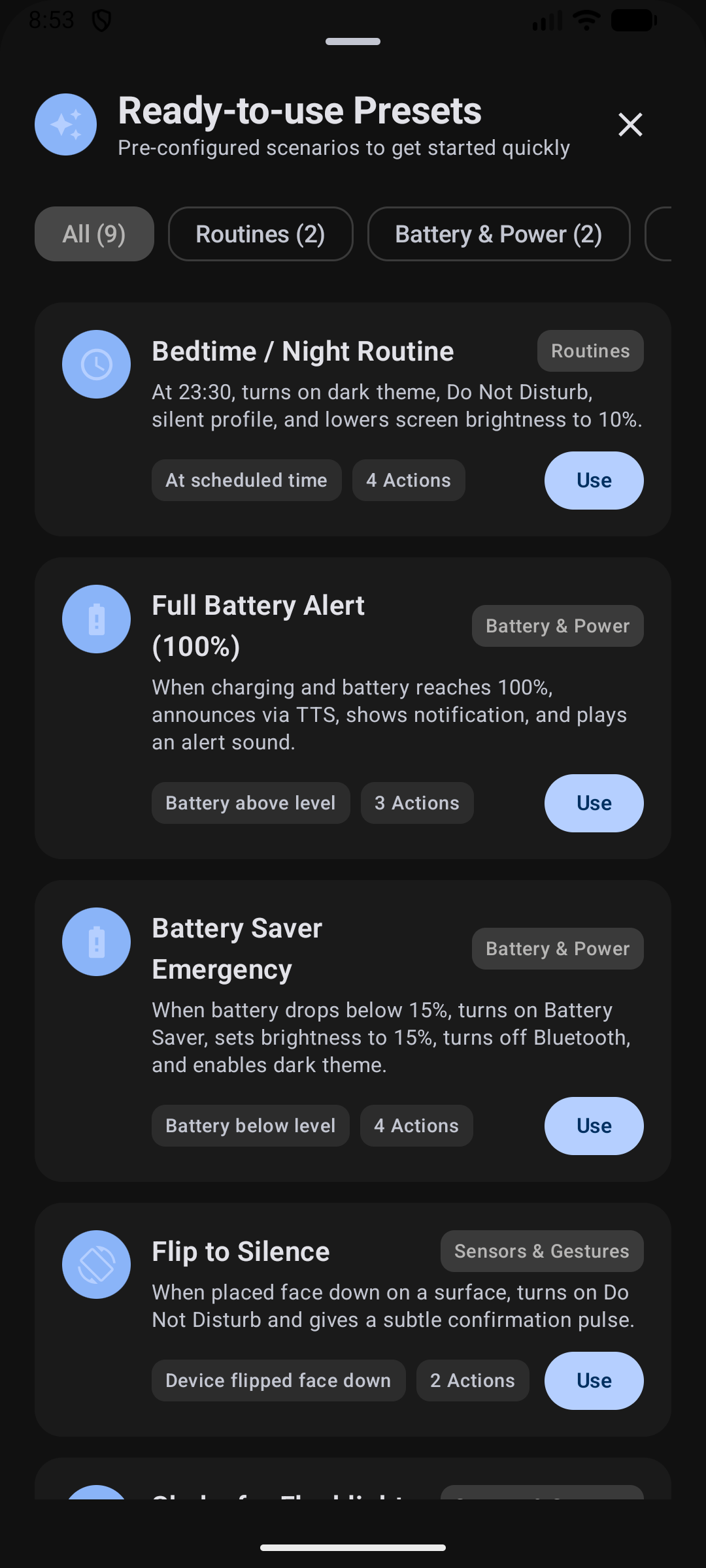
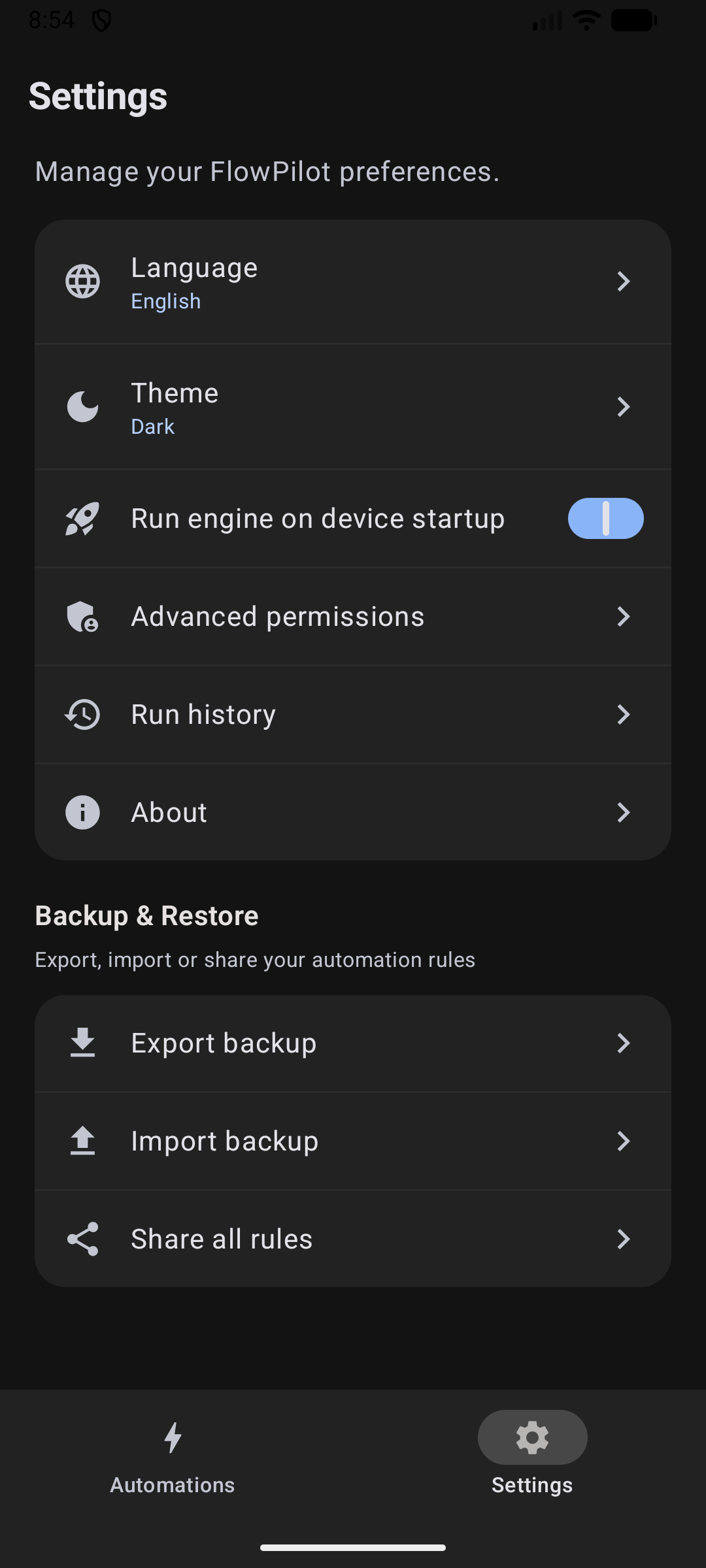
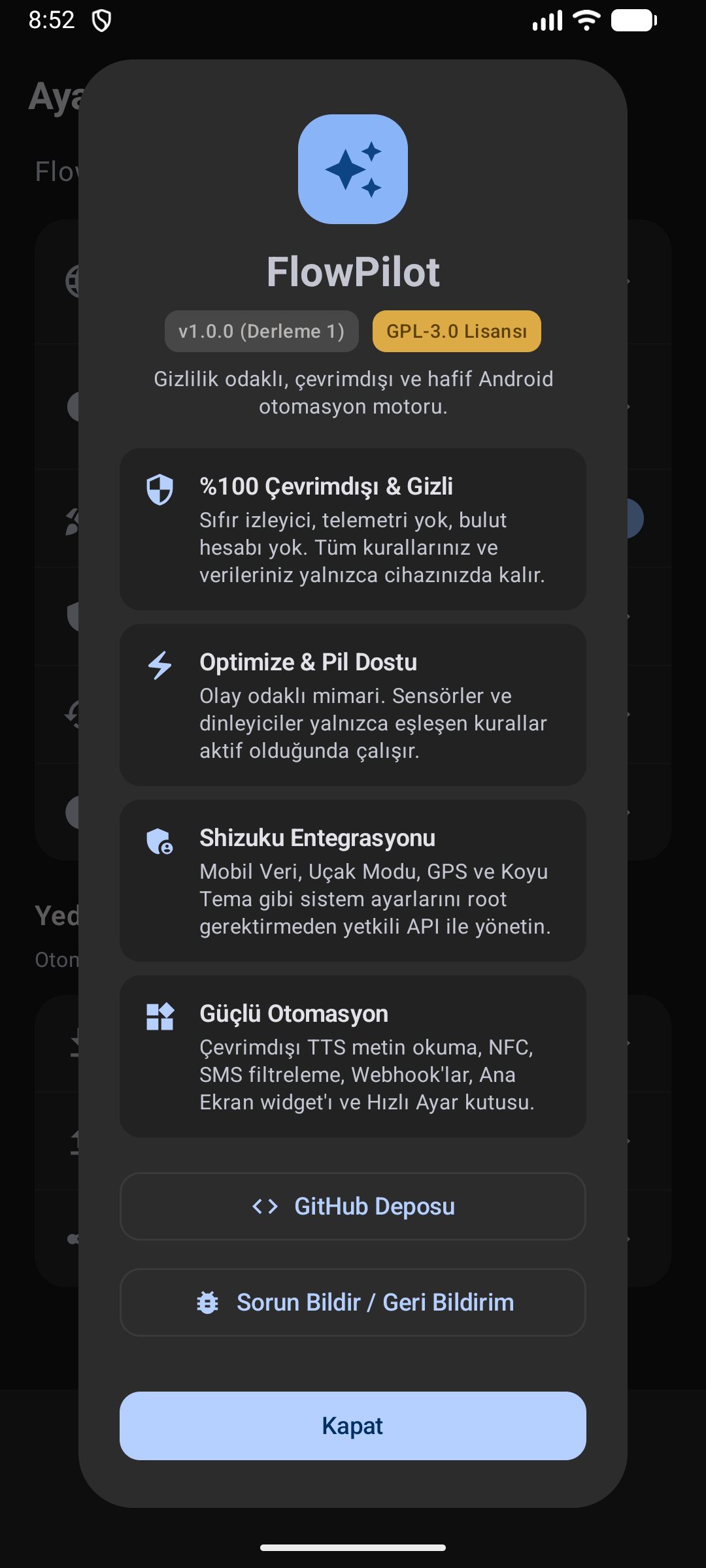
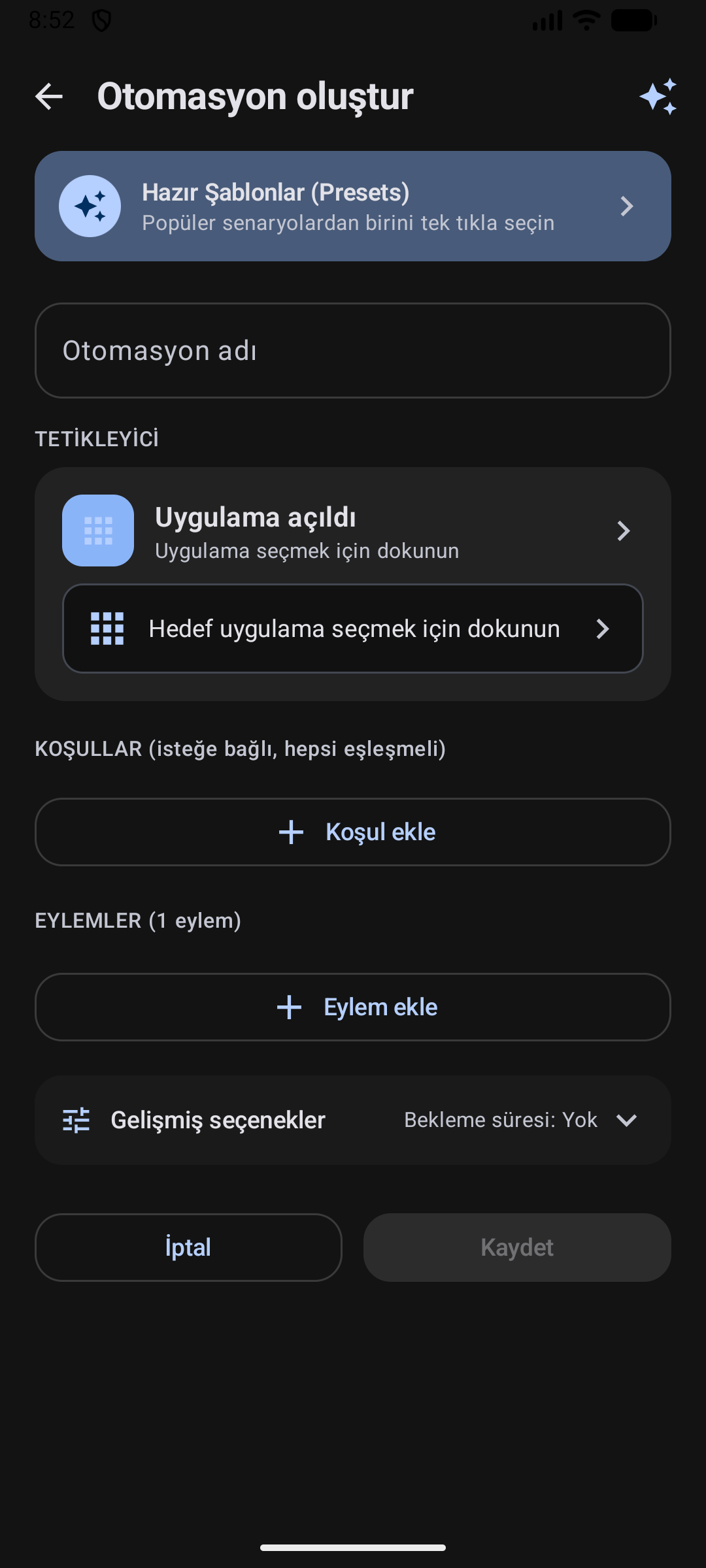
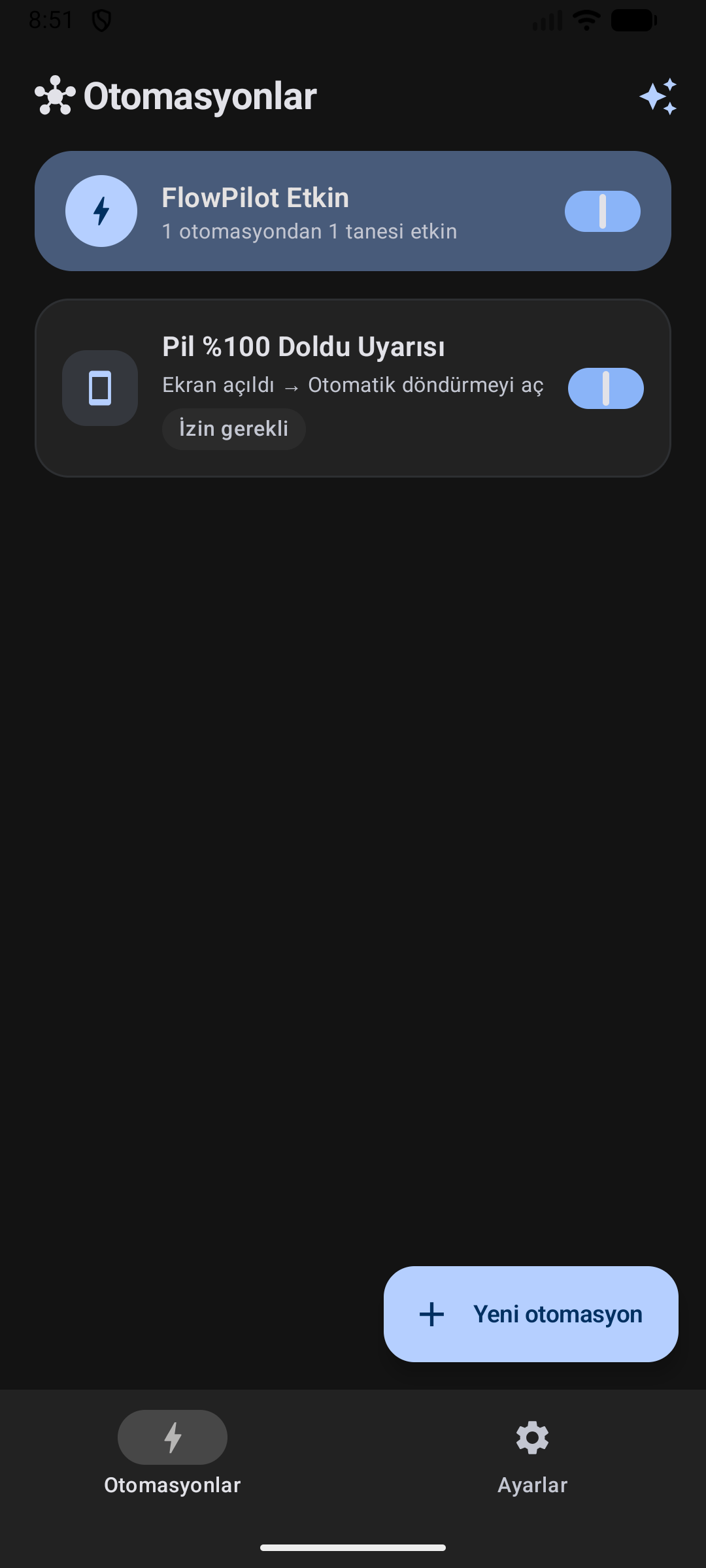
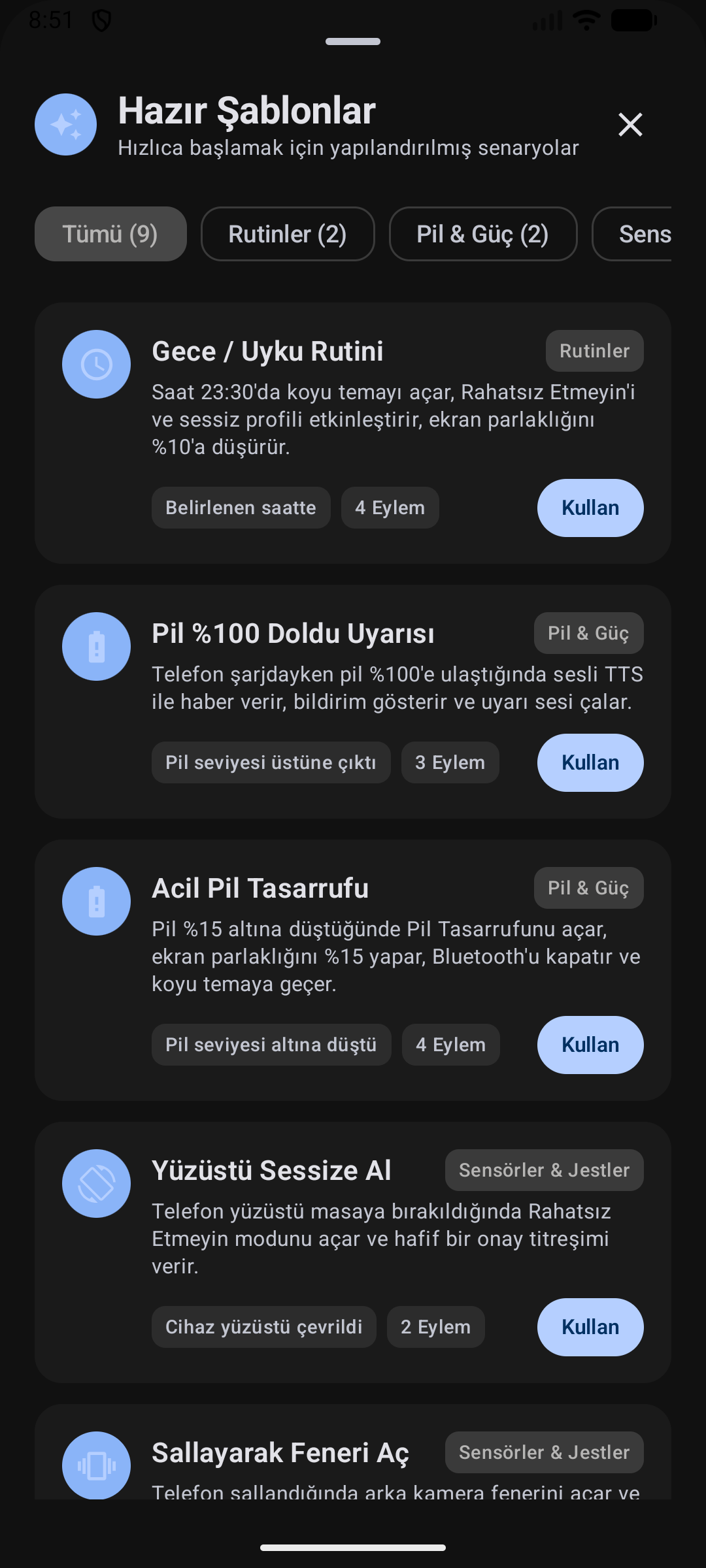
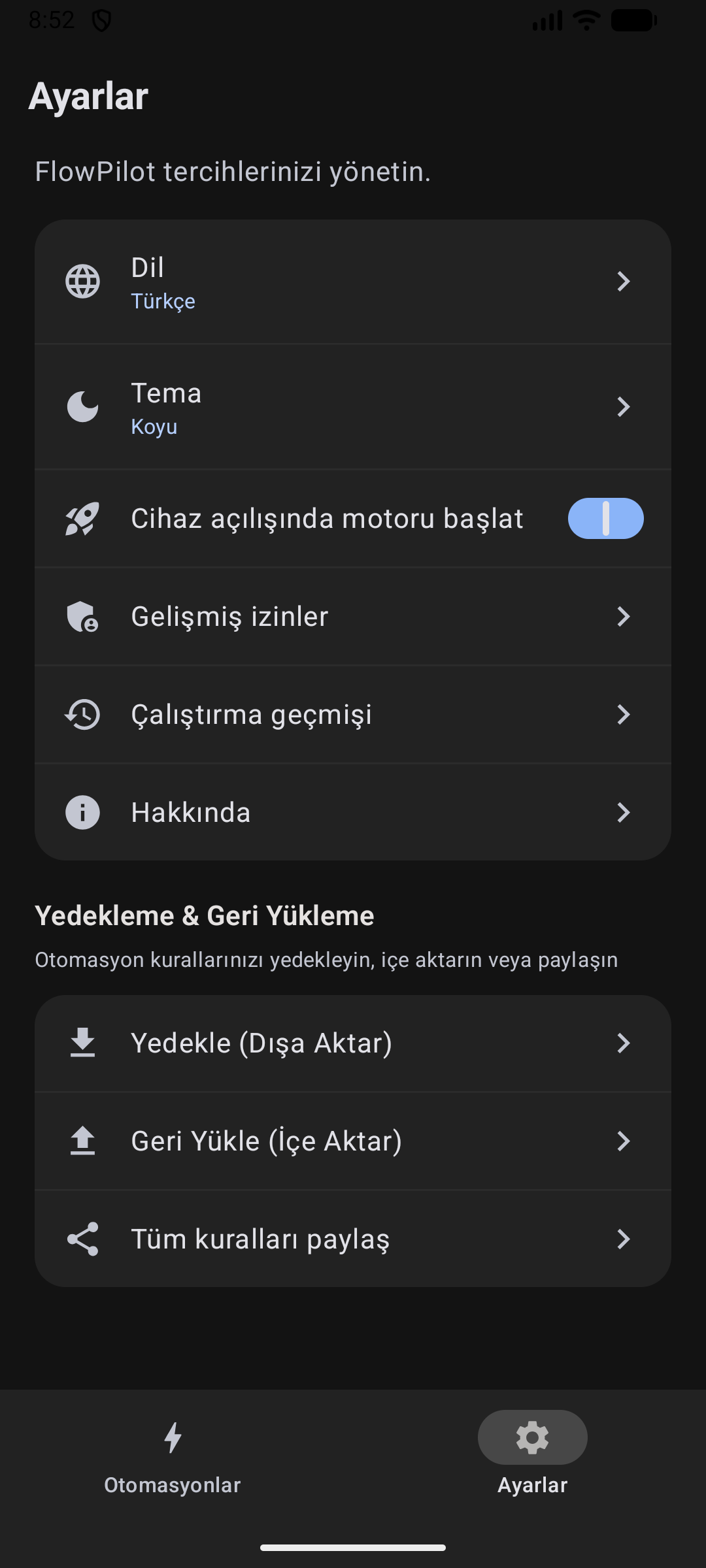
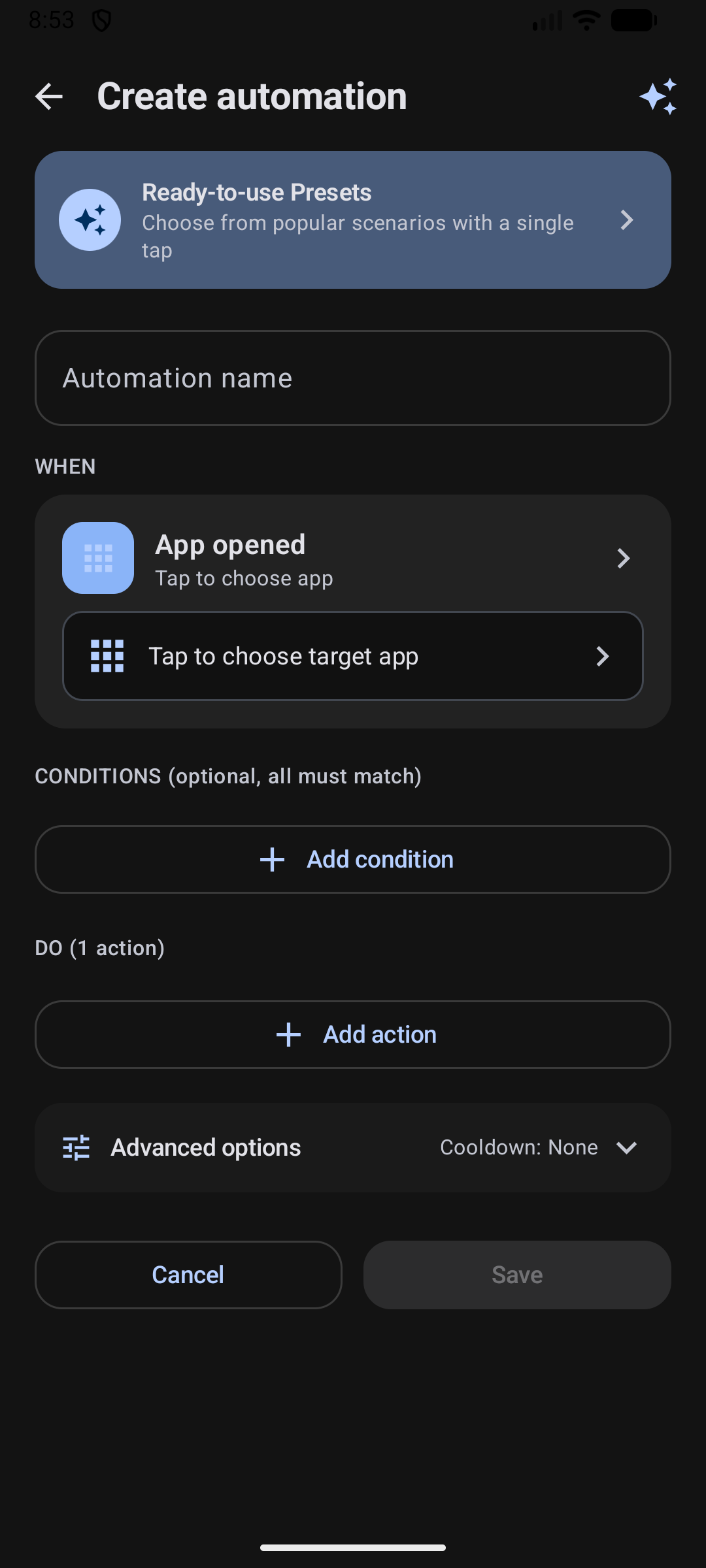
| Home Screen | Ready Presets | Rule Builder | Settings & Backup | About Dialog |
 |
 |
 |
 |
 |
💡 How FlowPilot Works
FlowPilot follows a clear, intuitive 3-step mental model:
┌───────────────────────────┐      ┌───────────────────────────┐      ┌───────────────────────────┐
│       1. TRIGGER          │      │       2. CONDITIONS       │      │        3. ACTIONS         │
│     "When this happens"   │ ───► │    "Only if all match"    │ ───► │    "Do this in order"     │
│   (e.g., Arrive at Work)  │      │     (e.g., Weekdays Only) │      │  (Silent + Turn on Wi-Fi) │
└───────────────────────────┘      └───────────────────────────┘      └───────────────────────────┘
Relatable Examples:
- 🌙 Bedtime Routine: When the clock strikes 23:30 ➔ Only if charging ➔ Turn on Silent Mode, enable Dark Theme, and dim brightness to 10%.
- 🔋 Full Charge Alert: When battery reaches 100% ➔ Speak "Phone is fully charged, please unplug" and show notification.
- 🔕 Flip to Silence: When phone is placed face-down on a desk ➔ Immediately enable Do Not Disturb with a subtle confirmation pulse.
⚡ 1-Tap Ready Presets
Start automating instantly with built-in recipes designed for everyday life:
| Preset | Trigger | Key Actions |
|---|---|---|
| 🌙 Bedtime Routine | Time reaches 23:30 | Enables Dark Mode, sets Silent profile, turns on DND, dims screen to 10% |
| 🔋 Full Battery Protection | Battery reaches 100% | Speaks offline unplug voice reminder & pushes persistent notification |
| ⚡ Battery Saver Emergency | Battery drops below 15% | Turns on Battery Saver, disables Bluetooth, lowers brightness, enables Dark Mode |
| 🔕 Flip to Silence | Phone placed face-down | Dual sensor check (Proximity + Gravity Z-axis) enables DND with a haptic pulse |
| 🔦 Shake for Flashlight | Firm phone shake | Toggles rear camera torch with tactile haptic feedback |
| 🎬 Cinema / Night Reading | Ambient light drops < 5 lx | Dims brightness to minimum and switches system to Dark Theme |
| 🚗 Leaving Home Mode | Disconnected from Home Wi-Fi | Enables Mobile Data (Shizuku), sets Normal ringer, raises volume to 80% |
| 🏠 Welcome Home Mode | Connected to Home Wi-Fi | Disables Mobile Data (Shizuku) to save power and restores balanced settings |
| 📍 SMS Emergency Responder | Incoming SMS with secret phrase | Locks GPS coordinates and replies with a live Google Maps location link |
🎛️ Feature Matrix
1. Triggers (Events)
FlowPilot listens to a rich spectrum of hardware, radio, and system events:
- 📱 App Lifecycle: App launched or closed (lightweight
UsageStatsManagertransitions). - 🔌 Power & Battery: Charger plugged in / unplugged, battery level rises above or drops below custom percentage.
- 💡 Screen & State: Screen turned on/off, device unlocked.
- ⏰ Schedule & Time: Daily, weekdays, weekends, or specific days and exact times.
- 📶 Connectivity: Wi-Fi connected/disconnected (any or target SSID), Bluetooth device connected/disconnected.
- 🔄 Sensors & Motion:
- Device Flip: Face-down on table or turned face-up (Proximity + Gravity Z-axis with 500ms debounce).
- Shake: Firm shake detection with configurable sensitivity slider.
- Ambient Light: Lux drops below or rises above target threshold.
- 📍 Hardware Geofencing: Enter or exit defined geographical zones using Google Play Services
GeofencingClient. Uses no idle CPU wake-lock, keeps up to 50 queued events across engine restarts, and reuses transition coordinates for template variables. - 🏷️ NFC Tags: Instant hex UID matching on physical scans. Foreground ReaderMode scans run matching rules automatically; background Android discovery opens FlowPilot and requires explicit confirmation before any matching NFC automation runs.
- 📞 Phone & SMS: Call ringing, answered, outgoing dialed, call ended; SMS received with keyword, prefix, regex, or exact sender matching.
- 🔔 Notifications: Incoming notifications from selected apps with keyword filtering.
2. Conditions (Logic Gates)
Rules execute only when all specified conditions (AND logic) are satisfied:
- ⏳ Time Window: Run only between specific hours (e.g., 23:00 to 07:00), with full midnight-crossing support.
- 📅 Days of the Week: Restrict to weekdays, weekends, or custom individual days.
- 🔋 Battery Level: Require battery to be \(\ge\) or \(\le\) a specific threshold.
- ⚡ Charging State: Require device to be currently charging or discharging.
- 📲 Screen State: Require screen to be on or off.
- 📶 Wi-Fi Network: Require connection to a specific Wi-Fi network (SSID).
3. Actions (Executors)
Chain multiple actions in any custom sequence with drag-and-drop ordering and individual delays (0–300s):
- 🌐 Connectivity (via Shizuku): Toggle Wi-Fi, Mobile Data, Airplane Mode, Bluetooth, and GPS Location.
- 🖥️ Display & Device: Toggle Flashlight (Torch), Dark Theme (Shizuku), Auto-rotate, Brightness level, Lock Screen (Shizuku), and Force Stop App (Shizuku).
- 🔊 Sound & Alerts: Do Not Disturb (DND) toggle, Sound Profiles (Normal / Vibrate / Silent), Media Volume (0–100%), Custom Audio playback (1–60s duration), Haptic Patterns (Pulse, Double Tap, Alert, Heartbeat, Triple Tap, SOS), and Rich Notifications.
- 🗣️ Offline Speech (TTS): Speak custom voice alerts using Android's on-device TTS engine with speech rate control.
- ⏱️ Clock & Timers: Set system alarm or start a background timer (1s–24h).
- 🚀 Apps & Web: Launch installed app or open web URL.
- 💬 Phone & SMS: Open dialer, place direct phone call, send automated background SMS, or prepare SMS draft.
- 🔗 HTTPS Webhook: Send outbound HTTP requests (
GET,POST,PUT,PATCH,DELETE,HEAD) with custom headers, JSON body, AES-256-GCM Keystore encrypted secrets, and dynamic template variables:${trigger},${batteryPercent},${isCharging},${wifiSsid},${time},${timestamp},${location.lat},${location.lng},${location.coords},${location.maps_url}
4. Smart Productivity & Controls
- Quick Settings Tile & Engine Notification: Toggle the automation engine or inspect live status directly from Android's notification shade. Engine status and startup-failure notifications follow FlowPilot's English, Turkish, or system-language setting even after a background restart.
- Material 3 Home Screen Widget: Glance-powered widget displaying active rule counts with a one-tap pause/resume button.
- In-App Live Test Run: Test any rule action directly inside the editor before saving to verify parameters.
- Safe Rule Duplication: Clone any rule into an immediately editable disabled copy with freshly encrypted webhook credentials.
- Execution Run History: Local persistent audit trail of the last 100 executions with masked sensitive details. Raw provider errors, private URIs, local paths, credentials, and phone numbers are not persisted.
- Conflict Warnings: Automatic non-blocking analysis warning you when opposite state actions target the same trigger.
🛡️ Shizuku Setup Guide
FlowPilot uses Shizuku to perform elevated actions (Mobile Data, Airplane Mode, GPS, Dark Mode, App Killing) safely without needing root.
- Install Shizuku: Get it from Google Play or GitHub.
- Start Shizuku Service:
- On Android 11+ (Wireless Debugging): Start directly on your phone using Developer Options > Wireless Debugging (no PC required).
- Via PC (ADB): Run the following command:
adb shell sh /sdcard/Android/data/moe.shizuku.privileged.api/start.sh
- Authorize FlowPilot: Open FlowPilot and tap Grant when prompted for Shizuku access.
- All elevated actions will now be unlocked and execute instantly!
🔒 Privacy & Zero-Trust Promise
FlowPilot is engineered with an uncompromised commitment to user privacy:
- 🚫 Zero Telemetry: No Firebase Analytics, no Sentry, no remote crash reporters, and zero tracking SDKs.
- 📵 No Cloud Synchronization: Your automations, logs, and secrets never touch any third-party cloud.
- 🛡️ Android Keystore Protection: Webhook secrets, tokens, and sensitive headers are encrypted with AES-256-GCM using Android Keystore keys, hardware-backed when supported by the device.
- 🙈 Strict Log Sanitization: Phone numbers, webhook credentials, and sensitive headers are masked across all UI screens and audit logs.
Transparent Permission Disclosures
FlowPilot declares sensitive permissions solely to power explicit automation features:
QUERY_ALL_PACKAGES: Required to list installed apps in the App Trigger and App Launcher pickers on Android 11+.RECEIVE_SMS&SEND_SMS: Used exclusively by the SMS trigger and direct SMS responder actions.ACCESS_BACKGROUND_LOCATION: Powers zero-battery hardware geofencing (GeofencingClient) and injects coordinates only into user-configured automations.FOREGROUND_SERVICE_LOCATION: Required by Android 14+ to keep geofencing and active location tasks compliant while running in the background.
Note: FlowPilot does not seek Google Play approval because these uncompromised permissions are essential for core automation functionality. Download verified APKs directly from GitHub Releases.
📦 Backup & Recovery
| Mode | Format | Security | Ideal For |
|---|---|---|---|
| Sanitized JSON | Plain JSON | Webhook URLs & credentials stripped | Sharing automation rules with friends or online communities |
| Encrypted Backup | Encrypted Container | AES-256-GCM + PBKDF2 (100k iterations, salt + IV) | Full backup including secrets, phone numbers, and enabled states |
Restoring is effortless: choose your file, enter your password, and select Merge or Replace. Secrets are automatically re-encrypted with your new device's local Android Keystore.
🛠️ Tech Stack & Architecture
FlowPilot follows modern Android architecture guidelines:
FlowPilot
├── app/src/main/java/com/flowpilot/app/
│   ├── actions/          # Executors: Shizuku, Audio, TTS, Webhook, SMS, System
│   ├── analysis/         # AutomationConflictAnalyzer and logic checks
│   ├── data/             # Models, JSON Serialization, DataStore Repositories, Backups
│   ├── engine/           # Foreground AutomationService, Receivers, Sensor Trackers
│   ├── glance/           # Jetpack Glance Home Screen Widget
│   ├── quicksettings/    # System Quick Settings Tile Service
│   ├── shizuku/          # Shizuku AIDL IPC client bridge
│   └── ui/               # Jetpack Compose UI (Material 3 Theme, Screens, Components)
└── app/src/test/         # Deterministic JUnit unit test suites
- Language: Kotlin 2.2.10
- UI Toolkit: Jetpack Compose & Material 3
- Async Runtime: Kotlin Coroutines & StateFlow
- Storage: Jetpack DataStore (Preferences & JSON)
- Encryption: Android Keystore (AES-256-GCM)
- Privileged Bridge: Shizuku AIDL IPC
- Widgets: Jetpack Glance
- Target SDK: Android 16 (API 36) • Min SDK: Android 8.0 (API 26)
📥 Build from Source
Prerequisites
- JDK 17 (OpenJDK or Eclipse Temurin)
- Android SDK (Platform 36, Build-Tools 36.0.0+)
- Git
# Clone the repository
git clone https://github.com/emi-ran/flowpilot.git
cd flowpilot

# Run unit tests
./gradlew testDebugUnitTest

# Assemble debug APK
./gradlew assembleDebug
Compiled APK output:
app/build/outputs/apk/debug/app-debug.apk
Install directly to your connected device:
adb install -r app/build/outputs/apk/debug/app-debug.apk
🤝 Contributing
Contributions, bug reports, and ideas are welcome!
- Check out CONTRIBUTING.md to get started.
- Found a bug? Open a Bug Report.
- Want to propose a new trigger or action? Submit a Feature Request.
📄 License
FlowPilot is free and open-source software licensed under the GNU General Public License v3.0 (GPL-3.0).
Made with ❤️ for Android Power Users
How Shizuku is used
Can toggle data, WiFi, Bluetooth, NFC, airplane mode, dark theme, location, battery saver, lock screen and force stop apps plus self grant a system permission via Shizuku shell commands.
This is an AI-assisted analysis of Shizuku-related usages in the app's public source code. It is best effort, so it may not catch every single usage.
How this app uses Shizuku
FlowPilot uses Shizuku to run privileged system actions for its offline automation rules through a shell user service.
- Toggle mobile data: turn cellular data on or off in automations with the
svc data enableandsvc data disableshell commands through Shizuku. - Toggle WiFi: turn WiFi on or off in automations with the
svc wifi enableandsvc wifi disableshell commands through Shizuku. - Toggle Bluetooth: turn Bluetooth on or off in automations with the
svc bluetooth enableandsvc bluetooth disableshell commands through Shizuku. - Toggle NFC: turn NFC on or off in automations with the
svc nfc enableandsvc nfc disableshell commands through Shizuku. - Toggle airplane mode: turn airplane mode on or off in automations with the
cmd connectivity airplane-mode enableandcmd connectivity airplane-mode disableshell commands through Shizuku. - Switch dark theme: turn system dark theme on or off in automations with the
cmd uimode night yesandcmd uimode night noshell commands through Shizuku. - Toggle location services: turn location on or off in automations with the
cmd location set-location-enabled trueandcmd location set-location-enabled falseshell commands through Shizuku. - Control battery saver: turn battery saver on or off in automations with the
cmd power set-modeshell command plussettings putupdates for low power mode through Shizuku. - Lock screen: lock the screen or turn off the display in automations with the
input keyevent 26shell command through Shizuku. - Force stop apps: stop a selected app in automations with the
am force-stopshell command through Shizuku using the package chosen for the action. - Grant system permission: grant its own secure settings permission from the permissions screen with the
pm grantshell command through Shizuku.
Android APIs or commands used
svc data enablesvc data disablesvc wifi enablesvc wifi disablesvc bluetooth enablesvc bluetooth disablesvc nfc enablesvc nfc disablecmd connectivity airplane-mode enablecmd connectivity airplane-mode disablecmd uimode night yescmd uimode night nocmd location set-location-enabled truecmd location set-location-enabled falsecmd power set-mode 1cmd power set-mode 0settings put system POWER_SAVE_MODE_OPEN 1settings put system POWER_SAVE_MODE_OPEN 0settings put global low_power 1settings put global low_power 0input keyevent 26am force-stoppm grant
Notable details
Battery saver can work without Shizuku when the secure settings permission is already granted, by writing the system setting directly. The privileged shell is restricted to a fixed allowlist, so automations cannot run arbitrary commands, and force stop only accepts a validated package name.
Changelog
What's new for version 1.1.0
This release adds safer rule management, strengthens automation trust boundaries, and improves privacy-safe English and Turkish background behavior.
✨ Safer Rule Management
- Duplicate any rule from Home into a disabled, immediately editable copy with a new identity and reset runtime state.
- Duplicated webhook secrets receive fresh Android Keystore ciphertext; cached TTS audio is copied independently with failure-safe cleanup.
- Conflict warnings detect opposing state actions before saving or enabling a rule.
- Warnings distinguish likely and possible conflicts, preserve the pending operation, allow inspection of the conflicting rule, and require deliberate override.
🛡️ Automation Security
- Background NFC discovery now requires visible confirmation before a matching automation can run; trusted foreground ReaderMode scans remain automatic.
- Webhook connections pin initial delivery to prevalidated public IP addresses while preserving TLS hostname verification.
- Rendered webhook headers reject unsafe input, and HTTP/1.1 response parsing is bounded.
- SMS and notification events are accepted only while the engine is enabled, freshness-limited, bounded, and reauthorized immediately before execution.
- Durable execution leases and rule-revision checks prevent cooldown races and revoke queued work after a rule changes.
🔒 History Privacy
- Execution-history rule names, trigger snapshots, action arguments, and failure messages are sanitized before persistence and during legacy migration.
- Raw provider errors, private URIs, local paths, credentials, phone numbers, and embedded synthetic markers are not retained in history.
- Executors and dispatcher failures use stable privacy-safe outcomes instead of persisting raw exception text.
🌐 Language & Background Notifications
- Engine and startup-failure notifications follow saved English, Turkish, or system-language selection across boot, service restart, process recreation, and task removal.
- Changing language refreshes active notification text, channel metadata, and widget state immediately.
- System-language mode no longer remains stuck on a previously selected app language.
🌍 Project Site & Release Integrity
- Project site gains improved mobile layout, browser-language selection, accessible brand navigation, honest network/runtime claims, and v1.1.0 installation guidance.
- Release automation requires exact version/tag alignment, current
main, successfulBuild & Testfor exact release commit, prepared notes, verified APK identity/signature, and signed APK output.
🧪 Verification
- Required GitHub
Build & Testcompleted successfully for exact release commit98f10b1763911378ef6ff1a5cfd51ce4c8532efa. - Release workflow completed resource contracts, debug unit tests, Android lint, debug APK assembly, and signed release APK assembly.
- Physical-device checks passed for safe rule duplication, conflict warnings, background NFC confirmation, and language switching.
- Release workflow verified APK SHA-256 before publication.
📥 Installation
- Download
FlowPilot-v1.1.0.apkfrom Assets below. - Download
FlowPilot-v1.1.0.apk.sha256or copy checksum below. - Verify APK checksum before installation.
- Install on Android 8.0+ (API 26–36). Configure Shizuku only for privileged system actions.
SHA-256 Checksum
SHA256 (FlowPilot-v1.1.0.apk) = a5d8c1d2a036b9c588cc02857f0245528721d6a15baf18df25b9db389dd89efd
📱 Compatibility
Developed and tested primarily on Xiaomi HyperOS (Xiaomi 15T Pro). Android OEM background restrictions can differ. Background NFC discovery requires explicit confirmation; foreground ReaderMode scans remain automatic. Privileged system actions require active Shizuku permission.
🇹🇷 Türkçe Özet
- Ana ekrandan kurallar güvenli biçimde çoğaltılabilir; kopya devre dışı oluşturulur, hemen düzenlemeye açılır ve çalışma durumu sıfırlanır.
- Kural kaydedilirken veya etkinleştirilirken karşıt işlemler için olası çakışma uyarıları gösterilir.
- Arka plan NFC keşfi otomasyonu çalıştırmadan önce görünür kullanıcı onayı ister; ön plandaki ReaderMode taramaları otomatik çalışmaya devam eder.
- Webhook bağlantıları doğrulanmış genel IP adreslerine sabitlenir; TLS ana makine doğrulaması korunur ve güvenli olmayan başlıklar reddedilir.
- SMS ve bildirim olayları yalnız motor etkinken, süre ve boyut sınırlarıyla kabul edilir; çalıştırmadan hemen önce yeniden yetkilendirilir.
- Çalıştırma geçmişindeki hata, argüman, kural adı ve tetikleyici verileri kaydedilmeden önce gizlilik için temizlenir.
- Motor bildirimleri, başlangıç hata bildirimleri ve kanal bilgileri seçilen uygulama dilini kullanır; dil değişikliği etkin bildirimlere hemen uygulanır.
- Kural çoğaltma, çakışma uyarısı, NFC onayı ve dil değişikliği fiziksel cihazda doğrulandı.
- Kurulumdan önce
FlowPilot-v1.1.0.apkdosyasının SHA-256 değerini doğrulayın.
Permissions
31 permissions requested
More from this category
 IMD
IMD
 Nothing Modes
 Argus
Argus
 OpenTasker
 NexaFlow
 Service Keeper
 AutoJs6
 vFlow
vFlow
 PhoneProfilesPlus
 自动滑动器
自动滑动器
 Tasker Settings
 MacroDroid