 ShizuStore
FireWall Blocks
1.5.shynoid · GitHub
More about this app
Dual-mode firewall: blocks internet access using Shizuku or a standard local VPN interface or both.
FireWall Blocks: An Android Firewall App (With Shizuku & VPN support)
A simple, open-source Android firewall that blocks app internet access using either Shizuku or a local VPN, with no root requirement.
Screenshots


Features
- Dual Mode: Choose between the efficient Shizuku mode (recommended) or the no-setup-required VPN mode (or even use them at the same time!).
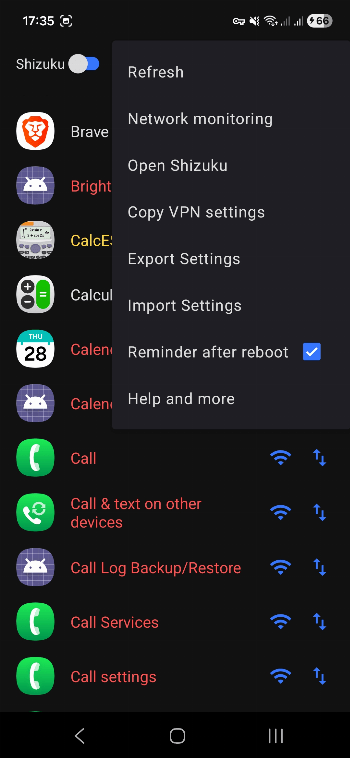
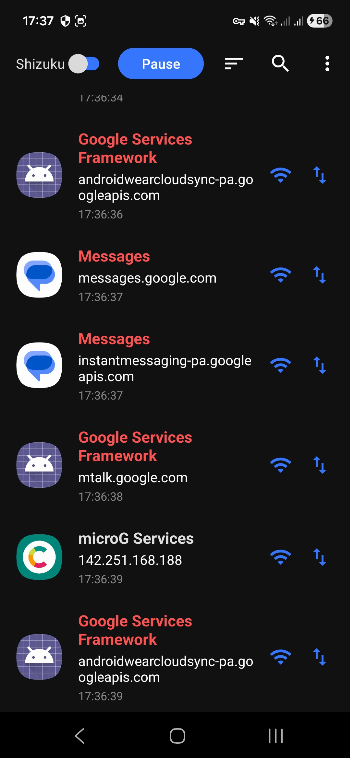
- Network Monitoring Screen: Real-time traffic tracking via local VPN. See which apps are actively trying to access the network and block or allow connections directly from the live monitoring log.
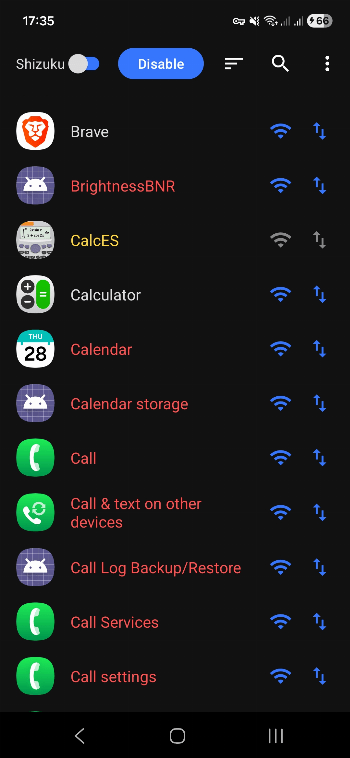
- Per-App Rules: Control Wi-Fi and Mobile Data access for each app individually.
- Import/Export: Save and load your firewall rules as a simple .json file.
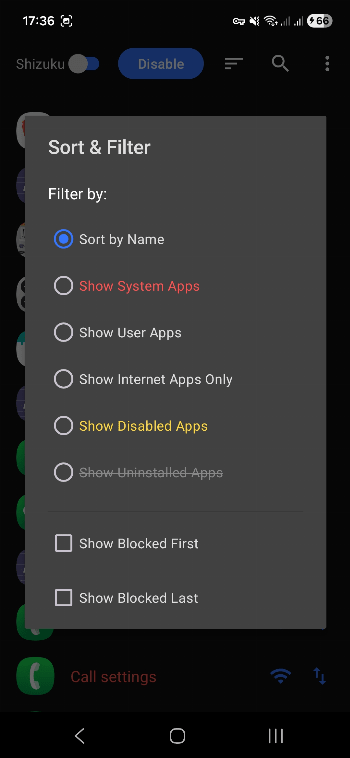
- Sorting: Advanced filtering based on user apps, system apps, network permission, disabled status, uninstalled leftover rules, or blocked-placement priority.
- Efficient: The app doesn't need to be constantly running in the background when utilizing Shizuku mode.
- Elegant Reapplying: Hassle-free user experience on startup.
- App search and more
How to Use
- Enable the Firewall: Press the "Enable" button on the main screen.
- Choose Mode: Toggle between "Shizuku" (requires setup) or "VPN" (works instantly).
- Block Apps: Tap the Wi-Fi or Data icons next to any app to block its access.
- Network Monitoring: Access "Network monitoring" from the top-right menu to see app connection requests in real-time.
- Note: After rebooting your phone, for Shizuku mode, you must first start Shizuku, then re-open the app to re-apply the rules.
Download

Also, you can find the latest installable APK file on our Releases page.
Support
If you like the app and want to support its development, you can donate via Bitcoin:

15GVxMuexgbDapqDDSxSi6h7EDsN2d7wdr
How Shizuku is used
Can block or unblock internet per app and apply or clear all blocks via `iptables` and `cmd connectivity` through Shizuku.
This is an AI-assisted analysis of Shizuku-related usages in the app's public source code. It is best effort, so it may not catch every single usage.
How this app uses Shizuku
Shizuku is used to enforce the firewall blocks directly on the system, without routing traffic through VPN.
- Block or allow apps: tapping a block toggle for an app immediately blocks or unblocks its internet access through Shizuku, including toggles from the app list and from network monitoring.
- Apply all saved blocks: enabling the Shizuku firewall, reopening the app, or importing settings reapplies the saved per app block list through Shizuku in one batch.
- Remove all blocks: turning off the Shizuku firewall clears every system block it created, restoring internet access for all apps.
Android APIs or commands used
iptablesip6tablescmd connectivity set-chain3-enabledcmd connectivity set-package-networking-enabledandroid.net.IConnectivityManager.setUidFirewallRuleandroid.net.IConnectivityManager.setFirewallUidRule
Notable details
The app also offers a local VPN firewall mode that works without Shizuku. In Shizuku mode the WiFi and mobile data toggles act as a single block switch, so blocking an app blocks all of its network access together.
Changelog
What's new for version 1.5.shynoid
Major update:
- Network Monitoring Mode: Added a real-time traffic sniffer via the local VPN to intercept and view which apps are attempting to connect to the internet, allowing direct blocking from the log screen.
- App Status Color-Coding: Visually differentiate apps in the list with specific colors: Red for System apps, Yellow for Disabled apps, and Grey with a strike-through for Uninstalled apps that still have orphan firewall rules.
- Orphaned Rules Management: The app now scans for and displays previously uninstalled apps that still have leftover firewall rules in storage, allowing you to clean them up.
- Enhanced Sorting & Filtering: Expanded list management with new options to show blocked apps last, show disabled apps only, or filter by uninstalled apps.
- UI & Performance Enhancements: Integrated fast scrolling for quicker list navigation, locked user inputs during app loads to prevent race conditions, and added smooth rotation handling to prevent screen resets.
- New confirmation dialog when copying rules from one another.
- in Shizuku mode, when copying VPN settings, the rules get bundled in UI correctly. (Shizuku limitations)
- Many other bug fixes and performance improvements.
Permissions
10 permissions requested
More from this category
 ADNS
ADNS
 ShizuWall
 Quintz
 Dolphy
 Traffic Light
 NetManager
 De1984
 Shizzi
 Hikari AdBlock
 sing-box
 Bluetooth Bouncer
 NetSwitcher