 ShizuStore
De1984
2.7.8 · GitHub
More about this app
App firewall without using an VPN; can also manage packages
De1984
Privacy isn’t default. Take it back with De1984 Firewall and Package Control.



The name De1984 is inspired by George Orwell’s novel Nineteen Eighty-Four, reflecting the app’s philosophy of resisting surveillance and reclaiming digital privacy. It symbolizes a reversal of the dystopian control described in the book, empowering users to take back control over their devices and data.
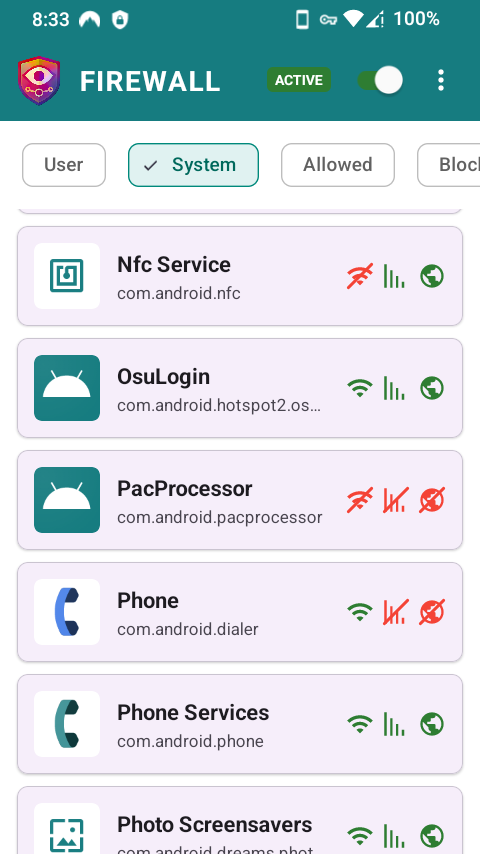
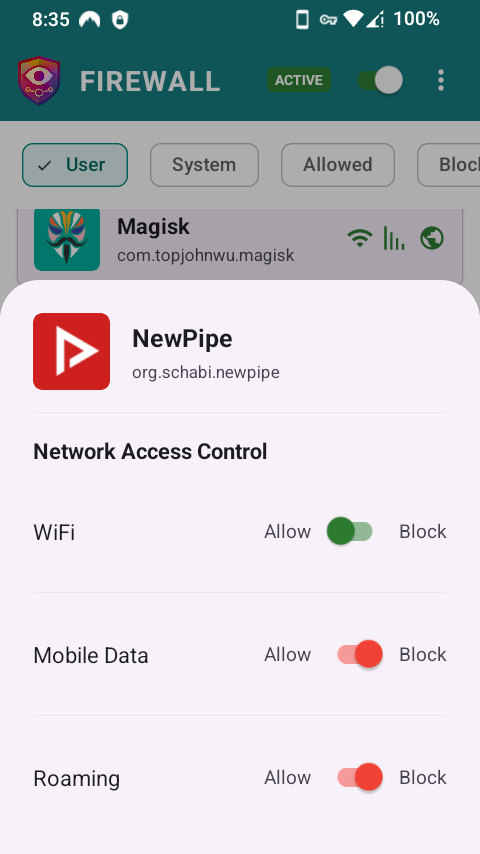
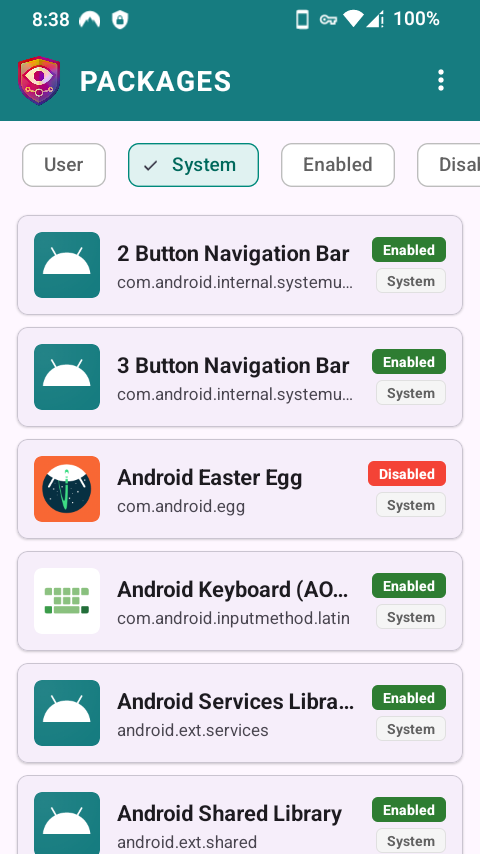
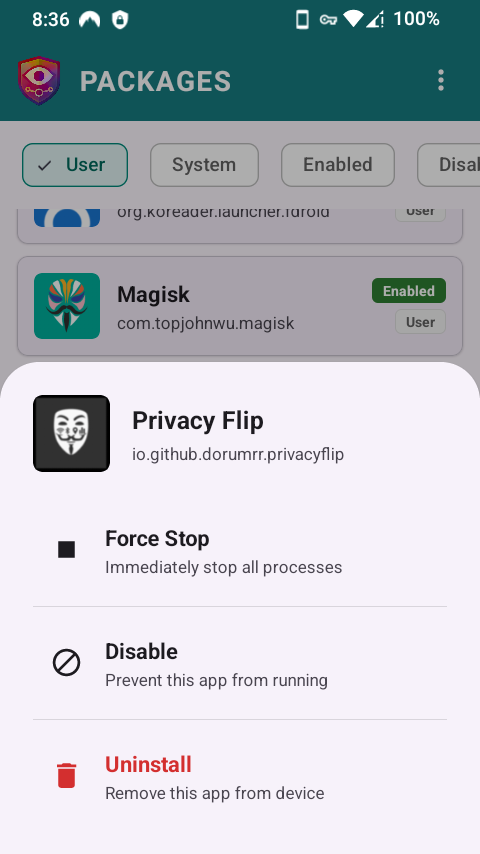
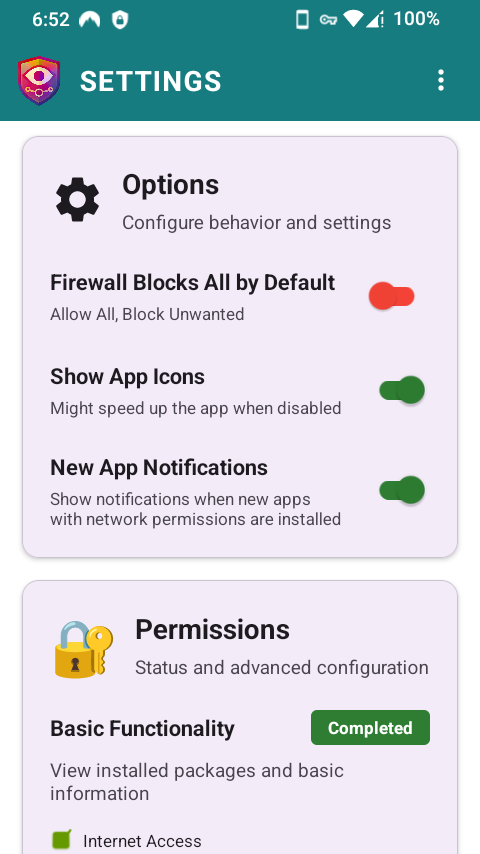
📸 Screenshots


✨ Features
🛡️ Firewall
- Multiple firewall capabilities: iptables, ConnectivityManager, NetworkPolicyManager, and VPN fallback
- Automatic firewall method selection based on device capabilities
- Comprehensive iptables for rooted devices provides kernel-level blocking with superior performance
- ConnectivityManager for Android 13+ devices with Shizuku, no root required
- NetworkPolicyManager for older devices with Shizuku, selectable manually
- VPN backend as fallback for maximum compatibility (no root required)
- Block apps from accessing WiFi, Mobile Data, or Roaming independently
- Global firewall policies: "Block All by Default" (allowlist) or "Allow All by Default" (blocklist)
- Screen-off blocking to save battery and data
- Real-time network state monitoring and automatic rule application
📦 Package Management (with Shizuku or root)
- Enable/disable system apps
- Force stop running apps
- Uninstall system and user apps
- Works with Shizuku (no root required) or traditional root access
- Filter packages by system/user apps, enabled/disabled state
- Search functionality for quick package lookup
🔒 Privacy First
- Zero tracking or analytics
- No telemetry
- Local-only data storage
- No proprietary libraries
- Buildable from source
- 100% open source (MIT License)
📋 Requirements
- Android 8.0 (API 26) or higher
- For iptables firewall: Root, or Shizuku running in root mode. Shizuku started over ADB runs as the shell user and cannot create kernel rules, so this backend stays unavailable in that mode
- For ConnectivityManager firewall: Shizuku + Android 13+ (no root required)
- For NetworkPolicyManager firewall: Shizuku (no root required). On ROMs that do not implement
POLICY_REJECT_ALLit can only block metered background data, not WiFi - For VPN firewall: VPN permission (no root required, works on all Android versions)
- For package management: Shizuku or root access
🔐 Permissions
- ACCESS_NETWORK_STATE: Monitor network connectivity for automatic rule application
- BIND_VPN_SERVICE: Create local VPN for VPN-based firewall backend
- QUERY_ALL_PACKAGES: View all installed apps
- POST_NOTIFICATIONS: Show notifications for new app installations (optional)
- RECEIVE_BOOT_COMPLETED: Auto-start firewall on device boot
- Shizuku or root access: For the iptables, ConnectivityManager and NetworkPolicyManager firewalls, and for package management (optional)
⚠️ Good to Know
If you use VPN mode, turn OFF "Block connections without VPN"
In Android's VPN settings, De1984 must not have "Block connections without VPN" (also called lockdown) enabled. De1984's VPN routes only the apps you have blocked through its tunnel — allowed apps deliberately bypass it and use the network directly. Apps that share a user ID share one verdict, so an allowed app that shares one with an app whose rule blocks goes through the tunnel too. Lockdown tells Android to drop anything that does not go through the VPN, so it blocks exactly those allowed apps. On recent Android versions this switch is turned on automatically when you grant a VPN, so it is worth checking.
iptables needs real root, not ADB-mode Shizuku
Shizuku started over ADB runs as the shell user (uid 2000), which cannot create kernel firewall rules. The iptables backend stays greyed out in that mode. It becomes available with root, or with Shizuku itself started in root mode.
AUTO mode never picks NetworkPolicyManager
Automatic selection tries iptables, then ConnectivityManager, then VPN. NetworkPolicyManager is available only by choosing it manually in Settings, and on ROMs that do not implement POLICY_REJECT_ALL it can block metered background data but not WiFi.
🤝 Contributing
Help make this app better. No contribution is too small!
How to Contribute
- Fork the repository
- Create a feature branch (
git checkout -b feature/amazing-feature) - Make your changes
- Commit your changes (
git commit -m 'Add some amazing feature') - Push to the branch (
git push origin feature/amazing-feature) - Open a Pull Request
All contributions are valued and appreciated!
📄 License
This project is licensed under the MIT License - see the LICENSE file for details.
💖 Support Development
De1984 protects your privacy. You can protect its future!

Late nights for brighter days.
Created by Doru Moraru
How Shizuku is used
Can block apps without VPN, manage packages, keep protection after reboot and tune connectivity checks via `Shizuku`.
This is an AI-assisted analysis of Shizuku-related usages in the app's public source code. It is best effort, so it may not catch every single usage.
How this app uses Shizuku
De1984 uses Shizuku to enforce its firewall, manage installed apps and change system connectivity settings without using a VPN connection.
- Block apps without VPN: per app network access is turned on or off through Shizuku using the system network policy service and the
cmd connectivity set-package-networking-enabledandcmd connectivity set-chain3-enabledshell commands. - Filter traffic by address: internet and local network traffic is filtered per app with
iptablesandip6tablesrules applied through Shizuku. - Enable or disable apps: installed apps are enabled or disabled for a user with the
pm enableandpm disable-usershell commands through Shizuku. - Uninstall and restore apps: apps are removed with the
pm uninstallshell command and system apps are restored with thecmd package install-existingshell command through Shizuku, and installed packages are listed withpm list packages. - Stop running apps: selected apps are stopped with the
am force-stopshell command through Shizuku. - Stay protected after reboot: a boot time block is installed and removed through Shizuku and the device is rebooted with the
svc power rebootshell command so the on disk state and live filtering agree. - Customize connectivity checks: captive portal detection mode, server URLs, defaults and restore are read and changed with the
settings get,settings putandsettings deleteshell commands through Shizuku. - Support multiple profiles: access across user profiles is enabled with a
pm grantshell command through Shizuku so work profile and secondary user apps can be listed and controlled.
Android APIs or commands used
INetworkPolicyManager.setUidPolicyINetworkPolicyManager.getUidPolicypm enablepm disable-userpm list packagespm uninstallcmd package install-existingam force-stopcmd connectivity set-chain3-enabledcmd connectivity set-package-networking-enabledsettings getsettings putsettings deleteiptablesip6tablesdumpsys netpolicysvc power rebootpm grant
Notable details
Current connectivity check values can be viewed without Shizuku, changing them and all firewall and package actions need Shizuku.
Changelog
What's new for version 2.7.8
- Fixed: stop could keep failing after ConnectivityManager was used #107
- "Allow in Background" is now "Allow while screen off" #105
- One verdict per shared user ID; VPN Block All no longer cuts off Android System, Bluetooth, NFC
- Fixed: a removed app's rule could block its user ID
- Fixed: a VPN restart loop, and taking another VPN's slot unasked
- Fixed: no new-app notifications for the main profile
- Fixed: work-profile rows on ConnectivityManager; false or stale banners and notifications
Permissions
19 permissions requested
Sources
2 sources
Sources
2 sources
More apps from this developer
 Privacy Flip
More from this category
 ADNS
ADNS
 ShizuWall
 Quintz
 Dolphy
 Traffic Light
 NetManager
 Shizzi
 Hikari AdBlock
 sing-box
 Bluetooth Bouncer
 NetSwitcher
 NetToggle