 ShizuStore
音质助手
8.8 · GitHub
More about this app
Bluetooth codec fix for Xiaomi HyperOS: restores each earphone's chosen codec and bitrate after A2DP reconnects using Shizuku plus accessibility UI automation.
Bluetooth Codec Auto-Fix
Author: Halo
A no-root Android app for Xiaomi / HyperOS that automatically restores the Bluetooth codec and bitrate you selected (default LHDC 900 kbps) every time your earphone reconnects.


Why
Some earphones (e.g. MOONDROP Little White) fall back to AAC on every reconnect even though they support LHDC. Switching the codec and bitrate back manually each time is tedious — this app does it automatically, with no root.
Features
- Auto-fix on reconnect: works with any earphone out of the box, remembers devices after the first connection, restores codec + bitrate after each A2DP reconnect
- Full codec list, identical to developer options: System default / SBC / AAC / aptX / aptX HD / LDAC / aptX Adaptive / aptX TWS+ / LHDC V5 / V3/V4 / V2 / V1 / MIHC / enable & disable optional codecs
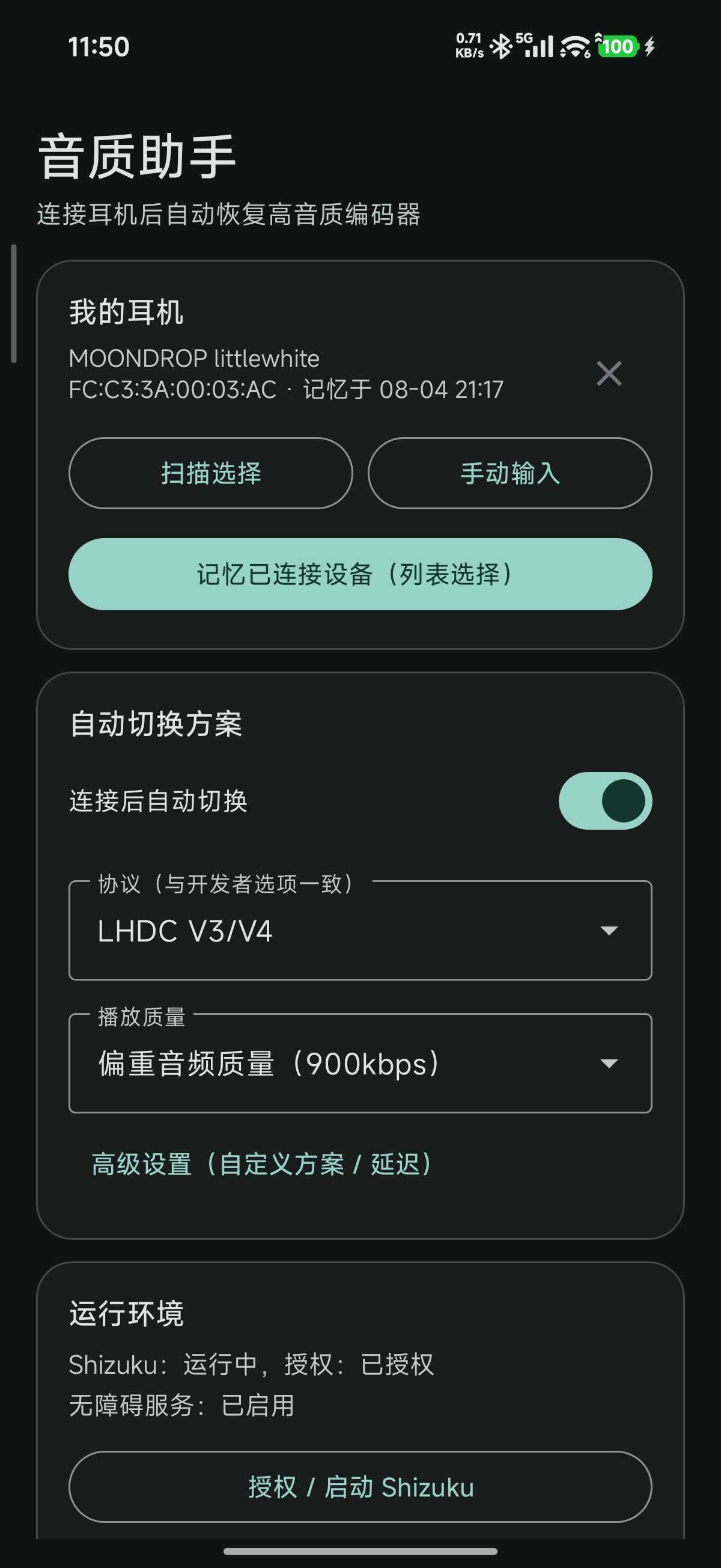
- Bitrate options identical to the settings UI: e.g. LHDC 990/909, 660/606, 330/303 kbps and adaptive
- No root: Shizuku user-service + Accessibility service, no bootloader unlock required
- Per-earphone presets: every remembered earphone keeps its own codec + bitrate; tap an earphone to switch to its preset
- Optional post-flow actions: exit Settings and resume the current music after the switch completes (both off by default)
- Custom overrides: manual device entry, custom row/option labels, trigger delay
Requirements
- Tested on a Xiaomi phone with HyperOS 3 (Android 16). Other devices and ROMs are not guaranteed to work — you can try at your own risk
- Android 8.0+ (API 26+)
- Shizuku running (wireless debugging is enough)
Install & Setup
- Download the latest APK from Releases (or build from source) and install it.
- Start Shizuku and grant this app the Shizuku API permission.
- Enable the accessibility service: Settings → Accessibility → 音质助手 (Audio Quality Assistant).
- Allow display pop-up windows while running in the background for this app (MIUI may block background starts otherwise).
- Open the app, pick your earphone (or leave any-device mode), pick the codec and bitrate, and enable auto-switch.
- Reconnect your earphone — the codec and bitrate are restored automatically.
Build
./gradlew :app:assembleDebug
- JDK 17+, Android SDK platform 36 (
compileSdk=36,targetSdk=37) - Output:
app/app/build/outputs/apk/debug/app-debug.apk - Shizuku API jars are vendored under
app/app/libs/; no extra downloads needed
How It Works
Earphone reconnects (A2DP)
    |
    v
Accessibility service detects the connection
    |
    v
Shizuku shell opens Settings search "LHDC" (fastest route to the audio section)
    |
    v
UI automation selects codec row, then bitrate row
    |
    v
Done — codec stays until the next reconnect
- MIUI blocks background activity starts, so the Settings page is opened through the Shizuku shell instead of
startActivity. - The unified "LHDC" search keyword works for every codec because it lands directly on the audio section where all codec/bitrate rows live.
- LHDC bitrate values:
codecSpecific10x8001= 400 kbps,0x8003= 900 kbps,0x8004= adaptive. - On other ROMs / devices, labels may differ; use the in-app "custom" overrides or edit
Config.java.
License
GPL-3.0. See LICENSE.
Acknowledgments
- RikkaApps/Shizuku — Shizuku API used for root-free shell access
- DeepSeek v4 flash — development and debugging assistance
蓝牙音质助手(Bluetooth Codec Auto-Fix)
作者:Halo
一个免 Root 的小米 / HyperOS 安卓应用:耳机每次重连后,自动把开发者选项里的蓝牙编码器和播放质量恢复成你选好的配置(默认 LHDC 900kbps)。
为什么需要它
有些耳机(比如水月雨小白线)明明支持 LHDC,却每次重连都掉回 AAC。手动切回去又麻烦又容易忘——这个 App 会在重连后自动帮你切回来,全程不需要 Root。
功能
- 重连自动修复:默认对任意耳机生效,连接过一次就自动记忆;每次 A2DP 重连后自动恢复编码器 + 播放质量
- 完整协议列表,与开发者选项完全一致:使用系统选择(默认)/ SBC / AAC / aptX / aptX HD / LDAC / aptX Adaptive / aptX TWS+ / LHDC V5 / V3/V4 / V2 / V1 / MIHC / 启用与停用可选编解码器
- 比特率选项与系统设置完全一致:如 LHDC 990/909、660/606、330/303kbps 与自适应
- 免 Root:Shizuku 用户服务 + 无障碍服务,不需要解锁 Bootloader
- 每耳机预设:每个记忆的耳机独立保存自己的协议 + 码率,点击耳机即可切换到它的预设
- 完成后可选操作:切换完成后自动退出设置、继续播放当前音乐(默认均关闭)
- 自定义能力:手动输入耳机、自定义行文案/选项文案、触发延迟
环境要求
- 以小米手机(HyperOS 3 / Android 16)为测试环境;其他手机 / 系统不保证功能正常,可自行尝试
- Android 8.0+(API 26+)
- 已启动 Shizuku(无线调试即可)
安装与设置
- 从 Releases 下载最新 APK(或按下面方法自己编译)并安装。
- 启动 Shizuku,并给本 App 授予 Shizuku API 权限。
- 开启无障碍服务:设置 → 无障碍 → 音质助手。
- 允许本 App 后台弹出界面(MIUI 不开这个会拦截后台启动)。
- 打开 App,选择你的耳机(或保持“任意设备”模式),选择协议和码率,打开自动切换。
- 重连耳机,编码器和播放质量就会自动恢复。
编译
./gradlew :app:assembleDebug
- 需要 JDK 17+ 与 Android SDK Platform 36(
compileSdk=36,targetSdk=37) - 产物:
app/app/build/outputs/apk/debug/app-debug.apk - Shizuku API jar 已内置在
app/app/libs/,无需额外下载
工作原理
耳机重连(A2DP)
    |
    v
无障碍服务检测到连接
    |
    v
Shizuku shell 打开设置并搜索 "LHDC"(最快直达音频设置区)
    |
    v
UI 自动化依次选择编码器行、播放质量行
    |
    v
完成——直到下次重连都保持该编码器
- MIUI 会拦截后台启动设置页,所以设置页必须通过 Shizuku shell 打开,不能用
startActivity。 - 无论选哪种协议都统一搜索 "LHDC",因为该搜索结果直接落在音频设置区,所有编码器/码率行都在同一屏。
- LHDC 码率数值:
codecSpecific10x8001= 400kbps、0x8003= 900kbps、0x8004= 自适应。 - 其他 ROM / 机型文案可能不同:可在 App 内用“自定义”覆盖,或直接改
Config.java。
许可证
GPL-3.0,详见 LICENSE。
鸣谢
- RikkaApps/Shizuku —— 本项目使用的 Shizuku API,实现免 Root 执行 shell
- DeepSeek v4 flash —— 开发与调试协助
How Shizuku is used
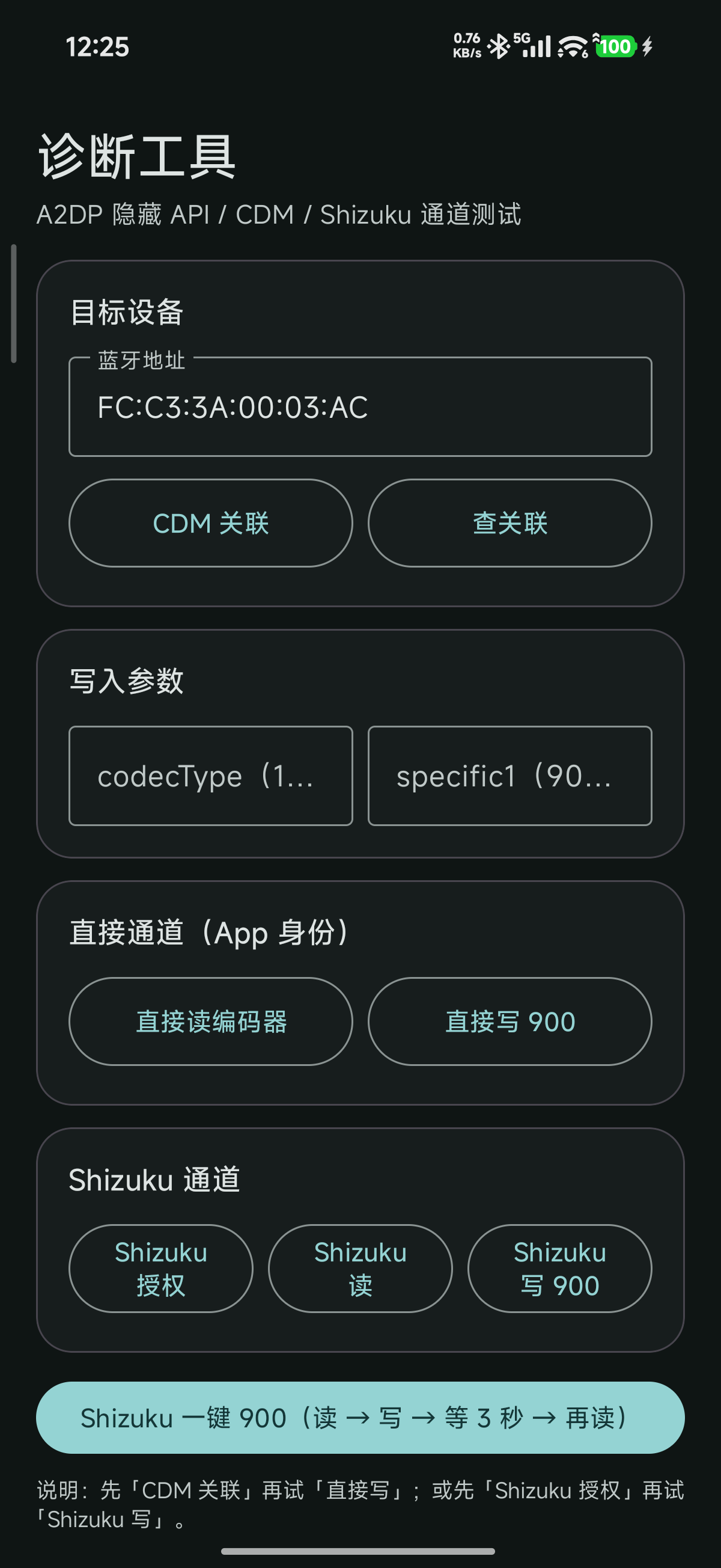
Can restore saved Bluetooth codec and bitrate after reconnect and test codec settings via `am start`, `input tap` and Bluetooth codec APIs through Shizuku.
This is an AI-assisted analysis of Shizuku-related usages in the app's public source code. It is best effort, so it may not catch every single usage.
How this app uses Shizuku
The app uses Shizuku to reapply the user's chosen Bluetooth audio settings after the earphones reconnect, plus a test screen for checking codec behavior.
- Restore saved codec: after a remembered headset reconnects over A2DP, the app opens system settings and reselects the saved codec option using the
am startandinput tapshell commands and screen content checks through Shizuku. - Restore playback quality: together with the codec, it reselects the saved playback quality such as high bitrate using the same settings search plus
input tap,input textandinput swipeautomation through Shizuku. - Finish automation tidily: after a successful switch it can leave Settings with back key presses, resume music playback, and check whether Settings is in front using
input keyeventanddumpsys windowthrough Shizuku. - Test codec directly: a diagnostics screen can read the current codec status and apply a high quality codec preference, such as high sample rate and bit depth, using Bluetooth codec controls through Shizuku.
Android APIs or commands used
BluetoothA2dp.getCodecStatusBluetoothA2dp.setCodecConfigPreferenceam startam force-stopinput tapinput textinput swipeinput keyeventdumpsys windowuiautomator dump
Changelog
What's new for version 8.8
Latest release of Bluetooth Codec Auto-Fix(音质助手)v8.8.
- Per-earphone presets: tap a remembered earphone to load its own codec + bitrate preset
- Optional post-flow toggles: exit Settings and resume music after the switch (both off by default)
- "无可选播放音质" placeholder for codecs without selectable quality (AAC/SBC/aptX…)
- Auto-restores Bluetooth codec + bitrate on earphone reconnect (no root)
- Tested on Xiaomi / HyperOS 3 (Android 16)
APK is debug-signed; install from Release assets or build from source.
Permissions
8 permissions requested
More from this category
 HyperOSUnf*cker
 HyperOS MTZ Studio
 FxxkMIUIAd
 Island Recorder
 Aura
Aura
 HyperOS FCM Fix
 MixFlipTool
Navigation Switcher
MixFlipTool
Navigation Switcher
 壁纸设置器
壁纸设置器
 FiveGSwitcher
 FpsSwitcher