 ShizuStore
BooxUltimatum
0.7.0 · GitHub
More about this app
Open-source suite for BOOX E Ink tablets: high-contrast home, sleep screens, instant pen ink, battery log and reversible tweaks, using Shizuku for privileged tweak tiers.

BooxUltimatum
A suite of apps for the BOOX Note Air6 C, without root: a hub with a home screen, sleep-screen designer, battery doctor and reversible tweaks, and Nib, a drawing app with Boox's instant pen.




Website and technical guide · Changelog · Contributing · Report a bug or a finding


The Note Air6 C is a lovely tablet with a frustrating side. Independent reviews such as eWritable's praise the screen and the pen, then point at the same two things owners complain about: battery life, and software that scatters useful settings across a dozen places. BooxUltimatum is one owner's attempt to fix that from the inside. It isn't a skin over the problem. Every change it makes is measured on the real tablet, explained in plain words, and one tap away from being undone.
Nothing is flashed, and the bootloader stays locked. The hub, BooxUltimatum, is one APK; the apps that build on it, starting with Nib, install and uninstall on their own.
Status: public preview (0.5). It runs daily on the author's own tablet (Note Air6 C, firmware 4.3, Android 16), and hasn't been tested elsewhere yet. Download it from Releases, and please report how it behaves on your tablet. From 0.5 on, the app can update itself and file a report for you from its Device page.
What it does
A suite, not just a launcher
BooxUltimatum is the hub of a small suite. Its Suite page installs, opens, updates and uninstalls the suite's other apps, and lists the modules built into the hub: the home screen, the sleep screen, Instant ink and the battery log. Removing a module stops it and undoes what it changed, and its pages leave the menu until you add it back. The apps share one kit of libraries: the same design, the same logbook, the same pen code and the same updater. Every suite app keeps a log of what it did and what went wrong, and keeps its own cache, downloads and exports bounded. Device › Logs shares every app's logs as one zip, and Device › Storage shows and clears what each app keeps.
Nib: drawing with Boox's instant pen
Nib draws the way Boox Notes writes. The display paints each stroke under the nib at once, and the moment you lift the pen, Nib's own rendering takes its place. It's built for drawing rather than notes:
- Brushes. Pens, pencils, markers, brushes and textured charcoal, each previewed in the closest of the display's styles.
- Widths down to a fraction of a millimetre.
- Layers. As many as you need, with opacity, visibility and locking. Boox Notes stops at five.
- The rest. Undo, zoom that keeps the preview and the result matching, crash-safe autosave, and PNG export.
Its tools float over a full-screen page like cut cards on a desk. The pens are drawn as their own strokes, and every brush property has a slider with − and + keys and a typed value. The Brushes, Colour and Layers cards can be pinned and moved. There's also a lasso that moves, scales and turns strokes, a page you can turn, paper guides, and exports with or without the paper or layer by layer. It works without BooxUltimatum, and without Shizuku or a computer. From 0.3 it writes the way BOOX's own apps do: the display holds the page for the whole writing session, so quick strokes follow each other without a pause, and Nib's ink replaces the preview when you stop to use a card, a panel or a gesture. Its pens are matched to BOOX's own: the preview gets each brush's pressure sensitivity, tilt and nib angle, and textured brushes show Nib's exact ink after you pause. The eraser end and the lasso are drawn by the display too, the page refreshes fast while fingers move it, and an optional palm guard switches finger touch off while the pen is near. See Known limits, docs/08-nib.md and docs/09-ink.md.
A home screen made for e-ink

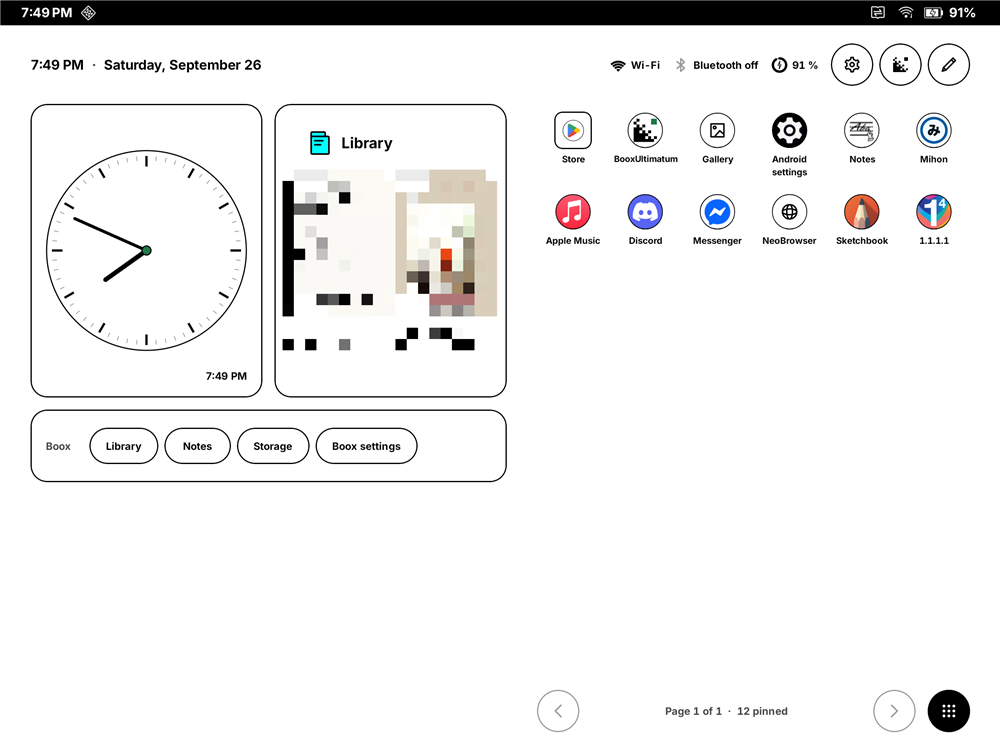
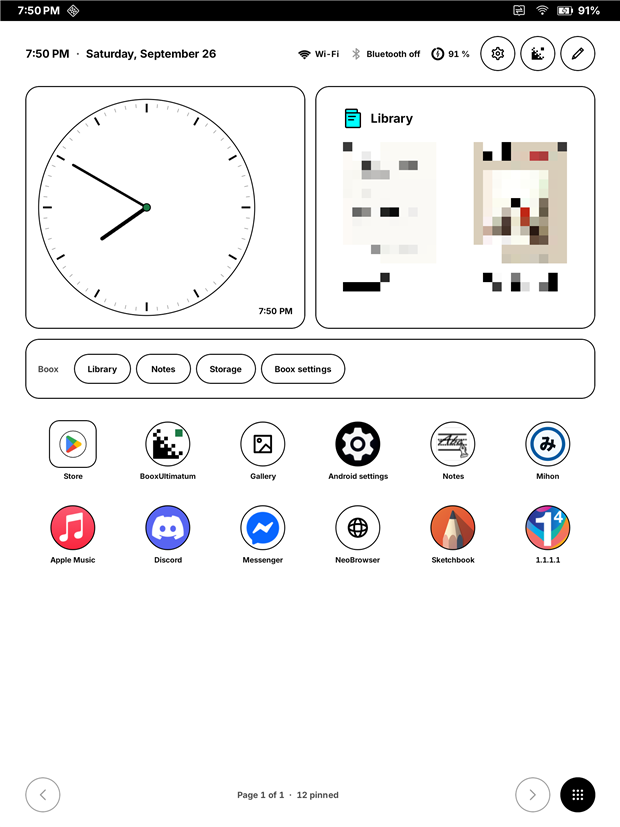
A calm, paper-white launcher that uses about a third of the Boox home's memory and no CPU when idle.
- Widgets: clock, month, agenda, weather, battery, next alarm, a note, a Boox shelf (Library, Notes, Storage) and any app's widget, including Boox's own. Library covers are pixelated in these screenshots.
- Apps: paged grids you turn with a swipe, folders, and icon shapes that remove the frame Boox draws into its own icons.
- The header: time, network, Bluetooth and battery in 8 Wi-Fi and 8 battery designs, plus keys for Boox Settings and BooxUltimatum.
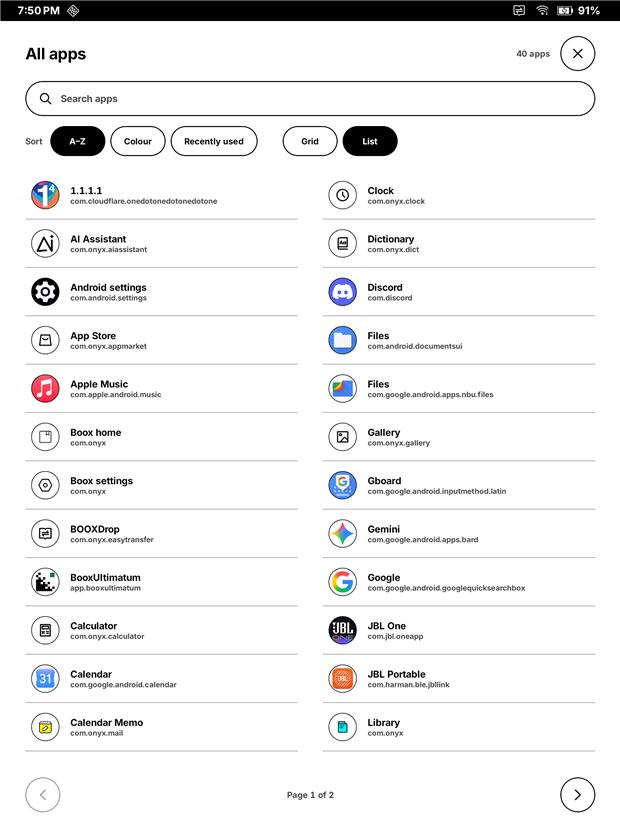
- All apps: includes the Boox functions that have no launcher icon, sorted by name, colour or recent use.
- Layout: two panes in landscape. Nothing ever reflows while you type.

Your own sleep screen


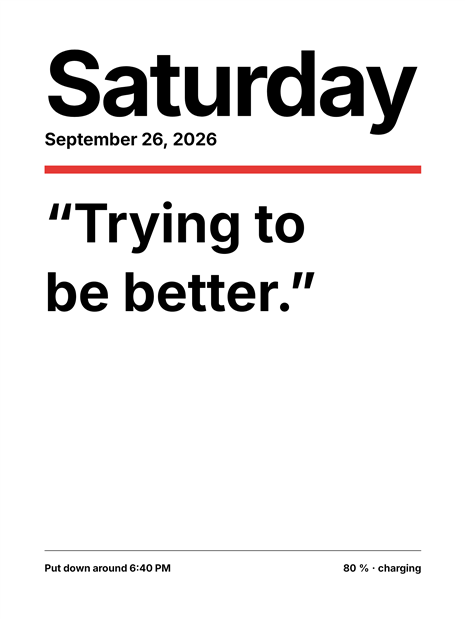
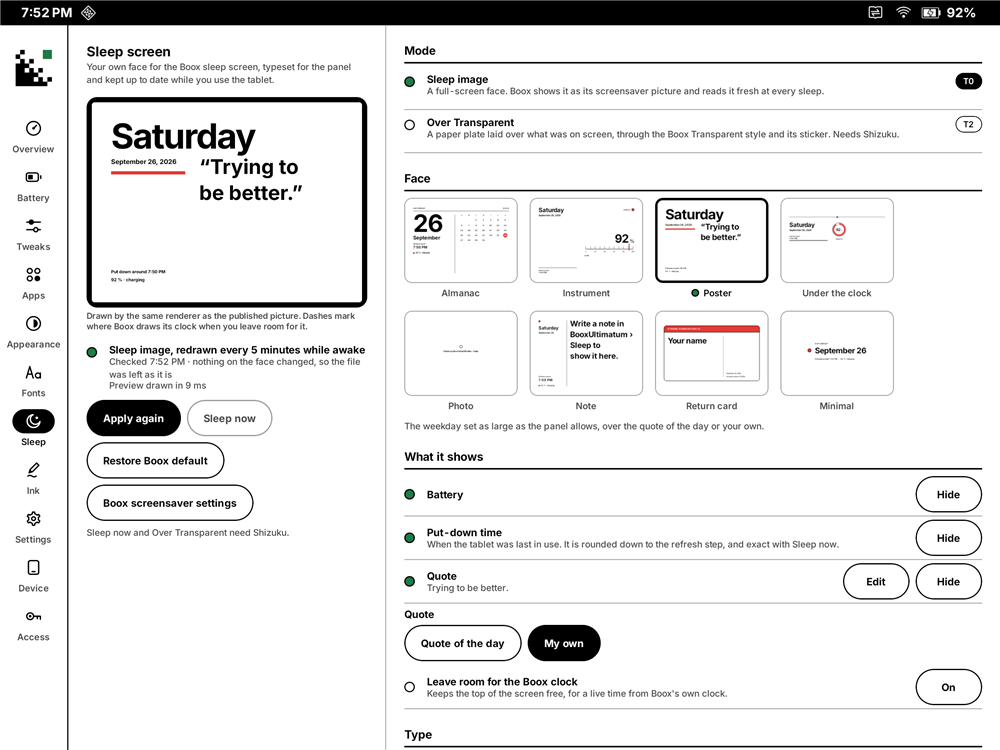
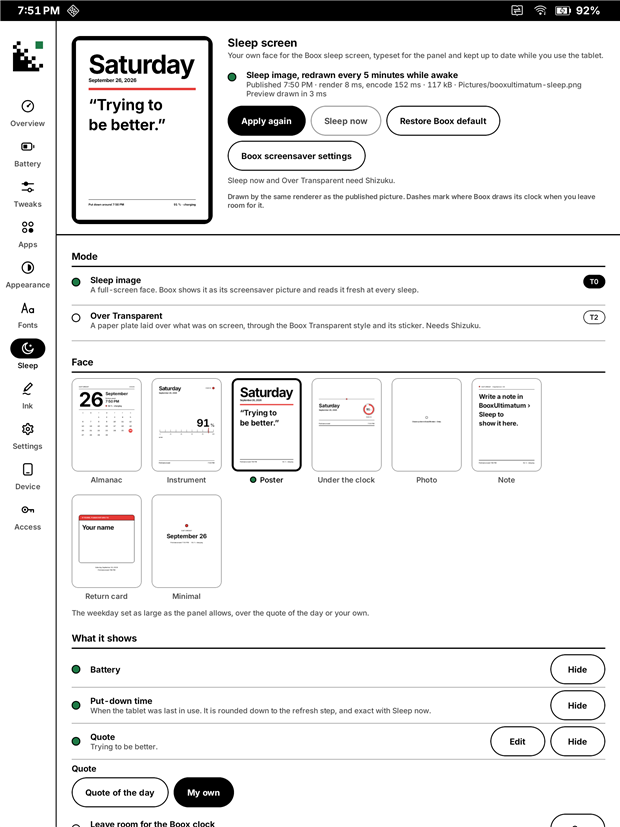
Boox gives you six preset screensavers. BooxUltimatum gives you twenty-one faces set in your tablet font, from a Braun wall clock and a 3D cube to a split-flap board, a dashboard and a newspaper front page. Each has its own portrait and landscape layout.
Freshness: Boox only reads the picture as the tablet goes to sleep, so the studio quietly redraws it while you use the tablet. It updates every 5 minutes by default, and whenever the battery, date or rotation changes. The time it shows is honest: "put down around 4:30 PM".
While asleep (new, off by default): the face can also update while the tablet sleeps, every 1 to 60 minutes, and it covers Boox's charging bar. It needs an accessibility service (which only holds the picture and reads nothing), background use and exact alarms, all allowed on the tablet. Each update wakes the tablet for about a second and a half, and the battery cost isn't measured yet.
Twenty-one faces, twelve of them live.
- Dial, Clock, Monitor, Cube, Split-flap, Dashboard, Word clock, Day ring, Timeline, LCD, Sky and Broadsheet keep time while the tablet sleeps.
- Almanac, Year, Instrument, Poster, Under the clock, Photo, Note, Return card and Minimal are still faces.
- Many faces have options of their own, such as Dial styles, 12- or 24-hour time, the Dashboard's tiles and the Cube's shading.
Faces show only what the tablet knows:
- Calendar events, when you allow access.
- The home screen's weather, with how old it is.
- Sunrise and sunset for the home screen's weather city.
- The moon's phase, worked out on the tablet.
Without updates while asleep, a clock face shows when the tablet was put down and says so.
Rotation: both orientations are kept ready, so turning the tablet never leaves you with a cropped face.
Keeping the Transparent style: an Over Transparent mode lays a small paper plate over it instead.
Power-off screen: the same face can also be what the tablet shows when it's switched off, set with one tap through the same Boox interface.
Instant ink for other apps (experimental)

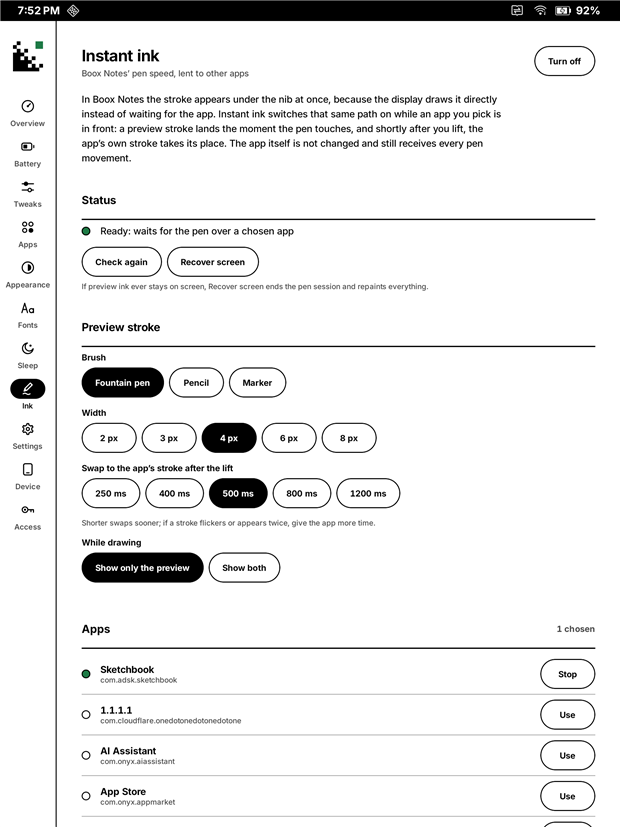
In Boox Notes, ink appears under the nib in about 10 ms. In Sketchbook and most other apps, it trails behind. The reason is that the display system draws the stroke straight from the pen, a firmware feature Onyx offers app developers through its public pen SDK, for drawing inside their own app. Most apps don't include that SDK. BooxUltimatum switches the same path on from the outside for apps you choose, and hands the stroke back to them after you lift the pen.
A preview stroke lands at once, and once you pause (0.8 s by default, 0.4 to 2 s to choose), the app's own brush takes its place; quick strokes share one preview, as in BOOX's own apps. The display holds the app's own drawing back while the pen touches, so its brush and colour always appear after the lift. Instant ink keeps a paused display session ready, so even the first stroke after unlocking or switching apps gets the preview, and it steps aside for Boox's own apps. The app isn't modified in any way, and it needs no root and no Shizuku, only usage access, which you allow on the tablet so it knows which app is in front. A Quick Settings switch and the buttons on its notification turn it off or recover the screen without leaving your app. The Ink page shows what it found (pen input, display route) and has a pen test, which is what helps most in a report from another tablet. The brush and width of the preview are adjustable. It's new and has only been tried in Sketchbook so far, next to Boox Notes; see Known limits.
A battery doctor that doesn't drain the battery


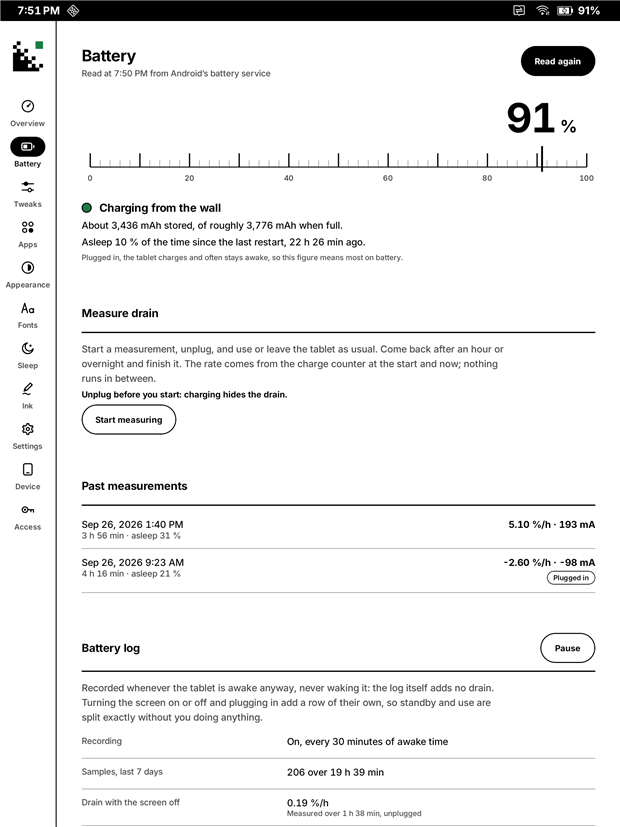
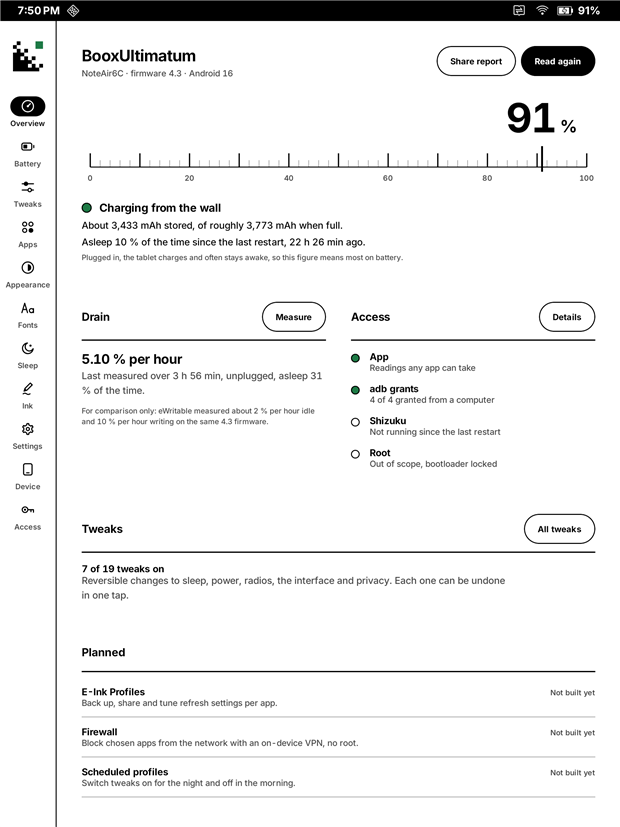
- Measure drain: unplug, use the tablet, and read the rate. The time-left estimate comes from real mAh, not guesses.
- Battery log: runs without ever waking the tablet, logging every screen, plug and level change, with a chart and a one-zip export.
- Findings so far on this tablet: standby is already excellent (0–12 mA), and screen-on use is where the battery goes, mostly because background downloads, music and chat apps keep the processor awake. The tweaks aim at exactly that.
Tweaks you can undo


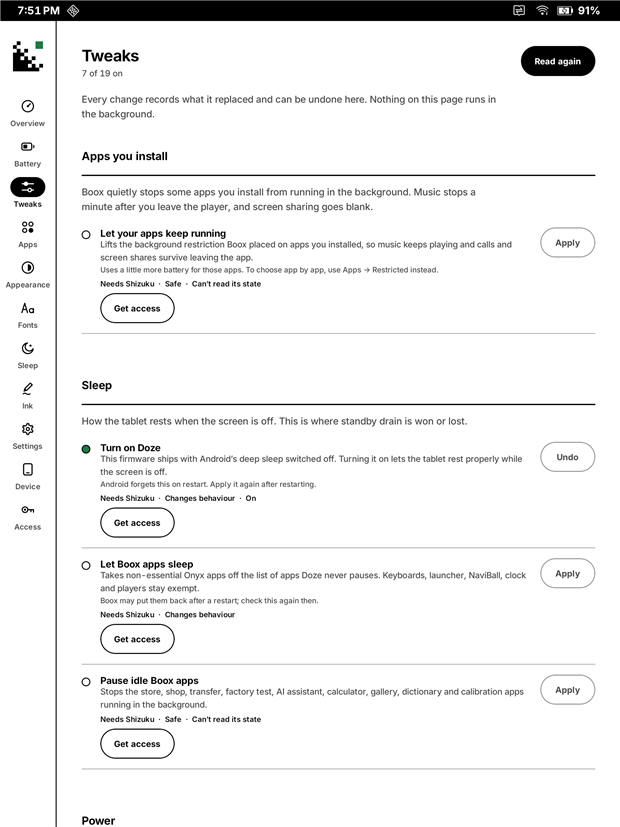
There are 19 reversible tweaks across apps, sleep, power, radios, interface and privacy. Every one records what it replaced, and Undo puts it back. Some examples:
- Let your apps keep running. Boox background-restricts every app you install, which is why music stops a minute after you leave the player.
- Let Boox apps sleep, Turn on Doze, and Pause idle Boox apps.
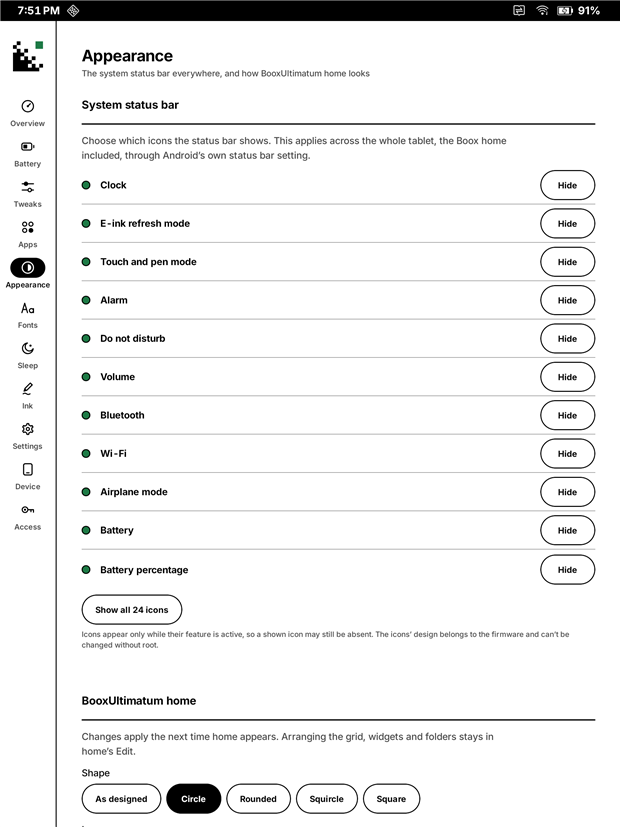
- Status bar icons, shown or hidden tablet-wide.
- The whole tablet's font, at a proper weight, without root.

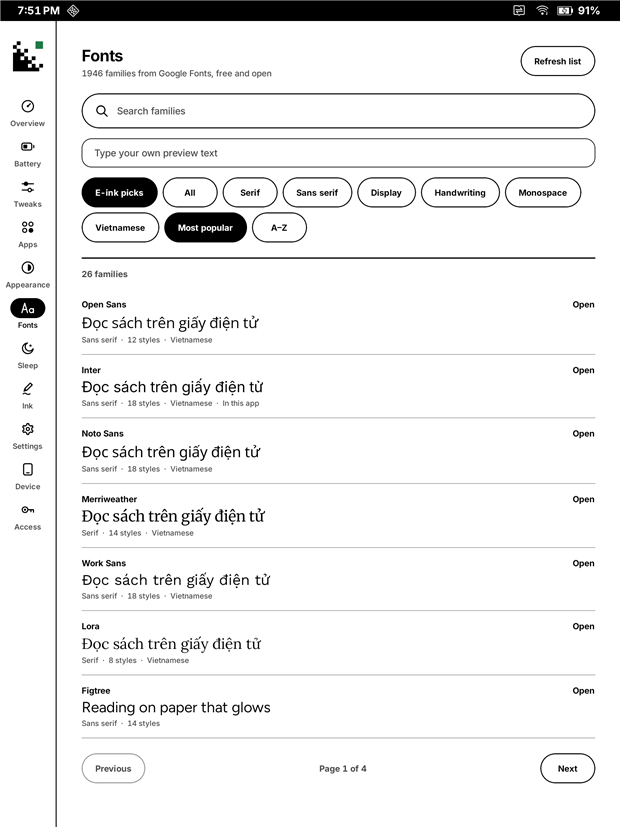
A full Google Fonts browser (1946 families, with a Vietnamese filter) installs fonts for the tablet, NeoReader, the home screen or the app. Its font manager lists what's installed, where each font is used, and its size. It turns fonts off and on, and deletes them, handing every use back first, and it never touches fonts it didn't install.
How much access it needs
Most of BooxUltimatum works straight after installing, with no computer, no Shizuku and no root. Every feature declares the least access it needs, and when a higher level is missing, the app shows what it can still do and where the manual switch is.
| Level | What it is | What it adds |
|---|---|---|
| T0: just the app | Nothing to set up, or a switch you allow on the tablet itself | Nib, the drawing app, entirely. The suite's logbook and installs. The home screen, the sleep screen and power-off screen designer, the sleep screen while asleep (an accessibility service and background use), Instant ink (usage access), battery measurement and the battery log, the Google Fonts browser, the whole tablet's font, the settings hub, and making BooxUltimatum your home screen (Android asks you to confirm). For apps Boox restricts, a one-tap link to Android's own battery page and to Boox's hidden App Freeze page (also in the Settings hub). |
| T1: a one-time setup from a computer | Four permissions granted once over adb; they survive reboots |
Reading battery statistics inside the app, showing or hiding status bar icons tablet-wide, and the tweaks that are system settings |
| T2: Shizuku | Shizuku, a free app that runs a small helper with the same rights as adb |
Most tweaks (Doze, Battery Saver, pausing Boox apps), reading and lifting Boox's background restriction for every app at once, switching the home screen in one tap, the Wi-Fi network name in the header, Sleep now, and the Over Transparent sleep mode |
| T3: root | Out of scope. BooxUltimatum doesn't need or ask for it |
About the status bar: tablet-wide, BooxUltimatum can show or hide the system's status bar icons (T1). The custom Wi-Fi and battery designs are drawn in BooxUltimatum's own home screen header. Replacing the system's own icon artwork would need a system overlay, which Android only allows with root, so that isn't possible.
What Shizuku is, and how to start it
Shizuku lets ordinary apps use the same commands you could type over adb, without root. It needs adb (from a computer, or wireless debugging on the tablet) to start its helper, and on this firmware the helper stops whenever the tablet restarts. BooxUltimatum works without it; Shizuku only adds the features in the T2 row.
- Install Shizuku from GitHub or Google Play.
- On the tablet, turn on USB debugging: Boox Settings › More Settings › USB Debug Mode (firmware 4.3).
- Plug the tablet into a computer with platform-tools (
adb) and accept the "Allow USB debugging" prompt. - From this repository, run the setup once, then start Shizuku (again after each reboot):
# Windows
.\tools\host\grant-permissions.ps1   # T1, once
.\tools\host\start-shizuku.ps1       # T2, after every reboot
# macOS / Linux
./tools/host/grant-permissions.sh    # T1, once
./tools/host/start-shizuku.sh        # T2, after every reboot
Without the scripts, the T1 grants are these four commands:
adb shell pm grant app.booxultimatum android.permission.WRITE_SECURE_SETTINGS
adb shell pm grant app.booxultimatum android.permission.DUMP
adb shell pm grant app.booxultimatum android.permission.READ_LOGS
adb shell appops set app.booxultimatum GET_USAGE_STATS allow
Firmware 4.3 hides the Wireless debugging switch from Developer options, so restarting Shizuku without a computer isn't possible yet. Making it survive reboots is on the roadmap.
Install
From a release: download BooxUltimatum-0.7.0.apk from this repository's Releases page, allow your browser or file manager to install apps, and open it. The Access page shows what each level unlocks and the exact commands for it. Releases are signed with the project's own key, so later releases update it in place. The hub's Suite page installs Nib for you, or download Nib-0.2.0.apk from the same page; Nib's releases are tagged nib-v….
Test builds for the tablet: unfinished builds of the hub or Nib are sometimes published as test-… pre-releases so they can be checked on a real tablet. The hub offers them only when Offer test builds is on (Device page), and a release always replaces its own test build.
Development builds: every commit on main also builds debug-signed APKs of the hub and Nib. Open the latest successful Build run and download booxultimatum-debug-signed or nib-debug-signed under Artifacts (GitHub asks you to sign in). They use a different key from the releases, so Android won't install one over the other, or a debug build of one suite app next to a release of another. Uninstall first when switching, which also clears the app's settings.
From source (today):
# JDK 21 and the Android SDK (platform 36) are required.
$env:JAVA_HOME = 'C:\Program Files\Eclipse Adoptium\jdk-21.0.8.9-hotspot'
.\gradlew.bat assembleRelease                  # -> hub\build\outputs\apk\release\hub-release.apk
adb install -r hub\build\outputs\apk\release\hub-release.apk
Release builds from source are debug-signed for now, so they update an installed copy in place. Public releases will use a proper signing key.
Using it as your home screen, and going back
Suite › Home screen › Use this makes BooxUltimatum the home screen. It first records the Boox home, so going back never loses anything:
- On the tablet: Suite › Home screen › Back to Boox. You can also tap Notes on the Boox shelf to use the Boox home for a moment.
- From a computer, if BooxUltimatum ever won't open:
adb shell cmd package set-home-activity --user 0 com.onyx/.StartupActivity. - Without either: Android Settings › Apps › Default apps › Home app › ONYX Launcher.
Recents, gestures, NaviBall and EinkWise belong to the system, so they behave the same under either home.
Known limits
- Nib is new:
- 0.3's way of writing is built from BOOX's own apps and checked on an emulator, but not yet on the tablet: pushing ink and cards into the display, the eraser end's and lasso's previews, fast refresh and palm guard are all waiting for their check in Diagnostics › Lab.
- While you write, the page shows the display's preview. With the native-matched pens it looks like the ink; other brushes show Nib's ink after you pause.
- Its preview can look a little wider than the stroke that replaces it. Diagnostics › Match preview tunes it per preview style.
- Styles 3 to 7 (neo brush, charcoal, dash, charcoal v2, square pen) are the ones BOOX Notes uses, but haven't been judged on this tablet with their settings. How thin a preview the panel draws cleanly isn't measured yet.
- Marker and highlighter previews are in solid colour, covering what's under the stroke until you lift the pen, because the display drops translucent colours. Blue looks grey in the preview. Settings › Display preview offers a see-through grey instead.
- Its Diagnostics page asks what the panel shows and records your answers, which is the most useful thing to send from another tablet.
- One key for the whole suite. Every suite app declares the same signature permission, so a development build (signed differently) can't be installed next to a release of another suite app. Install both from Releases, or both from the same build.
- One tablet, one firmware. Everything is verified on a Note Air6 C with firmware 4.3. The Note Air4 C and Air5 C run very similar Boox software, so much of it may work there, but nothing is tested on them yet. Results from those tablets, and from other Boox models, are the most welcome contribution; use the Device finding issue form.
- Unofficial interfaces. The sleep and power-off screen broadcast and the pen path appear in Onyx's own SDK, and the tablet font switch in Boox's own apps, but none of them is a stable, documented public API. Instant ink also uses the pen path in a way the SDK doesn't offer: on behalf of another app, through the firmware's display calls. A firmware update can change any of these without notice. When something stops working, the app says so rather than guessing.
- Instant ink is experimental:
- The preview is Boox's own black pen, so a coloured brush or the eraser only shows once the app's stroke takes over. The firmware holds the app's own drawing while the pen touches, so the two can't be shown together.
- After Boox Notes has been used, the first stroke in a chosen app can miss the preview once, because Boox's apps sometimes end the waiting session.
- It's been tested with a real pen in Sketchbook only. Other drawing and note apps are the next thing to try.
- Updates while asleep are new. They're verified on battery on the Note Air6 C, but their battery cost isn't measured yet, and the faces don't yet have much that changes while the tablet sleeps. Without them, Boox doesn't read the picture again until the tablet wakes. The power-off screen is a copy Boox keeps, so it changes only when you set it again.
- Charging: without updates while asleep, Boox always draws its battery bar over the sleep screen while the tablet charges.
- Charge limit: Boox's Charging protection stops at 80 %. Other levels would need root, because the threshold files are closed even to Shizuku.
- Other Boox models and other tablets: the app recognises Boox tablets and, elsewhere, hides what needs Boox firmware (the sleep screen and Instant ink). Instant ink had no effect on a Note Air 2 Plus and a Go 10.3 Gen II Lumi; the Ink page now shows why, and those reports are open.
- Shizuku stops on every restart, and starting it again needs a computer on firmware 4.3 (see How much access it needs). Everything in the T0 row works without it.
Updates and reports
The Device page's This app plate checks this repository's releases, at most once a day when the app opens or when you tap Check for updates. It downloads the APK, checks its SHA-256 and signing key, and hands it to Android's installer. Development builds, which are signed differently, say so and don't offer updates. Report a problem or idea fills in a GitHub issue form, or copies or shares the report. You choose which parts to include and can preview each one.
Privacy
There are no accounts, analytics, ads or trackers. The app goes online for three things only: weather from Open-Meteo (the city you type), fonts from Google Fonts when you open the browser, and GitHub's release list when it checks for updates, for itself and the suite's apps. Nib goes online only to check GitHub for its own updates, at most once a day, and only when BooxUltimatum isn't installed to do it. Neither app sends its logs anywhere; you share them yourself. The battery log stays on the tablet until you choose to share it, and a problem report is only sent when you open it on GitHub or share it yourself.
Disclaimer
BooxUltimatum is an independent project. It is not affiliated with, endorsed by or supported by Onyx International or BOOX. "BOOX", "Note Air" and related names are trademarks of their owners, used here only to say which device this is for.
The app changes system settings, and, if you ask it to, the home screen, the sleep screen and how other apps draw. Every change is recorded and reversible, and nothing touches the system partitions or the bootloader. Still, this is preview software that relies on unofficial behaviour: use it at your own risk. As the GPL says, it comes with no warranty (sections 15 and 16 of LICENSE).
Roadmap
No dates promised; this is a spare-time project, and each release ships when it works on the tablet.
- 0.4, first public preview (released)
- A release-signed APK on GitHub Releases.
- Instant ink with hover-held frames and a working width, checked with a real pen in Sketchbook.
- The sleep face as the power-off screen too.
- More of the app working without Shizuku: the tablet font, becoming the home screen, and one-tap links to the background controls Boox hides.
- 0.5, the sleep screen while asleep (released)
- Updates while asleep, verified on battery, and twenty-one faces, twelve of them live, many with options of their own.
- In-app updates and problem reports.
- Instant ink diagnostics for other Boox models: the usage access check, pen detection by behaviour, and a pen test.
- One device profile, so tablets that aren't Boox get only what works there.
- 0.5.1: a steadier Instant ink, with a session kept ready so the first stroke is previewed, and a Quick Settings switch.
- 0.6, the suite (released)
- BooxUltimatum as a hub: a Suite page that installs and updates the suite's apps, and built-in modules that can be removed and added back.
- A logbook in every suite app, with crash capture and one shared export.
- Five-section navigation.
- Nib 0.2, the first release: instant preview, many brushes, fine widths, unlimited layers, a lasso, a page that turns, paper guides, undo, autosave and exports, with floating cards and a Diagnostics page for the tablet.
- A font manager, a Storage page, and logs and leftovers kept bounded in every suite app.
- 0.7, steadier sleep and ink, home keeps frozen apps (released 2026-10-01)
- Sleep live updates every minute, with the battery cost measured at about 1 % per one to two hours.
- Batched instant ink with a stronger recovery, and the computer command for usage access on the Ink page.
- Home lists Boox-frozen apps dimmed instead of hiding them.
- A Clean screen tile and key.
- Still ahead from the 0.7 plan
- A one-tap reading mode: Wi-Fi and Bluetooth off, Battery Saver on and sync paused, all undone together.
- Shizuku that survives a restart without a computer, and an in-app first-run guide for the adb grants.
- The first overnight and A/B results shown in the app.
- Instant ink tried in more drawing and note apps, and on the models testers reported.
- Round trips recorded for the last three unverified tweaks.
- Refinements to the faces from how they look on the panel.
- Nib 0.3, native writing (in progress)
- Built on
kit:ink, the suite's new ink framework:- one hold per writing session;
- every card kept clear of the preview;
- exact ink and cards pushed into the display;
- the display's eraser-end and lasso previews;
- pens matched to BOOX's own, with tilt;
- fast refresh while the page moves;
- a palm guard;
- a Lab for the checks on the tablet.
- Instant ink batches strokes the same way, and a Clean screen tile arrives.
- Built on
- Nib 0.4 and on
- The thinnest clean preview, and anything the Lab shows needs changing.
- Image import, PDF and OpenRaster export, templates, and pages or an endless canvas.
- 0.8, home polish
- Notification dots (opt-in).
- Front-light and refresh-mode quick actions.
- Backing up and restoring the layout.
- 1.0
- Confirmed on at least one more Boox model.
- A Vietnamese translation.
- Reproducible release builds.
The full, dated history is in CHANGELOG.md.
How it's built
Kotlin and Jetpack Compose, minSdk 30, target 36, in one Gradle build with a module for each app and a shared kit. The look is a "Braun Instrument" design language: paper white, black ink, one green lamp, the Archivo typeface, and no animation, because e-ink punishes motion. Every device fact the app relies on is written down with its evidence in knowledge/experiments.md. The design docs in docs/ explain the research, the architecture, the launcher and the sleep screen.
It is written by an owner of the tablet working with an AI pair programmer (GitHub Copilot). Every change is tested on the tablet before it's committed.
| Path | What's there |
|---|---|
hub/ |
The hub app. core/ holds system readers, tweaks, the battery log, sleep/, ink/ and suite/. launcher/ is the home screen and ui/ the screens |
nib/, nib-engine/ |
Nib, the drawing app, and its drawing model in pure Kotlin |
kit/ |
The libraries every suite app builds on: core, log, ui, ink and update (docs/07-suite.md) |
docs/ |
Numbered design docs (00 device research to 08 Nib), plus the screenshots |
knowledge/ |
The evidence log (experiments.md) and the Onyx package knowledge base bundled with the app |
tools/host/ |
PowerShell scripts run from a computer over adb (recon, battery logger, Shizuku start) |
tools/dev/ |
Repository hygiene (prose_wrap.py) and publishing (publish.ps1) |
AGENTS.md |
The rules for anyone, human or AI, working in this repo |
Contributing
Bug reports and findings from other Boox models are the most useful contributions right now; the issue forms ask for exactly what's needed. CONTRIBUTING.md covers where help is wanted, the development setup, the rules for changes and how pull requests work. In short: every tweak must be reversible and declare its access tier, device facts need evidence, and prose is never hard-wrapped. Security problems go through private reporting.
License
BooxUltimatum is free software under the GNU General Public License v3.0 or later (see LICENSE). You may use, study, share and change it; if you distribute a changed version, you share its source under the same terms. Third-party code and assets, and their licenses, are listed in THIRD_PARTY.md.
How Shizuku is used
Can freeze apps, tweak system settings, sleep screens, fonts and instant pen ink via `Shizuku shell service` and `SurfaceFlinger binder`.
This is an AI-assisted analysis of Shizuku-related usages in the app's public source code. It is best effort, so it may not catch every single usage.
How this app uses Shizuku
Shizuku provides the privileged tier that applies reversible tablet tweaks, manages apps and powers E Ink features on BOOX tablets.
- Freeze and restore apps: disable and re-enable selected system packages such as update, store and factory test apps with
pm disable-userandpm enablethrough Shizuku, and force stop apps witham force-stop. - Control background activity: allow or restrict background running with
cmd appops set RUN_ANY_IN_BACKGROUND, check status withcmd appops getandcmd appops query-op, read standby buckets witham get-standby-bucket, and add or remove BOOX apps from the Doze allowlist withdumpsys deviceidle whitelist. - Tune sleep and power: turn Doze on or off and force deep idle with
dumpsys deviceidle enable,disableandforce-idle, switch battery saver withcmd power set-mode, and read sleep, alarm, power and battery stats withdumpsys deviceidle,dumpsys alarm,dumpsys poweranddumpsys batterystats. - Change system settings: read and write Global, Secure and System values with the
settings get,settings putandsettings deleteshell commands through Shizuku, covering animation scales, screen timeout, Wi-Fi and Bluetooth scanning, private DNS, adaptive battery and status bar icons and battery percent. - Switch default launcher: set the home app directly with
cmd package set-home-activitythrough Shizuku. - Adjust location and theme: turn location on or off with
cmd location set-location-enabled, and switch the serif font overlay withcmd overlay enable,disableanddump. - Customize sleep and power-off screens: publish the sleep image with an
am broadcastfor the Onyx screensaver action, find and replace the Transparent style sticker withlsandcpthrough Shizuku, and put the tablet to sleep from the studio withinput keyevent KEYCODE_SLEEP. - Manage reader and system fonts: list, copy, hash and remove fonts in the BOOX reader folder with
stat,sha256sum,mkdir,cp,chmodandrmthrough Shizuku, stage the tablet font withcpandchmod, and apply it with anam broadcastfor the Onyx font replace and reset actions. - Enable instant pen ink: draw stylus preview directly through the
SurfaceFlingersystem service via Shizuku when the direct route is refused, hold app frames during strokes and clear ghosting with a full panel refresh. - Show diagnostics and home status: read frontlight state with
cat, Wi-Fi name withcmd wifi status, and SystemUI icon slots withdumpsys activity servicefor battery and status views.
Android APIs or commands used
settings getsettings putsettings deletepm enable --user 0pm disable-user --user 0am force-stopam get-standby-bucketcmd appops get RUN_ANY_IN_BACKGROUNDcmd appops set RUN_ANY_IN_BACKGROUNDcmd appops query-op RUN_ANY_IN_BACKGROUNDdumpsys deviceidledumpsys deviceidle whitelistdumpsys deviceidle enabledumpsys deviceidle disabledumpsys deviceidle force-idledumpsys alarmdumpsys powerdumpsys batterystats -cdumpsys activity service com.android.systemui/.SystemUIServicecmd package set-home-activitycmd power set-modecmd location set-location-enabledcmd overlay dumpcmd overlay enablecmd overlay disablecmd wifi statusam broadcastinput keyevent KEYCODE_SLEEPSurfaceFlingercpmkdir -pchmodrm -fstatsha256sumlscatpidof shizuku_servergetprop
Notable details
Many settings, status bar, launcher, font and sleep image actions also work without Shizuku via the Settings provider, system home settings, MediaStore copies and app-sent broadcasts, with Shizuku used for the shell-only paths such as reader folder writes, sticker overwrite and direct home switching. Diagnostics prefer the app's own dumpsys when an adb grant is present to avoid starting the helper process.
Changelog
What's new for version 0.7.0
BooxUltimatum 0.7.0
Steadier sleep and ink, and a home that keeps frozen apps visible. Tested on a Note Air6 C with firmware 4.3 (Android 16).
Added
- Sleep live updates every minute. Checked on the tablet: the 1-minute step arrives, and an hour of sleep used about 1 % of battery, sometimes one hour, sometimes two.
- Home shows Boox-frozen apps instead of hiding them. The drawer lists them dimmed with a frozen tag (checked on the tablet); opening still works, and the app panel explains where to stop Boox freezing them again. Fixes #3.
- A Clean screen tile and key (Quick Settings, and the Instant ink page).
Changed
- Instant ink batches strokes: quick strokes share one hold, replaced after a pause you choose (0.4 to 2 s). Checked on the tablet: instant ink works.
- Instant ink recovery also clears fast mode, excluded areas and pen settings.
- The Ink page names the computer command for usage access (checked on the tablet):
adb shell appops set app.booxultimatum GET_USAGE_STATS allow.
Fixed
- Sleep live updates survive one missed tick.
Known limits: Nib stays on its test builds; frozen apps that are truly disabled fall back to their app details instead of opening.
Permissions
22 permissions requested
More from this category
 Calibrate SoC
 VR Launcher
 buttonoo
 Heimdall
 MindControl
 SidePad
 Glyph Barty
 ha-paneld
 DiAuto
 Thor Volume Link (ThorVolumeLink)
 flipx
flipx
 Thor’s Lightning