 ShizuStore
Bluesky Redirect
1.0.1 · GitHub
More about this app
A simple app for automatically launching Bluesky links in your preferred Bluesky client
Bluesky Redirect
Automatically launch Bluesky (and other client) links in your preferred Bluesky client.
Features
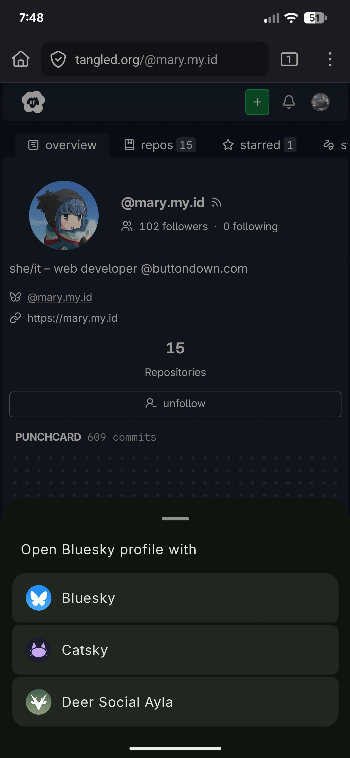
- Multi-client support, e.g. deer.social links will open in Catsky
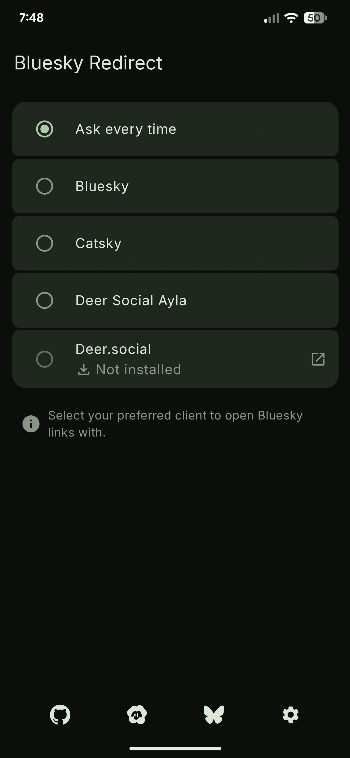
Screenshots


Downloads
Bluesky Redirect lets you open Bluesky links in your preferred client. Download the latest APK below to get started.
GitHub


IzzyOnDroid

Supported Domains
- bsky.app
- main.bsky.app
- deer.social
- deer-social-ayla.pages.dev
- catsky.social
- social.daniela.lol
Setup
If any domains aren't enabled for handling, the app will let you know and provide you buttons for enabling them.
Enabling each supported domain one at a time is possible, but tedious. Instead, you can use Shizuku to automatically enable all links at once. The setup for Shizuku is a little complex, but can be done completely on-device on Android 11 and later. It is also only needed once for the initial setup or for enabling domains added in app updates.
Alternatively, you can use LinkSheet to have supported domains open. LinkSheet needs to be set as your default browser and then acts as a much more comprehensive and usable version of Android's built-in link handling options.
Usage
Open the Bluesky Redirect and select your preferred client. Bluesky Redirect currently supports the following clients:
If your favorite client isn't on the list, consider creating an issue, but please search through the existing issues first, including ones that have been closed. Pestering developers won't help anyone.
Adding Client Support
If you're the developer of a Bluesky client and want to add support for Bluesky Redirect into your app, here's how.
Automatic
wip
Manual
The high level process is pretty simple: expose some way for your app to be launched that accepts a URL and tries to parse it as a bluesky link to open as a post or profile. There are a few ways you can do this.
Once you've implemented support, feel free to open an issue or PR to have it added to Bluesky Redirect.
Create a view target.
This is similar to the share target, but won't show up to users directly in the share menu.
In your AndroidManifest.xml, add the following intent filter inside the relevant Activity tag:
<intent-filter>
    <action android:name="android.intent.action.VIEW"/>
   <category android:name="android.intent.category.BROWSABLE"/>
    <category android:name="android.intent.category.DEFAULT"/>

    <data android:scheme="https" />
    <data android:scheme="http" />
    <data android:host="*" />
</intent-filter>
Inside the Activity itself:
override fun onCreate(savedInstanceState: Bundle?) {
   // ...

    val url = intent?.data?.toString()

    // Validate `url`.
    // Pass it to your internal link parser to find the post ID and such.
    // Open in your thread/profile viewer component.
}
Building
In order to build Bluesky Redirect, you'll need the latest Android Studio Canary build.
Contributing
If you want to add support for another app to Bluesky Redirect:
- Find the
LaunchStrategy.ktfile in theappmodule:
app/src/main/java/io/github/turtlepaw/blueskyredirect/app/util/LaunchStrategy.kt - Add the app's name to the
strings.xmlfile for Bluesky Redirect. - Create a new data object that implements
BlueskyClientLaunchStrategy. - Override the
createIntents()function and return a list of Intents to launch the app. Usually, only one Intent is needed. - Annotate both objects with
@Keep.
Bluesky Redirect will automatically detect the new class and show it as an option.
Refer to the existing objects in the file for examples.
How Shizuku is used
Can verify and reset its own Bluesky link handling via Shizuku using `cmd package set-app-links-user-selection` and `IPackageManager.updateIntentVerificationStatus`.
This is an AI-assisted analysis of Shizuku-related usages in the app's public source code. It is best effort, so it may not catch every single usage.
How this app uses Shizuku
Shizuku is used to approve and reset this app as the automatic handler for its Bluesky links without leaving the app.
- Verify app links: tapping the enable option approves this app for its web links through Shizuku, applying always-open handling for its own package.
- Reset link verification: using the reset option returns link handling to ask-before-opening through Shizuku, clearing the prior automatic approval for its own package.
Android APIs or commands used
cmd package set-app-links-user-selectionIPackageManager.updateIntentVerificationStatus
Notable details
The same approval can be completed without Shizuku through the offered LinkSheet option or the system settings screen.
Changelog
What's new for version 1.0.1
- Add witchsky.app and blacksky.community to supported domains
Permissions
3 permissions requested
More from this category
 ShizuCallRecorder
 CallVault
 Rivo
Rivo
 Ghost Mode
 ClipShare
 Aliucord Manager
 Revenge Manager
 Kettu Manager
 cally
cally
 KDE Connect
 TxtNet Browser
 CatShare