 ShizuStore
BHub
1.1 · GitHub
More about this app
Download, install and share mods easily






Other language: Русский
Blays Hub
A convenient way to download and distribute apps and mods
Features
For user
- Downloads apk from catalogs
- Install and delete apps
- Check apps updates
- Install root versions of mods
- One-click app update without root and Shizuku on Android 12+
- Support for working in the background
- Shizuku support
- Add another catalogs
For catalog creators
- The ability to create your own application catalogs (you can upload them to any file server, for example GitHub)
- The ability to publish both root and non-root versions of applications (if needed)
- Multilanguage changelogs and descriptions
- The application description supports the placement of screenshots and The application description supports the placement of screenshots and multilanguage text in markdown format
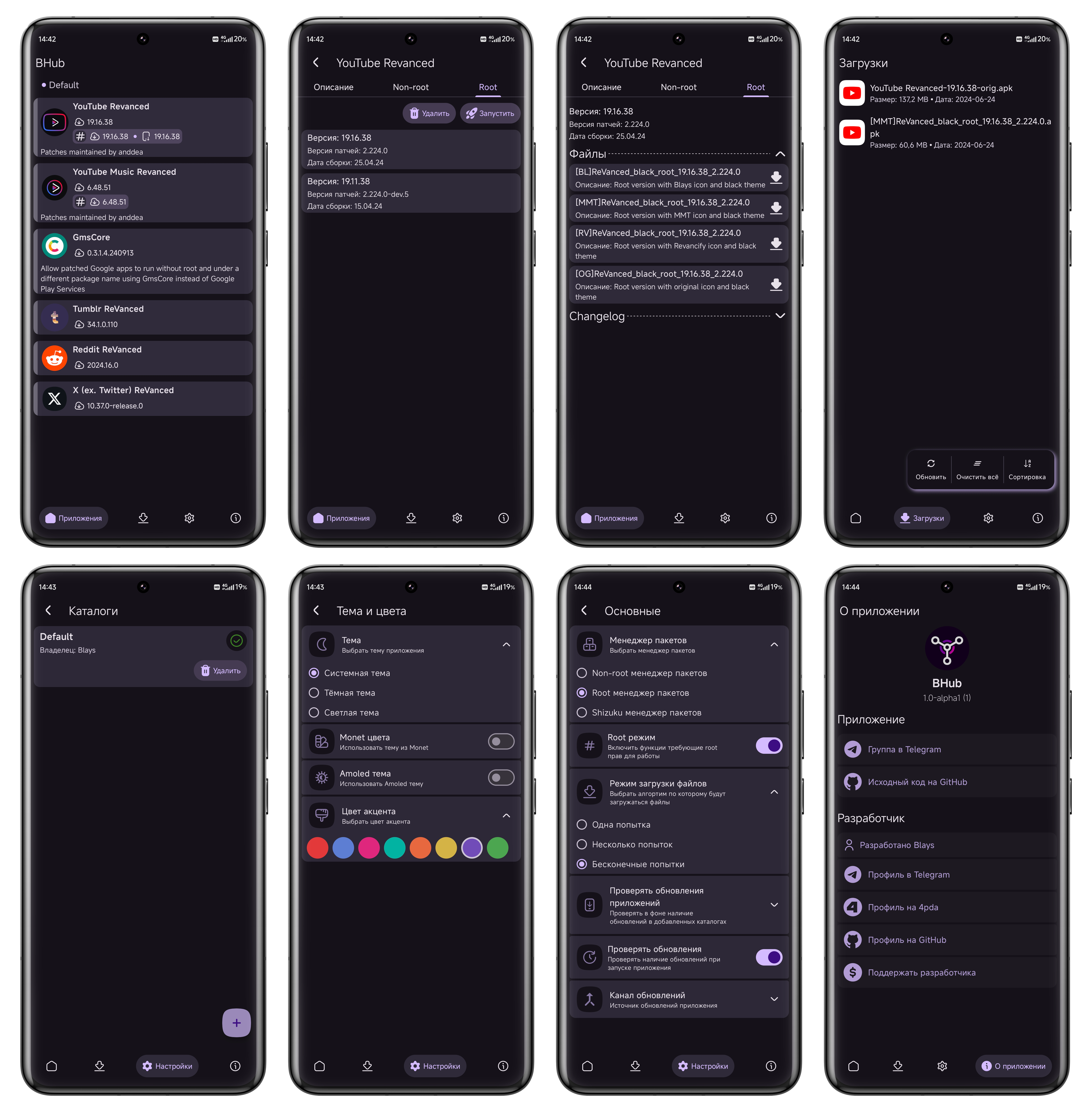
🖼️ Screenshots

Requirments
- Android 8+ (api 26)
- Magisk/KSU (for work in Root mode)
- Shizuku (for work in Shizuku mode)
How Shizuku is used
Can install, uninstall, check and force-stop mod apps silently via Shizuku with `IPackageInstaller` and `IActivityManager`.
This is an AI-assisted analysis of Shizuku-related usages in the app's public source code. It is best effort, so it may not catch every single usage.
How this app uses Shizuku
Shizuku lets BHub manage mod apps with system privileges when the Shizuku installer mode is selected in settings. The app reaches privileged package services through Shizuku instead of showing system install dialogs.
- Install downloaded apps: downloaded APK files chosen from version lists or the download queue are installed silently through a privileged install session that allows replacing, downgrading and test builds.
- Reinstall apps: a reinstall first removes the existing package and then installs the newly downloaded APK through the same privileged path.
- Uninstall apps: packages the user deletes from version lists are removed silently through the privileged uninstall path.
- Check installed versions: installed version codes, version names, install presence and install location are read through the privileged package service to show update state, warn about downgrades and refresh lists.
- Force-stop apps: target apps are force-stopped through the privileged activity service as part of installing or managing packages.
Android APIs or commands used
IActivityManager.forceStopPackageIPackageManager.getPackageInfoIPackageInstallerIPackageInstallerSessionPackageInstaller.createSessionPackageInstaller.Session.commitPackageInstaller.uninstall
Notable details
The app can also work without Shizuku in a non-privileged installer mode using the normal install flow. Shizuku mode is an optional choice in settings.
Changelog
What's new for version 1.1
Changed
- Name of default catalog match original source
- Full app name on about screen
- Small refactor
Изменено
- Имя стандартного каталога соответствует оригинальному
- Полное имя приложения на экране "О приложении"
- Небольшой рефакторинг кода
Permissions
21 permissions requested
More from this category
 ShizuStore
 Droid-ify
 InstallerX Revived
 Universal Installer
 Komi Store
 Vyxel Apps
 APKUpdater
 Neo Store
 Orion Store
 ObtainX
 ShizuCoreFetch
 Aurora Store