 ShizuStore
Battery Health Tracker
1.6 · GitHub
More about this app
Battery health diagnostics and true chemical capacity tracker for Oppo, OnePlus, and Realme devices via Shizuku.

Battery Health Tracker (O+ - Oppo - Realme Edition)
Advanced hardware-level battery health, BMS telemetry, and degradation tracker for Oppo, OnePlus, and Realme devices. Powered by Shizuku.








📌 Overview
On modern Android devices—particularly within the Oplus ecosystem (Oppo, OnePlus, Realme / ColorOS, OxygenOS, Realme UI)—the operating system restricts and abstracts critical battery metrics. Standard Android battery APIs typically return coarse percentage estimates, rounded cycle counts, or hidden health statistics.
Battery Health Tracker bridges this gap. By utilizing Shizuku to execute elevated unprivileged shell transactions (no root required), the app directly interrogates the kernel Battery Management System (BMS) hardware nodes (/sys/class/oplus_chg/battery/ and /sys/class/power_supply/battery/).
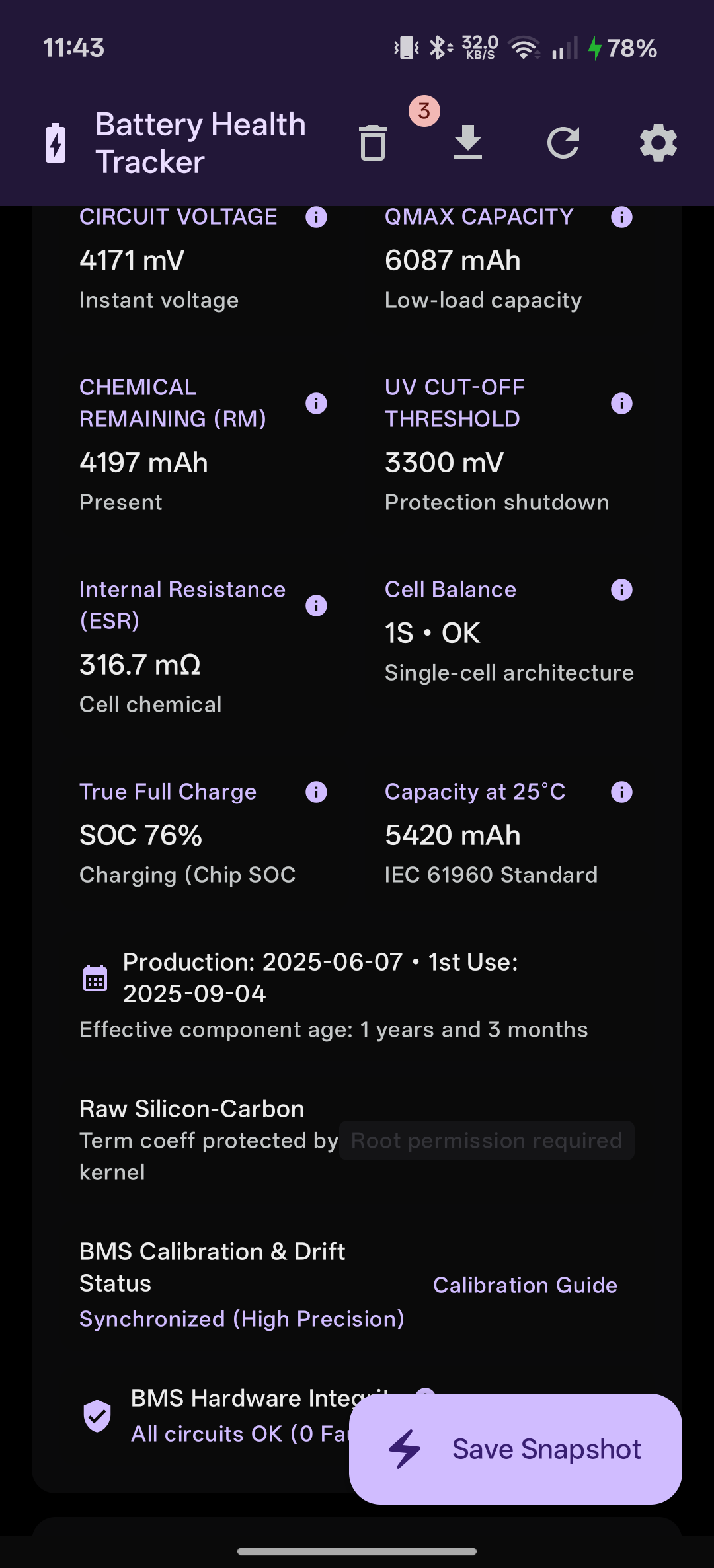
This delivers accurate, real-time electrochemical diagnostic data: true State of Health (SOH), cycle counts, internal cell resistance (ESR), cell temperature, thermal capacity compensation (IEC 61960), charging IC safety fault registers, and live wattage.
Note
🚀 Repository Development Status / Stato di Sviluppo della Repository:
The codebase in the main branch may be ahead of the latest tagged GitHub Release (BatteryHealthTracker-v1.6.apk). New features, hardware presets, and optimizations currently undergoing testing in the repository will be bundled and published in future release APKs.
Il codice presente nella repository (main) potrebbe risultare più avanzato rispetto all'ultima release ufficiale scaricabile, poiché alcune nuove funzioni o migliorie sono ancora in fase di testing e confluiranno nelle release successive.
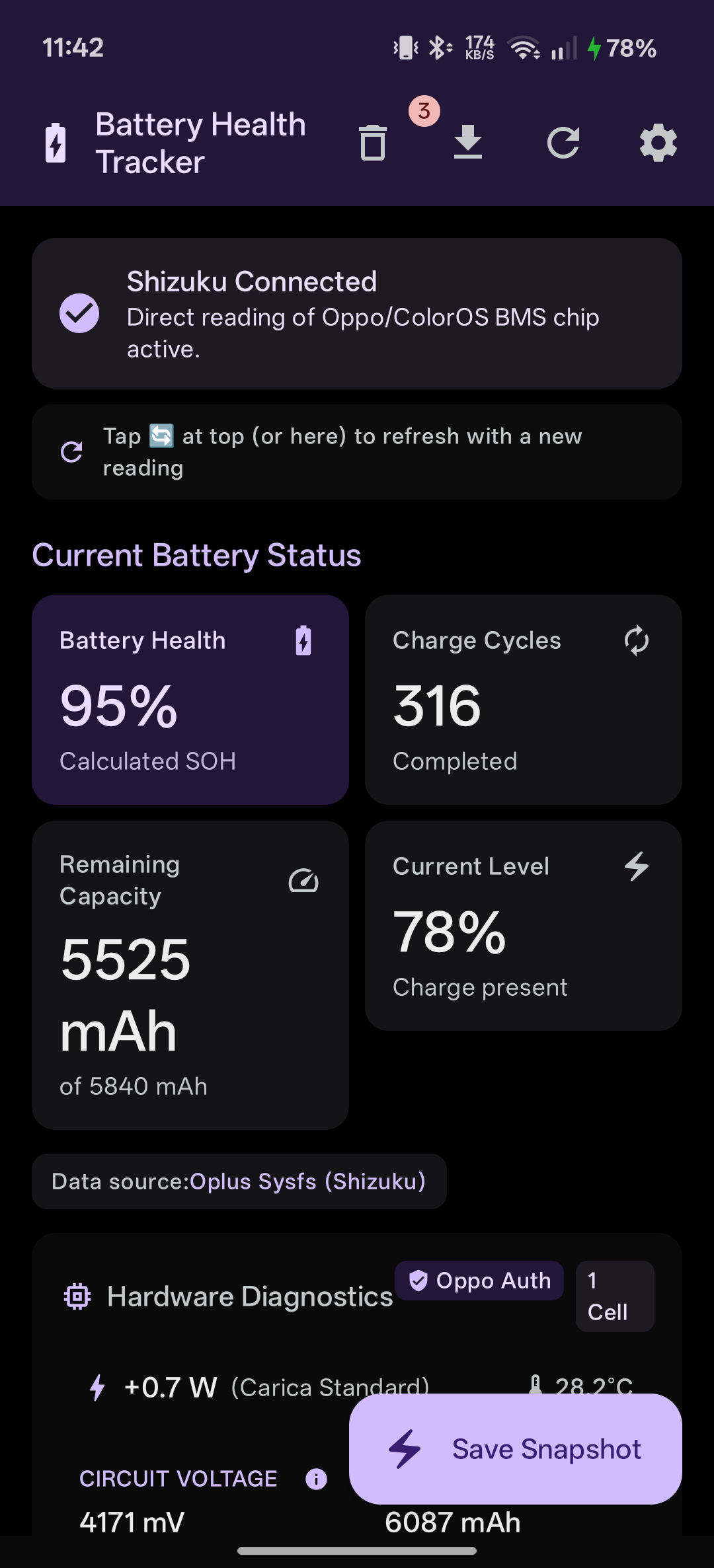
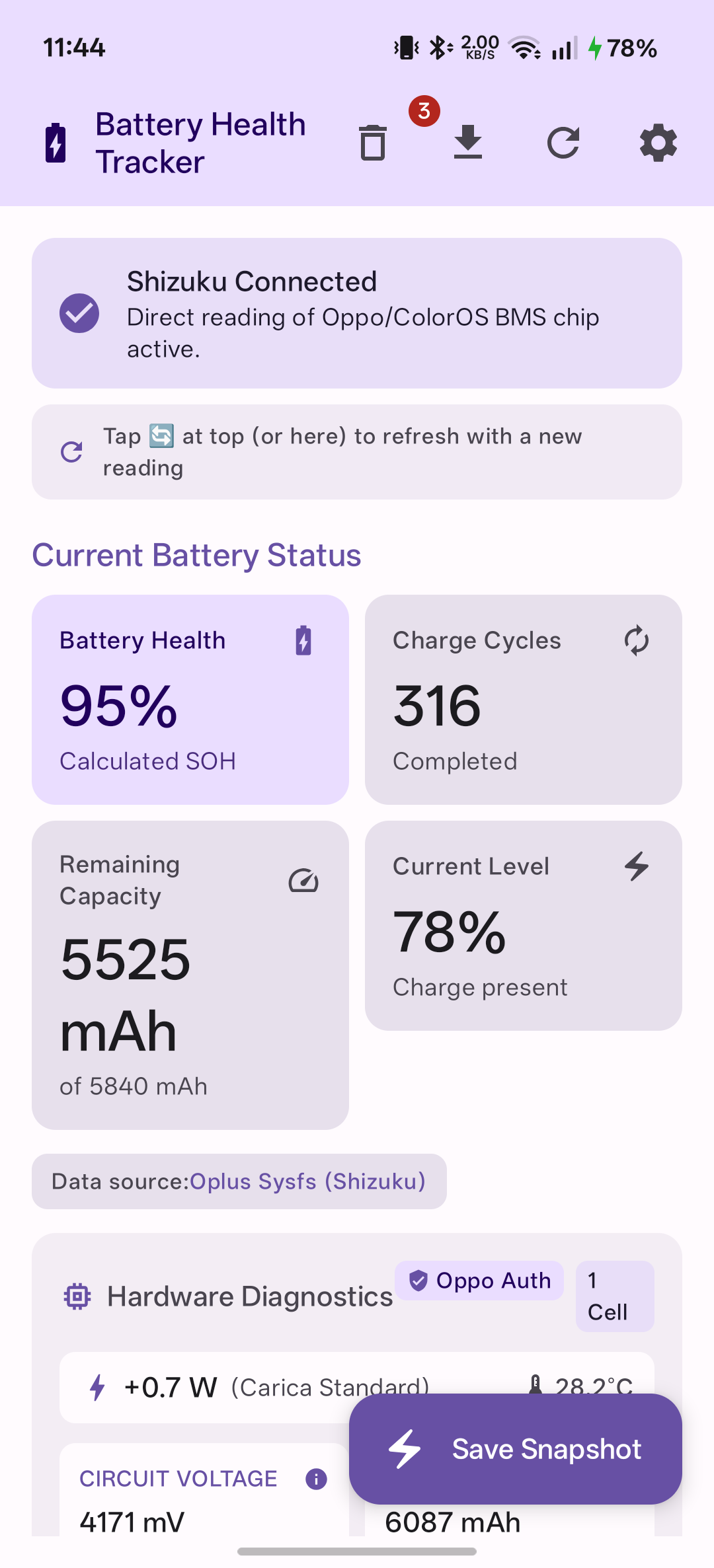
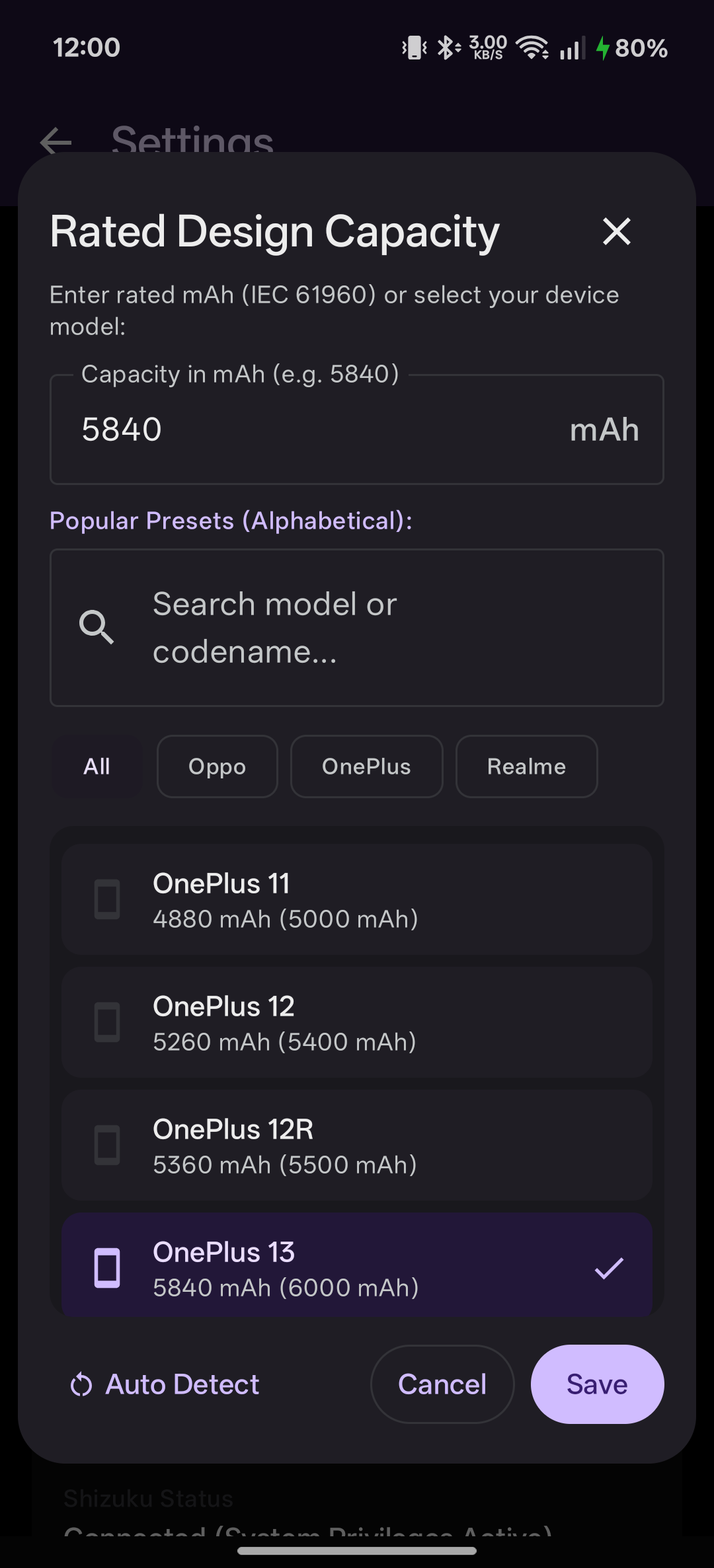
📸 Screenshots
| AMOLED Pure Black | Light Theme | Hardware Diagnostics |
 |
 |
 |
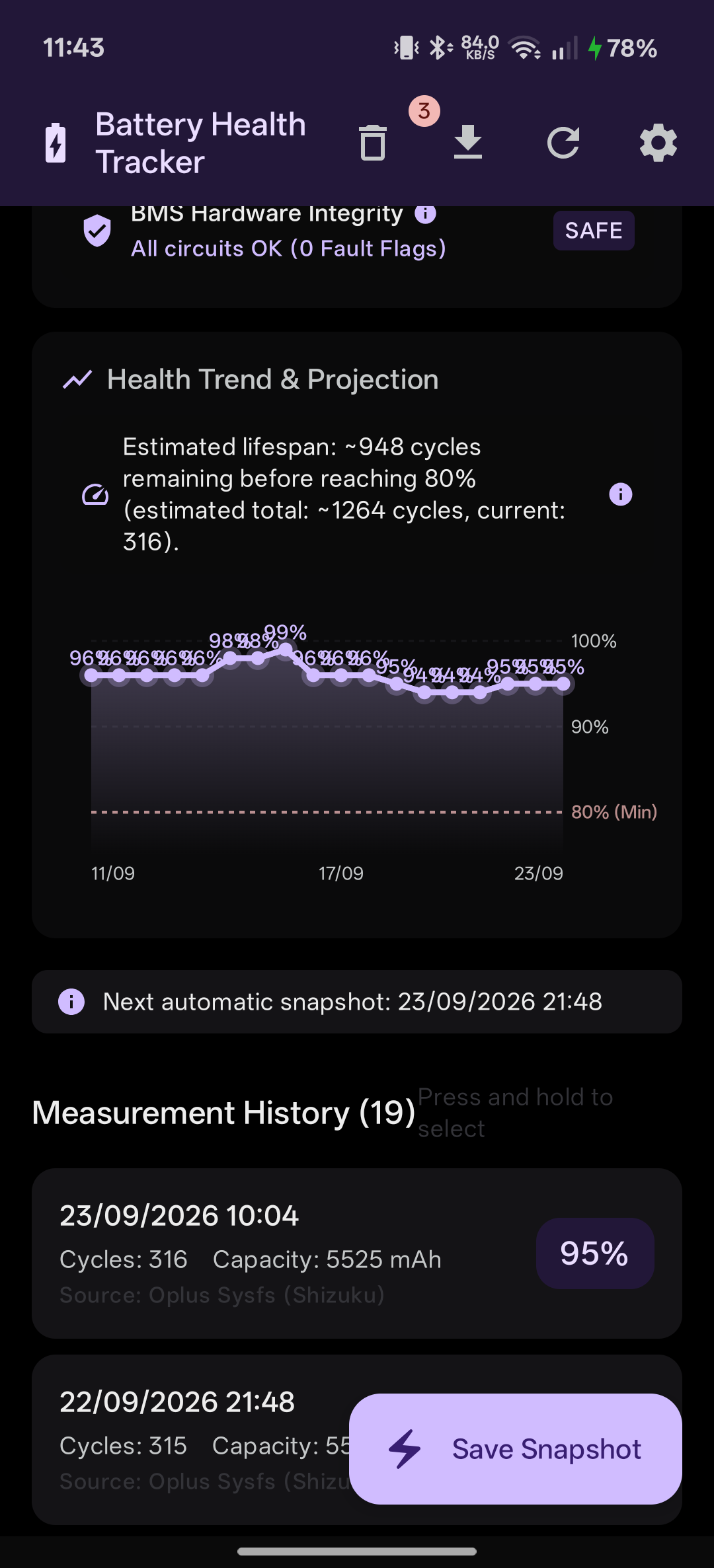
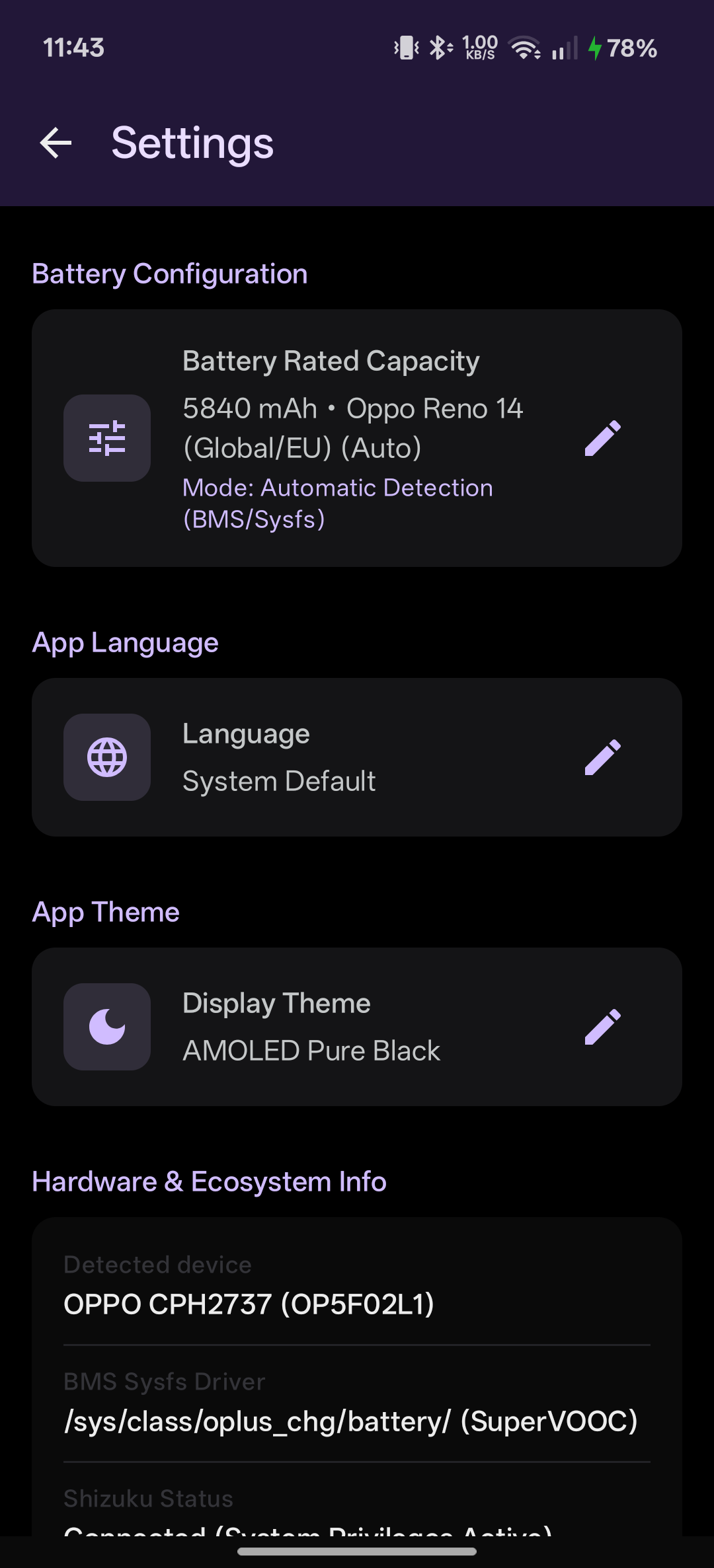
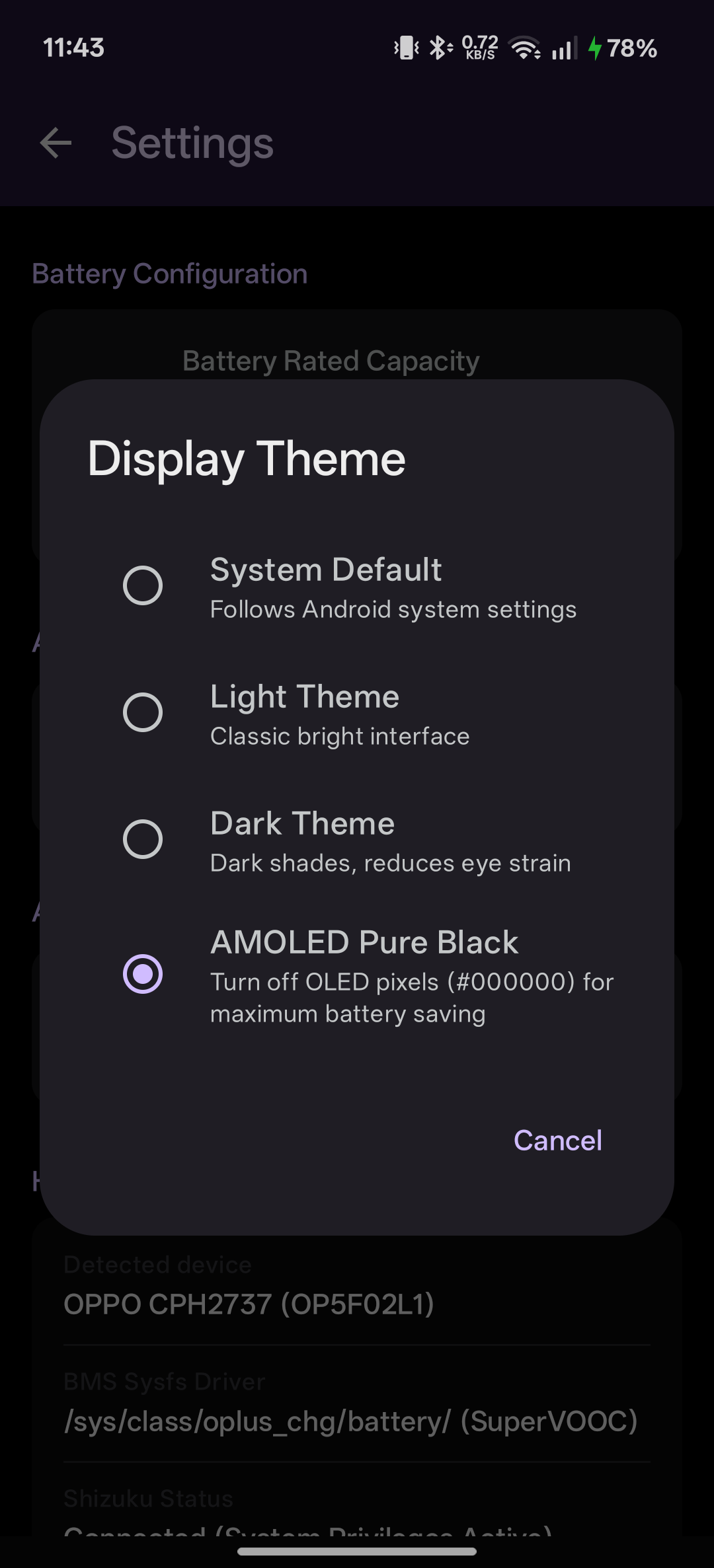
| Health Trend & Projection | Device Presets & Rated mAh | Theme Settings |
 |
 |
 |
✨ Key Features
🔬 Low-Level BMS & Kernel Telemetry (via Shizuku)
- Direct Fuel Gauge Queries: Reads physical registers directly from
/sys/class/oplus_chg/battery/and/sys/class/power_supply/battery/. - True State of Health (SOH): Real electrochemical capacity evaluated against nominal factory design capacity.
- Hardware Cycle Counter: Reads non-volatile cycles tracked by the physical fuel gauge IC (immune to OS battery stat wipes).
- Dual-Cell SuperVOOC Monitoring: Individual cell voltages (
cell0Volt,cell1Volt) and series balance \(\Delta\text{ mV}\).
⚡ True Full Charge vs Display 100%
- CC/CV Saturation Tracking: Distinguishes between the display "100%" (often end of Constant Current at ~90% saturation) and True Full Charge when Constant Voltage current tapers below cutoff (\(I \le 80\text{ mA}\)).
🌡️ IEC 61960 Thermal Compensation
- Normalized Capacity at 25°C: Eliminates seasonal capacity swings (winter vs summer) using the electrochemical standard formula: \(C_{25^\circ\text{C}} = \frac{C_{\text{fcc}}}{1.0 + 0.006 \times (T_{\text{batt}} - 25.0)}\)
🛡️ Silicon Safety & Protection Registers
- Hardware Fault Monitoring: Inspects physical protection flags in real time (
short_c_hw_status,short_ic_otp_status,subboard_temp_err) with an instant SAFE / ALERT indicator.
📈 Internal Resistance (ESR)
- Dynamic Impedance Calculation: Estimates real-time internal resistance (\(\text{m}\Omega\)) using active \(\frac{\Delta V}{\Delta I}\) load steps, helping identify aging and degradation.
📊 Health Trends & Projections
- Interactive SOH Chart: Visual canvas trend with 100%, 90%, and 80% industrial replacement threshold lines.
- Cycle Life Projection: Estimates remaining cycles before reaching 80% capacity based on historical wear rate.
- Safe History Management: Multi-select deletion, persistent Trash bin, full restore, and CSV/JSON export.
🔔 Smart Notifications & Thermal Protection
- Snapshot Receipts: Confirmation cards for manual saves, 24h background logs (
WorkManager), and 100% charger unplug events. - Overheat Alarm: High-priority alert when battery temperature exceeds 42°C during high-speed charging or heavy workloads.
🚀 120 Hz UI & Themes
- Fluid Performance: Zero-allocation Composables locked to 120 Hz (8.33 ms frame budget).
- 4 Themes: System Default, Light, Dark, and AMOLED Pure Black (
#000000) for zero OLED sub-pixel power draw.
💻 Built-in Diagnostic Console
- Real-Time Shell Inspector: Live log of every sysfs, dumpsys, and settings query with exit codes and fallback paths.
- 1-Click Bug Reporting: Instant Markdown generation ready to paste into GitHub Issues.
🏷️ SOH Determination Hierarchy
The app clearly indicates how SOH is sourced on your device:
BMS Hardware / OS: Direct read from OEM kernel fuel-gauge registers (ColorOS / OxygenOS / Realme UI certified).Calculated SOH: Dynamically computed (\(\text{FCC} / \text{Typical Capacity} \times 100\)) when vendor firmware restricts direct SOH registers.Unavailable via API: Fallback indicator when running without Shizuku permissions.
🌐 Multilingual
- Fully localized in English, Italian (Italiano), and Spanish (Español).
📱 Verified Device Battery Database & Hardware Compatibility
Important
Compatibility, Community Testing & Diagnostic Logs:
- 🟢 Oppo Reno 14 (EU): 100% Tested & Verified working seamlessly via Shizuku without root (all BMS telemetry, SOH, FCC, cycle counts, voltage, power, and safety registers read with complete accuracy).
- 🟢 Realme GT 7T (EU / RMX5085): 100% Tested & Verified working seamlessly via Shizuku without root (dynamic fuel-gauge SOH parsing, Qmax 6736 mAh, 259 cycles, dual-cell balance, ESR, production & first use dates).
- 🟡 Other Devices (
🤝 Help wanted): Due to variations in regional firmware, SELinux enforcement (e.g. OnePlus Nord 5 requiring root for direct Qualcomm sysfs access), and vendor driver differences across ColorOS, OxygenOS, and Realme UI, full hardware compatibility is not yet guaranteed for other models.- 📋 1-Click Markdown Report: Simply tap "Copy Report" in the console to copy your device environment and all raw kernel query outputs to your clipboard.
- 🐛 Standardized Compatibility Form: Open our dedicated Device Compatibility Report Form to submit verified metrics with a structured checklist and paste your console logs.
- 📖 Detailed Matrix & Testing Guide: See docs/device-compatibility.md for in-depth testing procedures and architecture details.
- Sharing these logs allows us to map missing sysfs nodes, adapt SELinux fallbacks, and certify new devices for the entire community!
| Manufacturer | Model Series | Battery Architecture | Typical / Rated Capacity | Compatibility Status |
|---|---|---|---|---|
| Oppo | Reno 14 (EU) | High-Density Single-Cell | 6000 mAh / 5840 mAh | ✅ 100% Verified (Shizuku) |
| Realme | GT 7T (EU) | Dual-Cell Serial | 7000 mAh (2×3500) / 6850 mAh (2×3425) | ✅ 100% Verified (Shizuku) |
| OnePlus | OnePlus 13 | Silicon-Carbon Dual-Cell | 6000 mAh / 5840 mAh | 🧪 Testing in progress / 🤝 Help wanted |
| OnePlus | OnePlus 13R | Silicon-Carbon Dual-Cell | 6000 mAh / 5840 mAh | 🤝 Help wanted |
| OnePlus | OnePlus 15 | Serial Dual-Cell | 7300 mAh (2×3650) / 7150 mAh (2×3575) | 🤝 Help wanted |
| OnePlus | OnePlus 12 / 12R | Dual-Cell Serial | 5400–5500 mAh / 5260–5360 mAh | 🤝 Help wanted |
| OnePlus | OnePlus 11 / 10 Pro | Dual-Cell Serial | 5000 mAh / 4880 mAh | 🤝 Help wanted |
| OnePlus | Nord 5 (Global & India)* | High-Capacity Dual-Cell | 6800 mAh / 6650 mAh | ⚠️ Requires Root (SELinux) |
| OnePlus | Nord 5 (EU/UK)* | Dual-Cell Serial | 5200 mAh / 5200 mAh | 🤝 Help wanted |
| OnePlus | Nord 4 / CE 4 / CE 4 Lite | Dual-Cell Serial | 5500 mAh / 5360 mAh | 🤝 Help wanted |
| OnePlus | Nord 3 | Dual-Cell Serial | 5000 mAh / 4880 mAh | 🤝 Help wanted |
| OnePlus | OnePlus Open | Dual-Cell Foldable | 4805 mAh / 4680 mAh | 🤝 Help wanted |
| Realme | GT 8 Pro | Dual-Cell Serial | 7000 mAh (2×3500) / 6850 mAh (2×3425) | 🤝 Help wanted |
| Realme | GT 7 Pro (Global/EU/CN) | Dual-Cell Serial | 6500 mAh (2×3250) / 6310 mAh (2×3155) | 🤝 Help wanted |
| Realme | GT 7 Pro (India) | Dual-Cell Serial | 5800 mAh / 5660 mAh | 🤝 Help wanted |
| Realme | GT 7 | Dual-Cell Serial | 7000 mAh (2×3500) / 6850 mAh (2×3425) | 🤝 Help wanted |
| Realme | GT 6 / GT 6T / GT 5 Pro | Dual-Cell Serial | 5400–5500 mAh / 5260–5360 mAh | 🤝 Help wanted |
| Realme | 14 Pro+ | Silicon-Carbon Single-Cell | 6000 mAh / 5850 mAh | 🤝 Help wanted |
| Realme | 13 Pro+ | High-Density Single-Cell | 5200 mAh / 5050 mAh | 🤝 Help wanted |
| Realme | 12 Pro+ | High-Density Single-Cell | 5000 mAh / 4880 mAh | 🤝 Help wanted |
| Oppo | Find X9 Ultra | High-Density Single-Cell | 7050 mAh / 6890 mAh | 🤝 Help wanted |
| Oppo | Find X9 Pro | Silicon-Carbon Dual-Cell | 7500 mAh / 7290 mAh (28.13 Wh / 27.34 Wh) | 🤝 Help wanted |
| Oppo | Find X9 | Silicon-Carbon Dual-Cell | 7025 mAh / 6840 mAh (26.35 Wh / 25.65 Wh) | 🤝 Help wanted |
| Oppo | Find X8 / X8 Pro | Silicon-Carbon Dual-Cell | 5630–5910 mAh (Typical) | 🤝 Help wanted |
| Oppo | Find X7 / X7 Ultra | Dual-Cell Serial | 5000 mAh / 4860–4880 mAh | 🤝 Help wanted |
| Oppo | Reno 16 (Global/EU) | High-Density Single-Cell | 6000 mAh / 5820 mAh (22.5 Wh / 21.83 Wh) | 🤝 Help wanted |
| Oppo | Reno 16 (China) | Silicon-Carbon | 6700 mAh / 6490 mAh | 🤝 Help wanted |
| Oppo | Reno 15 / 15 Pro | High-Density Single-Cell | 6200–6500 mAh / 6040–6335 mAh | 🤝 Help wanted |
| Oppo | Reno 14 Pro | High-Density Single-Cell | 6200 mAh / 6060 mAh | 🤝 Help wanted |
| Oppo | Reno 13 | High-Density Single-Cell | 5600 mAh / 5450 mAh | 🤝 Help wanted |
| Oppo | Reno 10 Pro / 11 Pro | Dual-Cell Serial | 4600 mAh / 4440 mAh | 🤝 Help wanted |
Manual rated capacity override is also supported in Settings for custom or unlisted models.
Note
* OnePlus Nord 5 Root Requirement: On the OnePlus Nord 5 (CPH2707 / Snapdragon 8s Gen 3), OxygenOS SELinux policies strictly isolate Qualcomm battery sysfs nodes from standard shell access (Shizuku). Direct hardware BMS readings on this model require Root (su) permissions.
🛠️ How It Works (Technical Architecture)
flowchart TD
    subgraph Data Sources & Hardware Tiers
        A1["OPlus Kernel Sysfs MediaTek<br/>(oplus_chg/battery, battery_cc)"]
        A2["OPlus Kernel Sysfs Snapdragon<br/>(power_supply/battery/bms, battery_cycle)"]
        A3["Android 14+ HAL Interface<br/>(BatteryManager API 34+ id 7)"]
        A4["Universal Android API Fallback<br/>(Standard BatteryManager)"]
    end

    A1 & A2 -->|Elevated Shell via Shizuku| B[Multi-Path Hardware Resolver]
    A3 -->|Automated HAL Cycle Fallback| B
    A4 -->|Non-OPlus Fallback with Warnings| B

    B -->|Normalized Telemetry & Inferences| C[BatteryViewModel]
    C -->|StateFlow| D[Jetpack Compose UI]
    C -->|Persistent History| E[Room SQLite Database]
    C -->|Periodic & 100% Triggers| F[WorkManager & Charge Receiver]
    C -->|Sampling & Safety Alerts| G[NotificationHelper]
Multi-Tiered Hardware Resolution Pipeline
- Tier 1: Direct OPlus Kernel Sysfs (via Shizuku)
- Automatically adapts between MediaTek (
battery_cc) and Qualcomm Snapdragon (battery_cycle,/power_supply/bms/) nodes within a single low-overhead Binder transaction. - Normalizes microampere (\(\mu\text{Ah}\)) PMIC registers to \(\text{mAh}\) and performs bidirectional SOH/FCC inference when nodes are partially restricted.
- Automatically adapts between MediaTek (
- Tier 2: Android 14+ Hardware HAL Fallback
- Automatically queries
BatteryManager.getIntProperty(7)if vendor SELinux updates isolate custom sysfs cycle nodes.
- Automatically queries
- Tier 3: Universal Android Fallback (Non-OPlus devices)
- Graceful fallback for generic hardware with explicit warning badges to ensure instantaneous charge (
CHARGE_COUNTER) is never confused with chemical health.
- Graceful fallback for generic hardware with explicit warning badges to ensure instantaneous charge (
📥 Installation & Setup
Tip
OPPO, Realme & OnePlus Users: ColorOS, Realme UI, and OxygenOS require a one-time toggle in Developer Options to allow Shizuku shell access ("The permission of ADB is limited").
👉 Follow our step-by-step fix & language workaround: OPPO_REALME_ONEPLUS_SHIZUKU_GUIDE.md
Prerequisites
- Device: Oppo, OnePlus, Realme (Android 14+), or any Android 14+ device.
- Shizuku: Installed from Google Play or GitHub Releases and running via Wireless Debugging or Root.
App Setup
- Download and install
BatteryHealthTracker-v1.6.apkfrom Releases. - Open the app and grant the Notification Permission (required for background snapshot receipts and > 42°C overheat alerts).
- Tap "Authorize Shizuku" and allow access when prompted.
- Telemetry, health metrics, and hardware registers will populate immediately!
🔨 Building from Source
Requirements
- JDK 17 or JDK 21
- Android SDK 34 (compileSdk 34)
- Gradle 8.7+
Steps
- Clone this repository:
git clone https://github.com/FrancescoMin/batteryhealthtracker.git cd batteryhealthtracker - Build the debug APK using Gradle wrapper:
# On Linux / macOS: ./gradlew assembleDebug # On Windows (PowerShell): .\gradlew.bat assembleDebug - Install directly to your connected device via ADB:
adb install -r app/build/outputs/apk/debug/app-debug.apk
🔒 Privacy, Security & Permissions
- Transparent Network Usage (
android.permission.INTERNET): Used exclusively for the manual in-app update check against official public GitHub Releases (api.github.com). Zero background analytics, zero telemetry trackers, zero personal data leaves your device. - Transparent Notifications (
POST_NOTIFICATIONS): Used strictly for local on-device sampling receipts (manual captures, 24h background sampling, and 100% unplug events) and critical battery overheat alarms (> 42°C). Never used for marketing or background telemetry. - Zero Trackers / Telemetry: No Google Analytics, Firebase, Crashlytics, or third-party advertising SDKs.
- Local Storage Only: Historical measurements are stored in a local on-device SQLite database via Android Room.
- Open Source: Full source code is open, auditable, and distributed under the Apache-2.0 License.
🤝 Contributing
Contributions, device profile additions, translations, and feature suggestions are welcome!
📱 Device Testing & Verification
Do you own any of the devices marked as 🤝 Help wanted in the Hardware Compatibility Table?
Testing the app on your device is warmly encouraged and greatly appreciated!
- Install the app and grant access via Shizuku (no root required for most devices).
- Verify if real-time hardware telemetry (SOH, capacity, cycle count, temperature, voltage) is extracted accurately.
- Share your findings or report any anomalies using our Device Compatibility Report Form or open a GitHub Issue.
💻 Code & Preset Contributions
- Fork the project.
- Create your feature branch (
git checkout -b feature/NewDevicePreset). - Commit your changes (
git commit -m "Add verified battery preset for Device X"). - Push to the branch (
git push origin feature/NewDevicePreset). - Open a Pull Request.
⚖️ Disclaimer & Accuracy Notice
Battery Health Tracker is an independent diagnostic utility for monitoring and personal reference.
- Non-Official: This project is not affiliated with, endorsed by, or certified by Oppo, OnePlus, Realme, or BBK Electronics. It must not be confused with official manufacturer service tools or warranty inspection software.
- Sensor & Firmware Tolerances: Telemetry is read directly from kernel sysfs nodes and fuel-gauge registers via Shizuku. Reported metrics (SOH %, capacity, cell resistance) may fluctuate depending on operating temperature, OEM firmware revisions, and sensor calibration.
📄 License
Distributed under the Apache License, Version 2.0. See LICENSE for more information.
Built with ❤️ for Android enthusiasts, battery health purists, and the Shizuku community.
How Shizuku is used
Can track battery health, true capacity, cycles and charging diagnostics via `Shizuku newProcess` shell commands.
This is an AI-assisted analysis of Shizuku-related usages in the app's public source code. It is best effort, so it may not catch every single usage.
How this app uses Shizuku
Shizuku is used to read protected battery hardware data on Oppo, OnePlus and Realme devices, powering detailed health diagnostics.
- Track battery health: shows true health percentage and current chemical capacity calculated from full charge capacity and rated capacity, read with shell file reads through Shizuku.
- Show cycle count: displays charge cycle count from kernel battery nodes, with system battery properties as backup, read through Shizuku.
- Reveal absolute capacity: shows absolute chemical capacity and dual cell detection from battery log and aging data through Shizuku.
- Show cell voltages: displays individual cell voltages, pack voltage and cutoff voltage from gauge and cell nodes through Shizuku.
- Show battery origins: displays battery type, manufacture and first use dates, age in months and authenticity check from protected nodes through Shizuku.
- Monitor charging status: shows remaining capacity, charging power in watts, charging protocol such as SuperVOOC or USB-PD, temperature and open circuit voltage through Shizuku.
- Analyze cell balance: shows cell balance difference and status plus internal resistance estimated from voltage and current readings through Shizuku.
- Check calibration state: tracks sync status, cycles since full charge calibration, true full charge and saturation state, temperature compensated capacity and hardware safety faults through Shizuku.
- Use system battery data: reads system battery service output including voltage, charge counter, saved health and learned or estimated capacity via system diagnostic commands through Shizuku when kernel nodes are blocked.
Android APIs or commands used
cat /sys/class/oplus_chg/battery/*cat /sys/class/power_supply/battery/*cat /sys/class/power_supply/bms/*cat /sys/class/oplus_chg/usb/fast_chg_typesettings getsettings listcontent querydumpsys batterydumpsys batterystatsbase64 /proc/device-tree/soc/oplus,mms_gauge/deep_spec,term_coeff
Notable details
When Shizuku access is unavailable, the app falls back to the standard Android BatteryManager API with more limited health information.
Changelog
What's new for version 1.6
What's Changed
🔄 In-App GitHub Release Checker
- Added manual update check in Settings: directly checks GitHub Releases via public API without background trackers.
- Semantic version comparison with instant changelog preview dialog and 1-tap APK download button.
- Declared transparent
android.permission.INTERNETexclusively scoped for release checks.
📱 Hardware Presets & Database
- Added Oppo Find X9 Ultra battery preset (7500 mAh typical / 7290 mAh rated).
- Verified preset detection and capacity calculations.
🧪 Architecture & Tests
- Extracted pure
BatteryTelemetryParserfor decoupled, reliable fuel-gauge log parsing. - Added comprehensive unit tests for version comparisons and telemetry decoding.
Permissions
9 permissions requested
More from this category
 Amply
Amply
 NoMoreBackground
 电池统计
电池统计
 RebootNya
 BatStats
 EnforceDoze
 Volt
Volt
 usb pd bs
 Batt
Batt
 DozeTap
 Battery Monitor
 Battery Stats Changer