 ShizuStore
电池统计
1.9.9.5 · GitHub
More about this app
Battery health and hardware analysis; Shizuku provides the elevated shell for deep battery parameter reads.
🔋 Battery (Battery Health & Hardware Analysis)
A lightweight, accurate, and modern battery health and hardware analysis tool crafted for Android.



📱 Screenshots
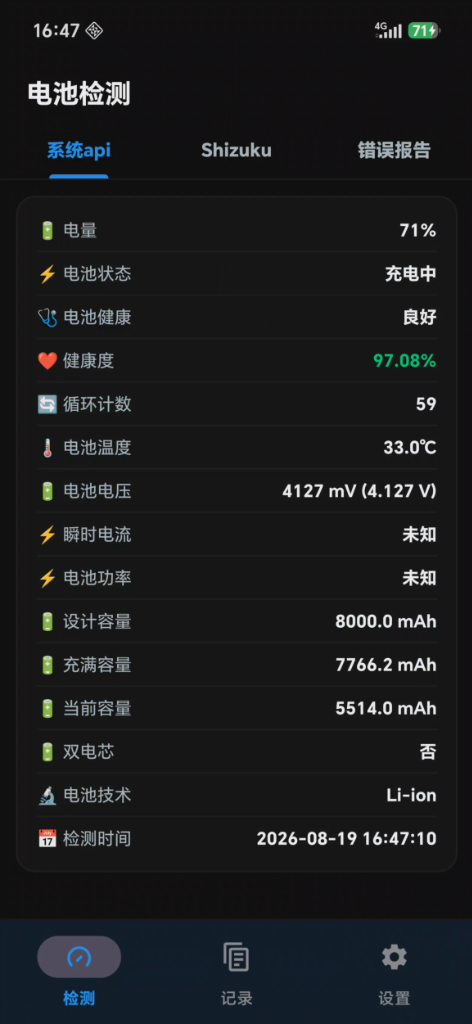
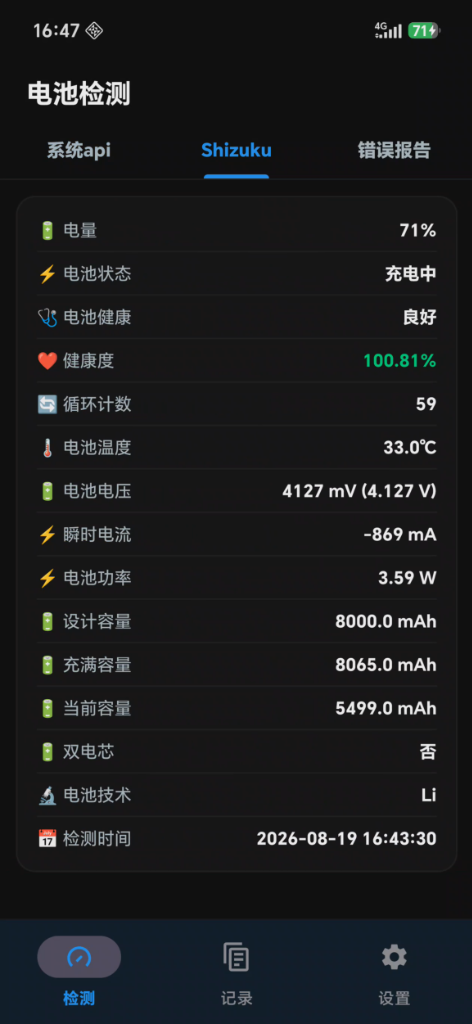
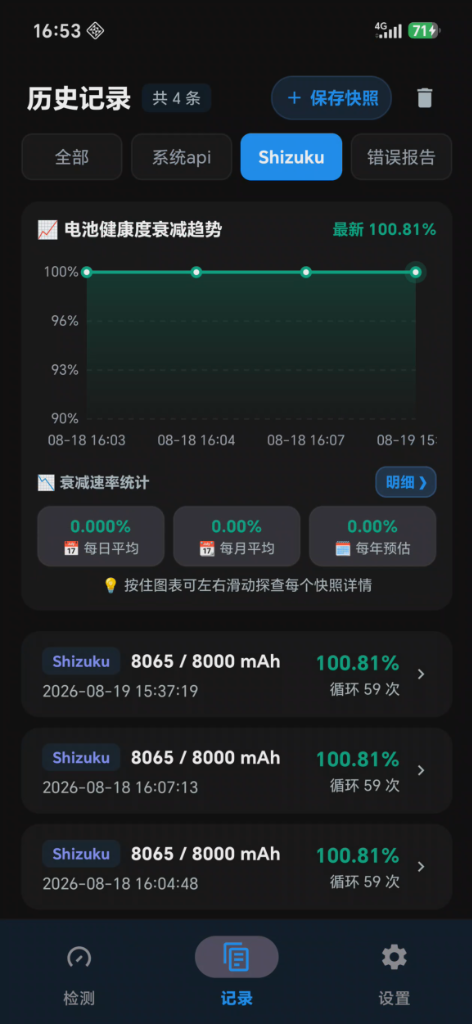
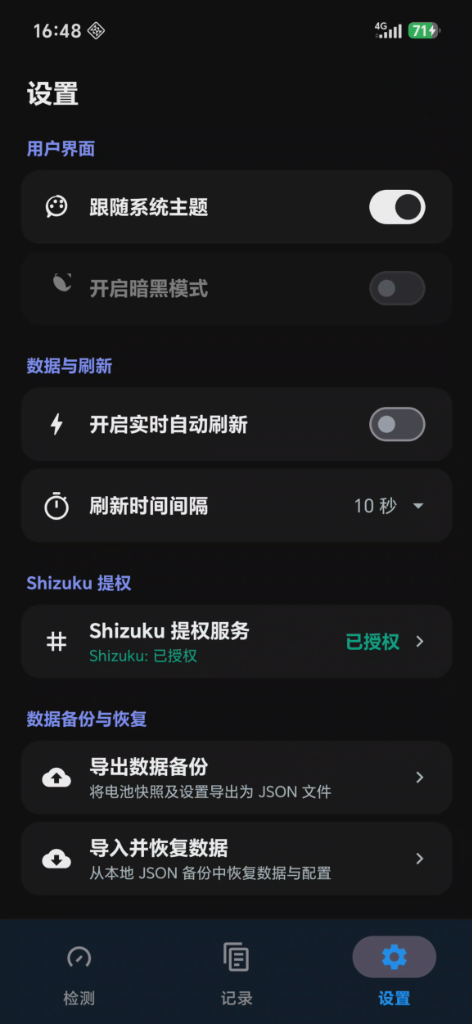
| 🔋 System API Detection | ⚡ Shizuku Privileged Reading | 📈 History Trend & Decay Stats | ⚙️ Settings & Backup |
|---|---|---|---|
 |
 |
 |
 |
🌟 Key Features
1. 🔍 Triple Data Collection & Deep Parsing Engine
- System Standard API (BatteryManager): Zero barrier to reading system broadcast and standard API data (battery level, charging status, health state, temperature, voltage, current, etc.).
- Shizuku Privileged Deep Reading (Rootless ADB):
- No root required; obtains underlying shell permissions via Shizuku authorization;
- Directly reads
/sys/class/power_supply/driver nodes anddumpsysbattery services; - Extracts real full charge capacity (FCC), cycle count, microampere-level real-time current, and dual-cell battery architecture;
- Specially adapted for HONOR private battery drivers and node services.
- Lightning-Fast Bugreport Stream Parsing:
- Supports directly importing system bugreport files (
bugreport-*.zipor.txt) ranging from tens to hundreds of megabytes; - Employs native byte stream sliding window fast scanning to locate and parse the
getHealthInfostructure within milliseconds; - Automatically extracts and displays the actual capture/generation timestamp of the bugreport.
- Supports directly importing system bugreport files (
Warning
⚠️ Device Compatibility Notice: Currently, Shizuku Privileged Reading and Bugreport Parsing have been deeply adapted primarily for HONOR devices. Other brands (such as Xiaomi, OPPO, vivo, Samsung, etc.) have not been extensively tested, and compatibility differences may exist in private kernel driver nodes and bugreport formats. System Standard API detection works on all general Android devices.
2. 📈 Battery Health Degradation Trend & Multi-period Loss Statistics
- Smooth Bezier Health Trend Chart: Canvas hardware-accelerated curve fitting for historical snapshot data, supporting touch gestures to inspect details of each snapshot node.
- Multi-dimensional Degradation Rate Estimation:
- 📅 Daily Average Degradation (%/day);
- 📆 Monthly Average Degradation (%/month);
- 🗓️ Estimated Yearly Degradation (%/year).
- Periodic Loss Breakdown: Automatically groups and aggregates data by calendar day, month, and year to review starting/ending health percentage changes and charge cycle count increments for each period.
3. 📊 15 Comprehensive Battery Hardware Parameters
Every parameter is carefully sanitized, validated, and converted into standard physical units:
| Parameter | Description | Source |
|---|---|---|
| 🔋 Battery Level | Remaining battery percentage (e.g., 85%) |
System API / Kernel Nodes |
| ⚡ Status | Charging / Discharging / Not Charging / Full | Power Management IC (PMIC) |
| 🩺 Health State | Android diagnostic state (Good / Overheat / Dead / Over Voltage, etc.) | Android Diagnostic API |
| ❤️ Battery Health | Actual health percentage (FCC ÷ Design Capacity) | Precise Algorithmic Calculation |
| 🔄 Cycle Count | Equivalent charge/discharge cycles recorded by fuel gauge | Hardware Fuel Gauge Counter |
| 🌡️ Temperature | Real-time Celsius temperature (accurate to 0.1°C) |
Internal Battery Thermistor |
| 🔋 Voltage | Real-time terminal voltage (mV / V) |
Analog-to-Digital Converter (ADC) |
| ⚡ Current | Real-time charge/discharge current (mA, with clear +/- direction) |
Coulomb Counter Sensing Resistor |
| ⚡ Power | Real-time instantaneous operating power (W) |
Dynamic Power Calculation Formula |
| 🔋 Design Capacity | Factory nominal design capacity (mAh) |
PowerProfile / Kernel Parameters |
| 🔋 Full Charge Capacity (FCC) | Estimated maximum capacity when battery is fully charged (mAh) |
Fuel Gauge Learned Capacity |
| 🔋 Current Capacity | Remaining available capacity (mAh) |
Coulomb Counter Charge Tally |
| 🔋 Dual Cell | Identification of dual-cell (series/parallel) architecture | Hardware Topology Detection |
| 🔬 Technology | Battery chemistry/material type (e.g., Li-ion, Li-poly) |
Hardware Properties |
| 📅 Capture Time | Exact date and time when the detection or bugreport was taken | Automatic Timestamp |
4. 🎨 Modern Material 3 UI & Fluid Interactions
- Material 3 Bottom Navigation: Three core sections: "Detection", "History", and "Settings".
- Gestures & Pull-to-Refresh: Integrated
SwipeRefreshLayoutwith smooth pull-down refresh animations. - Grouped Card Settings:
- Categorized cards for User Interface, Data & Refresh, Shizuku Privilege, and About;
- Consistent
56dpphysical height with auto-centering alignment; - Precision right-aligned compact popup menu that smoothly unfolds from top-right (supporting 1s / 2s / 3s / 5s / 10s refresh intervals).
- System-wide Dark Theme & Rounded Ripple Effects:
- Flawlessly supports light and dark (AMOLED true black/dark grey) themes;
- Rounded mask-clipped ripple feedback for refined aesthetics without clipping overflow.
🛠️ Technical Architecture
- Programming Language: 100% Kotlin
- Architecture Pattern: MVVM (Model-View-ViewModel) + Unidirectional Reactive Data Flow
- Asynchronous & Concurrency: Kotlin Coroutines + Flow / StateFlow
- View Binding: Android Jetpack ViewBinding
- Component Libraries:
- Google Material Components 3 (
com.google.android.material:material:1.11.0) - AndroidX SwipeRefreshLayout (
androidx.swiperefreshlayout:swiperefreshlayout:1.1.0) - Rikka Shizuku API (
dev.rikka.shizuku:api:13.1.5/provider:13.1.5) - AndroidX Lifecycle & ViewModel KTX (
2.7.0) - Kotlinx Coroutines Android (
1.7.3)
- Google Material Components 3 (
📦 Project Structure
Battery/
├── app/
│   ├── src/main/
│   │   ├── java/com/battery/analysis/
│   │   │   ├── model/                  # Battery parameters and result models (BatteryInfo, HealthInfoItem)
│   │   │   ├── provider/               # Data providers (NormalApi, Shizuku, BugreportParser, Fusion)
│   │   │   ├── ui/                     # UI layer (Fragments, ViewPager2 adapters, ViewBinder)
│   │   │   ├── viewmodel/              # Business logic & state flow ViewModels
│   │   │   └── MainActivity.kt         # Main Activity (navigation & lifecycle coordination)
│   │   └── res/
│   │       ├── anim/                   # Popup animation resources
│   │       ├── color/                  # State color selectors
│   │       ├── drawable/               # Vector icons and card backgrounds
│   │       ├── layout/                 # Layout XML files
│   │       ├── values/                 # Theme styles, strings, and light color palette
│   │       ├── values-en/              # English string resources
│   │       └── values-night/           # Dark theme and high contrast color palette
├── .github/workflows/                 # CI/CD automated build and release workflows
└── build.gradle.kts                   # Top-level and module-level build configurations
🚀 Build & Setup
1. Prerequisites
- Android Studio: Hedgehog (2023.1.1) or higher
- JDK: OpenJDK 17 or higher
- Android SDK: API 34 (Android 14)
2. Local Build Steps
# Clone the repository
git clone https://github.com/zhyang18/Battery.git
cd Battery

# Build Debug APK
./gradlew assembleDebug

# Build Release APK
./gradlew assembleRelease
Compiled APK artifacts are located in the app/build/outputs/apk/ directory.
📱 Usage Guide
- Standard Detection: Open the app, navigate to the "Detection" tab, and swipe down to refresh all battery metrics fetched via standard APIs.
- Shizuku Privileged Detection:
- Install and start Shizuku on your device (pair via Wireless Debugging or PC ADB);
- In the app's "Settings" tab, click "Request Auth" or switch directly to the "Shizuku" tab. Once granted, real fuel gauge cycle counts and low-level parameters will be parsed in real time.
- Bugreport Analysis:
- In "Developer options" on your device, tap "Take bugreport";
- Once completed, go to the "Bugreport" tab and click "Import Bugreport", select the generated
.zipor.txtfile, and the app will instantly parse and present the capture time along with detailed battery health metrics.
📄 License
This project is licensed under the MIT License.
How Shizuku is used
Can read battery health, per app drain, foreground app, grant usage access, reset stats and keep monitor alive via `Shizuku newProcess and privileged binders`.
This is an AI-assisted analysis of Shizuku-related usages in the app's public source code. It is best effort, so it may not catch every single usage.
How this app uses Shizuku
Shizuku provides an elevated shell and privileged system binders for deep battery and power analysis beyond normal system APIs.
- Read battery health: shows design capacity, full charge capacity, current capacity, cycle count, temperature, voltage, current, power and technology by reading protected battery nodes, system battery output and vendor properties through Shizuku.
- Show per app drain: shows per app power drain, discharge duration, screen time and hardware use such as CPU, network, wake locks and sensors by querying batterystats output and package UID mapping through Shizuku.
- Show single app details: shows CPU, wake lock, GPS, network and foreground service time for a chosen app by querying batterystats for that package through Shizuku.
- Detect foreground app: attributes power use to the app on screen by asking the privileged activity task service for the focused task and top activity through Shizuku.
- Enable usage access: grants its own usage stats access in one tap with system grant commands through Shizuku so power attribution works without manual settings steps.
- Reset discharge stats: clears the system discharge ledger when a new discharge session starts or is cleared through Shizuku.
- Keep background monitor alive: starts a persistent battery monitor helper process with an elevated shell launch through Shizuku so sampling continues in the background.
Android APIs or commands used
cat /sys/class/power_supply/battery/ueventcat /sys/class/power_supply/bms/ueventcat /sys/class/power_supply/*/current_nowcat /sys/class/power_supply/*/voltage_nowcat /sys/class/power_supply/*/power_nowdumpsys batterydumpsys batterystatsdumpsys batterystats --chargeddumpsys batterystats --historydumpsys batterystats --checkindumpsys batterystats --resetdumpsys activity broadcastsdumpsys miui.batterygetproppm list packages -Ucmd package list packages -Uappops setpm grant android.permission.PACKAGE_USAGE_STATSpm revoke moe.shizuku.manager.permission.API_V23IActivityTaskManager.getFocusedRootTaskInfoIActivityTaskManager.getTasksIActivityManager.getTasksapp_processkillpkill -f com.battery.analysis.daemon.BatteryDaemonServer
Notable details
Without Shizuku active or authorized, battery health falls back to normal system APIs with less detail, power statistics run in standard mode, and foreground detection uses normal usage stats.
Changelog
What's new for version 1.9.9.5
📦 应用安装包
- 🚀 Release APK: 经由正式签名,推荐日常使用
- 🛠️ Debug APK: 调试开发包
📌 版本说明
优化统计算法
📝 提交更新记录 (Changelog)
统计范围:
v1.9.9.4.1\(\rightarrow\)v1.9.9.5
- 优化统计算法 (45e7986)
- 后台采样服务与常驻通知机制的改进 (09c345e)
- 优化卸载、重装第三方app统计数据,支持自动叠加重装前的数据合并 (ffc65c5)
- 修复无障碍模式下负一屏统计无数据问题 (e2c5c51)
构建编号: #209 | 触发提交: 45e79862944831158d0888f5055a150342fa930a
Permissions
11 permissions requested
Sources
3 sources
Sources
3 sources
More from this category
 Battery Health Tracker
 Amply
Amply
 NoMoreBackground
 RebootNya
 BatStats
 EnforceDoze
 Volt
Volt
 usb pd bs
 Batt
Batt
 DozeTap
 Battery Monitor
 Battery Stats Changer