 ShizuStore
Aura
0.5.0 · GitHub
More about this app
Custom RGB notification LED app for POCO X8 Pro with per-app, per-contact, and per-group colors and animations
Aura — Custom LED and notification light for POCO X8 Pro (HyperOS)

Aura is an open-source Android app for custom LEDs on the POCO X8 Pro. It drives the RGB LED rings on the back of the phone (Xiaomi / HyperOS 3) and shows a different color and animation per app, per contact and per group — while the screen is off. It replaces HyperOS's default notification light, which is limited to a single global color with no sender distinction.
If you are looking for a custom notification LED, RGB notification ring, back LED effect or a way to customize the rear lights on a POCO X8 Pro, Aura provides per-app and per-sender rules without root. The POCO X8 Pro Max (also known as Redmi Turbo 5 Max) is supported by the same LED hardware and has been confirmed working by users.
En français : Aura permet de personnaliser la LED arrière, la lumière de notification et les anneaux RGB du POCO X8 Pro sous HyperOS, avec une couleur différente pour chaque application, contact ou groupe.
Notification LED · RGB LED · light ring · POCO X8 Pro · Xiaomi · HyperOS · Shizuku · Android · custom notification LED · RGB notification ring — no root required.
- 100% local: no network permission, no backend, no telemetry.
- Hardware control via Shizuku (ADB privileges) or, for rooted devices, directly through
su. - Resolution priority: contact > group > app.
Features
- Color per app: each enabled app has a default LED color.
- Live LED preview: tap a color in the picker to preview it on the ring in real time before saving.
- Color + animation per contact/group: messages (WhatsApp…) and calls can be distinguished by sender (breathing, flashing, rainbow, alert).
- Lock screen aware: the LED drives when the screen is off or the device is locked; it stays off only while you're actively using the phone.
- "Last one wins" with smart fallback: a new notification replaces the previous state, and dismissing it falls back to the previous one.
- Auto-restart on boot: the service and notification listener reconnect automatically after a reboot.
- Light / dark / auto theme: manual toggle in Settings (follows the system by default).
- System LED disabled on HyperOS to avoid double lighting (single driver).
- Configurable light duration (1–30 s, default 10 s).
- English / French UI: language picker on first launch (choice persisted, switchable from Settings).
- Works even when notification content is hidden on the lock screen (content recovered via Shizuku — see How it works).
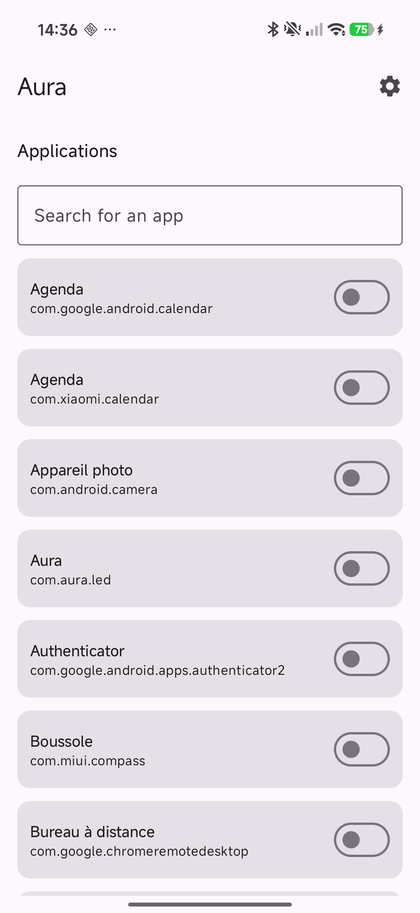
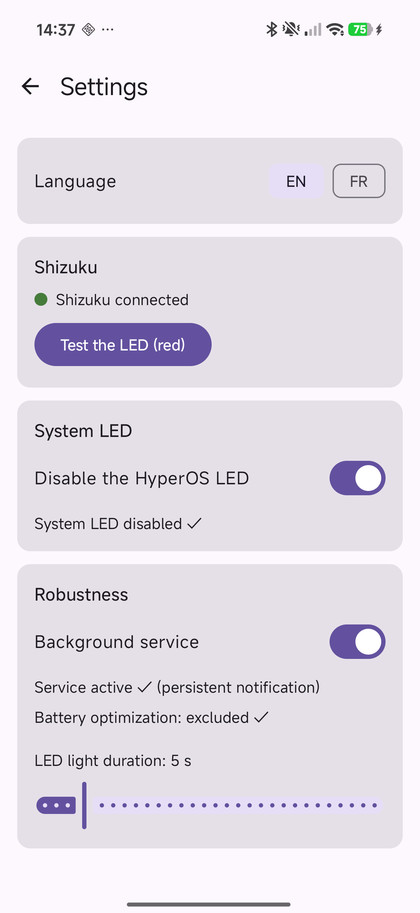
Screenshots
| Main screen | Settings |
|---|---|
 |
 |
Download
Get the latest signed APK from the releases page:
- v0.5.0 —
app-release.apk
Prerequisites
Hardware / system
- POCO X8 Pro running HyperOS 3 (Android 16). This is the only device it has been developed and tested on. The POCO X8 Pro Max (a.k.a. Redmi Turbo 5 Max) shares the same RGB ring hardware and HyperOS version, and has been confirmed working by users.
- Shizuku installed and enabled (see below), unless the device has working root access. Root fallback is experimental.
Build environment
- JDK 17
- Android SDK (compileSdk 36, minSdk 26)
- Gradle 8.13+ (the wrapper is provided, nothing to install)
Build
# Linux / macOS
./gradlew assembleDebug

# Windows
gradlew.bat assembleDebug
The APK is generated at:
app/build/outputs/apk/debug/app-debug.apk
Installing on the device
adb install -r app/build/outputs/apk/debug/app-debug.apk
Getting started
Aura needs a few one-time permissions to take control of the ring. Do these in order.
Enable the notification LED on the phone first: turn on the back light in Settings → Additional settings → Back light effects (French: Paramètres supplémentaires → Effets de lumière arrière). Without it the ring won't light up, even though Aura is running.
1. Install Aura
- Download the latest
app-release.apkfrom the releases page. - Open the APK and allow the install when your browser / file manager asks ("Install unknown apps").
2. Set up Shizuku or root
Aura drives the LED through Shizuku or a root shell. Root users do not need Shizuku; Aura detects root automatically and shows it in Settings.
Root support status — not tested: the root fallback (
su) is implemented but has not yet been tested on a physically rooted phone. The development phone used for this release has nosu, so Shizuku is the only validated privilege path. If you test root, grant Aura permanent access in Magisk/KernelSU/APatch and use Test the LED first.
Root: grant Aura permanent root access in Magisk/KernelSU/APatch, then continue with step 3.
Shizuku:
- Install Shizuku from the Play Store or shizuku.rikka.app.
- Start it, one of two ways:
- Wireless (recommended, no PC): enable Developer options (Settings → About phone → tap the HyperOS version 7 times), then turn on Wireless debugging. In Shizuku, tap Start → Wireless debugging and follow the pairing prompts.
- Via a PC (ADB): connect the phone to a computer that has
adb, then run the command Shizuku shows under "Start via computer connection" → "Show command".
- Wait until Shizuku shows "Shizuku is running".
3. Grant Aura's permissions
Open Aura, pick your language, then open Settings:
- Notification access — in Settings → Robustness, the notification listener row shows its status; tap it to open the system screen and enable Aura.
- Privilege access — with Shizuku, tap "Request authorization"; with root, grant Aura access in your root manager. Then tap "Test the LED (red)" to confirm the ring lights up.
4. Let it survive HyperOS (important)
HyperOS aggressively kills background apps, so do both of these in Settings → Robustness:
- Tap "Open Autostart settings" and enable Aura in the MIUI autostart manager.
- Tap "Exclude from battery optimization" and choose "No restrictions".
Without autostart, HyperOS may block the notification listener after a reboot.
5. Choose your colors
- On the main screen, toggle the apps you want and pick a default color (tap a swatch, or the + for a custom color — the ring shows a live preview).
- For messages and calls, turn on "Identify sender" and add contact / group rules with their own color and animation.
6. (Optional) Avoid double lighting
HyperOS lights the ring itself too. In Settings, disable "System LED" so only Aura drives the ring.
How it works
notification/AuraNotificationListener: detects notifications (NotificationListenerService) and only emits a LED command while the device is not actively used (screen off or locked).engine/RuleEngine: resolves the rule according to the contact → group → app priority.led/ShizukuLEDController: drives the rings via themiui.lights.ILightsManagersystem service (setCustomLight), using Shizuku when authorized orsuon rooted devices. The color is arbitrary (RGB) and the LED turns off automatically after the timeout.notification/FullNotificationReader: when Android hides notification content on the lock screen, the listener only receives a redacted version (empty title/text). Aura then recovers the full content viadumpsys notification --noredact(run through Shizuku or root) so contact/group rules — and their animations — keep working while the screen is off.data/: local persistence of rules and settings with Room.ui/: Jetpack Compose UI.
Frequently asked questions
Can I customize the LEDs on a POCO X8 Pro?
Yes. Aura customizes the back RGB LED rings of the POCO X8 Pro and can assign a color and animation to each app, contact or group notification.
Does Aura need root?
No. The validated setup uses Shizuku with ADB-level privileges. An experimental root fallback is also included.
Does it work on the POCO X8 Pro Max or Redmi Turbo 5 Max?
The POCO X8 Pro Max, also called Redmi Turbo 5 Max, shares the same RGB ring hardware and has been confirmed working by users. Other POCO models are not guaranteed.
Which HyperOS notification light settings should I use?
Enable the phone's back light effects first, then disable HyperOS's System LED in Aura so that only Aura controls the notification ring and double lighting is avoided.
Recherches en français
Les termes LED personnalisée POCO X8 Pro, lumière arrière POCO, anneau LED de notification HyperOS et couleur LED par application POCO décrivent le même usage pris en charge par Aura.
Tech stack
- Kotlin 2.1, Jetpack Compose (Material 3)
- Room (local persistence)
- Kotlin Coroutines / Flow
- Shizuku (API 13.1.5)
License
MIT — © 2026 Aura Contributors
How Shizuku is used
Can show per-app LED colors and animations via `miui.lights.ILightsManager`, plus system LED control and hidden notification lookup via Shizuku.
This is an AI-assisted analysis of Shizuku-related usages in the app's public source code. It is best effort, so it may not catch every single usage.
How this app uses Shizuku
Aura uses Shizuku to drive the custom RGB notification LED and to support its per-app rules.
- Show notification colors: lights the rear LED strip in the color chosen for each app, contact or group using the system lights service through Shizuku.
- Play LED animations: plays breathing, flashing, rainbow and alternating color effects for notifications, reminders and repeats through the same lights service.
- Preview and test colors: lights the strip while picking a color, flashes swatches briefly, keeps custom picks lit for confirmation, and turns the light off when dismissed or when notifications are cleared.
- Silence system LED: turns off the built-in notification light setting with the
settings put system notification_light_pulsecommand through Shizuku so only Aura drives the LED, and can turn it back on. - Match contacts when locked: runs
dumpsys notification --noredactthrough Shizuku to recover hidden notification titles and text when the lock screen redacts them, so per-contact and per-group colors still apply.
Android APIs or commands used
miui.lights.ILightsManager.setCustomLightsettings put system notification_light_pulsedumpsys notification --noredact
Changelog
What's new for version 0.5.0
Full Changelog: https://github.com/tgvdufuture/Aura/compare/v0.4.2...v0.5.0
Permissions
8 permissions requested
More from this category
 HyperOSUnf*cker
 HyperOS MTZ Studio
 FxxkMIUIAd
 Island Recorder
 HyperOS FCM Fix
 MixFlipTool
Navigation Switcher
MixFlipTool
Navigation Switcher
 壁纸设置器
壁纸设置器
 音质助手
音质助手
 FiveGSwitcher
 FpsSwitcher