 ShizuStore

Appzuku
1.3.16 · GitHub
More about this app
Fork of shappky with scheduled cleanup, background restriction, kill history and Shizuku/root support
Appzuku




Important
Appzuku has been officially succeeded by Process Warden.
Process Warden is a modern rewrite designed to be the definitive solution for Android process management, resolving previous bugs and introducing a more refined user experience.
- Premium Experience: Process Warden is a paid application with a 3-day free trial for all new users.
- Legacy Support: Appzuku will remain free and available on GitHub, but all future development and feature updates will be exclusive to Process Warden.
- Secure Payments: All transactions are handled securely via Polar.
- Privacy First: Your email is only used for essential purchase support and is never shared or used for marketing.
Please consider switching to Process Warden to support continued development and enjoy the latest improvements!
What is Appzuku?
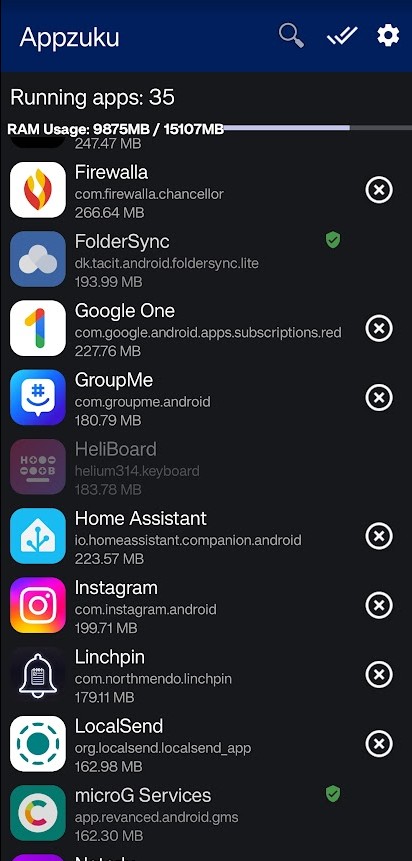
Appzuku is an Android application that stops background apps using either Shizuku or Root permissions. It supports one-tap manual kills, scheduled cleanup, and persistent background restriction for selected apps. The goal is straightforward control over apps that waste RAM, relaunch too often, or keep waking up in the background.
Features
- Flexible Permissions: Works with either Shizuku or Root access.
- Manual Kill Tools: Kill selected apps from the main screen, the current foreground app from Quick Settings, or run your configured background kill from a second Quick Settings tile.
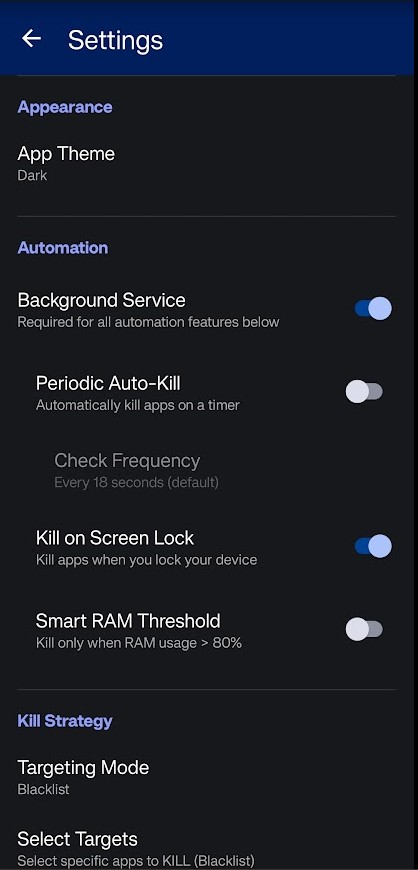
- Automation: Periodic auto-kill, kill on screen lock, and Smart RAM Threshold controls.
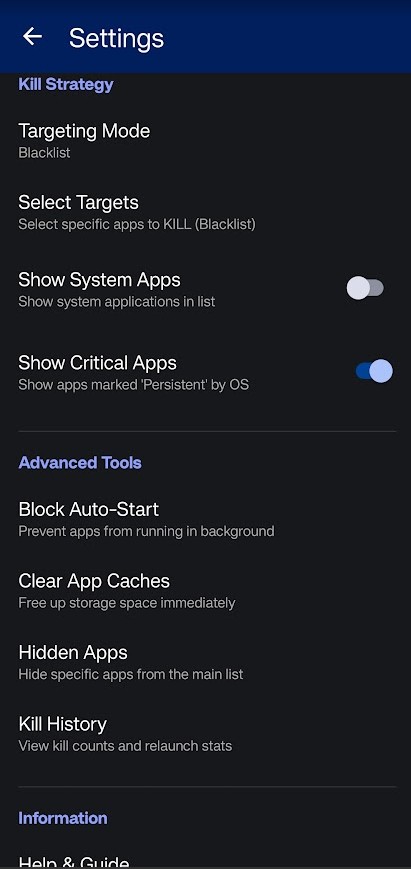
- Targeting Modes: Use Whitelist mode to protect apps from kills or Blacklist mode to target only selected apps.
- Background Restriction (Android 11+): Keep selected apps asleep in the background with AppOps-based restriction.
- Restriction Repair & Log: Re-apply saved restrictions and review recent restriction results/errors from Settings.
- Kill History & Top Offenders: Review which apps were killed, which ones relaunch, and which apps recover the most RAM.
- Backup & Restore: Save and restore your configured app lists.
- Search & Filter: Quickly find apps in your running list by name or package ID.
- Theme Customization: Support for Light, Dark, and System Default themes.
- Protected Apps: System-critical apps and user-whitelisted apps are protected from being killed.
- RAM Monitoring: Real-time display of system RAM usage.
Screenshots


Requirements
- Android Version: 6.0 (SDK 23) or higher.
- Shizuku or Root: Appzuku requires Root access or the Shizuku app to be running.
- Android 11+ for Background Restriction: The app installs on Android 6+, but the Background Restriction feature requires Android 11 or newer.
Installation
You can download and install Appzuku via: GitHub Releases: Download the latest APK from the Releases page.
How It Works
- Main Screen: Kill selected running apps manually.
- Quick Settings Tiles: One tile kills the current foreground app, and another runs your configured whitelist/blacklist background kill.
- Automation: Run cleanup periodically or when the screen turns off.
- Background Restriction: Keep chosen apps asleep more aggressively on Android 11+.
License
Appzuku is licensed under the GNU General Public License v3.0.
Donate
If you want to support me, I would be very grateful.
Credits
This project was forked from YasserNull/shappky
How Shizuku is used
Can force-stop and uninstall apps, restrict background activity and clear caches via `am`, `pm` and `cmd appops` commands.
This is an AI-assisted analysis of Shizuku-related usages in the app's public source code. It is best effort, so it may not catch every single usage.
How this app uses Shizuku
Appzuku uses Shizuku to manage running apps, restrict background activity, uninstall apps and clear caches.
- Stop running apps: force-stop one app, selected apps or all background apps with the
am force-stopandam kill-allshell commands through Shizuku, including automatic kills, launcher shortcut kills and Quick Settings tile kills. - View running apps: show running apps and memory use collected with the
psanddumpsys activityshell commands through Shizuku, and detect the foreground app withdumpsys activity,dumpsys windowandcmd activity get-top-activity. - Restrict background activity: turn background execution off or on for chosen apps with the
cmd appops setshell command through Shizuku and check current state withcmd appops query-op. - Uninstall apps: remove installed apps with the
pm uninstallshell command through Shizuku. - Clear cached data: clear device caches with the
pm trim-cachesshell command through Shizuku.
Android APIs or commands used
am force-stopam kill-allpm uninstallpm trim-cachescmd appops setcmd appops query-opcmd activity get-top-activitycmd statusbar collapsedumpsys activity activitiesdumpsys activity recentsdumpsys windowps
Notable details
Background restriction requires Android 11 or newer.
Changelog
What's new for version 1.3.16
Important
Appzuku has been officially succeeded by Process Warden.
Process Warden is a modern rewrite designed to be the definitive solution for Android process management, resolving previous bugs and introducing a more refined user experience.
- Premium Experience: Process Warden is a paid application with a 3-day free trial for all new users.
- Legacy Support: Appzuku will remain free and available on GitHub, but all future development and feature updates will be exclusive to Process Warden.
- Secure Payments: All transactions are handled securely via Polar.
- Privacy First: Your email is only used for essential purchase support and is never shared or used for marketing.
Please consider switching to Process Warden to support continued development and enjoy the latest improvements!
- Added a one-time thank-you popup for 1.3.16 pointing users to Process Warden.
- Added a compact Process Warden link at the top of Settings.
Permissions
9 permissions requested
More from this category
 Shappky
 Pensum
 KillMyApps
 TaskManager
 Android Monitor
 Pulse
 memhogs
ReAppzuku
 Running Services Monitor
 ProcessLens
 Recents
 RvSystem Monitor