 ShizuStore
Per-App Language
1.0.4 · GitHub
More about this app
Force per-app language settings on Android 13+ without root, even for apps without built-in language options
Per-App Language
English | 简体中文 | 日本語 | 한국어 | Español | Français
Download

Google Play: Under review. Coming soon.
Moving to Google Play
- Uninstall the directly distributed version.
- Install Per-App Language from Google Play.
- If prompted, grant Shizuku permission to the Google Play version.
Your existing per-app language selections remain on Android after uninstalling the directly distributed version.
Every release is signed with the same key; the certificate fingerprint is published in the release notes. Read the Privacy Policy for privacy details; the editable source is PRIVACY_POLICY.md.
About
An Android utility that forces a specific locale on individual apps — even apps that have no in-app language setting and never show up under Settings → Apps → App language.
Your phone can stay in Japanese while WeChat and Taobao run in Simplified Chinese, ChatGPT runs in English, and Google Maps stays in Japanese.
This is not a translator. It changes the locale an app sees. If the app does not ship resources for that language, nothing visible will change. See What this cannot do.
Screenshots
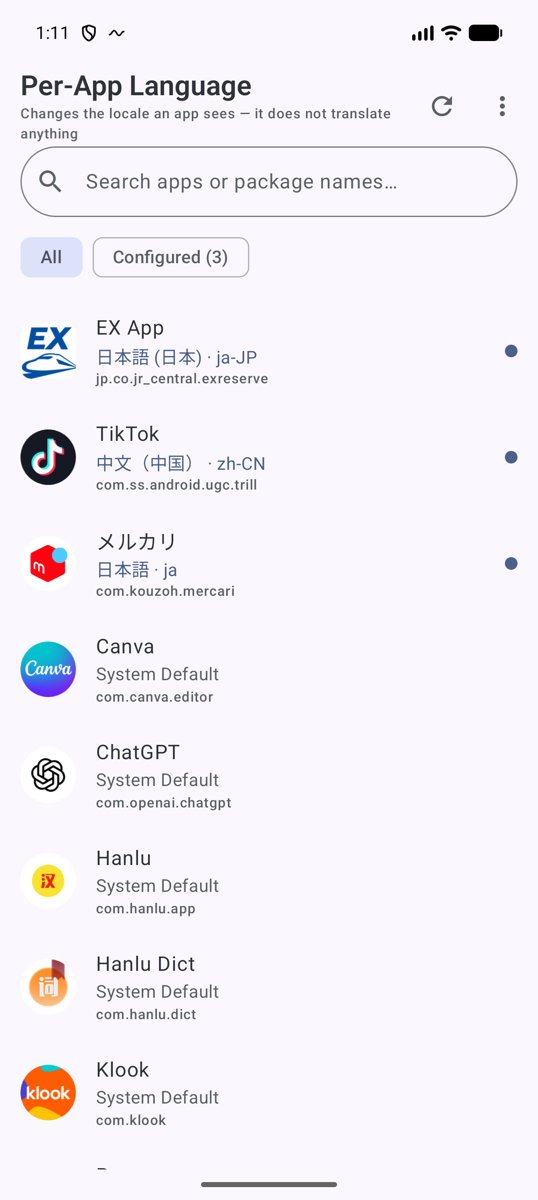
 Every installed app Overridden apps are marked and can be floated to the top |
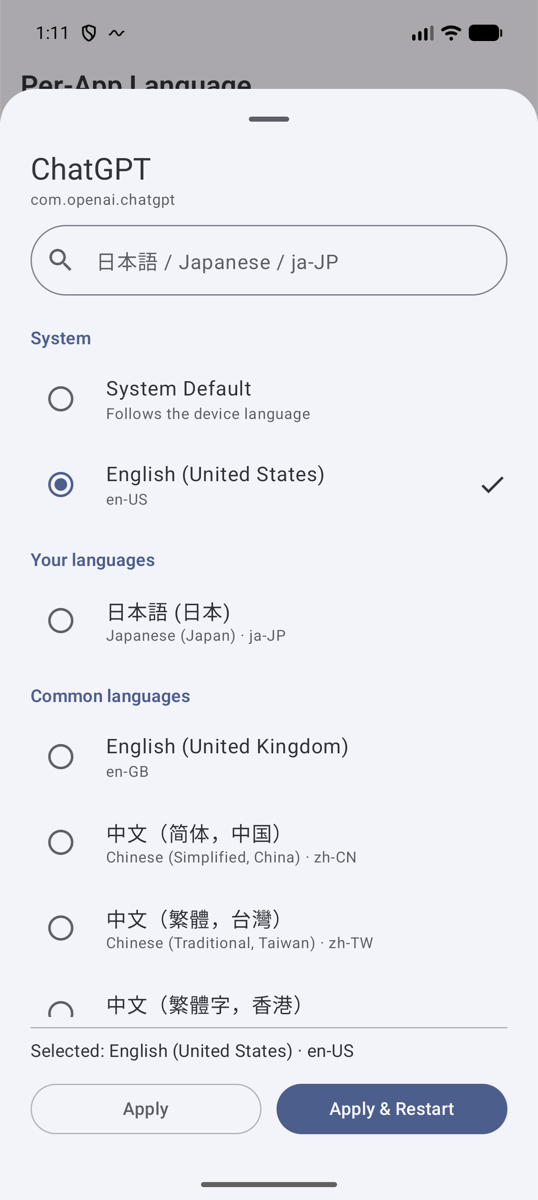
 Pick a language Presets, your own languages, or any BCP 47 tag you type |
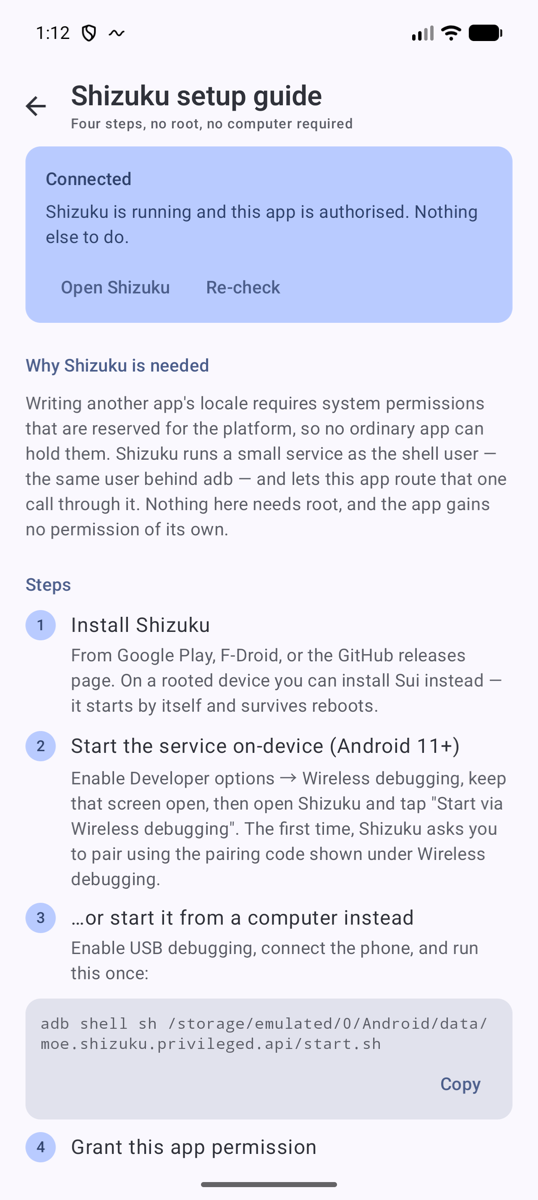
 Shizuku setup Four steps, no root, no computer required |
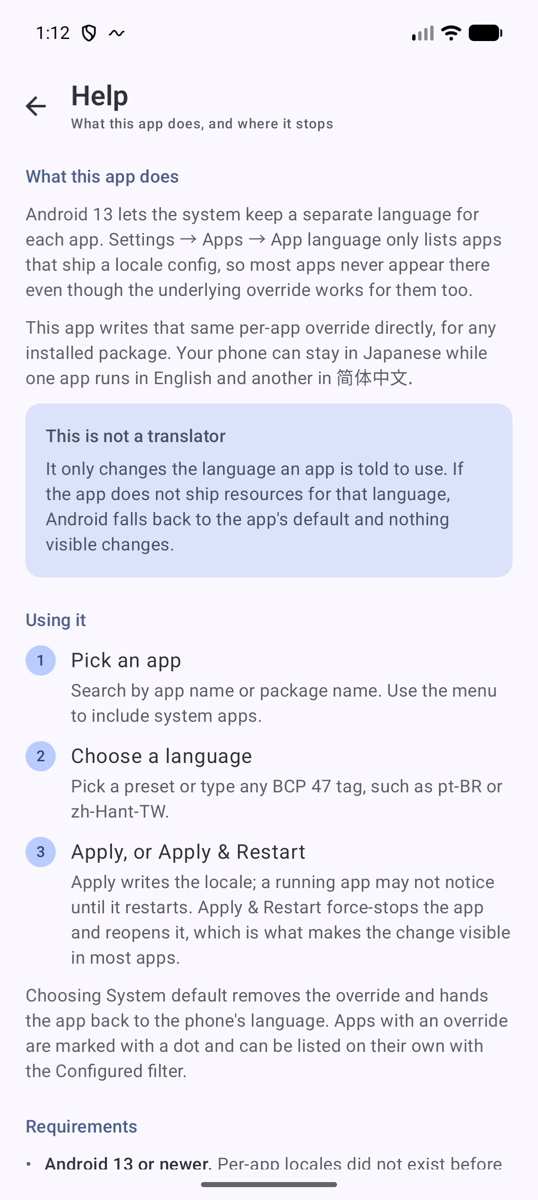
 Help What it does, and where it stops |
What it actually does
Android 13 introduced per-app locales. The system keeps a per-package LocaleList override and
applies it to that app's Configuration when the app starts. Apps do not have to opt in for this
to work — the framework overrides the configuration regardless.
What apps do have to opt in to is being listed: Settings → Apps → App language only shows
apps that ship a locales_config.xml (android:localeConfig). Apps without it are invisible in
Settings even though the underlying override works perfectly.
This app writes that same override directly, for any installed package.
When an OEM's app-cloner is backed by Android's standard clone-profile type (such as compatible
ColorOS App Cloner setups), the original and cloned installation are separate rows. Their identity
is packageName + userId, so each can retain a different locale override.
Runtime system calls use that user ID, while the local assignment cache uses the Android user
serial number plus package name. This prevents a deleted clone profile's cached choice from being
applied if an OEM later reuses its numeric user ID.
Requirements
| Android | 13 (API 33) or newer |
| Root | not required |
| Shizuku | required (or Sui on rooted devices) |
Why Android 13+
Per-app locales are a platform feature added in Android 13. LocaleManager, the "locale" system
service and the per-package LocaleList store simply do not exist before API 33, and there is no
comparable mechanism to emulate them on Android 12 and earlier.
Why Shizuku
The public API, LocaleManager.setApplicationLocales(LocaleList), only ever writes the calling
package's locales. The system service behind it exposes a package-scoped variant:
// frameworks/base/core/java/android/app/ILocaleManager.aidl
void setApplicationLocales(String packageName, int userId, in LocaleList locales);                          // API 33
void setApplicationLocales(String packageName, int userId, in LocaleList locales, boolean fromDelegate);    // API 34+
LocaleList getApplicationLocales(String packageName, int userId);
LocaleManagerService allows those calls only when the caller is the target package itself or
holds:
android.permission.CHANGE_CONFIGURATION— to write a localeandroid.permission.READ_APP_SPECIFIC_LOCALES— to read oneandroid.permission.FORCE_STOP_PACKAGES— for Apply & Restart
All three are signature|privileged, so a normal app can never be granted them. But
com.android.shell (uid 2000) declares all three in its manifest — which is exactly why
adb shell cmd locale set-app-locales … works.
Shizuku runs a small service as that same shell uid and lets an app route binder transactions through it. So this app does not gain any permission itself; it asks the shell uid to make the call on its behalf. That is also the reason nothing here needs root.
Why full app visibility
The core feature is a picker for any installed app, whose package names cannot be known in
advance. Android's targeted package queries cannot build that list, so the app declares
QUERY_ALL_PACKAGES. It uses the resulting package names, labels, icons, locale settings, and
official language declarations only on the device; it has no Internet permission and does not
share the inventory. See the Privacy Policy.
Setup
Install Shizuku — Google Play, or GitHub releases.
Start the Shizuku service.
On-device (Android 11+, no computer needed): Developer options → Wireless debugging on → open Shizuku → Start via Wireless debugging.
From a computer:
adb shell sh /storage/emulated/0/Android/data/moe.shizuku.privileged.api/start.shShizuku dies on reboot. This step has to be repeated after every restart. Rooted users can install Sui instead, which starts automatically.
Open Per-App Language and grant the Shizuku permission prompt.
Tap an app, pick a language, tap Apply & Restart.
After setup: Android keeps the applied language setting even if Shizuku stops, the device reboots, or Developer options are turned off. Developer options and debugging are only needed to start and keep Shizuku available; turn them back on and start Shizuku whenever you want to change or reset a language. On non-rooted devices, that startup step is required after every reboot. If you want Shizuku to remain continuously available, its troubleshooting guide recommends leaving Developer options and USB debugging enabled.
How a locale change is applied
Per-App Language (uid 10xxx)
        │  ServiceManager.getService("locale")      ← raw binder, no permission yet
        ▼
  ShizukuBinderWrapper                              ← re-routes the parcel
        │
        ▼
Shizuku server process (uid 2000 = com.android.shell)
        │  holds CHANGE_CONFIGURATION / READ_APP_SPECIFIC_LOCALES / FORCE_STOP_PACKAGES
        ▼
LocaleManagerService  →  per-package LocaleList override  →  applied on next app start
The app implements two ways of speaking to that service, and falls back automatically:
- Reflection on
ILocaleManager$Stub.asInterface(primary). It inspects the method it finds on the device, so it adapts by itself to the API 33 → 34 signature change (fromDelegate) and to OEM tweaks. - Hand-written
Parceltransactions (fallback), used when hidden-API reflection is blocked. It needs no hidden class at all, at the price of hard-coding transaction ids — which have kept the same AIDL declaration order since API 33.
Apply writes the locale only. Apply & Restart additionally calls
IActivityManager.forceStopPackage() and relaunches the app, because a locale change reaches a
running app as a configuration change, and many apps cache their strings at startup and ignore it.
Selecting System Default sends an empty LocaleList, which is how the framework spells
"remove the override".
What this cannot do
- It cannot translate. Setting
zh-CNon an app that only ships English resources changes nothing visible. Android falls back to the app's default resources. - Apps that pick their own language internally (a language stored in the account/server, or their own in-app setting) will ignore the system locale. Some Chinese super-apps do this.
- Apps that re-read the locale only at process start need Apply & Restart — that is what the button is for.
- Web content inside an app (WebViews, server-rendered screens) usually follows the account or
Accept-Language, not the per-app locale. - Force-stop may be refused on some OEM builds. The locale is still written; you just have to close the app yourself. The UI says so when this happens.
- Work profiles / secondary users: the app only affects the user profile it is installed in; cross-profile management is not supported.
- Some heavily modified OEM ROMs may restrict shell permissions further than AOSP does. In that
case the app reports the
SecurityExceptioninstead of silently failing.
Compatibility
Everything here goes through standard AOSP interfaces — the "locale" and "activity" system
services, PackageManager, and Shizuku. There is no per-OEM branching and no device model
allowlist. This design is intended to maximize compatibility across AOSP, Pixel, One UI, ColorOS,
OriginOS, and HyperOS. Where a vendor restricts something (most commonly force-stop), the app
surfaces the failure rather than working around it with device-specific hacks.
Verification
Clone-profile diagnostics
Clone discovery uses IUserManager's standard android.os.usertype.profile.CLONE type and
user-aware IPackageManager enumeration over Shizuku; it does not assume a vendor-specific user
ID. Check the actual profile and package IDs on a device with:
adb shell pm list users
adb shell pm list packages --user <USER_ID>
Some ColorOS devices expose the clone as user 999, so adb shell pm list packages --user 999
is an example diagnostic only—not a universal Android or ColorOS contract.
The privileged layer is verified against live Android system services rather than assumptions or
mocks. app/src/debug/.../LocaleGatewayProbe.kt runs the real LocaleGateway and ProcessGateway
classes as uid 2000 via app_process, straight against the live LocaleManagerService — no
Shizuku, no mocks:
./gradlew assembleDebug
adb push app/build/outputs/apk/debug/app-debug.apk /data/local/tmp/probe.apk
adb shell CLASSPATH=/data/local/tmp/probe.apk app_process /system/bin \
    --nice-name=locale-probe dev.takeru.perapplocale.probe.LocaleGatewayProbe com.android.settings
It exercises the reflection path and the raw-transaction path, and cross-checks every result
against cmd locale get-app-locales. On an API 37 emulator all nine checks pass, which confirms
the hard-coded transaction ids, the parcel layout and the fromDelegate argument are right.
Verified end-to-end on that emulator with Shizuku 13.6.0 actually running: state transitions
(not installed → permission needed → ready), the permission dialog, applying zh-CN to a
third-party app, force-stop-and-relaunch, and resetting back to System Default — each time
confirming the result with cmd locale get-app-locales rather than trusting the UI.
One caveat, stated plainly: the only Android version available here was API 37, so the API 33
three-argument setApplicationLocales branch is derived from the AOSP sources rather than executed.
The four-argument branch (API 34+) is the one that ran.
The fixed cross-OEM procedure and the current Pixel/AOSP, One UI, ColorOS, and HyperOS evidence
status are tracked in docs/OEM_SMOKE_TEST.md.
Architecture
app/src/main/java/dev/takeru/perapplocale/
├── PerAppLocaleApp.kt          Application; lifts hidden-API restrictions, owns ShizukuRepository
├── MainActivity.kt             Single activity, Compose host, event plumbing
├── core/
│   ├── SystemBinder.kt         Service lookup + ShizukuBinderWrapper
│   ├── LocaleGateway.kt        get/setApplicationLocales — reflection + raw-transaction paths
│   └── ProcessGateway.kt       forceStopPackage via IActivityManager
├── shizuku/
│   ├── ShizukuState.kt         READY / PERMISSION_REQUIRED / NOT_RUNNING / NOT_INSTALLED
│   └── ShizukuRepository.kt    Binder + permission listeners exposed as a StateFlow
├── data/
│   ├── AppInfo.kt              One row
│   ├── AppRepository.kt        PackageManager queries
│   ├── LocaleOption.kt         Presets + BCP 47 validation
│   └── SettingsStore.kt        DataStore: preferences + local mirror of assignments
├── ui/                         Compose (Material 3): MainScreen, LocaleSheet,
│   │                           ShizukuStatusCard, MainViewModel, and two prose
│   │                           screens — SetupScreen, HelpScreen — built from DocScreen
│   └── theme/Theme.kt          Dynamic color where available; light + dark
└── util/AppIcon.kt             Lazy, LRU-cached launcher icons
Unidirectional data flow: MainViewModel combines the Shizuku state, the package list and
DataStore preferences into one MainUiState; the UI is a pure function of it, and one-shot things
(snackbars, launching an app) travel over a separate event channel.
The system is the source of truth for locales — DataStore only keeps a mirror so the list can show configured apps instantly before the (per-package) binder scan finishes.
Building
git clone https://github.com/TakeruF/android-perapp-language-selector.git
cd android-perapp-language-selector
./gradlew assembleDebug
Requires JDK 17 and Android SDK 36. Open in Android Studio and it should just import.
Release builds
assembleRelease signs the APK when a keystore.properties sits in the project root; without
it the build still succeeds and produces an unsigned APK.
storeFile=/absolute/path/to/release.jks
storePassword=…
keyAlias=…
keyPassword=…
The file and the keystore are both gitignored.
Feedback and contributions
Found a translation error? Please report it with the translation error issue template. Bug reports and pull requests are also welcome.
Acknowledgements
- VegaBobo/Language-Selector — prior art that demonstrated per-app locale control over Shizuku is feasible. It was consulted as a reference for the general approach; this project is an independent implementation written against the AOSP sources and the Shizuku API, and contains no code from it. (Should any code ever be incorporated, its Apache-2.0 attribution will be added here formally.)
- RikkaApps/Shizuku and the Shizuku API.
- LSPosed/AndroidHiddenApiBypass.
License
Apache License 2.0 — see LICENSE.
How Shizuku is used
Can set and clear per-app languages, restart apps and cover clone profiles via `ILocaleManager`.
This is an AI-assisted analysis of Shizuku-related usages in the app's public source code. It is best effort, so it may not catch every single usage.
How this app uses Shizuku
This app uses Shizuku to set and read per-app language choices for other apps on Android 13 and later, including apps with no built-in language option.
- Set app language: a language chosen in the app list is forced onto the selected app through Shizuku as the shell user, so that app runs in that language.
- Clear app language: a customized app can be returned to following the system language through Shizuku, for one app, several apps at once, or all customizations.
- Show current languages: the language currently forced onto each installed app is read through Shizuku and shown in the list.
- Restart after change: a target app can be force stopped through Shizuku after applying a language so it relaunches and shows the new language.
- Support clone apps: apps installed in clone profiles are discovered through Shizuku and each can have its own language setting.
Android APIs or commands used
android.app.ILocaleManager.setApplicationLocalesandroid.app.ILocaleManager.getApplicationLocalesandroid.app.IActivityManager.forceStopPackageandroid.content.pm.IPackageManager.getInstalledApplicationsandroid.os.IUserManager.getProfilesandroid.os.IUserManager.getUserSerialNumber
Notable details
Changing this app's own language uses the public system API and does not need Shizuku. Restart after applying may not work on some device builds that refuse force stop for the shell user, in which case the language is still applied but the user needs to close the app manually.
Changelog
What's new for version 1.0.4
Direct download
- Installable APK:
per-app-language-v1.0.4.apk - SHA-256:
97c4cff1f82fcacd91ae4620de1594db88fad9a857d3f0ed314bc8760a6565b1
This release includes the Google Play migration guidance and the release-artifact policy. Google Play is under review and will be available soon.
The Android App Bundle is uploaded only to Google Play Console and is not a GitHub Release asset.
Permissions
3 permissions requested
More from this category
 Essentials
 Extendroid
 ShizuTools
 Dragon Launcher
 Smart Island
 GAMA
GAMA
 Tap, Tap
 Expressive Cutout
 SystemUI Tuner
 Ambient Music Mod
 ColorBlendr
 SetEdit+