 ShizuStore
Mirror
0.0.34 · GitHub
More about this app
Screen mirroring hub with support for sharing screen content over AirPlay, Moonlight/Sunshine, and DisplayLink
Screen Mirroring Manager for Android



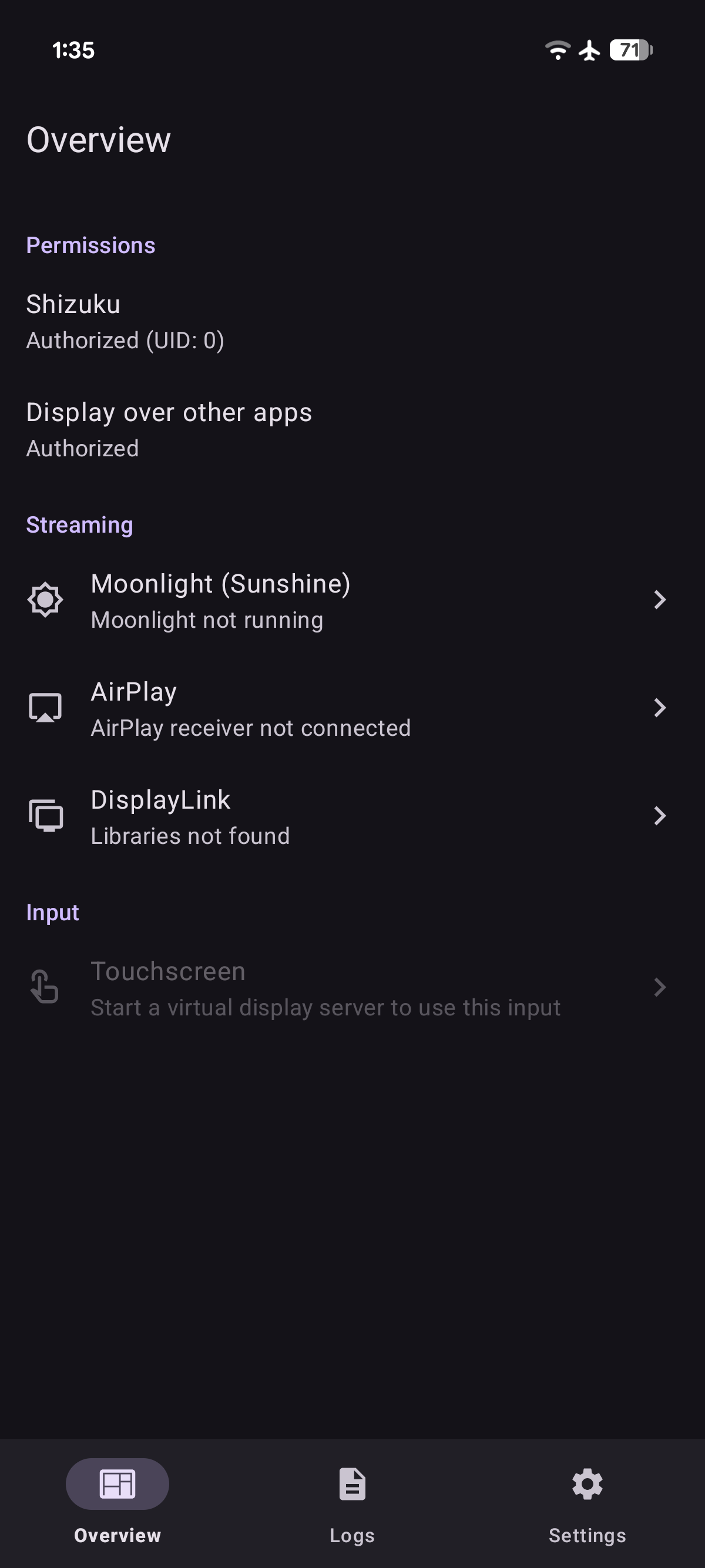
Mirror is an all-in-one application that forwards your screen content to external displays and expands Android's built-in screen mirroring capabilities. It creates virtual displays and supports screen sharing to:
- AirPlay receivers (Apple tvOS and macOS built-in receivers, or third-party receivers using AirPlay Server for Android or UxPlay)
- DisplayLink adapters connected to the device via USB host mode
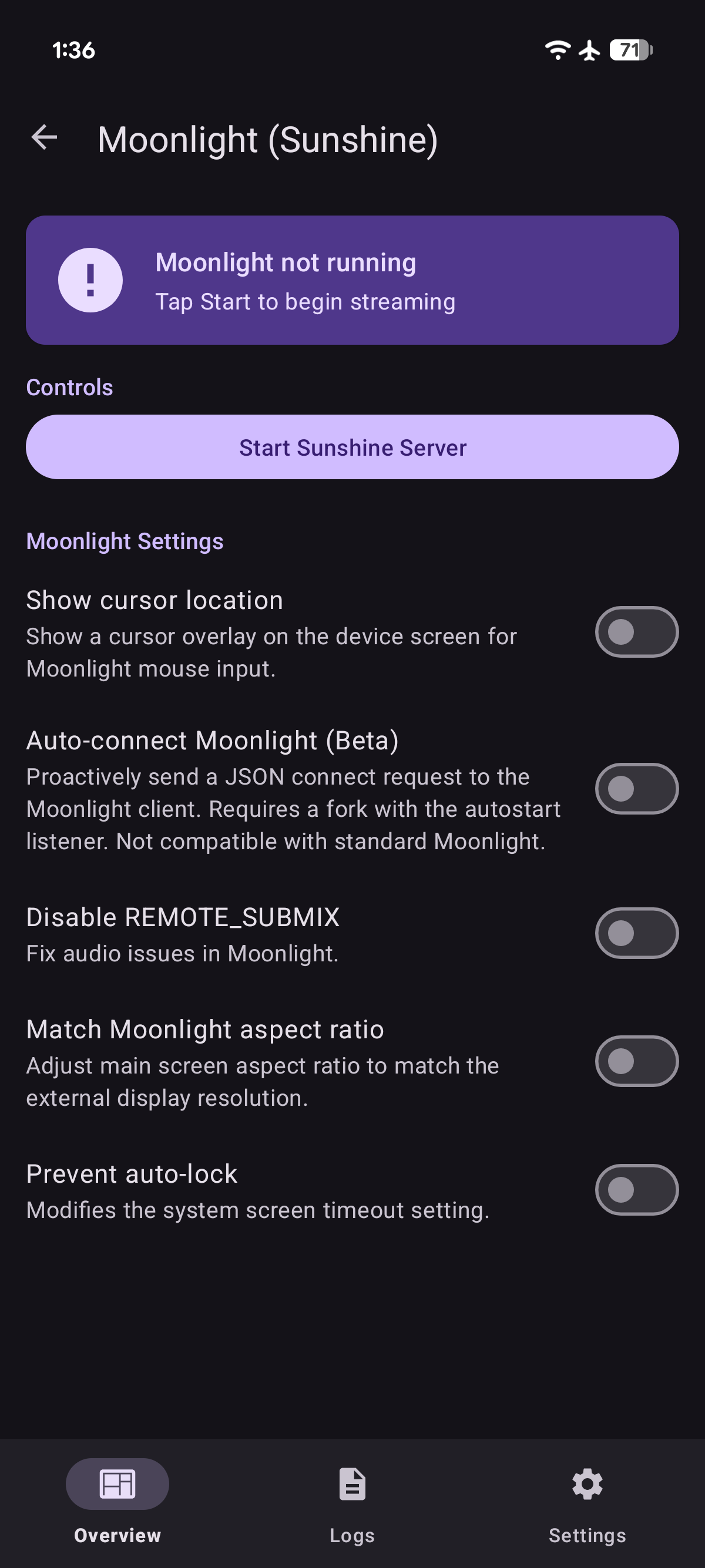
- Moonlight (Nvidia GameStream) clients with remote control support via the built-in Sunshine server
It can be used in conjunction with Extend to turn any connected display or sink device into a secondary display where you can cast and control any application. You can also use this with AirPlay Server for Android or Moonlight for Android to create a dummy display that stays in Picture-in-Picture.


Usage
Mirror supports creating virtual displays and streaming to them without Shizuku. Remote input requires Shizuku: enable it in any supported mode (wireless debugging, USB debugging, or root) and grant access to this application. See Shizuku documentation for details.
Using with Extend
Mirror gets pixels onto a display. What application runs on it, where it renders, and how input is routed are handled by Extend. The two applications connect through Android's display system via DisplayManager API.
Compatibility
- Any device on Android 8.0+ (no privileged access required)
- (Optional) Receiver on the same subnet for AirPlay and Moonlight sinks
- (Optional) USB 2 or higher for DisplayLink sinks
- (Optional) Extend for managing the secondary display
- (Optional) Shizuku for hidden API access
Features
- Outbound AirPlay 2 (modern) and AirPlay 1 (legacy) screen mirroring to Apple devices or third-party AirPlay receivers
- Outbound Moonlight streaming and remote control, with Sunshine server built in
- DisplayLink USB output via USB host mode (including USB 2)
- Each display sink is registered as a virtual display via
DisplayManagerAPI allowing other applications to launch activities on it - Touchscreen relay for remote pointer and keyboard input directed at the mirrored display
| Feature | Shizuku | Minimum API |
|---|---|---|
| AirPlay mirroring | N | 26 (MediaProjection.createVirtualDisplay) 34 ( MediaProjectionConfig.createConfigForDefaultDisplay) |
| DisplayLink USB output | N | 26 (android.hardware.usb.host) |
| Moonlight video streaming | N | 26 (MediaCodec H.264) 28 (BT.709/BT.2020 color metadata) 30 ( KEY_LOW_LATENCY) |
| Moonlight H.265/HEVC encoding | N | 29 (MediaCodecInfo.isHardwareAccelerated) |
| Audio capture (playback submix) | N | 29 (AudioPlaybackCaptureConfiguration) |
| Audio capture (remote submix) | O | 31 (REMOTE_SUBMIX) |
| Cursor overlay | O | 26 (TYPE_APPLICATION_OVERLAY) |
| Remote device input | R | 26 (IInputManager.injectInputEvent) |
| Touchscreen relay with live preview | R | 31 (setFocusedRootTask) 34 ( focusTopTask) |
| Auto-match aspect ratio | R | 26 (IWindowManager.setForcedDisplaySize) |
| Trusted virtual display | R | 33 (VIRTUAL_DISPLAY_FLAG_TRUSTED, OWN_DISPLAY_GROUP, ALWAYS_UNLOCKED, TOUCH_FEEDBACK_DISABLED) 34 ( DEVICE_DISPLAY_GROUP) |
| Untrusted virtual display | F | 26 (MediaProjection.createVirtualDisplay) |
| Application mirroring | N | 26 (ActivityOptions.setLaunchDisplayId) 29 ( ActivityManager.isActivityStartAllowedOnDisplay) |
| Prevent auto-lock | R | 26 (WRITE_SECURE_SETTINGS) |
| Disable USB audio output | R | 26 (IAudioService.setWiredDeviceConnectionState) 33 ( IAudioService.getDevicesForAttributes) |
| Display hotplug monitor | I | 26 (DisplayManager.DisplayListener) |
| Legend | Description |
|---|---|
| R | Required |
| O | Optional |
| F | Fallback |
| I | Inherited |
| N | Unused |
Implementation
Native streaming servers are bridged to Android via JNI. The Moonlight path compiles Sunshine for Android and exposes a MediaProjection backed video source. Sunshine handles RTP packetization itself; moonlight-common-c supplies the Limelight protocol headers, RTSP parser, and ENet UDP control transport. The AirPlay path is built on doubletake, ported to Android via Go mobile and patched for Apple devices and legacy AirPlay receivers. The DisplayLink path uses Android USB host mode with a user-imported vendor driver.
flowchart LR
    Android["Mirror"]
    Sunshine["Sunshine (C/JNI)<br/><small>Moonlight (RTSP + RTP)</small>"]
    Doubletake["doubletake (Go/JNI)<br/><small>RAOP + FairPlay + H.264</small>"]
    DL["DisplayLink (USB)<br/><small>USB host mode</small>"]
    Moonlight["Moonlight clients"]
    AppleSink["Apple devices or third-party AirPlay receivers"]
    DLSink["USB Display"]
    Android -- "VirtualDisplay" --> Sunshine --> Moonlight
    Android -- "VirtualDisplay" --> Doubletake --> AppleSink
    Android -- "VirtualDisplay" --> DL --> DLSink
CMake drives the native C/C++ build under ./app/src/main/cpp. Submodules must be initialized before building. AirPlay is powered by doubletake with custom bindings under ./doubletake. This library needs to be built with ./build.sh first. Make sure go is available in $PATH before building.
git submodule update --init --recursive
./build.sh && ./gradlew assembleDebug
Check out the CI for reproducible build instructions.
Credits
- LizardByte for Sunshine server
- Moonlight Game Streaming Project for Moonlight headers
- Omar Roth for open-source AirPlay sender
doubletake - Tao Wen for the open-source Android bindings of DisplayLink vendor driver
- Xiph.Org Foundation for the Opus codec
Disclaimer: This project is not affiliated with Apple Inc or Synaptics Inc.
How Shizuku is used
Can mirror screen over AirPlay, Sunshine and DisplayLink with trusted displays, remote input, global audio and display tweaks via Shizuku
This is an AI-assisted analysis of Shizuku-related usages in the app's public source code. It is best effort, so it may not catch every single usage.
How this app uses Shizuku
Mirror uses Shizuku to unlock system level display, input and audio features for its mirroring hub.
- Create trusted virtual displays: builds own content virtual displays owned by the shell through Shizuku instead of plain mirroring, used for AirPlay, Sunshine/Moonlight and DisplayLink targets with selectable size, density and refresh rate.
- Match main screen aspect: changes the built in display forced size to match the remote client aspect when auto match is enabled, and restores it when mirroring stops.
- Send remote input: forwards touches, back key presses and remote mouse, keyboard and gamepad events from Sunshine clients and the touchscreen view to the mirrored or external display.
- Focus apps on displays: moves focus to the top task on the target display so injected input lands on the shown app.
- Keep screen awake: grants its own secure settings permission through Shizuku, then extends the screen timeout to prevent auto lock during projection.
- Auto allow projection and overlay: runs fixed
appops setoperations through the privileged service to allow screen capture and overlay for the app. - Capture system audio: records the whole output mix in the privileged service for AirPlay and Sunshine streams when global audio capture is enabled.
- Restore screen power: turns the physical screen back on through the privileged service when AirPlay, Sunshine or DisplayLink sessions end.
- Export diagnostics logs: collects the system log buffer through the privileged service to create and share a log file.
Android APIs or commands used
IDisplayManager.createVirtualDisplayIDisplayManager.getDisplayInfoIDisplayManager.requestDisplayPowerIWindowManager.setForcedDisplaySizeIWindowManager.clearForcedDisplaySizeIWindowManager.getInitialDisplaySizeIWindowManager.getBaseDisplaySizeIInputManager.injectInputEventIActivityTaskManager.focusTopTaskIActivityTaskManager.setFocusedRootTaskIActivityTaskManager.setFocusedStackIActivityTaskManager.getAllRootTaskInfosOnDisplayIPermissionManager.grantRuntimePermissionIPackageManager.grantRuntimePermissionAudioRecordwithMediaRecorder.AudioSource.REMOTE_SUBMIXSurfaceControl.setDisplayPowerModeappops set io.github.jqssun.displaymirror PROJECT_MEDIA allowappops set io.github.jqssun.displaymirror SYSTEM_ALERT_WINDOW allowlogcat -d
Notable details
Without Shizuku the app falls back to normal MediaProjection mirroring and playback audio capture where available, without trusted own content displays, forced aspect matching, global mix capture or automatic permission grants.
Changelog
What's new for version 0.0.34
Permissions
12 permissions requested
Sources
2 sources
Sources
2 sources
More apps from this developer
 Extend
More from this category
Extend
 Adaptive Hz
 akiHz
akiHz
 Dextop
 MagicDesk
 Tideo Auto Brightness
 SecondScreen
 Grayscaler
 DeskControl
 Better Night Light
 PortalPad
 Fold Switcher