 ShizuStore
allEQ
1.0-alpha · GitHub
More about this app
Rootless 10-band system equalizer that hooks the output mix audio session through Shizuku.

allEQ
Rootless 10-band system equalizer for Android with Smart Dynamic Bass and tactile mixing controls.


-blue.svg?style=flat-square)



Telegram Community: Join discussions, beta testing, and presets sharing in our official Telegram chat — @allEQoff.
What It Is
allEQ is an open-source, rootless system-wide audio equalizer for Android built with modern Jetpack Compose and powered by Shizuku.
It attaches directly to the Android Audio HAL (Session 0) to provide low-latency, system-wide acoustic correction for built-in speakers, wired headphones, Bluetooth headsets, and external USB DACs.
- Package name:
com.omix.alleq - Maintainer: @omixin
- Architecture: 100% Kotlin, Jetpack Compose, Material 3, Android DynamicsProcessing & AudioEffects API
Why This Exists
Most existing equalizer applications on Android face one of three fundamental problems:
- Root requirement: Advanced DSP tools (such as ViPER4Android) require Magisk/KernelSU root, tripping SafetyNet/Play Integrity and making banking apps inaccessible.
- Aggressive background killing: Non-root equalizers often rely on
NotificationListenerServiceor accessibility hacks. Aggressive OEM task killers (MIUI, HyperOS, OneUI, OriginOS) terminate them within minutes of audio playback. - Muffled vocals during bass boost: Traditional equalizers simply boost lower frequencies, causing the phone's hardware amplifier protection to squash master volume and muffling speech and dialogue in videos.
- Bloat and trackers: Commercial equalizers frequently package invasive analytics, full-screen advertisements, and subscription paywalls.
allEQ was built to solve these problems directly:
- Rootless Session 0 Hook: Hooks directly into
AudioEffect(AUDIO_SESSION_OUTPUT_MIX)via Shizuku-elevated permissions (MODIFY_AUDIO_SETTINGS), applying EQ globally across all applications without root. - Smart Dynamic Bass & Vocal Protection: Integrates an adaptive limiter (-1.5 dBFS brickwall) and dynamic mid-frequency compensation (+1.5 dB on 800–3000 Hz) so speech in podcasts, TikTok, and YouTube stays intelligible when sub-bass is boosted.
- 100% Offline & Private: The app has zero network permissions (
android.permission.INTERNETis not declared). Zero analytics, zero telemetry, zero trackers. - Zero Passive Battery Drain: Operates via native Audio HAL effects without maintaining continuous CPU wake-locks or audio re-encoding pipelines.
Screenshots
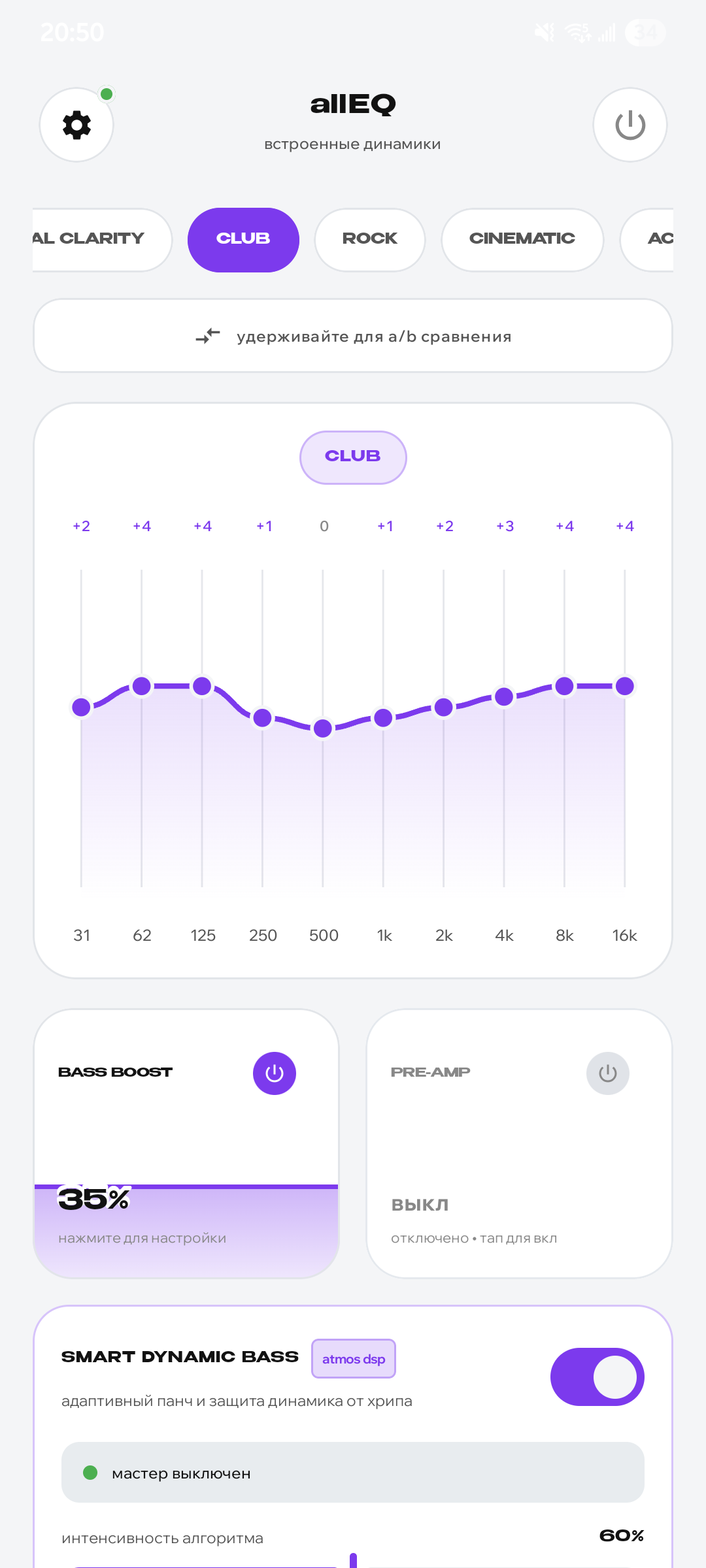
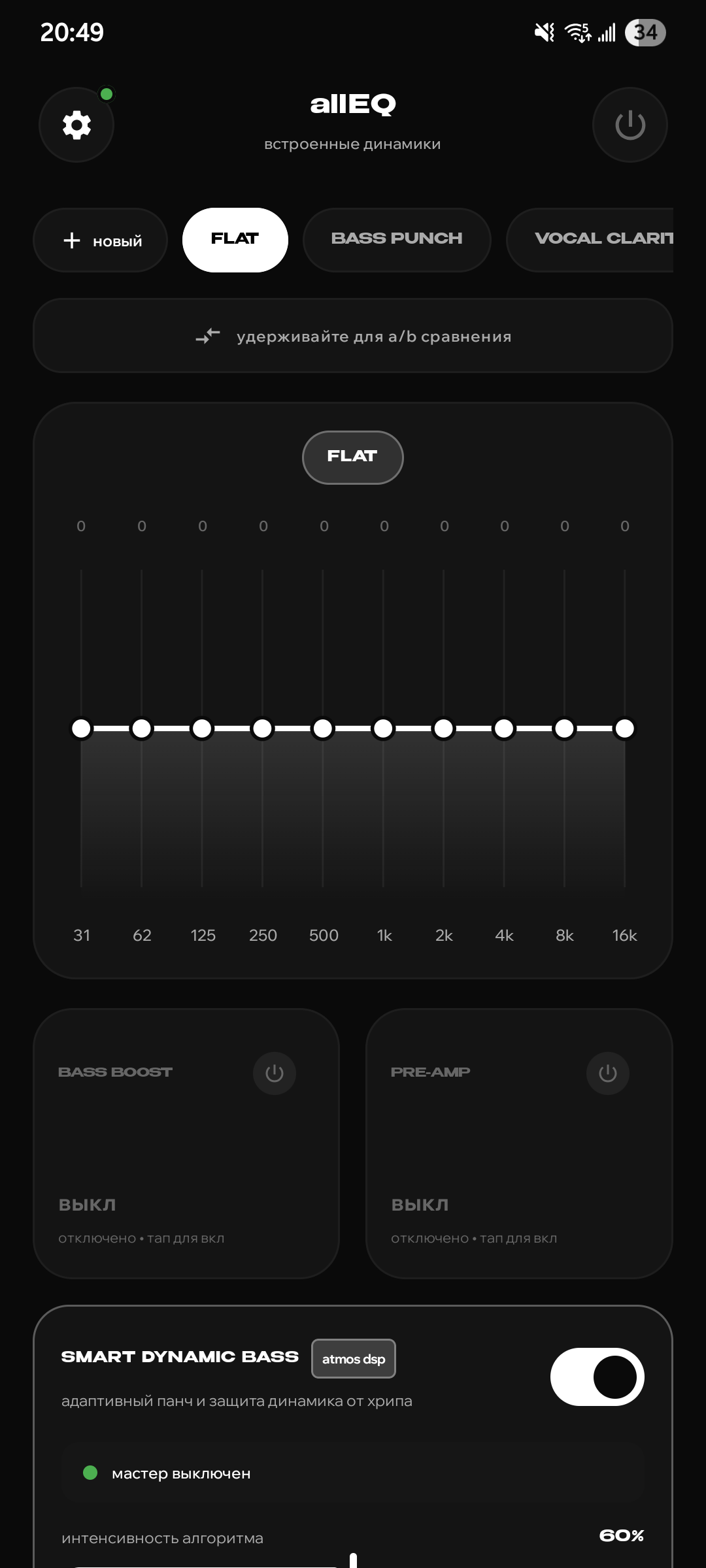
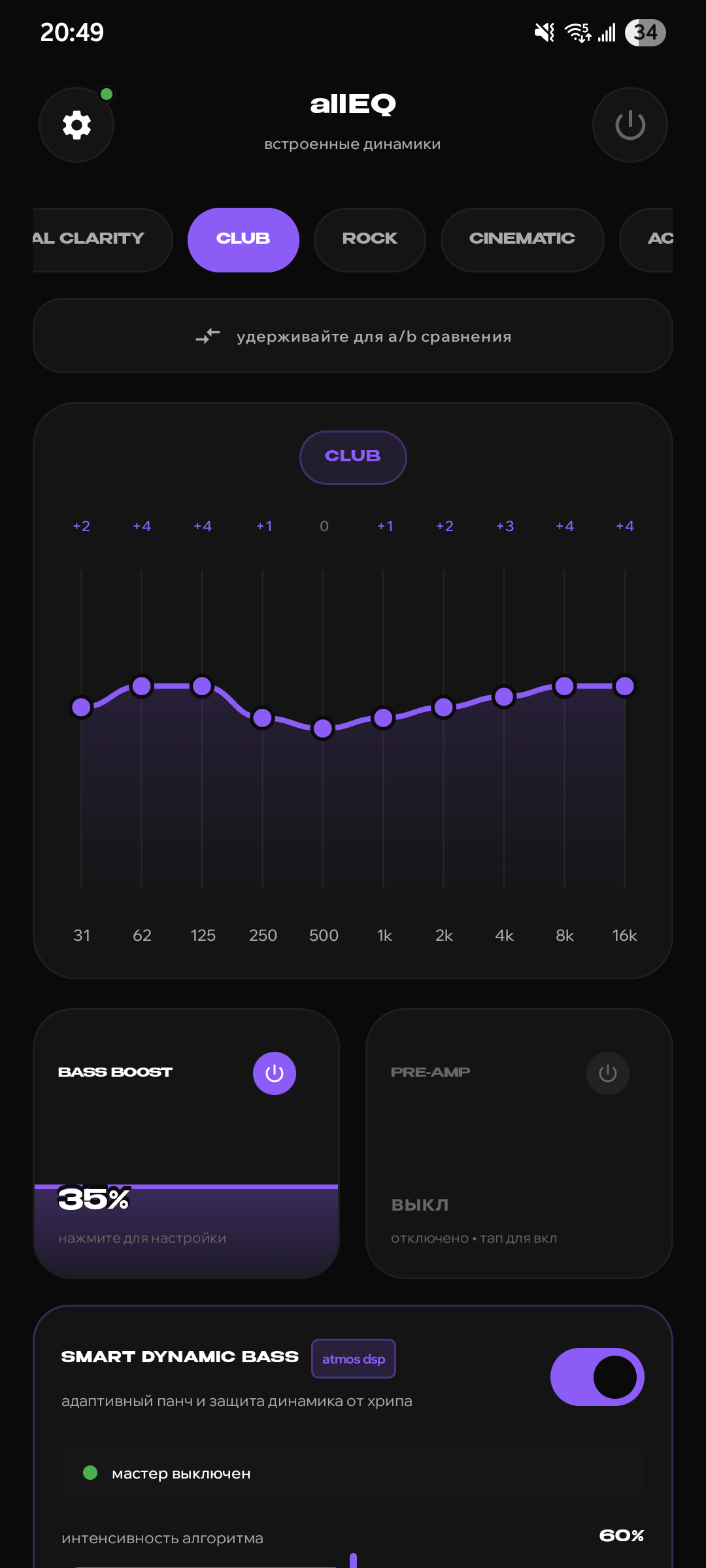
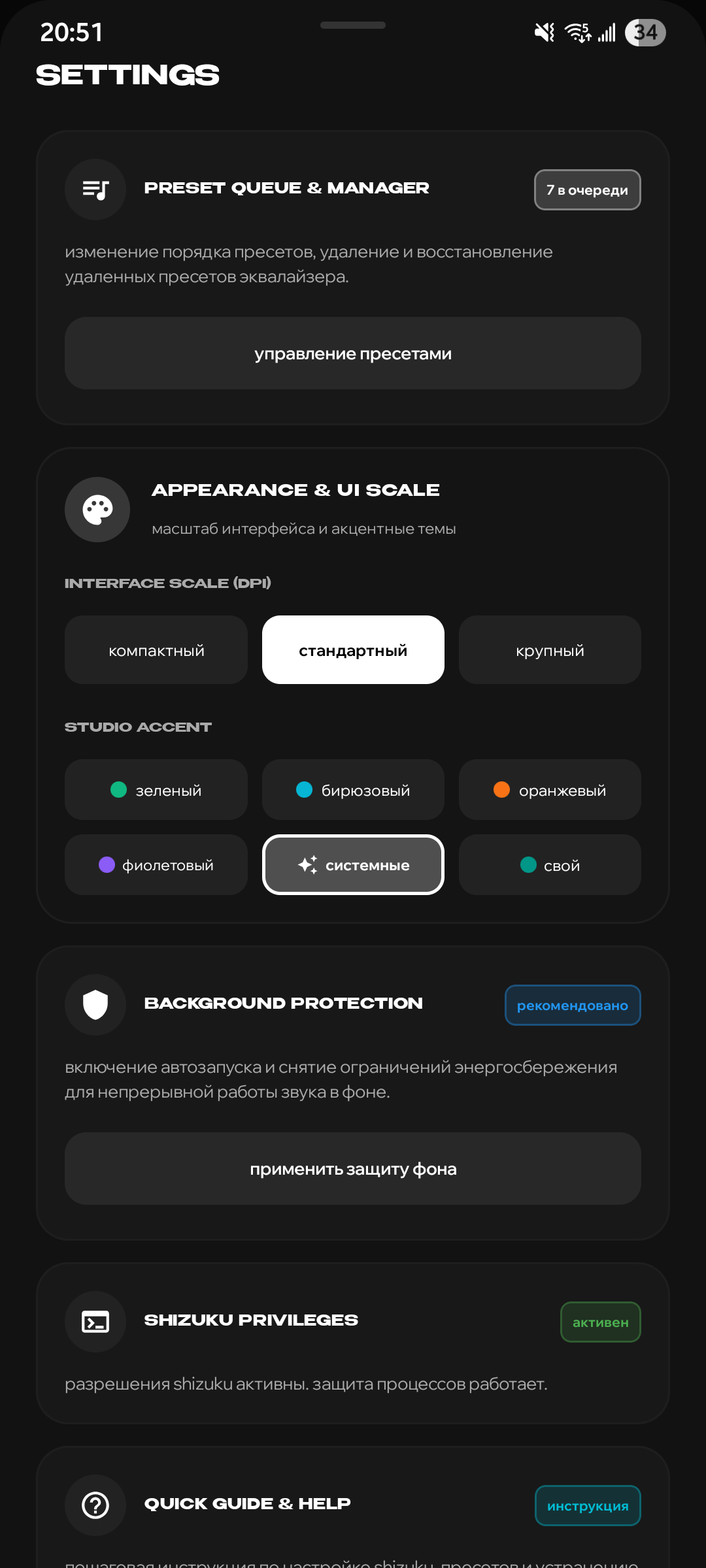
| System Equalizer | Club Preset & Bass | Light Theme | Settings & Theming |
|---|---|---|---|
 |
 |
 |
 |
| 10-band precision faders | Purple accent with CLUB curve | Clean high-contrast daylight UI | Scale, colors & Shizuku status |
Key Features
Audio DSP Engine
- 10-Band Graphic Equalizer: Studio-calibrated frequency bands (31 Hz, 62 Hz, 125 Hz, 250 Hz, 500 Hz, 1 kHz, 2 kHz, 4 kHz, 8 kHz, 16 kHz) with smooth cubic Bézier curve visualization.
- Tactile Capsule Faders: Vertical swipeable faders for Bass Boost (0–100%) and Pre-Amp (-12 dB to +12 dB) with haptic feedback steps.
- Smart Dynamic Bass: Volume-adaptive mid-bass punch at lower volumes with high-volume cone excursion protection to eliminate speaker distortion.
- Speech Leveller & Vocal Guard: Baseline gain floor and mid-band lift to keep dialogue crisp across videos with varying sound masterings.
- Instant A/B Bypass: Hold the comparison button to temporarily bypass all DSP processing and compare directly with the uncolored sound.
Interface & Theming
- Expressive Studio UI: Benzin bold headers and Wix Madefor Display body typography inspired by studio mixing consoles.
- Color Accents: Emerald Green, Electric Cyan, Vivid Orange, Studio Purple, System Material You, or Custom Hex Accent.
- UI Scaling: Three density presets (Compact 85%, Standard 100%, Large 115%) ensuring comfortable hitboxes on both compact phones and large displays.
- Preset Manager: Create, reorder with drag-and-drop (
☰), delete, and restore built-in or custom presets.
Privacy & System Integration
- 100% Offline: No internet permissions declared in
AndroidManifest.xml. - OEM Whitelist Integration: Automated background battery-saving whitelist via Shizuku shell.
Requirements
| Requirement | Specification |
|---|---|
| Android Version | Android 10.0 (API 29) or higher |
| Root Required | No (Rootless) |
| Privilege Provider | Shizuku (Running via Wireless Debugging or ADB) |
| Supported Devices | Samsung, Xiaomi/Redmi, Vivo/iQOO, OnePlus, Google Pixel, Motorola, etc. |
Quick Setup Guide
- Install and start Shizuku on your device (via Wireless Debugging or USB ADB from a PC).
- Download and install
allEQ-v1.0-alpha.apkfrom Releases. - Launch allEQ and grant Shizuku permissions when prompted.
- Tap the power button to activate system-wide equalization!
Building from Source
Prerequisites
- JDK 17
- Android SDK 35 (Platform tools & build tools)
- Gradle 8.11+ / AGP 9.2+
Clone & Build
# Clone the repository
git clone https://github.com/omixin/allEQ.git
cd allEQ

# Build debug APK
./gradlew assembleDebug

# Build optimized release APK
./gradlew assembleRelease
The output signed APK will be located at:
app/build/outputs/apk/release/app-release.apk
License
allEQ is distributed under the terms of the GNU General Public License v3.0 (GPL-3.0).
See the LICENSE file for the full license text.
How Shizuku is used
Can keep the equalizer alive in background via battery whitelist shell commands through Shizuku in `cmd deviceidle whitelist`.
This is an AI-assisted analysis of Shizuku-related usages in the app's public source code. It is best effort, so it may not catch every single usage.
How this app uses Shizuku
Shizuku is used only to keep the equalizer service running in the background, not to apply audio effects which use the standard system audio APIs.
- Keep service alive: tapping the background protection action exempts the app from battery and background restrictions with privileged shell commands run through Shizuku, including allowlisting it from idle optimization, allowing background and foreground operation, and marking it active.
Android APIs or commands used
cmd deviceidle whitelistcmd appops set RUN_IN_BACKGROUND allowcmd appops set RUN_ANY_IN_BACKGROUND allowcmd appops set START_FOREGROUND allowam set-standby-bucket active
Notable details
The equalizer itself does not use Shizuku in code, it attaches to the global output mix and per app sessions with the normal audio effect APIs. The same protection screen also offers the normal system battery optimization prompt, which works without Shizuku.
Changelog
What's new for version 1.0-alpha
Rootless 10-band system-wide equalizer, bass enhancement, and dynamics processing engine for Android 10+ using Shizuku IPC and Android AudioEffect session routing. Telegram channel - https://t.me/allEQoff <--------------> Системный 10-полосный эквалайзер, бас-бустер и динамический аудиопроцессор без root-прав для Android 10+ на базе Shizuku IPC и нативного Android AudioEffect пайплайна. Телеграм канал - https://t.me/allEQoff
Permissions
7 permissions requested
More from this category
 MicUp
MicUp
 Volume++
 Castix
 WEcho
WEcho
 Spotify Ad Skipper
 Voice Isolation
 Mixer (1)
 Volume Manager
 FineVolume
 centuryplay
 Call Recorder (Skvalex)
 PrecisEQ